YesAX V3.1.2 - Software User Manual.pdf - 第155页
3D X-Ray Inspection Methodolo gy 11 - 11 Threshold is the binary threshold that binarizes the laser spot image . A lar ger threshold number will produce a smaller laser spot blob. The center of laser spot blob will be me…
11-10 3D X-Ray Inspection Methodology
To add a laser height reference to recipe, the vision view must be selected first. When adding a
new part, make sure the Ref ID contains string “S100_REF”. The format of laser references is
like “S100_REF_N” while N is the ID of current laser reference. For example, a laser reference
with name “S100_REF_10” will have the ID of 10. When allocating laser references
automatically by using method mentioned in next sector, system will assign names to each
reference automatically, with the ID in a one-by-one increment order. When placing the
reference, under Vision View, select a clean spot which is not close to any via holes or shining
components. This spot must be close to the 3D site. The laser height measurement is a mark
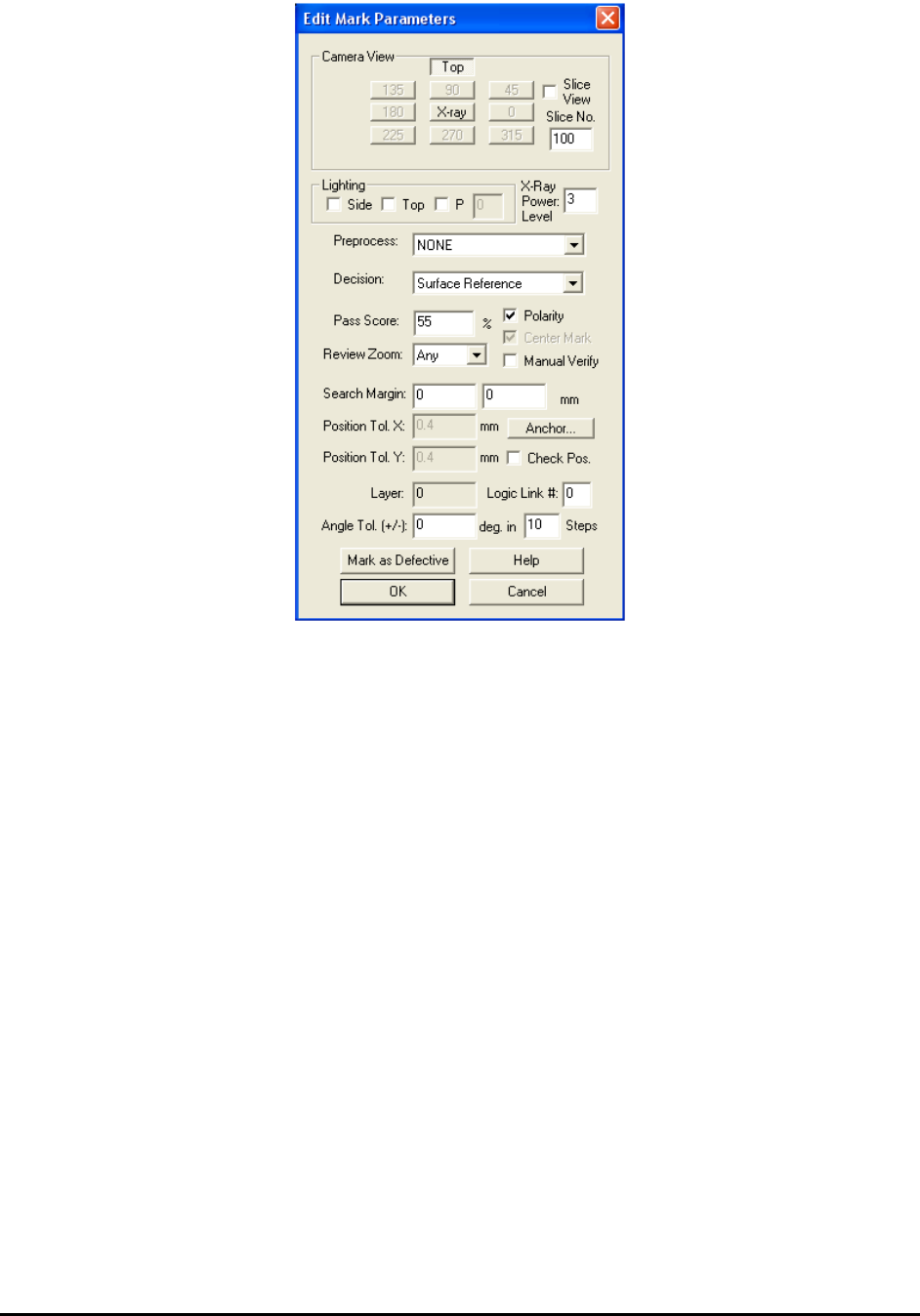
inspection. When launch the Mark Parameter dialog, please make sure no Lighting is selected
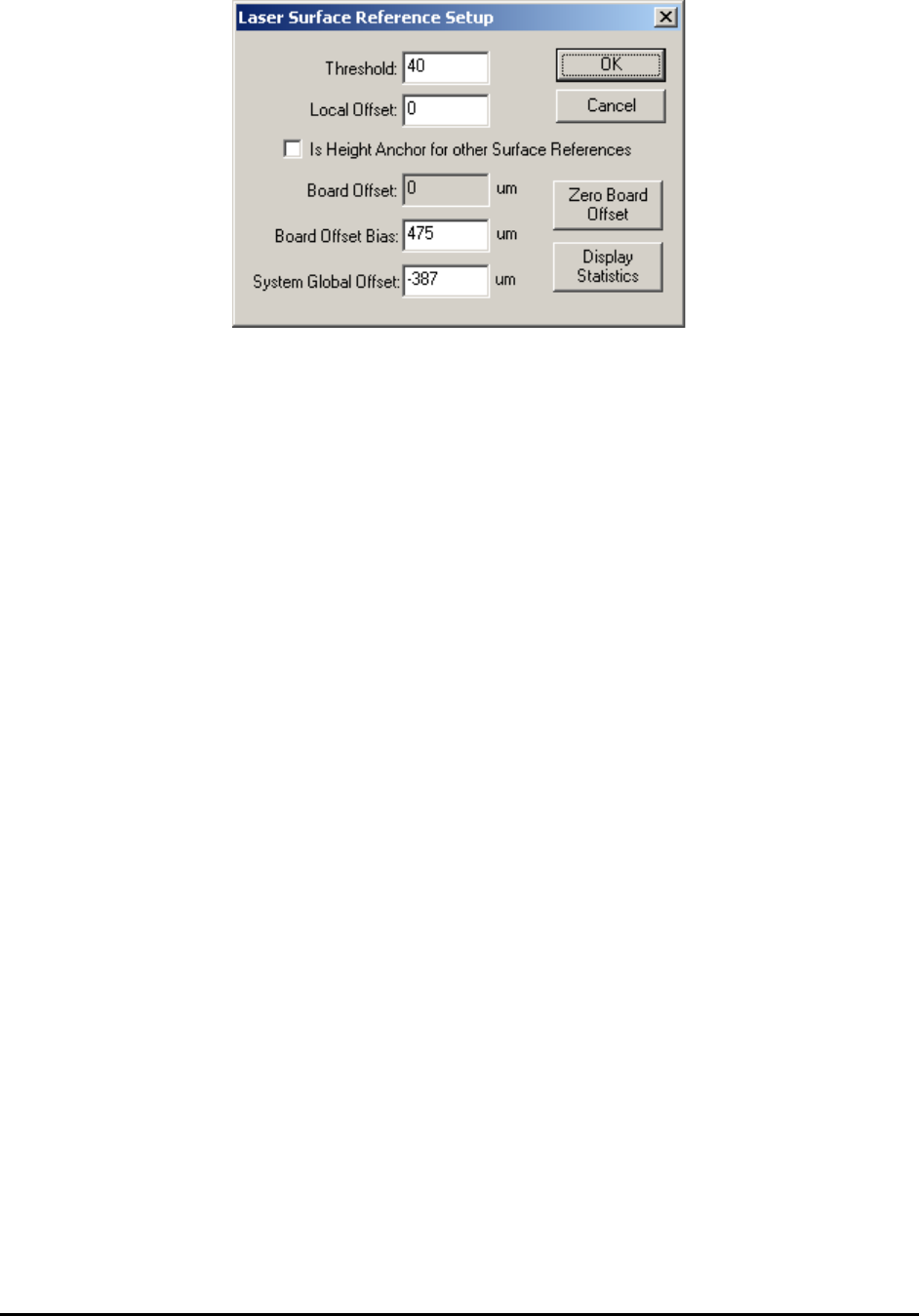
and the decision is set to Surface Reference. The Laser Surface Reference Setup dialog is show
below.
3D X-Ray Inspection Methodology 11-11
Threshold is the binary threshold that binarizes the laser spot image. A larger threshold number
will produce a smaller laser spot blob. The center of laser spot blob will be measured and used
for the rest of the calculation.
Local Offset is used to compensate the height of current laser surface reference point. By default
this parameter is set to 0. In cases like user wants to put laser on top of a surface other than the
normal board surface, i.e., top surface of component on board, a different layer on board surface,
but still want to use the current height measurement to represent the height of board surface, if
the height difference between another layer and board surface is known, it can be typed in Local
Offset field and allow the algorithm to offset the measurement result automatically. The unit of
this measurement is um.
Is Height Anchor for other Surface References is turned off by default. When programming a
3D recipe, the user needs to allocate two laser surface reference locations which are very close to
board front edge or back edge and close to each other. These two laser references will be served
as height anchor for the whole board. Do several tests on each reference points and get the
average height of these two points. Then open the Laser Surface Reference Setup dialog, click to
enable the “Is Height Anchor for other Surface References” option and type the average height in
the Board Offset Bias field.
Board Offset displays the average height of height anchor points. If there is no height anchor
points defined in current recipe, the board offset will always be 0.
Board Offset Bias store the negative number of original board offset during recipe program fine
tune. For example, if the average height of two height anchor points is around 550um, then the
board offset bias should be set to -550. This number is saved per recipe. After board offset bias’
been set, if user click Zero Board Offset button first then do a test on laser reference with its
height anchor selection turned on, the test result should be around 1100um. Once user launches
the 3D control menu (which will be discussed in next section) and clicks the Profile Board
Height command to run the test for all laser height references, the board offset will be calculated
automatically. In this case the board offset will be 550um. After that if user runs a test on height
anchor points, the result will go back to around 550um. Once the system finishes inspection for
one board, the calculated board offset number will be saved to the log file “SurfaceRef.log”,
which is under current recipe folder, automatically.
System Global Offset was set by manufacturer during system calibration. This was designed for
early version YTX-X3 system only and should leave as 0 for most systems.

11-12 3D X-Ray Inspection Methodology
Display Statistics if pressed will launch another dialog and show statistics of measurement of
current surface reference point. If the standard deviation and worst deviation are both very small
for current point, the calculation is stable and the reference point is well defined. Otherwise, it is
preferable for user to check the location of current reference points and other parameter settings
and make sure everything is ok.
The math: To help user better understand the calculation of height reference, below is the
formula:
Height Measurement Output = Initial Measurement + Local Offset – Board Offset – Board
Offset Bias
Here the Initial Measurement number was calculated from surface reference algorithm directly.
The Local Offset was set by user and can be used to compensate for height difference between
different surfaces. The Board Offset was the average height of height anchors (without minus
Board Offset and Board Offset Bias) and was calculated automatically every time inspection
runs or user performs a Profile Board Height command. The Board Offset Bias was set by user
during recipe programming.
Any laser surface reference with height anchor option turned on will be served as height
reference only and should not contribute to any z map compensation test. This is to offset the
board height differences between different boards and make sure the height information of the
same 3D site will be consistent among different boards.
Laser reference placement:
Laser references are important for 3D program. For board with an uneven surface or has severe
warp issue, using laser references and putting them in the right location will help software find
the surface map in that particular 3D site and generate the right slice which is parallel to real
board surface. When putting laser references on the board, there are several rules that user needs
to follow.
1. For each 3D site, if possible, the user should allocate 3 laser pointers as height references.
They need to be away from each other and not far away from the center of 3D site. As
shown in picture below, the current 3D site, which includes a BGA device, uses three
laser reference points well separated away from each other to construct the height map. In
this case the position of these laser references should be as close to the device as possible.