YesAX V3.1.2 - Software User Manual.pdf - 第60页
6-2 Recipe Creat ion Step by Step for 2D Recipes All items in the header are optional. If specific information is not provided in the YCD file, the default value is used. If there is no board size information available, …
Recipe Creation Step by Step for 2D Recipes 6-1
6 - Recipe Creation Step by Step for 2D
Recipes
Creating 2D X-ray inspection recipes are very similar to creating AOI inspection recipes. Here
are the basic steps:
6.1 Step1: Prepare CAD data
Although CAD data is not absolutely necessary to create inspection recipes, it certainly helps to
speed up the recipe creation process. First, convert the CAD data to YCD format (Nordson
YESTECH Cad Data) before importing to the machine. Microsoft Excel can be used for the
formatting tasks. More specialized CAM software, such as CircuitCAM, can also be used for the
tasks. To facilitate system installation and training, Nordson YESTECH recommends using
Microsoft Office on the computer. Nordson YESTECH supplies a conversion utility in the form
of an Excel macro to convert any column data into YCD format. The utility can be found in the
following folder. C:\Aoi_Data\CAD_Data.
YCD files are ASCII text files. There are two main sections in the file; Header and Part List.
The header section looks like this:
.YESTECH_CAD
[Header]
Version= 1
RecipeName= gdc-060p027002rev_k.rcp
ScaleFactor= 1000.000
InvertXPos= 0
InvertYPos= 0
RotationDir= 1
RotationOffset=0
BoardWidth= 238.154
BoardHeight= 159.513
BoardRotation= 0
PNLib= c:\aoi_data\recipe\gdc-060p027002rev_k\Settings.lib
CentralLib=
PkgLib= C:\AOI_Data\StdPkg\StdPkg_Post.pkg
PkgNameMap=
IsTopSide= 1
6-2 Recipe Creation Step by Step for 2D Recipes
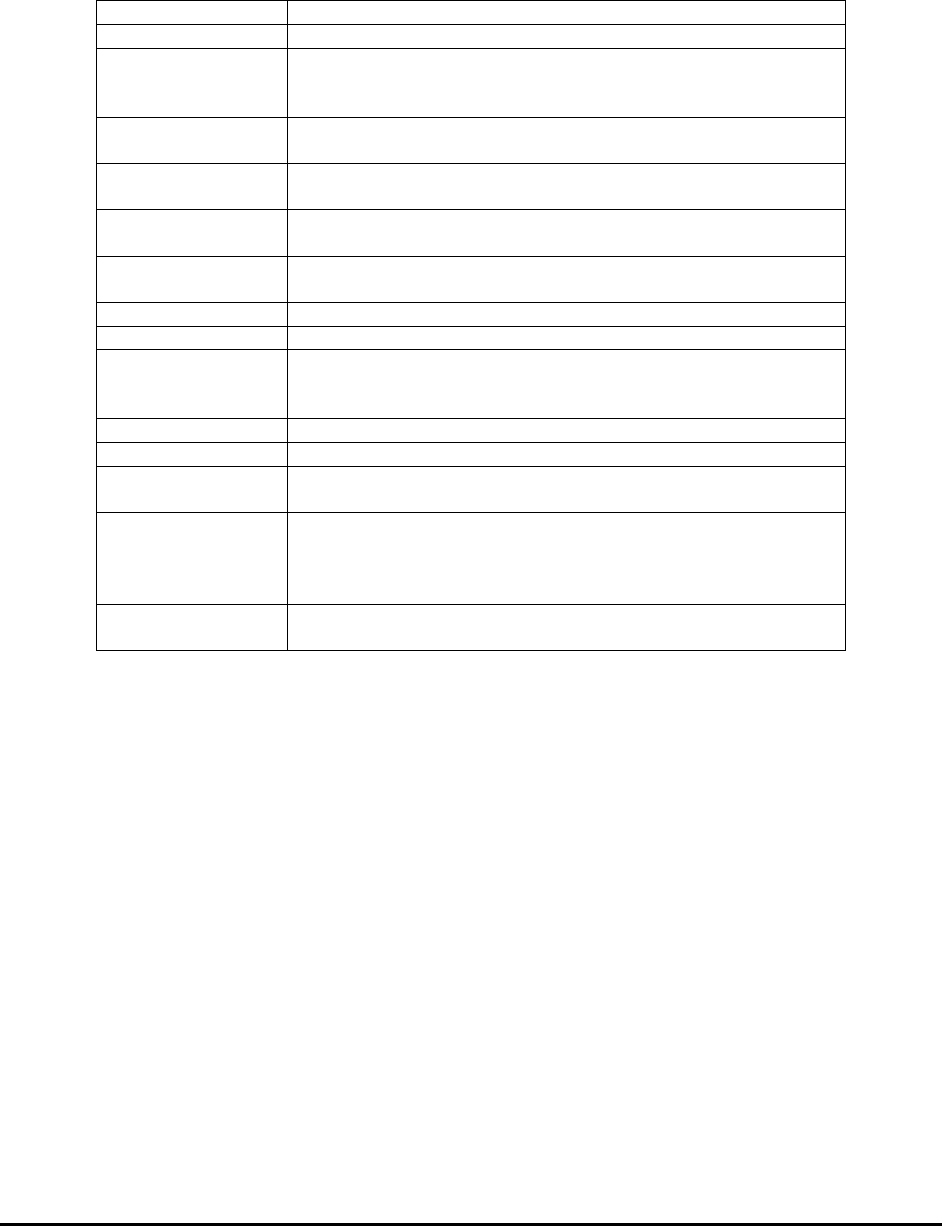
All items in the header are optional. If specific information is not provided in the YCD file, the
default value is used. If there is no board size information available, the software prompts the
user to define board size.
Version
Version of the YCD file should always be 1
RecipeName
Name of the inspection recipe.
ScaleFactor
Scale factor used for the XY position should
be 1 for um, 25.4 for mil, 1000 for mm and
25400 for inches.
InvertXPos
Can be 0 or 1 to indicate if the X positions
of the part are inverted.
InvertYPos
Can be 0 or 1 to indicate if the Y positions
of the part are inverted.
RotationDir
Part rotation direction can be 1 for counter
clockwise or -1 for clockwise.
RotationOffset
Rotation Offset this value is added to the
rotation parameter of every part.
BoardWidth
The Width of the board.
BoardHeight
The height of the board.
BoardRotation
Can be 90, 180 or 270 which indicates the
physical rotation of the board relative to
the CAD orientation.
PNLib
File path to the local Part number library.
CentralLib
File path to the central library.
PkgLib
Specifies which standard package library to
use.
PkgNameMap
Specifies the package name map file. Package
name map converts the package names used in
the CAD data to that of the standard package
library.
IsTopSide
Can be 1 or 0 to specify if this is the top
or bottom side CAD data.
The part list section lists the information for every part.
The following information is required:
Part Reference ID
Part Number
X Coordinate of the part center
Y Coordinate of the part center
Part Rotation
The following information is recommended:
Part Package
Part Description
Recipe Creation Step by Step for 2D Recipes 6-3
Here is a sample fragment of the Part List section.
[PartList]
RefID. P/N XPos YPos Rtn Pkg Extensions
FiduLeft ---- 12.097 10.471 0.00 ----
FiduRight ---- 211.93 5.17 0.00 ----
R63 ---- 157.41 113.29 0.00 ----
R132 ---- 72.19 51.21 270.00 ----
R102 302-111W000 100.94 76.60 270.00 1206 RES,SMT,1/8W,1%,0.00
R125 302-111W000 214.08 67.67 270.00 1206 RES,SMT,1/8W,1%,0.00
R73 302-111W001 156.89 103.89 0.00 1206 RES,SMT,1/8W,1%,10.00
R74 302-111W001 170.88 103.89 0.00 1206 RES,SMT,1/8W,1%,10.00
R93 302-111W001 164.51 91.82 270.00 1206 RES,SMT,1/8W,1%,10.00
R100 302-111W001 156.24 85.48 270.00 1206 RES,SMT,1/8W,1%,10.00
R887 302-111W043 204.94 96.19 270.00 1206 RES,SMT,1/8W,1%,27.00
R888 302-111W043 162.03 80.65 0.00 1206 RES,SMT,1/8W,1%,27.00
R891 302-111W043 158.58 65.15 0.00 1206 RES,SMT,1/8W,1%,27.00
R892 302-111W043 158.58 68.45 0.00 1206 RES,SMT,1/8W,1%,27.00
R72 302-111W069 144.11 102.00 270.00 1206 RES,SMT,1/8W,1%,51.10
[PartListEnd]
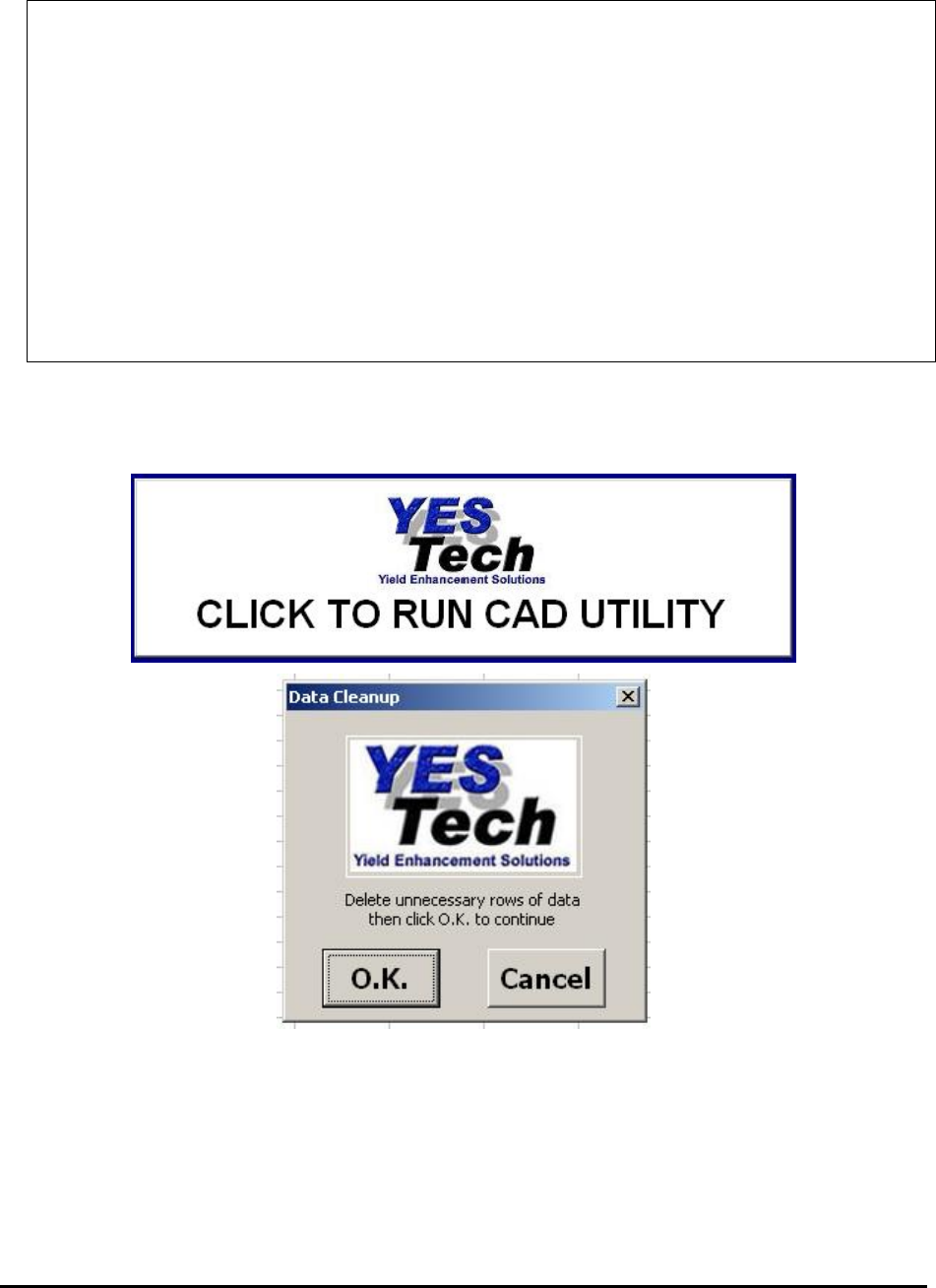
The Nordson YESTECH CAD Utility gathers header information from the graphical user
interface and collects CAD data in any column format to generate the YCD file. The following
are some of the screen shots of the CAD utility.