YesAX V3.1.2 - Software User Manual.pdf - 第26页
Safety 2-7 2.10 Emergency Shutdo wn In the event of an emergency or malfunction, press the EMO butt on. The EMO buttons are the large red buttons located on the front panel of the AXI system (Figure 2-3). Activating the …
2-6 Safety
2.7 Electrical Hazards
Always disconnect the equipment from the power source and attach a lockout device to the
electrical disconnect before performing any maintenance or repair.
2.7.1 X-Ray Safety Warning
The X2/X3 AXI systems generate X-rays. Exposure to the x-rays could lead to serious bodily injury. Use
is limited to persons trained in the required safety precautions, governmental health regulations, and
operational characteristics of the machine. Any user of this device in the U.S. must be familiar with
(CFR) 1020.40 that regulates the use of X-ray generating machines. Other local regulations may also
apply.
Please be aware that this machine is considered a “Cabinet X-ray System” under U.S. regulation. You
should familiarize yourself with the applicable national and local regulations, and independently
determine how the machine is regulated.
2.7.2 Laser Radiation
The AXI system uses a Class II Laser Height Sensor. Observe the following safety precautions in addition
to the standard AXI system safety precautions.
Operate the AXI system only according to the procedures described in the instructions
included. Failure to do so may result in injury due to exposure to the laser beam.
DO NOT look directly at the laser beam.
2.8 Disposal
Dispose of equipment and materials used in operation and servicing in accordance with local regulations.
2.9 Decommissioning Procedures
The Nordson YESTECH AXI systems should provide you with years of safe and reliable service. When it
becomes necessary to decommission the system, the components should be dispositioned as specified in
Table 2-2.
Table 2-2 Recommended Decommission Procedures
Component
Disposition
Aluminum Parts
Recycle aluminum chamber, panels, shelves, doors, and hardware.
Steel Parts
Recycle any stainless steel parts.
Copper Wiring
Recycle any copper wiring.
Lead Parts
Recycle any lead parts, or discard in designated collection areas, in
accordance with local safety/environmental regulations.
Electronic Components
Discard in accordance with local safety/environmental regulations.
Plastics
Recycle or discard in accordance with local safety/environmental
regulations.
Safety 2-7
2.10 Emergency Shutdown
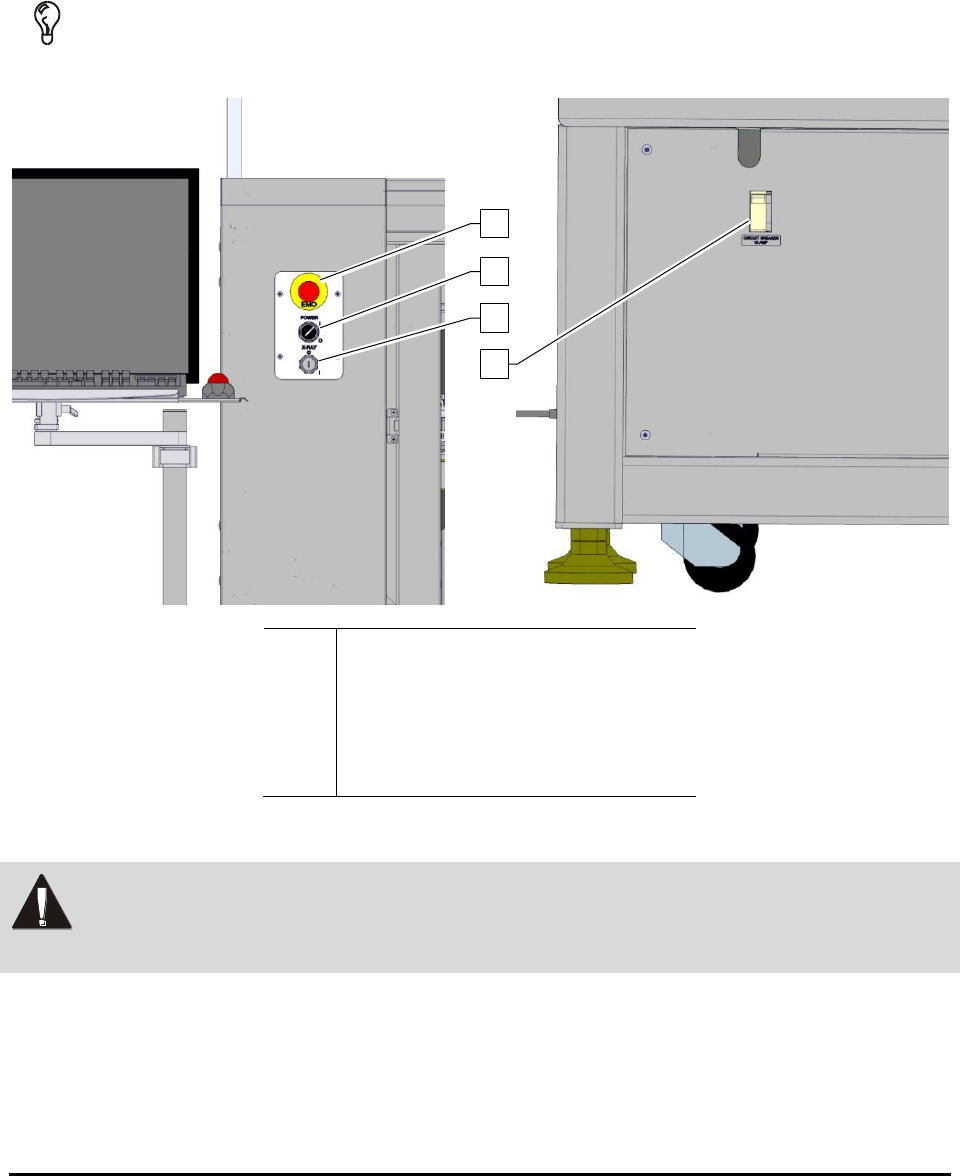
In the event of an emergency or malfunction, press the EMO button. The EMO buttons are the
large red buttons located on the front panel of the AXI system (Figure 2-3). Activating the EMO
vents all pressure in the pneumatic system and cuts power to all components except the computer,
the monitor, and the camera.
TIP If the operator or technician is unable to reach the EMO button, the main circuit breaker
(Figure 2-3) can be used for emergency shutdown.
Item
Description
1
EMO Button
2
System Power Switch
3
X-ray Power Switch
4
Circuit Breaker
Figure 2-3 ON and EMO/Off Buttons
WARNING! In an emergency, failure to completely shut down power to the AXI system with
the EMO can cause serious injury to the user and/or damage to the AXI system.
The AXI systems are equipped with a large, clearly marked, front console-mounted emergency machine
off (EMO) button. When activated, the main power connection to the system is disconnected via a
momentary action switch that sets the main power relay to the OFF state and stops operation. The only
connection that remains intact is the ON button which, after the EMO is reset, restores full power to the
system.
1
2
3
4
2-8 Safety
2.10.1 Emergency Shutdown Situations
As a minimum, activate the EMO in the following situations:
If anyone is in immediate danger of being injured by moving parts, hazardous materials,
or electrical shock.
If valuable AXI system components or the workpieces are in danger of being damaged.
2.10.2 Emergency Shutdown Recovery
WARNING! Do not restart the AXI operation until the condition that caused the emergency
shutdown has been corrected. Failure to comply could cause serious injury to the
user and/or serious damage to the AXI system.
To recover after an Emergency Shutdown:
1. Locate and remedy the cause of the emergency shutdown. If necessary, refer to
Section 28 - Trouble Shooting.
2. If applicable, close the AXI area doors.
3. Turn the EMO knob clockwise until it pops back into position.
4. Restart the YesAX Software program. See 3.8 Power On for details.
2.10.3 Electromechanical Interlocks
Electromechanical interlocks prevent personnel from being exposed to high voltages, x-rays, and
mechanical hazards that are present while the AXI system is in operation.
The front door of the AXI system has two interlock switches. When the door is closed the conveyor and
stages can move and the x-ray can emit. When the door is opened the conveyor and x-y stages cease
movement and the x-rays stop emitting.
The chute doors for board loading and unloading have a switch and a sensor. The switch is a CDRH rated
dual interlock switch. X-rays can emit when the chute doors are closed. The X-rays stop emitting when a
chute door opens. In addition, the chute doors use a laser sensor. The sensor prevents the door from
shutting when an obstacle is present within the opening.
WARNING! When these interlocks are activated, the electrical power remains ON.
In order to resume operation, all access points must be closed and the interlocks must be reset using the
touch screen.