YesAX V3.1.2 - Software User Manual.pdf - 第96页
10 -2 General Inspection Methodolog y The Gain Offset Enhancement algorithm has two adjustable parameters that can be set in the Image Gain and Offset Adjustment dialog. 10.2 Mark Inspection Mark inspection is designed t…

General Inspection Methodology 10-1
10 - General Inspection Methodology
YesAX software controls three types of inspections:
Marking Inspection
Lead Bank Inspection
Solder Inspection
Each part can have any number and combination of these three types of inspections. A chip part
(e.g. 0805) may have one Marking and two Solder inspections. An SOIC14, on the other hand,
may have one Marking, two Lead Banks and 14 Solder inspections.
The light setting for AXI inspections is always Side Light. For X2 AXI systems there are two
camera views for inspections: Top (Optical) View and Top X-Ray View. Most 2D inspections
will be run under Top X-Ray View with Side Light on. For X3 AXI systems, other than Top
Optical View and Top X-ray View, there are eight more side angle views for X-Ray.
Inspections are conducted in two processing steps: Preprocessing and Decision. The
Preprocessing step prepares the image and the Decision step determines the Pass/Fail. The two
steps use various machine vision algorithms to accomplish the task.
10.1 Preprocessing
The preprocessing step is common for the 3 inspection types. Including NONE there are seven
preprocessing algorithms:
NONE - No preprocessing (default)
Red Filter - Pass the image through red color filter.
Green Filter - Pass the image through green color filter.
Blue Filter - Pass the image through blue color filter.
Binarize - Binarize the image into two gray levels, black and white.
Gain Offset -Adjust the image gray levels by set up gain and offset value.
Median Filter2 -Pass the image through median filter2.
The three color filters are for color inspection only and won’t be used for X-ray inspection. The
first 4 preprocessing algorithms and the last algorithm have no parameters.
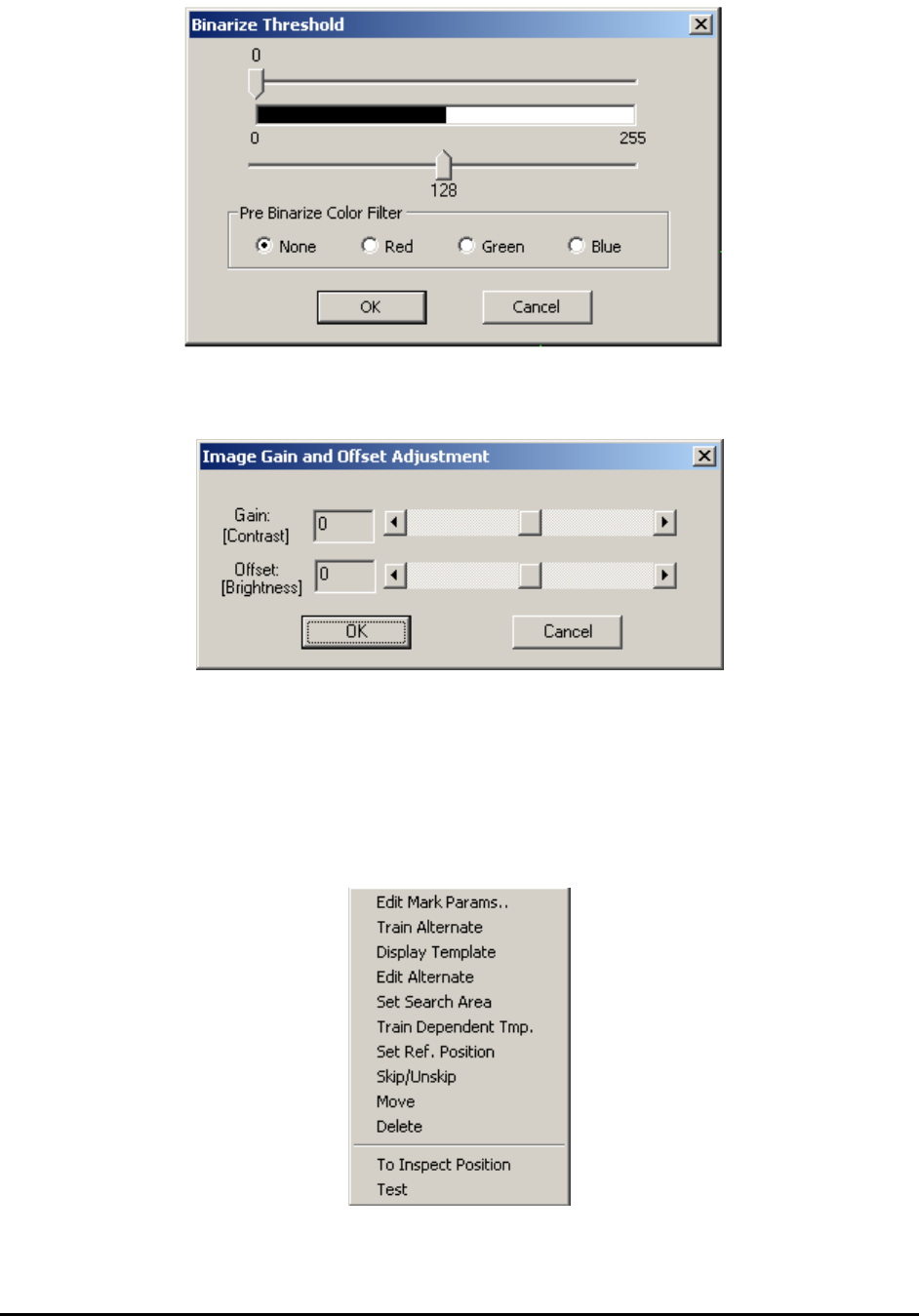
The Binarize algorithm has one that is set with the Binarize Threshold dialog displayed below.
10-2 General Inspection Methodology
The Gain Offset Enhancement algorithm has two adjustable parameters that can be set in the
Image Gain and Offset Adjustment dialog.
10.2 Mark Inspection
Mark inspection is designed to verify the markings on the part. The default algorithm for mark
inspection is pattern matching. Other available algorithms are barcode reading, edge locator and
surface reference. There can be more than one mark inspection box per part.
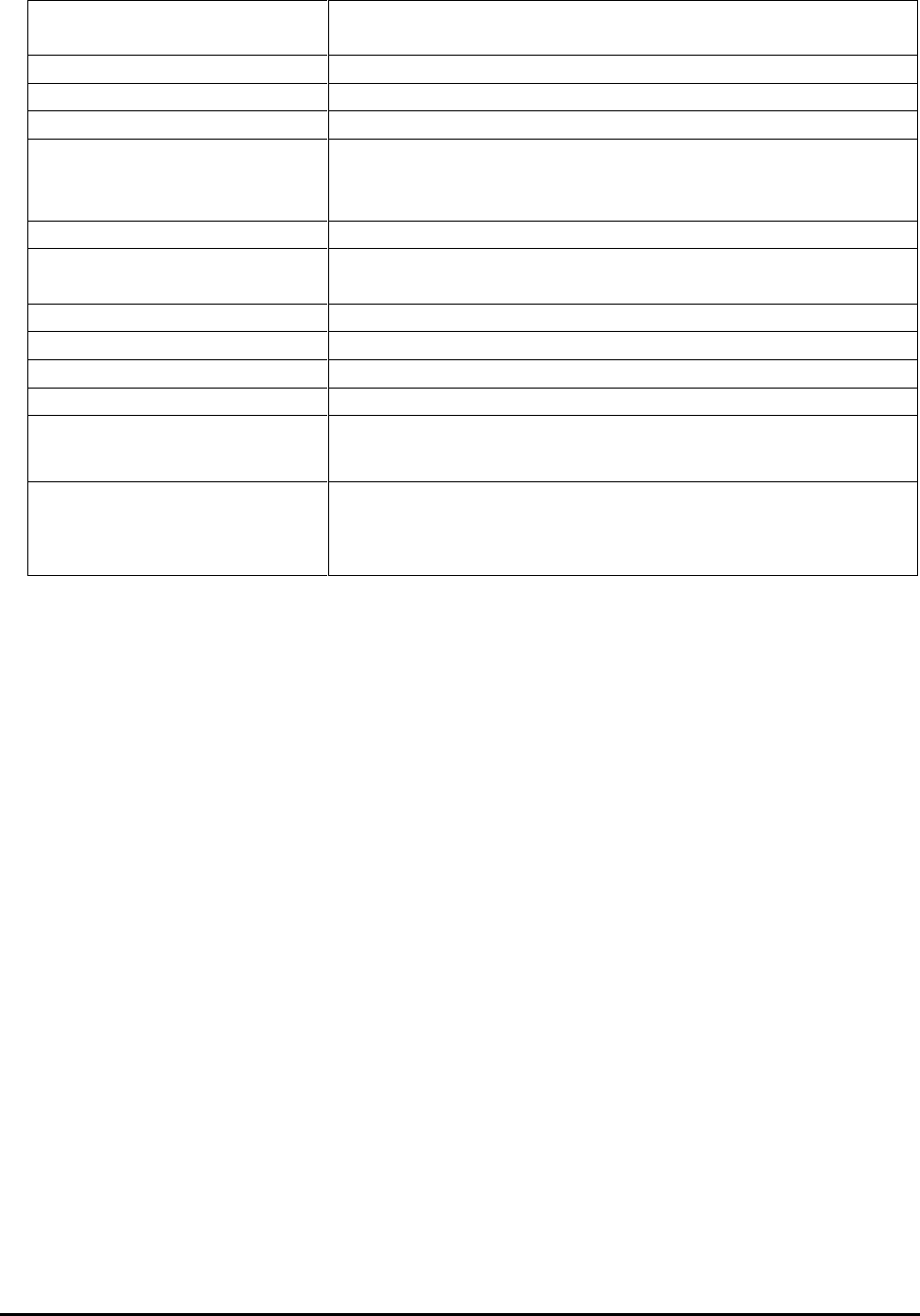
After the Mark inspection box is created, you can display the Mark pop-up menu by pressing the
right mouse button while pointing at the inspection box.
General Inspection Methodology 10-3
Edit Mark Params..
Launches the Mark Parameter dialog. See 10.2.1 Edit Mark
Parameters.
Train Alternate
Train alternate template for Pattern Match algorithm.
Display Template
Display the templates trained.
Edit Alternate
Edit each alternate template. See 10.2.2 Edit Alternate
Set Search Area
Set the area on the image inside of which the software will
search for a match. This operation will change the Search
Margin parameter.
Train Dependent Tmp
Add a dependent template to the current alternate template.
Set Ref. Position
Allows user to set up a template position as being a (0, 0)
reference position.
Skip/Unskip
Allows user to either skip or unskip this mark inspection.
Move
Move the mark inspection box.
Delete
Delete this mark inspection box.
Test
Run the test on this inspection box.
Bar Code Params..
Available only when Bar Code is selected as the decision
algorithm menu item. See 10.2.3 Bar Code Parameters
Edge Locator Params..
Available only when Edge Locator is selected as the
decision algorithm menu item. See 10.2.4 Edge Locator
Parameters.