YesAX V3.1.2 - Software User Manual.pdf - 第178页
在线预览 YesAX V3.1.2 - Software User Manual.pdf PDF 文档。

Other X-Ray Inspection Features 12-11
Upon entry, the cursor changes to a crosshair and the Line Profile dialog box displays without a
plot. Use the mouse to define the two end points of the line. First, press the left mouse button to
define the starting point and move the mouse around. Locate the cursor on the end point and
release the left mouse button to complete the process. As the line is being defined, its current
profile plot appears in the Profile dialog box.
The profile graph represents the gray scale of each pixel overlaid by the graphic line. The
vertical axis of the graph displays the possible gray level range from 0(black) to 255 (white). The
horizontal axis represents the relative position of the pixel on the line. Each end of the horizontal
axis is labeled with the position of one end point of the line.
When the measurement task is completed, press OK or Cancel in the Line Profile dialog box to
close the box.
Part List and Part Libraries 13-1
13 - Part List and Part Libraries
Components on the circuit board such as resistors, capacitors, and ICs are collectively called
parts. The inspection recipe organizes information based on the concept of parts. Because of the
one to one correspondence with the parts and the “parts” on the circuit board it is an easy concept
to understand. A part can have any number of the three types of inspection: Mark, Lead Bank
and Solder.
In the recipe, parts are grouped together to form lists and libraries which are described in the
section below.
13.1 Part List
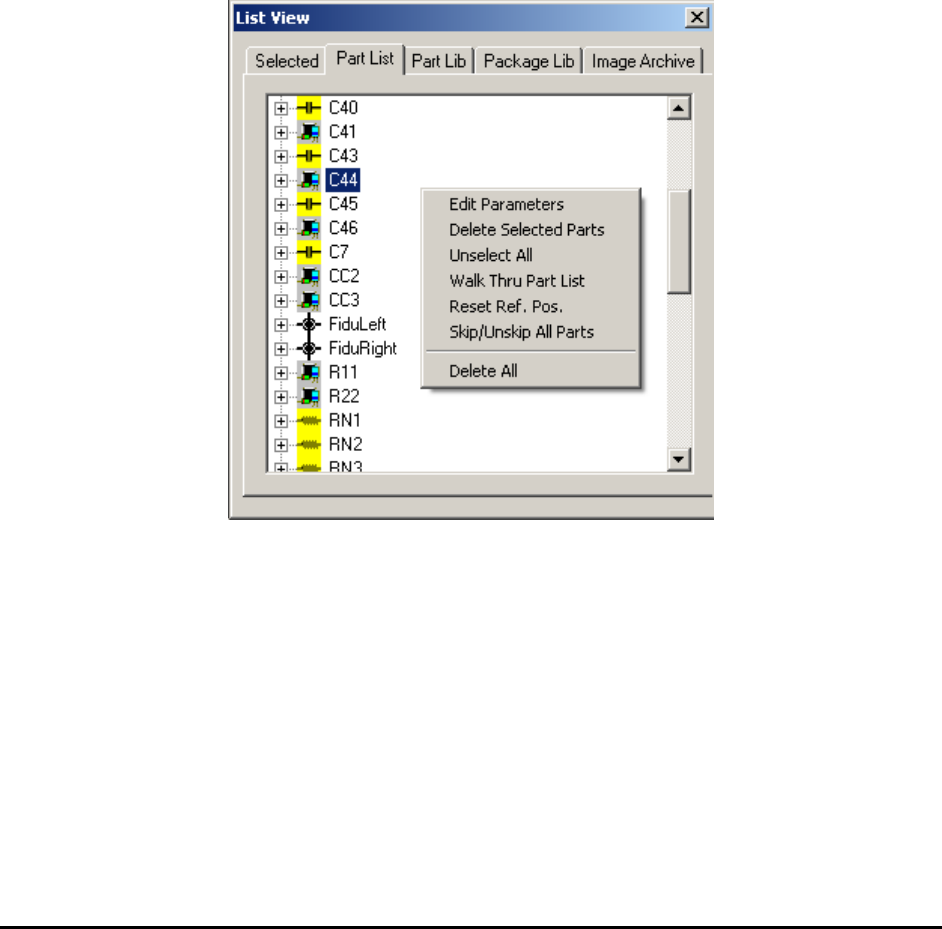
The part list page lists the reference ID for all the parts to be inspected on the board. The Part
List page in the List View shows the reference IDs in alphabetical order.
Double clicking the mouse on any of these parts will move the camera to that part on the board.
Right clicking the mouse in this view will pop up a menu.
On the Part List page it is possible to select multiple parts using a combination of the mouse and
the Shift- Ctrl keys. Skip/Unskip All Parts gives user an option to either skip or unskip all parts
during inspection. After all parts’ been skipped, if certain parts’ been enabled again then
inspection will run on these parts only. This is designed mainly for debugging and diagnosis
purpose.