YesAX V3.1.2 - Software User Manual.pdf - 第25页
2-6 Safety 2.7 Electrical Hazard s Always disconnec t the equipm ent from the power sour ce and attach a lockout dev ice to the electrical disconne ct before performing any maintenan ce or repair. 2.7.1 X-Ray Safet y W…

Safety 2-5
2.5.2 Preventing AXI System and Workpiece Damage
Immediately push the EMO button if AXI system or a workpiece is in danger of
being damaged.
Use standard Electrostatic Discharge (ESD) precautions when working near sensitive
components. Always wear a grounding strap and connect it to the ESD ground before
handling workpieces.
Follow all recommended system maintenance procedures.
Always keep the inspection area clear of any fallen workpieces or obstacles.
Ensure that no air intakes or exhaust grilles are blocked when the system is in operation.
2.6 Lifting and Transport Precautions
2.6.1 Considerations
Before attempting to lift a load, personnel should take into consideration the following factors:
Is lifting and transporting equipment available that might make the task safer and easier?
Do you need to use personal protective equipment such as back supports and work gloves?
Do you need an assistant to help you lift or guide the load?
Do you know the destination for the load and the route you have to follow?
Has the load been prepared for lifting (doors closed, facility cables disconnected, loose
items secured, earthquake-bolts removed)?
2.6.2 Precautions
When lifting, transporting, and lowering heavy or large loads, personnel should observe the following
precautions:
Stand close to the load to be lifted and place your feet at shoulder width.
Firmly grip the load and bring the load close to your body.
Lift your head and shoulders first and with your back straight, use the strength of your legs
to slowly and smoothly raise yourself up.
DO NOT twist your body. Change direction by first moving your feet.
When transporting the load on a cart or a lifting device, reduce back strain by pushing
rather than pulling the load.
When lowering the load, bend your knees, lower it slowly and smoothly, and keep your
fingers out from under the load.
2-6 Safety
2.7 Electrical Hazards
Always disconnect the equipment from the power source and attach a lockout device to the
electrical disconnect before performing any maintenance or repair.
2.7.1 X-Ray Safety Warning
The X2/X3 AXI systems generate X-rays. Exposure to the x-rays could lead to serious bodily injury. Use
is limited to persons trained in the required safety precautions, governmental health regulations, and
operational characteristics of the machine. Any user of this device in the U.S. must be familiar with
(CFR) 1020.40 that regulates the use of X-ray generating machines. Other local regulations may also
apply.
Please be aware that this machine is considered a “Cabinet X-ray System” under U.S. regulation. You
should familiarize yourself with the applicable national and local regulations, and independently
determine how the machine is regulated.
2.7.2 Laser Radiation
The AXI system uses a Class II Laser Height Sensor. Observe the following safety precautions in addition
to the standard AXI system safety precautions.
Operate the AXI system only according to the procedures described in the instructions
included. Failure to do so may result in injury due to exposure to the laser beam.
DO NOT look directly at the laser beam.
2.8 Disposal
Dispose of equipment and materials used in operation and servicing in accordance with local regulations.
2.9 Decommissioning Procedures
The Nordson YESTECH AXI systems should provide you with years of safe and reliable service. When it
becomes necessary to decommission the system, the components should be dispositioned as specified in
Table 2-2.
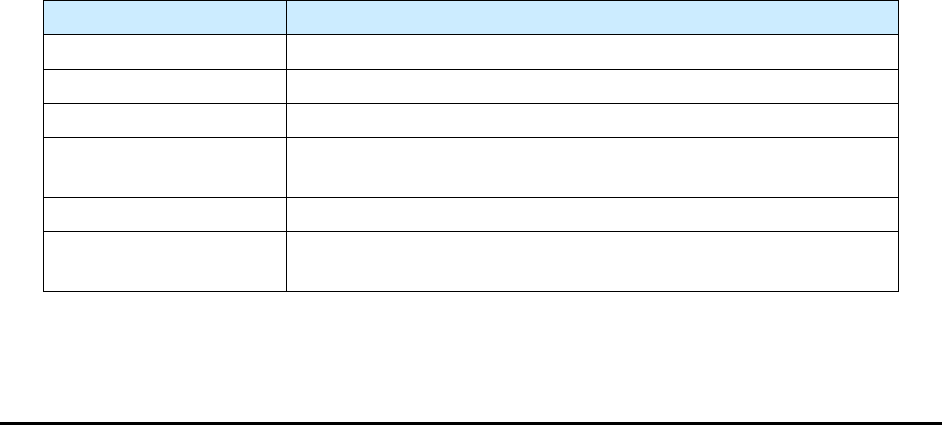
Table 2-2 Recommended Decommission Procedures
Component
Disposition
Aluminum Parts
Recycle aluminum chamber, panels, shelves, doors, and hardware.
Steel Parts
Recycle any stainless steel parts.
Copper Wiring
Recycle any copper wiring.
Lead Parts
Recycle any lead parts, or discard in designated collection areas, in
accordance with local safety/environmental regulations.
Electronic Components
Discard in accordance with local safety/environmental regulations.
Plastics
Recycle or discard in accordance with local safety/environmental
regulations.
Safety 2-7
2.10 Emergency Shutdown
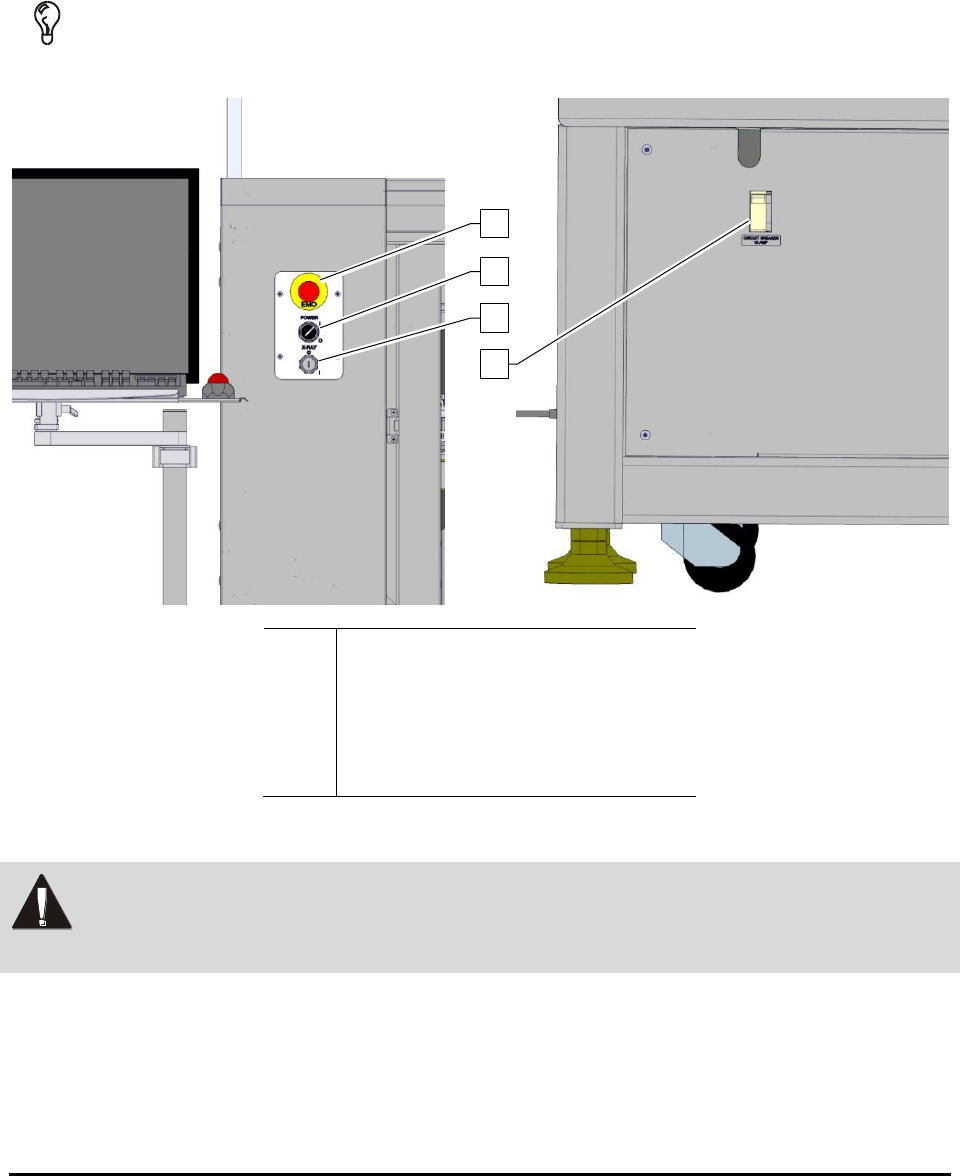
In the event of an emergency or malfunction, press the EMO button. The EMO buttons are the
large red buttons located on the front panel of the AXI system (Figure 2-3). Activating the EMO
vents all pressure in the pneumatic system and cuts power to all components except the computer,
the monitor, and the camera.
TIP If the operator or technician is unable to reach the EMO button, the main circuit breaker
(Figure 2-3) can be used for emergency shutdown.
Item
Description
1
EMO Button
2
System Power Switch
3
X-ray Power Switch
4
Circuit Breaker
Figure 2-3 ON and EMO/Off Buttons
WARNING! In an emergency, failure to completely shut down power to the AXI system with
the EMO can cause serious injury to the user and/or damage to the AXI system.
The AXI systems are equipped with a large, clearly marked, front console-mounted emergency machine
off (EMO) button. When activated, the main power connection to the system is disconnected via a
momentary action switch that sets the main power relay to the OFF state and stops operation. The only
connection that remains intact is the ON button which, after the EMO is reset, restores full power to the
system.
1
2
3
4