YesAX V3.1.2 - Software User Manual.pdf - 第28页
Safety 2-9 2.11 Service Shutdown Companies m ay differ in th eir Lockout/Tag out (LOTO) pro cedures and requirem ents, and it is the responsibility of the end user t o determine com pl iance with loca l safety procedur e…
2-8 Safety
2.10.1 Emergency Shutdown Situations
As a minimum, activate the EMO in the following situations:
If anyone is in immediate danger of being injured by moving parts, hazardous materials,
or electrical shock.
If valuable AXI system components or the workpieces are in danger of being damaged.
2.10.2 Emergency Shutdown Recovery
WARNING! Do not restart the AXI operation until the condition that caused the emergency
shutdown has been corrected. Failure to comply could cause serious injury to the
user and/or serious damage to the AXI system.
To recover after an Emergency Shutdown:
1. Locate and remedy the cause of the emergency shutdown. If necessary, refer to
Section 28 - Trouble Shooting.
2. If applicable, close the AXI area doors.
3. Turn the EMO knob clockwise until it pops back into position.
4. Restart the YesAX Software program. See 3.8 Power On for details.
2.10.3 Electromechanical Interlocks
Electromechanical interlocks prevent personnel from being exposed to high voltages, x-rays, and
mechanical hazards that are present while the AXI system is in operation.
The front door of the AXI system has two interlock switches. When the door is closed the conveyor and
stages can move and the x-ray can emit. When the door is opened the conveyor and x-y stages cease
movement and the x-rays stop emitting.
The chute doors for board loading and unloading have a switch and a sensor. The switch is a CDRH rated
dual interlock switch. X-rays can emit when the chute doors are closed. The X-rays stop emitting when a
chute door opens. In addition, the chute doors use a laser sensor. The sensor prevents the door from
shutting when an obstacle is present within the opening.
WARNING! When these interlocks are activated, the electrical power remains ON.
In order to resume operation, all access points must be closed and the interlocks must be reset using the
touch screen.
Safety 2-9
2.11 Service Shutdown
Companies may differ in their Lockout/Tagout (LOTO) procedures and requirements, and it is the
responsibility of the end user to determine compliance with local safety procedures. The purpose of any
LOTO effort is to help avoid injury or AXI system damage due to unexpected energizing of equipment,
start up, or the release of stored energy during repair, maintenance, and operation of equipment.
Situations where LOTO practices may be employed on your AXI include:
Adjusting cables, belts, pulleys, or moving parts
Servicing bearings or motors
Troubleshooting, servicing, or replacing electronic components or assemblies
Troubleshooting, servicing, or replacing pneumatic components or assemblies
Situations where LOTO practices might not be required are when troubleshooting electrical, pneumatic,
or hydraulic components or assemblies that make de-energizing the whole system impractical.
Troubleshooting or servicing you AXI system while powered up and operating should only be
accomplished by fully trained and qualified personnel. There should always be a second person present
when performing maintenance on a system under power.
WARNING! All personnel working on or near the AXI system should know the location of all
electrical power supply sources.
WARNING! CAUTION!
Lock out and tag out electrical power before performing service or maintenance
work on the AXI system. Failure to do so could cause serious injury to the user
and/or serious damage to the cure module.
2-10 Safety
To lockout/tagout the electrical and pneumatic energy:
1. Shut down the computer.
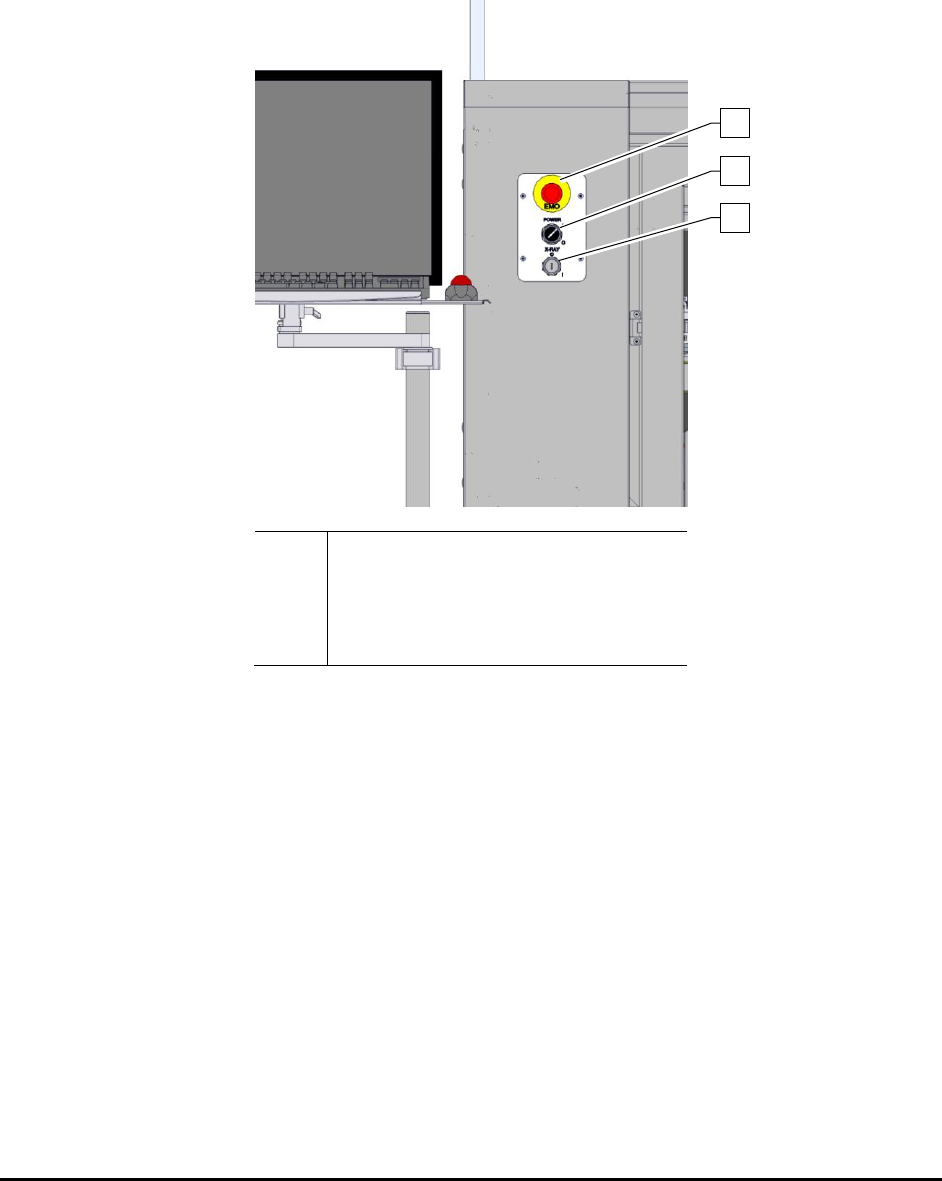
2. Press the red EMO button (Figure 2-4) to turn OFF the system.
3. Turn the Power switch to the OFF (O) position.
Item
Description
1
EMO Button
2
System Power Switch
3
X-ray Power Switch
Figure 2-4 ON and EMO/Off Buttons
4. Disconnect the electrical plug from the facility power outlet.
5. Attach a prominent warning tag to the power cord with durable string.
This tag documents the name of the technician taking the equipment out of operation,
the date, and other facility-required information. It is a warning that the equipment
cannot be put back into operation until the authorized technician has removed the tag.
6. Perform maintenance, servicing, and troubleshooting as necessary.
NOTE Warning tags document the name of the technician taking the equipment out of operation,
the date, and other facility-required information. It is a warning that the equipment cannot be
put back into operation until the authorized technician has removed the tag.
1
2
3