YesAX V3.1.2 - Software User Manual.pdf - 第91页
SMEMA Conveyor Setup 9-3 Press the Advance Setup button on the Conveyor Setup dialog to launch the Conve yor Adva nce Setup dialog. As the conveyor feeds a board and it reaches the middle sensor it slows down, and then s…

9-2 SMEMA Conveyor Setup
The Ignore Down Stream checkbox will ignore the downstream conveyor’s SMEMA busy
single when selected.
The No Feed checkbox will prevent the board from feeding after inspection. It is needed when
you want to inspect the same board repeatedly.
The By Pass checkbox selects the bypass mode of operation. The machine will pass any board
down once it enters the system without performing any inspection.
Board Support and Board Clamp are two options that can be purchased for the AXI machine.
They are pneumatically operated. These options require a high pressure air supply at 80 PSI or
more.
The Board Support option consists of a pair of pins which come up to support the back side of a
board. Board support corrects board sag on thin and large board. The board support pins have
magnetic bases which can be positioned anywhere under the board.
The Board Clamp option consists of a pair of clamps which clamp down on the top and the
bottom edge of the board along the conveyor belt. Used with the board support, the board clamp
helps de-warp the board for a more accurate inspection.
The two small “T” buttons to the right of the Board Support and Board Clamp checkboxes are
for the user to exercise the two mechanisms.
The Home on Load Recipe checkbox will home the conveyor before adjusting to the recipe
width every time a new recipe is loaded.
The Disable Width Adjust checkbox will not allow any adjustment of conveyor width. If the
customer only has one kind of test board or all the boards have the same width, there is no need
to adjust conveyor width during normal operations.
9.1 Advance Setup
The SMEMA connectors of the machine are located on the right side of EBOX 1 which can be
seen when the back panel is open. The SMEMA connector on top is for the upstream conveyor
(previous) and the SMEMA connector below is for the downstream conveyor (next). Despite
some of the claims, not all conveyor equipment is truly SMEMA compliant. SMEMA specifies
an edge triggered signaling scheme and lots of conveyor equipment with level trigger schemes
still claim to be SMEMA compatible. The YesAX software makes its SMEMA signal
configurable to accommodate for those conveyors.
SMEMA Conveyor Setup 9-3
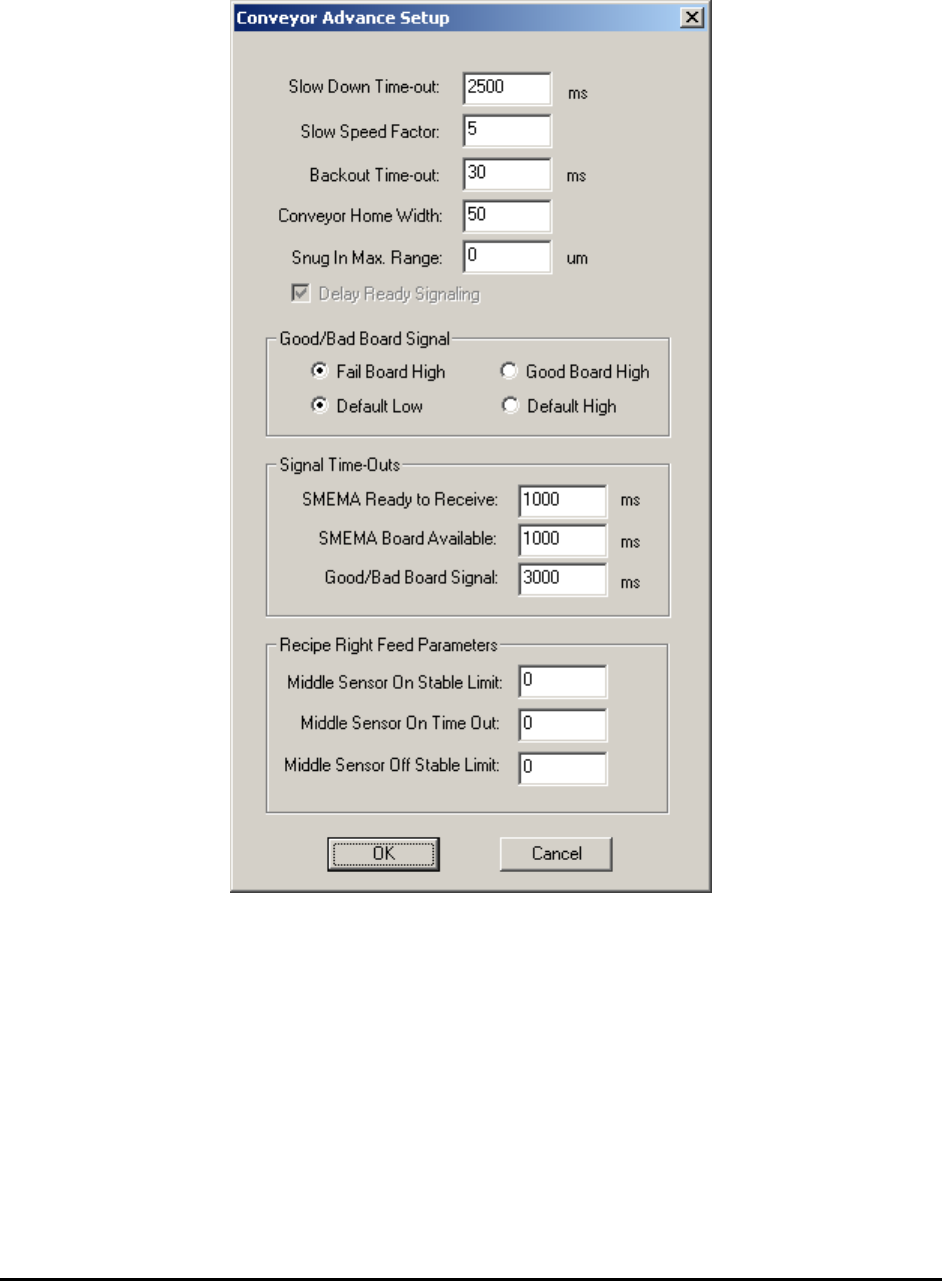
Press the Advance Setup button on the Conveyor Setup dialog to launch the Conveyor Advance
Setup dialog.
As the conveyor feeds a board and it reaches the middle sensor it slows down, and then slowly
creeps toward the hard stop.
The Slow Down Time-out is the time from the moment the middle sensor is triggered to the
time inspection begins. It is the time the board moves in slow speed mode.
The Slow Speed Factor sets the speed of the slow speed mode. The slow speed is always a
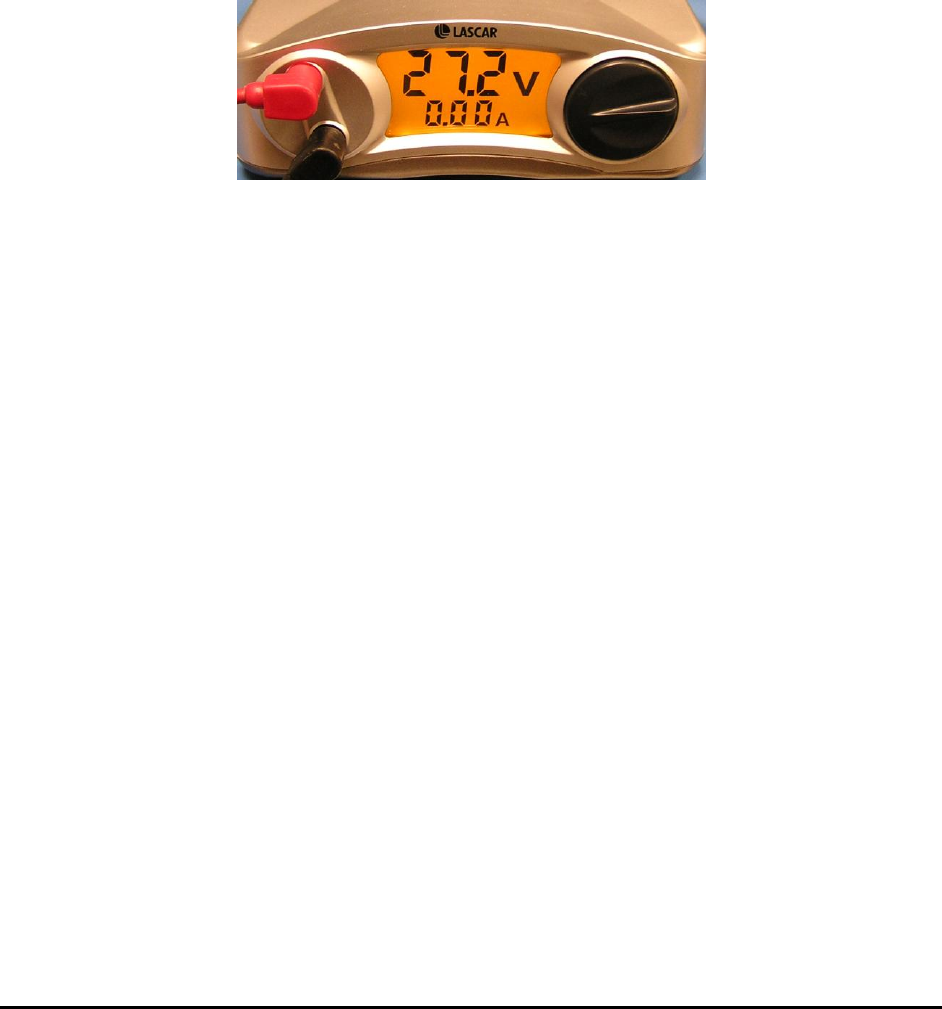
fraction of the overall speed. The overall feed speed is controlled by adjusting the power supply
voltage of the conveyor feed motor (shown below). In left to right feed mode, to feed board from
inspection position to the right requires retracting the hard stops. In order to retract the hard stops
freely, the board needs to be backed out from it first.
9-4 SMEMA Conveyor Setup
The Backout Time-out sets the time for the board to back-out from the stops. In normal
operation, for left to right or right to left feed mode, the system will allow the next board to enter
the machine while the current board is exiting the machine which increases throughput.
Concurrent feeding can be disabled by checking the Delay Ready Signaling checkbox.
The Conveyor Home Width field defines the conveyor home width. Sometimes the conveyor
width could be a bit bigger than the actual board width. This may cause board position shift
during conveyor movement.
To prevent this situation from happening, set up a Snug In Max. Range. Once the board is
loaded the conveyor will keep snug in with the amount in the Snug In Max. Range field. This
will help secure the position of the board. The common values for this parameter could be set to
between 0 and 300 um.
In addition to the standard SMEMA, X2/X3 AXI systems also provide a signal called the
Good/Bad Board Signal that indicates the inspection status. It can be used to signal the
downstream equipment. The signal comes out from U8 pin 10 and is isolated by solid state relay
(SSR) U18 on the I/O board, then emerges as OUT6+ and OUT6- lines and connects to screw
terminal ST3’s pin 5 and pin 6. There are two 12-pin screw terminals on the I/O board with ST3
on the right. This signal’s characteristic can be configured using the Good/Bad Board Signal
section of the Conveyor Advance Setup dialog.
In the last section on the dialog, configure signal timings for the SMEMA signals and the
Good/Bad Board signal.
The Signal Time-Outs section configures signal timings for the SMEMA signals and the
Good/Bad Board signal.
The last section of the dialog defines three middle sensor related parameters. All three apply to
conveyor right feed mode only. How the machine see the boards can be controlled by adjusting
these parameters. These are per recipe settings and may need to be set differently to handle
different sizes of the board.
During right feed mode the board comes in from the right side and moves towards left to trigger
the middle sensor (Sensor On). Once the board passes the middle sensor (Sensor Off), the board
hard stop is down and the conveyor belt motor reverses direction. After “Slow Down Time-out”
board clamps and the inspection begins.
During right feed there may have several possible problem scenarios:
1. Big holes or cut-outs on the board which cause the middle sensor to go off before
the board passes through completely.
2. The middle sensor flickers off momentarily after it first sees the board.