YesAX V3.1.2 - Software User Manual.pdf - 第209页
SPC Data Logg ing 15 -5 UseMySQL=1 MySQLServer=localhos t MySQLUser=root MySQLPassword=roo tpasswor d MySQLPort=3306 MySQLOption=3 .. UseMySQL is set to 1 to enable software to write data to M y SQL database instead of M…

15-4 SPC Data Logging
PWD: set to the password of the SQL Server.
WinNTMode: set to 1 when use windows authentication mode for login validation. Under this
mode the user don’t need to set the value of UID and PWD. If set WinNTMode to 0, connection
will use SQL Server mode, then the user needs to set up both UID and PWD.
UseNamedPipe: set to 1 when using Win32 named pipes(i.e. computer name for “Server =”
and/or “Address=”); set to 0 when using Win32 Winsock TCP/IP (i.e. actual IP address of the
Server and/or Address).
With the parameters set, starting the YesAX software will cause the creation of YesDb database
in the MS SQL server folder. (By default the full path is: C:\Program Files\Microsoft SQL
Server\MSSQL\Data). It is important to let the software create the YesDb database
automatically. Do NOT try to manually create the database or try to import the database using
the YesDb.mdb file created by the MS Access software. Doing so could prevent the YesAX
software from connecting to the SQL server.
The SQL Server main computer and all computers connecting to the SQL database can be within
the same workgroup (domain) or at different workgroup. For a remote connection, use the IP
address on both the Address and Server fields. If you have problems connecting to the remote
SQL database, try turning off the firewall on the remote machine. YesAX connects to the default
instance (SQL Server 2000 and later support multiple installations of SQL Server on a single
computer) of SQL Server, which is the first installation of SQL Server.
Below is an example of SQL Server connection settings:
..
UseSQLServer=1
Server=SQLServer1
Address=192.168.1.1
UID=sa
PWD=yestech
WinNTMode=0
UseNamedPipe=0
Sometimes when the user connects to SQL server for the first time, the following error message
“Cannot connect to SQL Server master database” may show up. In this case, the YesAX
software was not able to connect to master database thus it cannot create the YesDb database for
data logging. To solve the issue, it is possible for the user to attach the YesDb database (created
by YesAX software in early case) to SQL database and then the YesAX software should be able
to connect to this YesDb database. To do this, the user needs to go to YesTech ftp site and get
the yesdb.mdf and yesdb_log.ldf file first and then copy these two files to the SQL server
computer. After that the database administrator can use his preferred SQL database tools to do
the attach job.
15.3 Using MySQL Database
MySQL database can be used instead of MS Access or MS SQL Server for database
management. There are some parameter changes needed in the YesAX.ini file, [ODBC_Report]
section. These parameters look similar to SQL Server database settings but are not exactly the
same.
..

SPC Data Logging 15-5
UseMySQL=1
MySQLServer=localhost
MySQLUser=root
MySQLPassword=rootpassword
MySQLPort=3306
MySQLOption=3
..
UseMySQL is set to 1 to enable software to write data to MySQL database instead of MS Access.
Before dumping data to MySQL database, set up MySQL database either locally or on a remote
machine.
NOTE
UseMySQL and UseSQLServer cannot be set to 1 at the same time. If it is,
software will ignore both requests and write data to the default Access database
instead.
MySQLServer: parameter specifies the name of the MySQL database server. If the installed
database locates in the local YesAX computer, the default parameter will be “localhost”. If
software cannot connect to the specified MySQL database, it will automatically switch back to
Access database.
MySQLUser: specifies the current user.
MySQLPassword: specifies the password for current user.
MySQLPort: specifies the network port used by the current database. The default value is 3306.
MySQLOption: specifies the current connection options for MySQL database. The default
value is set to 3.
With the parameters set, starting the YesAX software will cause the creation of YesDb database
in the MySQL database folder. (By default the full path for MySQL Server version 5.0 is:
C:\Program Files\MySQL\MySQL Server 5.0\data). It is important to let the software to create
the YesDb database automatically. Do NOT try to manually create the database or try to import
the database using the YesDb.mdb file created by the MS Access software. Doing so could
prevent the YesAX software from communicating with the MySQL database server.
To write data to MySQL database, install one extra software package on the local computer. The
name of the installation package is called “mysql-connector-odbc-3.51.26-win32.msi”. Double
click this file to start the installation. This package will install MySQL version 3.51 ODBC
driver on the local computer. This driver will allow YesVision/YesAX to have the ability to
write data to the MySQL database. If you don’t want to export data to the MySQL database,
there is no need to install the MySQL ODBC driver.
15.4 XY Position Tracking
YesAX software can be used to track the XY position of parts on PCBs. The feature is
implemented as an extension to the Marking Inspection feature of the AXI. Marking Inspection
is able to verify placement of any markings or parts using template matching. The feature
compares the “found” position with the “trained” position. If the difference is greater than a
preset tolerance the software will fail the inspection. To track the XY position, the software can
be instructed to log all the “found” positions on the selected parts.
15-6 SPC Data Logging
The position tracking is OFF by default. To turn it on, go to Vision>Recipe Option and select
the Track XY Position to ODBC Database Table checkbox. Only templates with “Check Pos.”
turned on in the Mark Parameters dialog will have their XY position tracked.
Sample Data Output
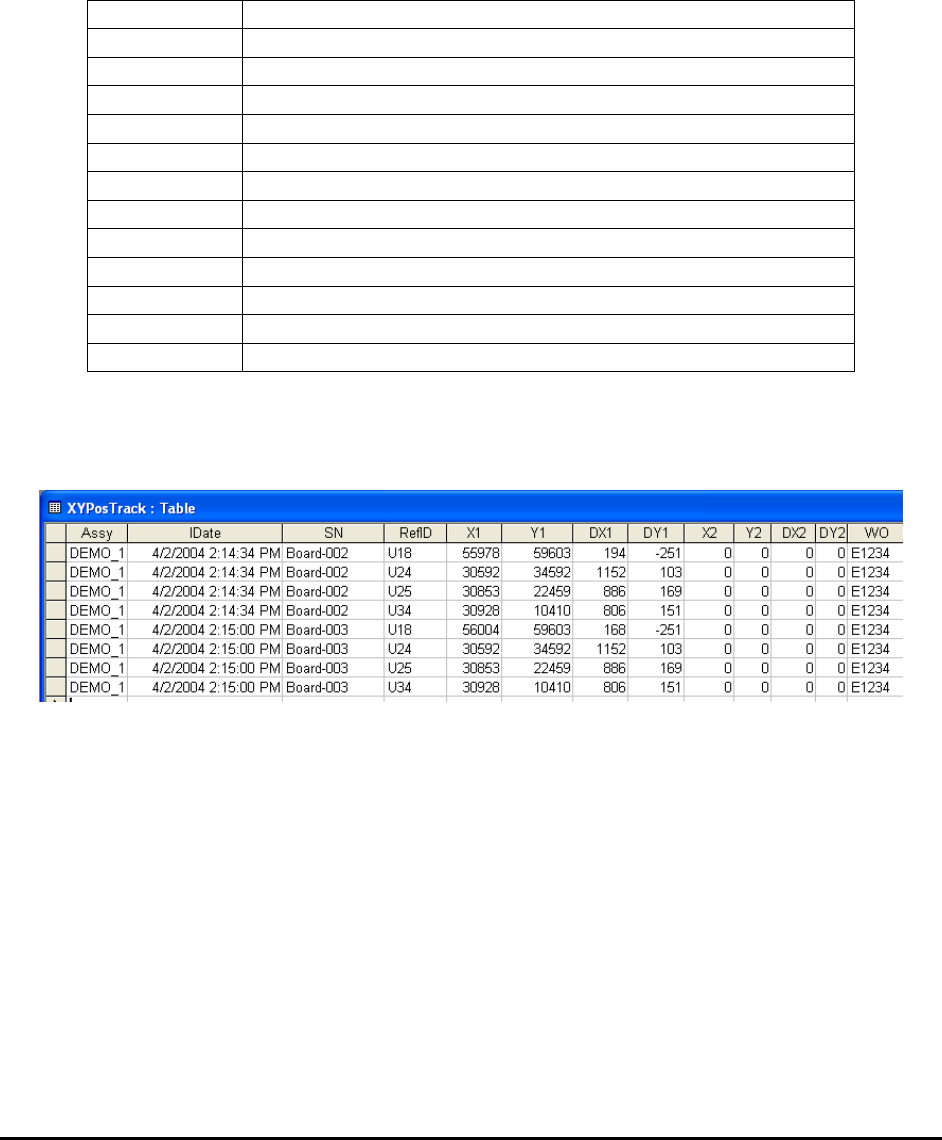
The XY Positions are sent via the ODBC to a separate table named XYPosTrack. The table has
the following fields:
Assy
Recipe Name
IDate
Inspection date and time stamp.
SN
Serial number of the board inspected.
RefID.
Reference designator for the part
X1
X reference position for the first mark
Y1
Y reference position for the first mark
DX1
X Offset position for the first mark
DX2
Y Offset position for the first mark
X2
X reference position for the second mark of the same part
Y2
Y reference position for the second mark.
DX2
X Offset position for the second mark.
DY2
Y Offset position for the second mark.
WO
WorkOrder
NOTE
All positioning units are in microns.
Here is a sample output.
Operational Details
Marking inspection uses a search algorithm called Normalized Grayscale Correlation or in
layman terms “template matching”. All successful template matches generate an XY position of
the successful match. We call this XY position the “Found” position. A deviation is calculated
by subtracting the trained position from this found position. It is this deviation that gets stored
into the database as X and Y.
Each part can have one or more mark inspection boxes. If the part has only one mark inspection
box, only the X1 and Y1 fields in the database table will be filled. X2 and Y2 are for the second
mark inspection box. Having a pair of XY data points allows for the calculation of the rotational
deviation of a placement.