X7056_Operating manual_en.pdf - 第130页
Software Automatic mo de 130 Inspection system X7056 | Operating manual | Version 3.1 Rev.006| 2016-01-06 | 30.009.1930a Feature di stri- bution The field F EATU RE D ISTRIBUTION displays the frequency distribution of th…
Software
Automatic mode
129
Inspection system X7056 | Operating manual |
Version 3.1 Rev.006| 2016-01-06 | 30.009.1930a
Feature statistic
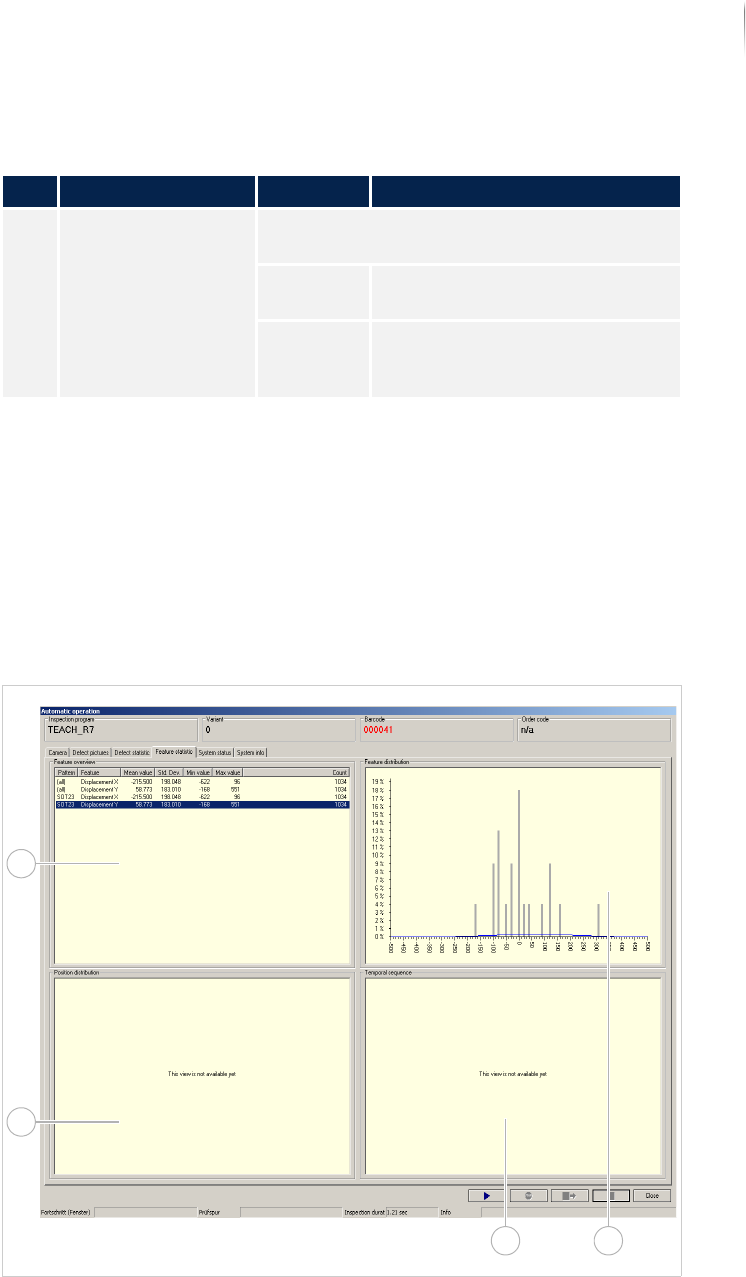
The file tab FEATURE STATISTIC displays the evaluation of the
component displacement and rotation.
The following elements are described:
F
EATURE DISTRIBUTION (Page 130)
F
EATURE OVERVIEW (Page 131)
Overview
File tab FEATURE STATISTIC
3 PATTERN Selects either all component types or only
one type for display.
ALL Displays all components in the
Top Te n S t at i st ic.
C0603... Only the selected component
type is displayed in the Top Ten
Statistic.
Description of the field PARETO DISPLAY
No. Name Value Description
3
12
4
Software
Automatic mode
130
Inspection system X7056 | Operating manual |
Version 3.1 Rev.006| 2016-01-06 | 30.009.1930a
Feature distri-
bution
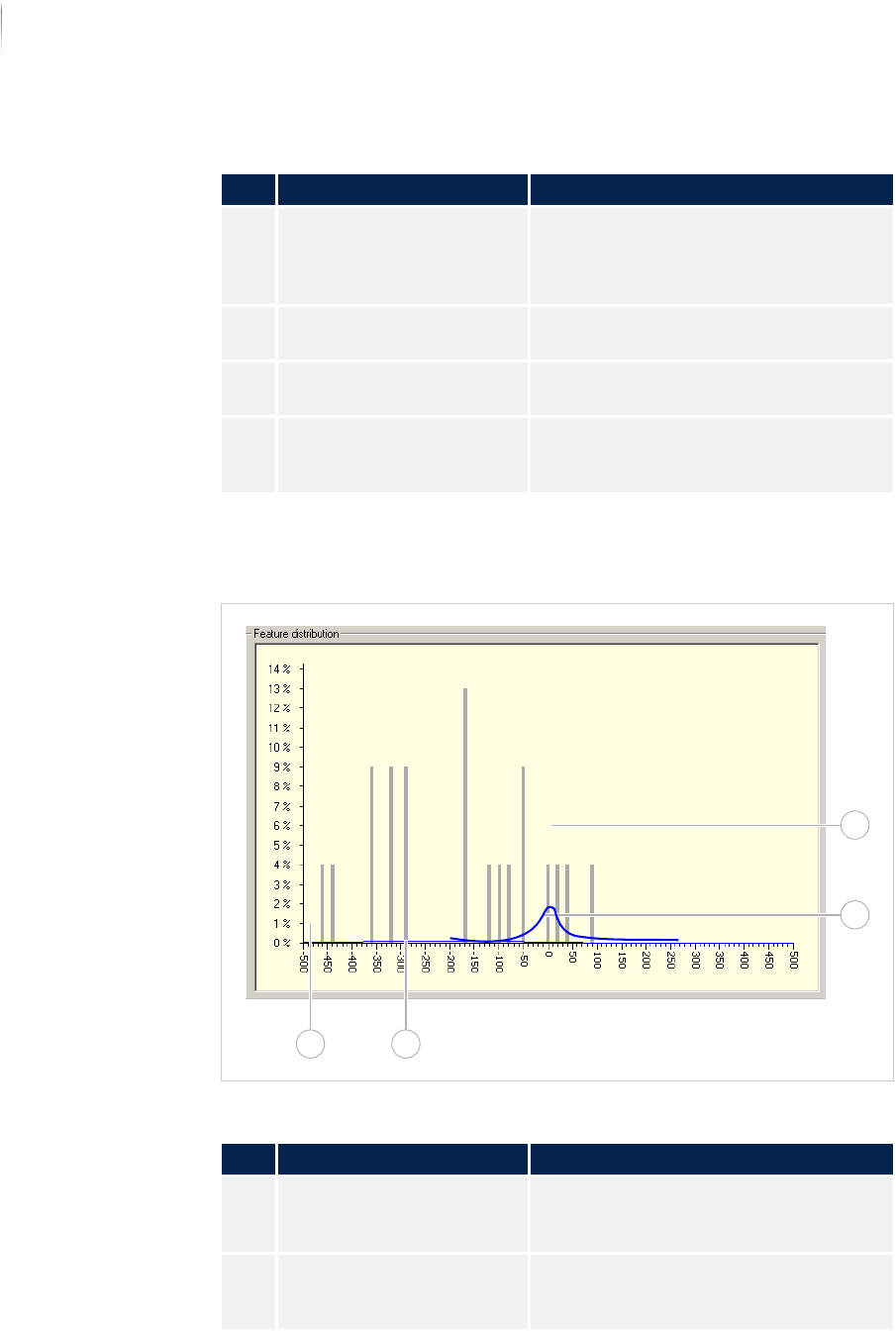
The field FEATURE DISTRIBUTION displays the frequency distribution
of the defect features.
Field FEATURE DISTRIBUTION
Description of the fields
No. Name Description
1 FEATURE DISTRIBUTION Compiles the frequency distribution of
the defect features of a selected
component type in a diagram. See
„Feature distribution“ (Page 130)
2 TEMPORAL SEQUENCE The field is first available as of Version
7.38.
3 POSITION DISTRIBUTION The field is first available as of Version
7.38.
4 FEATURE OVERVIEW Displays the evaluation of the compo--
nent displacement and rotation. See
„Feature overview“ (Page 131)
Description of the fields
No. Name Description
1 Column Displays which percentage of a
selected component type has a specific
displacement or rotation.
2 Curve The apex of the curve displays the
average displacement or rotation value
for a selected component type.
1
2
34
Software
Automatic mode
131
Inspection system X7056 | Operating manual |
Version 3.1 Rev.006| 2016-01-06 | 30.009.1930a
Feature over-
view
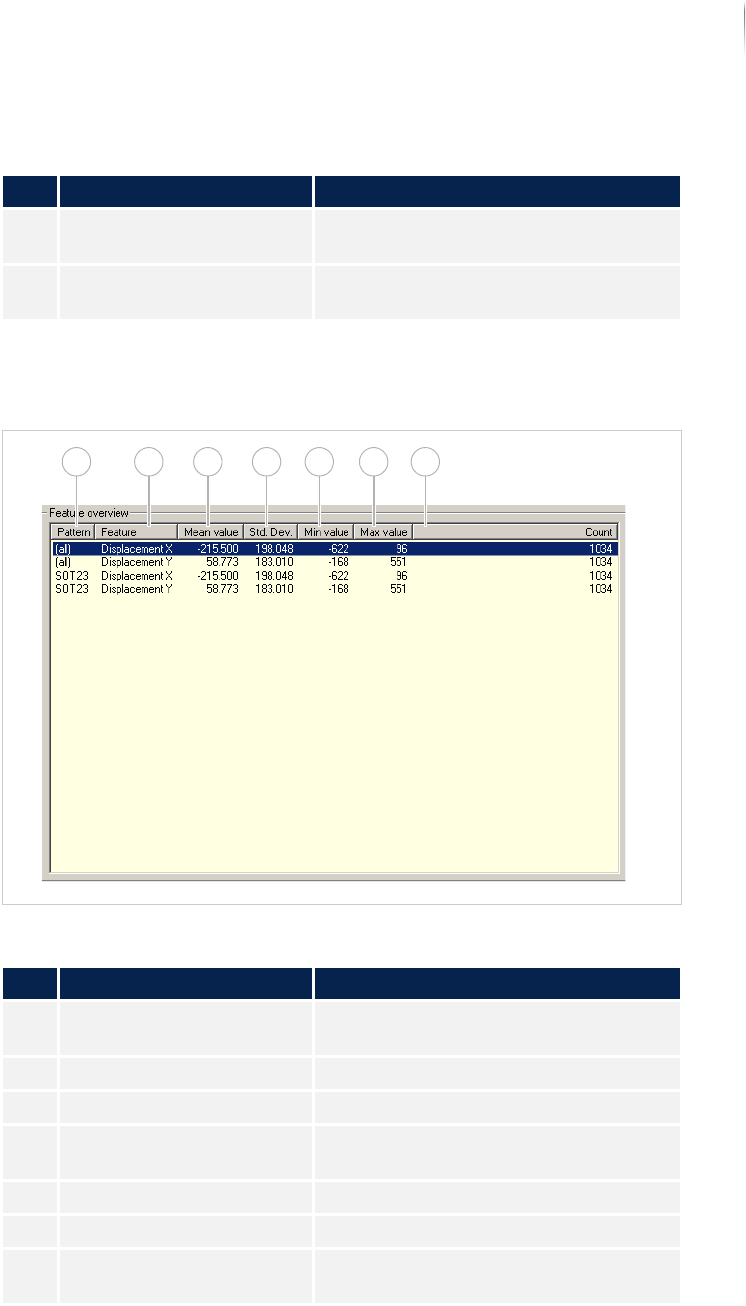
In the field FEATURE OVERVIEW, a list of the displacement and rota-
tion values for a specific component are displayed.
Field FEATURE OVERVIEW
3 Displacement/rotation Displays the displacement or rotation
values in hmm.
4 Percentage Displays the percentage portion of a
selected component.
Description of the fields
No. Name Description
Description of the field "Feature overview"
No. Name Description
1 PATTERN Displays the name of the component
type.
2 FEATURE Displays the defect feature.
3 MEAN VALUE Displays the mean value of the feature.
4 STANDARD DEVIATION Displays the standard deviation for this
component type.
5 MINIMUM VALUE Displays the minimum deviation.
6 MAXIMUM VALUE Displays the maximum deviation.
7 COUNT Displays the number of components
that are displaced or rotated.
1 2 3 4 5 6 7