X7056_Operating manual_en.pdf - 第146页
Software Ending 146 Inspection system X7056 | Operating manual | Version 3.1 Rev.006| 2016-01-06 | 30.009.1930a
Software
Ending
145
Inspection system X7056 | Operating manual |
Version 3.1 Rev.006| 2016-01-06 | 30.009.1930a
Ending
The VVP is ended through the button END.
The following elements are described:
E
ND PROGRAM
VVP INFORMATION
End program
Perform the following work steps:
1. Click E
ND in the Viscom Vision Pilot start display.
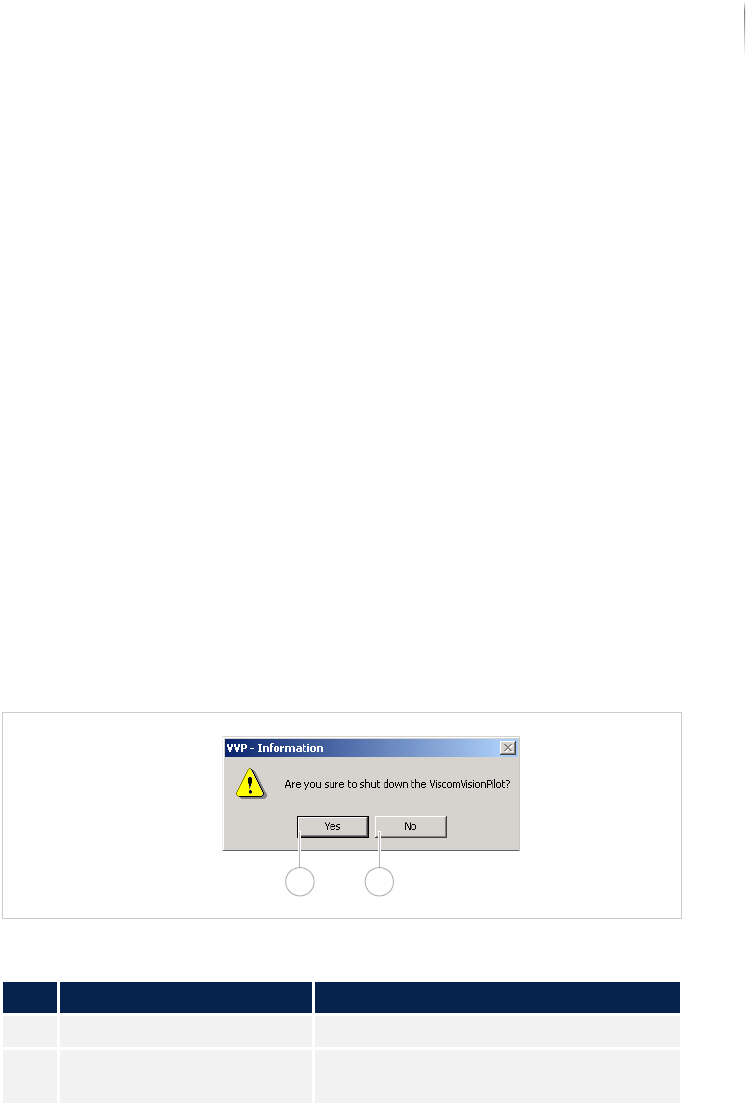
The window VVP INFORMATION is displayed.
2. Click Y
ES.
The program is ended.
VVP information
Window VVP INFORMATION
Description of the window "VVP information"
No. Name Description
1 YES Shuts down the VISCOM VISION PILOT.
2 NO Opens the VISCOM VISION PILOT start
display.
1 2

Software
Ending
146
Inspection system X7056 | Operating manual |
Version 3.1 Rev.006| 2016-01-06 | 30.009.1930a

Operation 147
Inspection system X7056 | Operating manual |
Version 3.1 Rev.006| 2016-01-06 | 30.009.1930a
Operation
This chapter describes the operation of the inspection system.
It contains the following sections:
Safety (Page 148)
Operating the safety features (Page 149)
Switching on the inspection system (Page 154)
Operating the inspection system (Page 155)
Switching off the inspection system (Page 159)