X7056_Operating manual_en.pdf - 第160页
Operation Switching off the i nspection sy stem 160 Inspection system X7056 | Operating manual | Version 3.1 Rev.006| 2016-01-06 | 30.009.1930a 2. Ente r the IP address of the AXI system computer ( 192.168.1.2 ) and clic…
Operation
Switching off the inspection system
159
Inspection system X7056 | Operating manual |
Version 3.1 Rev.006| 2016-01-06 | 30.009.1930a
Switching off the inspection system
This section describes how to switch off the inspection system.
The work steps in detail:
Shutting down the operating system (Page 159)
Switching off the inspection system (Page 160)
Shutting down the operating system
Precondition: There are no more PCBs in the system.
The Viscom software is ended.
NOTE
The password for the VC Viewer is set to viscom by default. These
settings can be customized. Adapting the configuration must be
done by Viscom service personnel.
Shutting down
the AXI system
computer.
Perform the following work steps:
1. Click M
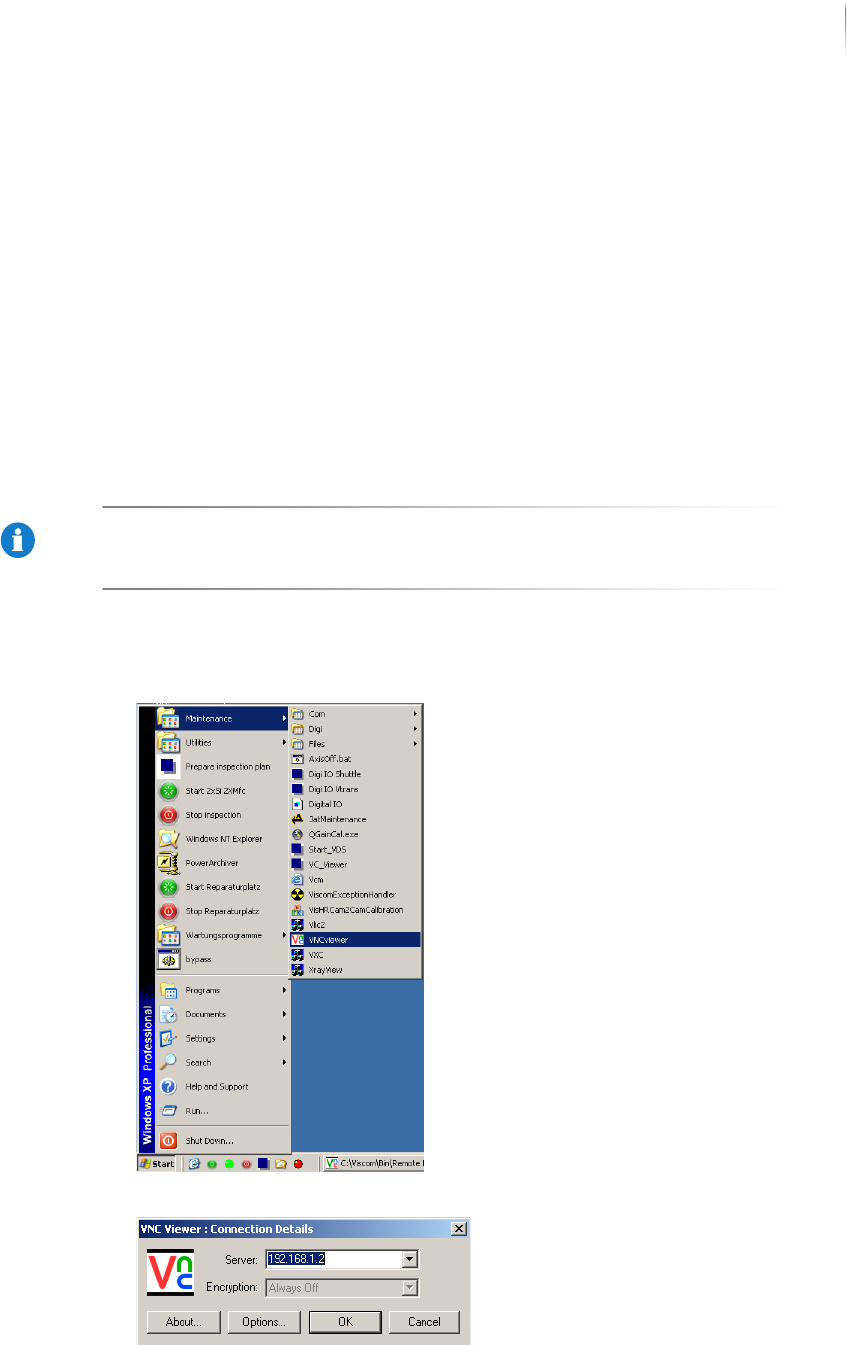
AINTENANCE > VNCVIEWER in the Windows start menu.
The monitor displays the VNC viewer start window.
Operation
Switching off the inspection system
160
Inspection system X7056 | Operating manual |
Version 3.1 Rev.006| 2016-01-06 | 30.009.1930a
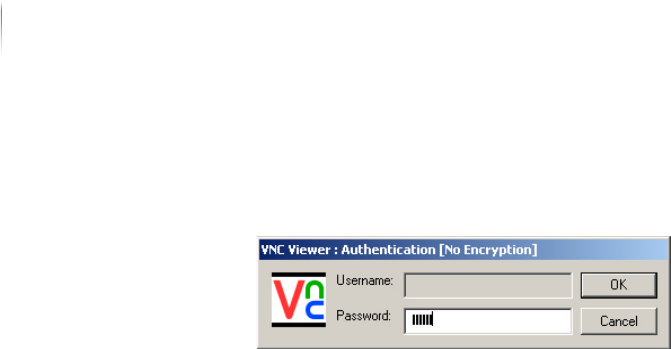
2. Enter the IP address of the AXI system computer (192.168.1.2)
and click OK.
The monitor displays the AXI system computer log on window.
3. Enter the password
viscom.
The AXI computer user interface appears.
4. Click S
HUT DOWN in the AI computer's Windows start menu.
The monitor displays the Windows LOG OFF window.
5. Select S
HUT DOWN from the drop-down list.
6. Click OK.
The AXI system computer is shut down.
Shutting down
the AOI system
computer.
Perform the following work steps:
1. Click S
HUT DOWN in the Windows start menu.
The monitor displays the Windows LOG OFF window.
2. Select S
HUT DOWN from the drop-down list.
3. Click OK.
The AOI system computer is shut down.
The operating system is shut down.
Switching off the inspection system
Perform the following work steps:
1. Turn the main switch to OFF.
2. Turn the key switch to
OFF and remove the key.
3. Turn off the UPS devices.
4. Switch off the monitor.
The system is switched off.
