X7056_Operating manual_en.pdf - 第237页
Decommissioning Take the inspection system out of op eration 237 Inspection system X7056 | Operating manual | Version 3.1 Rev.006| 2016-01-06 | 30.009.1930a Securing the power supply cables There are power supply cables …
Decommissioning
Take the inspection system out of operation
236
Inspection system X7056 | Operating manual |
Version 3.1 Rev.006| 2016-01-06 | 30.009.1930a
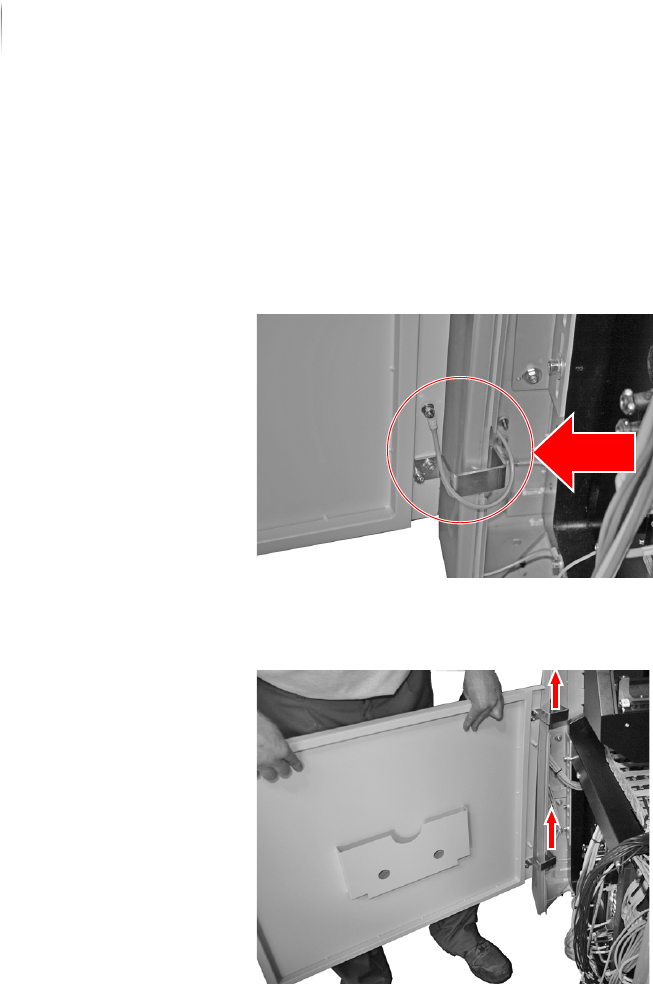
Removing the front door
Perform the following work steps:
1. Unlock and open the front door.
2. Remove the lower ground/earth cable from the door.
3. Remove the upper ground/earth cable from the door.
4. Unhinge the door.
5. Pack the door in a shipping carton.
The front door is removed.
Decommissioning
Take the inspection system out of operation
237
Inspection system X7056 | Operating manual |
Version 3.1 Rev.006| 2016-01-06 | 30.009.1930a
Securing the power supply cables
There are power supply cables on the front and back sides of the
inspection system. Secure these cables so they are not damaged.
ATTENTION
Damage to the inspection system
There are power supply cables on the front and back sides of the
inspection system.
Make sure that no cables are underneath the system.
Perform the following work steps:
Tie up all cables beneath the inspection system with cable ties.
The power supply cables are secured.
Cleaning the Inspection System
Perform the following work steps:
1. Open the front door and the rear swing doors.
2. Clean the interior of the system with a dry cleaning cloth.
3. Vacuum the interior of the system.
The inspection system is cleaned.

Decommissioning
Take the inspection system out of operation
238
Inspection system X7056 | Operating manual |
Version 3.1 Rev.006| 2016-01-06 | 30.009.1930a