1OM-1075-002.pdf - 第114页
AHB01EOPP 1 . 4 T emporary Stop and Restart of Automatic Opera- tion 1.4.1 Replenishment of Components There will be two cases of component supply replenishment during au- tomatic operation - Component Replenishment with…
AHB01EOPP
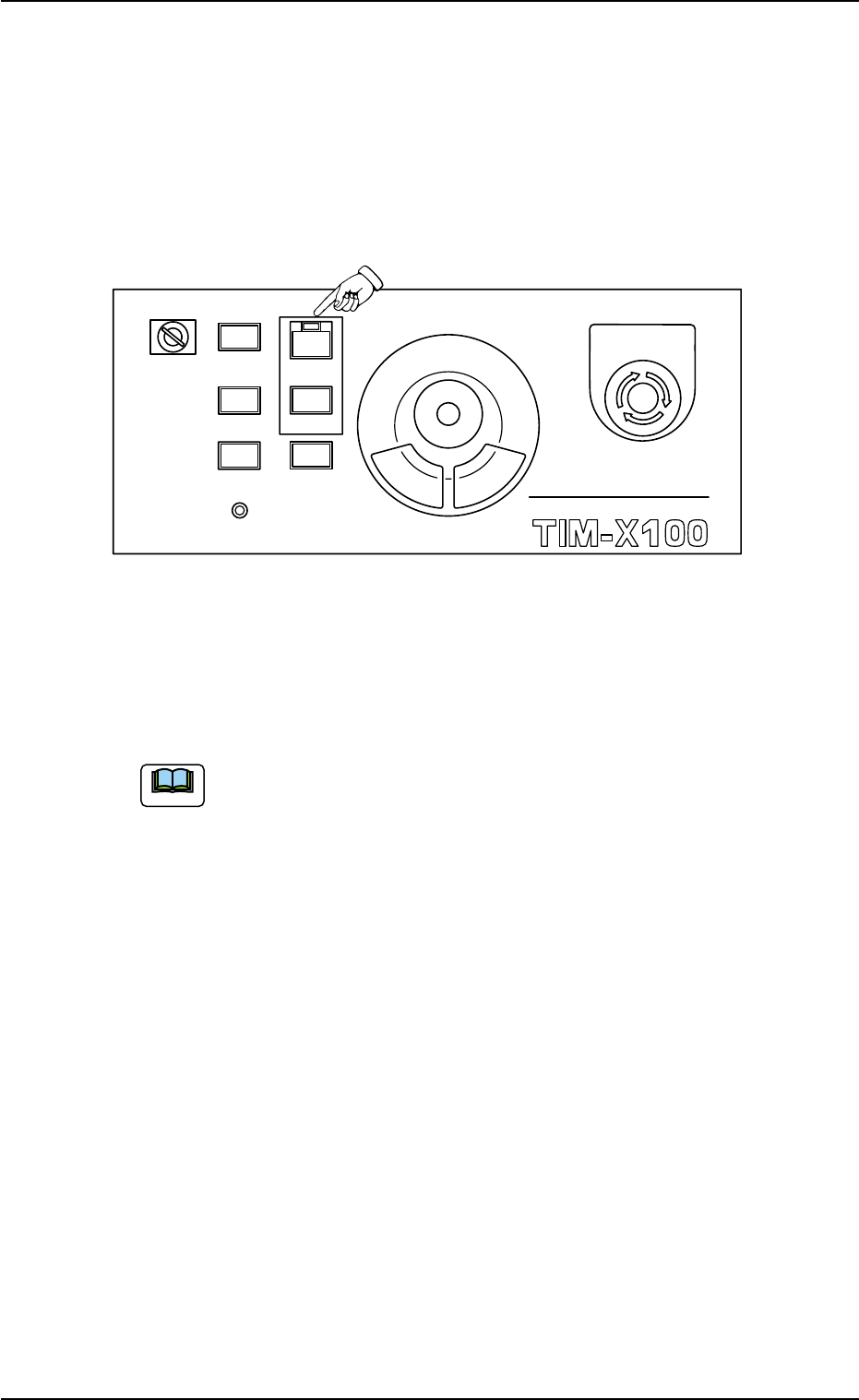
(6) Confirm that the lamp of the [READY] button illuminates in green.
Otherwise, press the [READY] button and wait until the lamp illumi-
nates.
(7) When the [START] button on the front operation panel is pressed
while the lamp is flickering, the automatic operation (placement)
starts.
Fig. 1C19
When the automatic operation (component placement) starts, the
lamp of the [START] button on the front operation panel illuminates
in green and the green lamp of the light tower also goes on.
(a) When a window other than the "AUTO OPN." one (main
menu) is active, it is impossible to start the automatic op-
eration because the lamp of the [START] button does not
flicker.
(b) When a P.C.B. already exists in the P.C.B. positioning sec-
tion, the machine discharges the P.C.B. without placing
any component on the P.C.B.
0308-003 3-14
Note
MULTI FUNCTIONAL MOUNTER
STOP
LOCK
OPERATION
RUN SETUP
START
ENABLE
PNL CHANGE
READY
POWER ON
EMERGENCY
1.3 Start of Automatic Operation
AHB01EOPP
1.4 Temporary Stop and Restart of Automatic Opera-
tion
1.4.1 Replenishment of Components
There will be two cases of component supply replenishment during au-
tomatic operation - Component Replenishment with Machine in Short of
Components and Intentional Component Replenishment.
The following is explained, presuming that the tape feeders are
being used.
As for the replenishment of the vibratory stick feeders and the
multi-layer tray feeders (option), refer to each instruction manual
for details.
• Component Shortage Mode
When a component shortage error occurs during automatic opera-
tion, an error alarm is issued and the machine stops.
In this case, follow the steps below to replenish components and re-
start the automatic operation.
(1) Check which feeder is short of components.
(2) Press the [RESET] button to cancel the error alarm.
(3) Detach the feeder base pullout prevention bar of the feeder base
where the feeder in short of components is located.
(4) Detach the feeder from the slot No. (Fdr. No.) where a component
shortage error has occurred.
In the case of tape feeders, the status indicator flickers.
(5) Replenish the feeder with components.
(6) Attach the feeder to the specified slot No. (Fdr. No.).
(7) Attach the feeder base pullout prevention bar.
(a) An error alarm means the following condition.
Tower Light : Error Indication
Component Shortage Light : Component Shortage Indi-
cation
Screen Display : Error Indication
Buzzer : Buzzer Sounds which cor-
respond to an error
0206-003 3-15
1.4 Temporary Stop and Restart of Automatic Operation
Note
Note
Note
AHB01EOPP
(b) Refer to the instruction manual of feeders for the detailed
information on how to install or remove the feeders.
• The feeders should be seated securely. Otherwise,
a collision with the head section or a pick-up error
will occur.
• Be sure to install the feeders on the correct feeder
slot Nos. (Fdr. No.). Otherwise, some components
may be trapped between the heads.
(8) After the feeder replacement, confirm that the "AUTO OPN." win-
dow (main menu) is active on the touch screen.
To restart the operation when the lamp of the [READY] button is
OFF, press the [START] button while the lamp is flickering after the
[READY] button.
• Intentional Component Replenishment during Automatic Opera-
tion
(1) Press the [STOP] button on the operation panel to stop the ma-
chine temporarily.
(2) Detach the feeder base pullout prevention bar of the feeder base
where a feeder in short of components is located.
(3) Detach the feeder in short of components.
(4) Load the feeder with new components and attach it to the feeder
base.
(5) Attach the feeder base pullout prevention bar.
(6) Press the [START] button. The automatic operation re-starts.
0308-004 3-16
1.4 Temporary Stop and Restart of Automatic Operation
CAUTION