1OM-1075-002.pdf - 第135页
AHB01EOPP (Remedy 3) • W ait until the program is started completely . • Cancel the "Emergency Stop" mode to reset the machine to its normal condition. Refer to "3.1 [EMERGENCY STOP] Button Pressed" f…
AHB01EOPP
1. Power Operation Impossible
Table 1D1
Symptom When the [POWER ON] button on the operation panel is pressed, the ma-
chine is not powered.
Cause (Cause 1) The [POWER ON] button on the operation panel is not held down
for more than 1 second.
(Cause 2) The power breaker is set to "OFF"
(Cause 3) The lamp of the [POWER ON] button on the operation panel illumi-
nates in red.
(Cause 4) The power breaker is tripped.
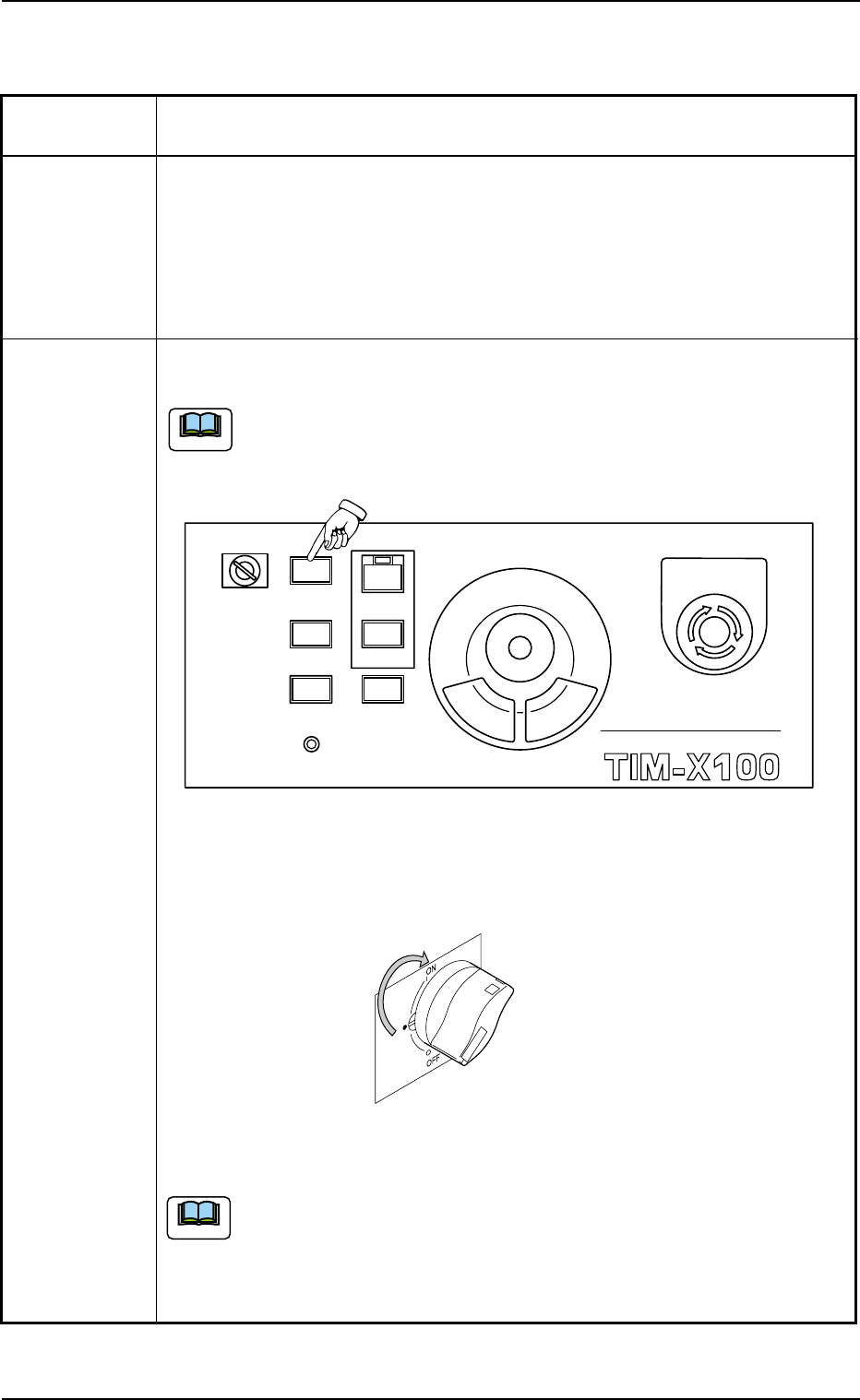
Remedy (Remedy 1) Hold down the [POWER ON] button on the front or the rear op-
eration panel for more than 1 second.
When power is supplied, the lamp of the [POWER ON] button illumi-
nates in yellowish green.
Fig. 1D1 Front Operation Panel
(Remedy 2) Set the power breaker to "ON".
Fig. 1D2
The working lamp switches are located beside the front or the rear
operation panel. When either one of the switches is turned on or off,
the working spot lamp also illuminates or extinguishes. Otherwise,
the machine is not powered.
1. Power Operation Impossible
0308-003 4-1
MULTI FUNCTIONAL MOUNTER
STOP
LOCK
OPERATION
RUN SETUP
START
ENABLE
PNL CHANGE
READY
POWER ON
EMERGENCY
Note
Note

AHB01EOPP
(Remedy 3)
• Wait until the program is started completely.
• Cancel the "Emergency Stop" mode to reset the machine to its normal
condition.
Refer to "3.1 [EMERGENCY STOP] Button Pressed" for details.
• Close the front and the rear safety doors.
• Set the main air pressure to the specified one "0.4 MPa (4.1 kgf/cm
2
)".
Refer to "1.1.1 Confirmation of Power Supply and Air Pressure" in
"Section 3" for details.
(Remedy 4) Turn on the power breaker while holding down the [RESET] but-
ton (red).
1. Power Operation Impossible
0206-003 4 - 2

AHB01EOPP
2. Nothing Displayed on Touch Screen
0107-001 4 - 3
2. Nothing Displayed on Touch Screen
Table 1D2
Symptom Nothing is displayed on the touch screen.
Cause (Cause 1) The screen saver function is activated.
(Cause 2) Power is not supplied from the source.
Remedy (Remedy 1) Touch a part of the touch screen. The foreground activities will
occur in any running application.
(Remedy 2) Refer to "1. Power Operation Impossible" for details and follow
the remedial procedure.