1OM-1075-002.pdf - 第68页
*9 [EMERGENCY STOP] Switch • This switch is used to stop the machine immediately in an emer- gency . • When this switch is pressed, the power is turned off and the ma- chine stops immediately . When the power is turned o…
*6 [LOCK] Lamp
• While this lamp is "ON", it indicates that only the rear operation
panel is available and no panel change operation is possible.
• The lamp flickers when any operation is made on the front opera-
tion panel with the lamp being kept ON.
To cancel the flickering of the lamp, press the [PNL CHANGE]
button and follow the steps to set the operation-lock mode again.
*7 [READY] Button
• This button is used to turn on or off the electromagnetic lock of the
rear safety door.
ON : The electromagnetic lock of the rear safety door is turned
ON.
OFF : The electromagnetic lock of the rear safety door is turned
OFF.
*8 [OPERATION] Switch
• The selection key must be inserted to change over the [OPERA-
TION] switch to "RUN" or "SETUP".
The [OPERATION] switch must be set to the "RUN" side for auto-
matic operation.
The switch can be changed over to "RUN" or "SETUP"
only when the machine is in the "STOP" mode.
• When the switch is changed to the "SETUP" side, the machine is
set as follows.
(a) The red, yellow, and green lamps of the light tower will illumi-
nate (initial setting of the machine upon shipment).
(b) The following operations are prohibited regardless of the rear
safety door condition (opened/closed).
Automatic Operation, Zeroing Operation, Device Check,
Unit Adjustment, and Teaching Operation
(c) Operations automatically become available on the rear op-
eration panel (operations locked).
No operations are accepted on the front operation panel.
• When the [OPERATION] switch is set to the
"SETUP" side, the interlock system of the rear safety
door is deactivated.
• Do not operate the machine with the [OPERATION]
switch in the "SETUP" mode except for the setup
operations.
• Do not keep the selection key inserted unless nec-
essary. The key shall be stored by the person in
charge.
• When the selection key is turned forcibly, the switch
may be damaged.
0308-003 1-22
AHB01EOPP
2.3 Equipment for Operations
Note
CAUTION

*9 [EMERGENCY STOP] Switch
• This switch is used to stop the machine immediately in an emer-
gency.
• When this switch is pressed, the power is turned off and the ma-
chine stops immediately.
When the power is turned off, the LED of the [POWER ON] but-
ton on the operation panel illuminates in red.
*10 Rear Touch Screen
• The operation windows will be displayed on the rear touch screen
as well as the front one.
Various types of operations become available by touching the but-
tons and tabs on the screen.
*11 Working Lamp Switch
• This switch is used to turn on or off the working lamp on the rear
side.
*12 Cycle Counter
• This counter counts how many times (cycles) the machine has
worked.
0308-003 1-23
AHB01EOPP
2.3 Equipment for Operations
0308-004 1-24 AHB01EOPP
2.3.8 Service Panel
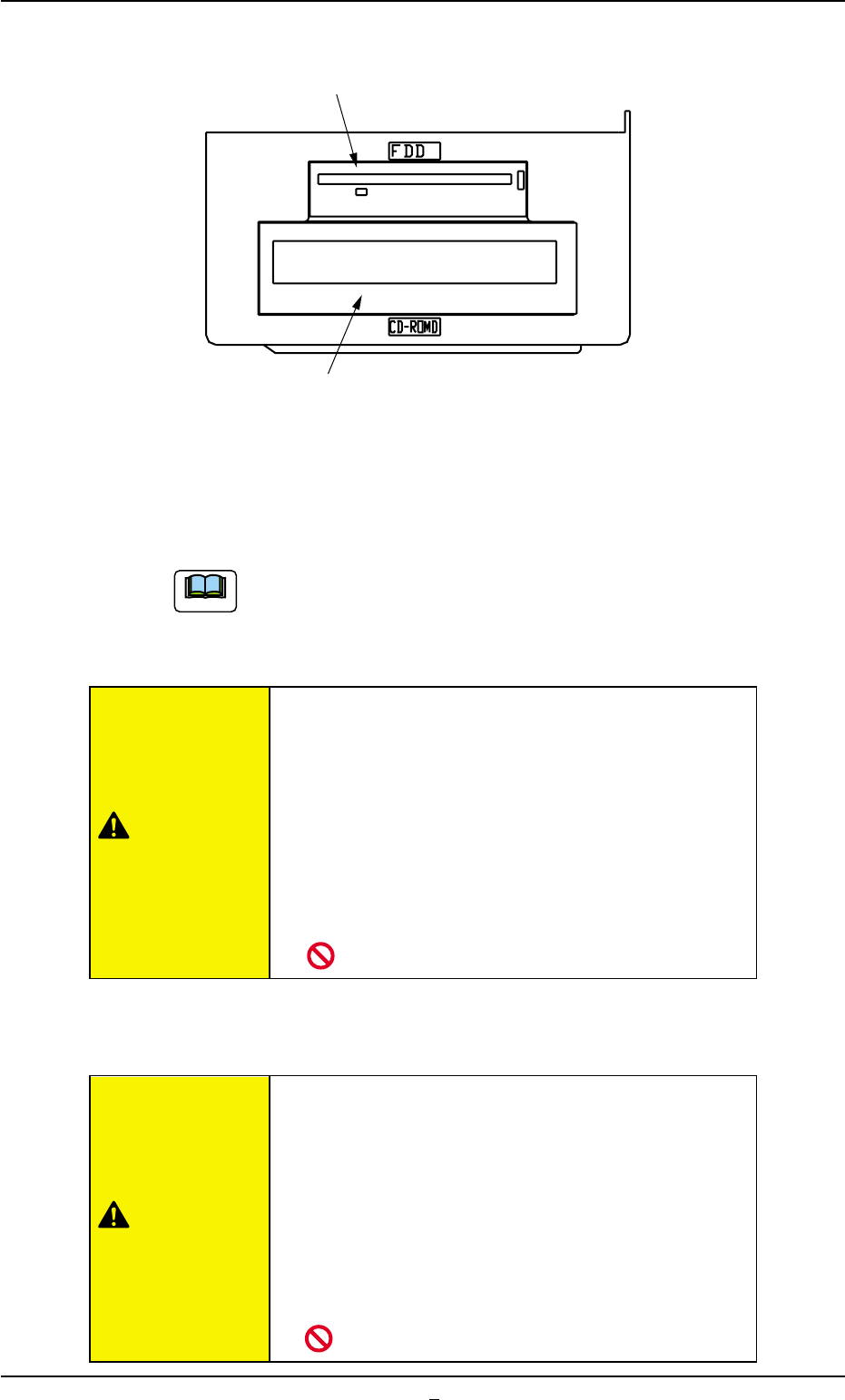
Fig. 1A18
*1 Floppy Disk Drive
The floppy disk drive is used to write data such as the device data,
a pattern program on a floppy disk (FD). The data on the floppy disk
can also be loaded onto the machine.
Do not press the eject button of the disk drive when the
access lamp is ON. Otherwise, the data stored on the in-
serted floppy disk may be corrupted, causing a mechanical
breakdown.
• Do not use the floppy disk drive for any func-
tions other than the specified ones.
Otherwise, the machine may break down because
the program in the hard disk may be changed due
to computer viruses or worms.
• Do not press the eject button of the disk drive
when the access lamp is ON.
Otherwise, the data may be corrupted, causing the
machine to break down.
*2 CD-ROM Drive
This is a device that can only read information from CD-ROM disk.
This is used to upgrade the system program.
• Do not use any CDs other than the provided
ones.
Otherwise, the machine may break down because
the program in the hard disk may be changed due
to computer viruses or worms.
• Do not remove the inserted CD from the drive
while the lamp is "ON".
Otherwise, the data may be corrupted, causing the
machine to break down.
*1 Floppy Disk Drive
*2 CD-ROM Drive
2.3 Equipment for Operations
Note
CAUTION
CAUTION