1OM-1075-002.pdf - 第49页
2.2.3 [READY] Buttons Fig. 1A6 [READY] Button (Front Operation Panel) Fig. 1A7 [READY] Button (Rear Operation Panel) The [READY] button is used to lock or unlock the safety door . This button must be used to open or clos…
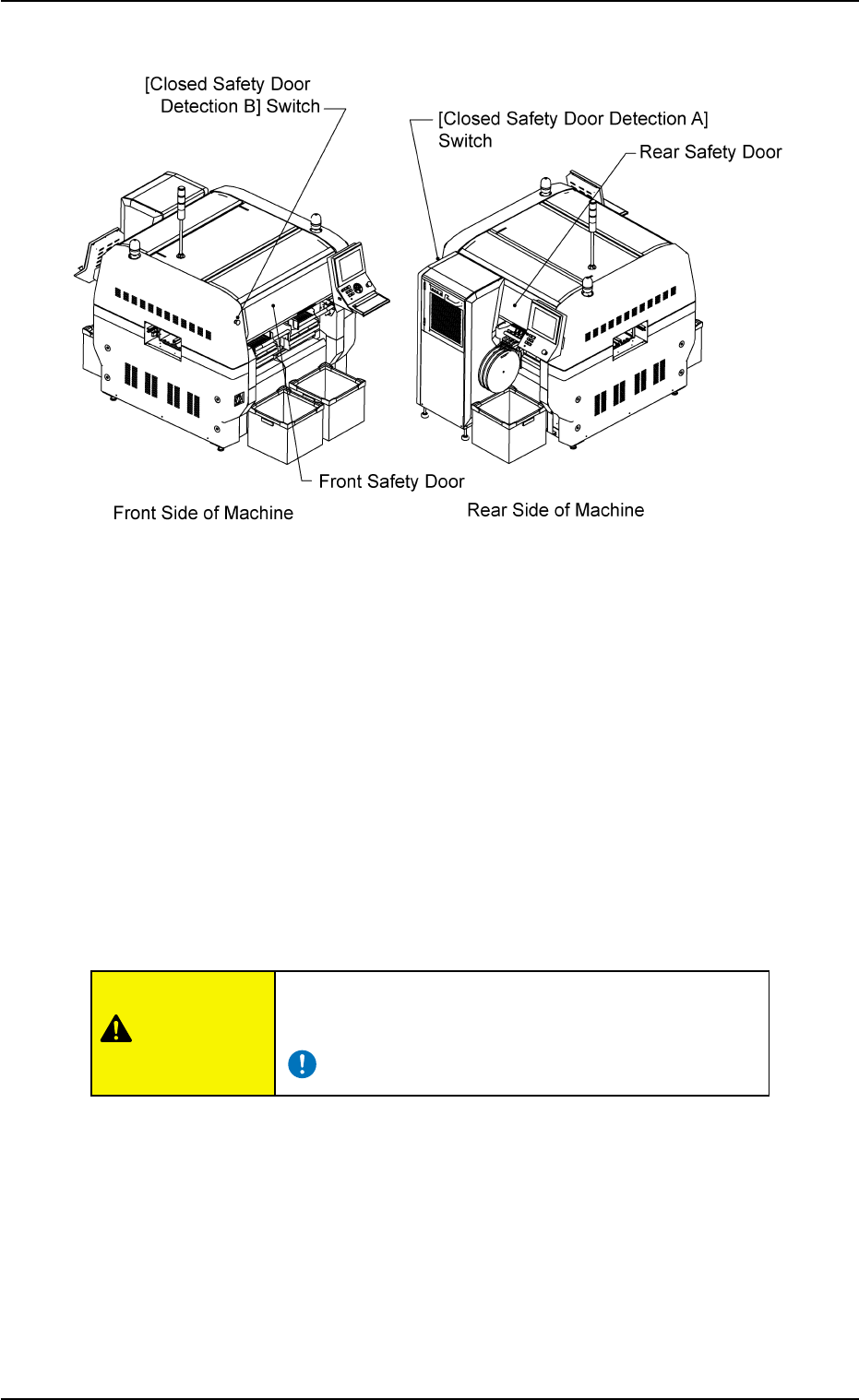
2.2.2 Safety Doors
Fig. 1A5
The machine is provided with safety doors on the front and rear sides of
the machine to keep any part of body and clothes and any object away
from the moving parts of the machine.
It is also provided with [Closed Safety Door Detection (A and B)] switches
to detect whether the safety doors are open or closed.
When the front or the rear safety door is opened with the [OPERATION]
switch (provided on the front or the rear operation panel) set to the "RUN"
side, this switch is activated, causing an error.
When the [OPERATION] switch is set to "SETUP", the [Closed Safety
Door Detection] switch is not activated.
Keep the safety doors closed during automatic opera-
tion to avoid any danger.
0308-003 1-5 AHB01EOPP
2.2 Safety Devices
CAUTION
2.2.3 [READY] Buttons
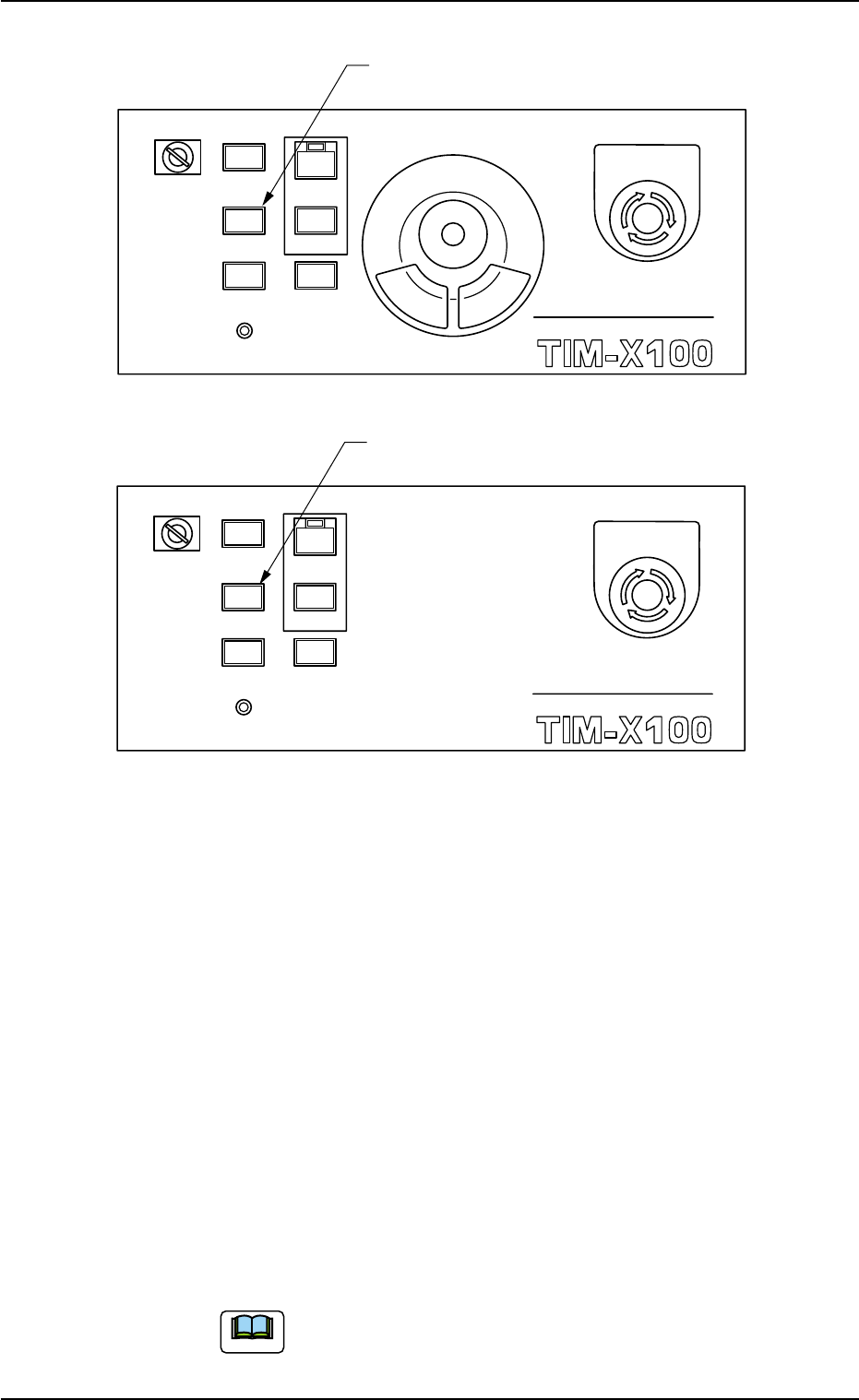
Fig. 1A6 [READY] Button (Front Operation Panel)
Fig. 1A7 [READY] Button (Rear Operation Panel)
The [READY] button is used to lock or unlock the safety door.
This button must be used to open or close the safey door for mainte-
nance work, etc.
"ON" or "OFF" indicates if the safey door can be opened or not.
OFF: The safety door can be opened or closed. The corresponding
safety door is unlocked and the power to drive the X/Y beam is
shut off.
When the safety door is opened in this mode, the power to
drive not only the X/Y beam but also the other devices is also
shut off with the [OPERATION] switch set to the "RUN" side.
ON : The safety door cannot be opened or closed. The safety door
is locked electromagnetically and the power to drive the X/Y
beam, etc., is also supplied. The axis can be activated under
this condition.
Be sure to confirm that the LED of the [READY] button
illuminates before moving any axis for zeroing opera-
tion, manual axis operation, etc.
0308-003 1-6
AHB01EOPP
MULTI FUNCTIONAL MOUNTER
STOP
LOCK
OPERATION
RUN SETUP
START
ENABLE
PNL CHANGE
READY
POWER ON
EMERGENCY
[READY] Button
MULTI FUNCTIONAL MOUNTER
OPERATION
RUN SETUP
READY
POWER ON
STOP
LOCK
START
ENABLE
PNL CHANGE
EMERGENCY
[READY] Button
Note
2.2 Safety Devices

ON and OFF :
This indicates that the button is being changed from "OFF" to
"ON".
This condition remains until the electromagnet lock of the
safety door is activated, the power to drive the X/Y beam,
etc., is supplied, and the servomotor is excited.
• Do not open the safety door while the [READY] but-
ton is flickering.
If the door is opened forcibly, the machine will break
down.
0308-003 1-7
AHB01EOPP
2.2 Safety Devices
CAUTION