1OM-1075-002.pdf - 第137页
AHB01EOPP 3. Remedial Procedures from "ERROR" Window 3 . 1 [EMERGENCY STOP] Switch Pressed 3.1.1 During Automatic Operation T able 1D3 Symptom (1 ) The LED of the [POWER ON] button illuminates in red and the fo…

AHB01EOPP
2. Nothing Displayed on Touch Screen
0107-001 4 - 3
2. Nothing Displayed on Touch Screen
Table 1D2
Symptom Nothing is displayed on the touch screen.
Cause (Cause 1) The screen saver function is activated.
(Cause 2) Power is not supplied from the source.
Remedy (Remedy 1) Touch a part of the touch screen. The foreground activities will
occur in any running application.
(Remedy 2) Refer to "1. Power Operation Impossible" for details and follow
the remedial procedure.
AHB01EOPP
3. Remedial Procedures from "ERROR" Window
3.1 [EMERGENCY STOP] Switch Pressed
3.1.1 During Automatic Operation
Table 1D3
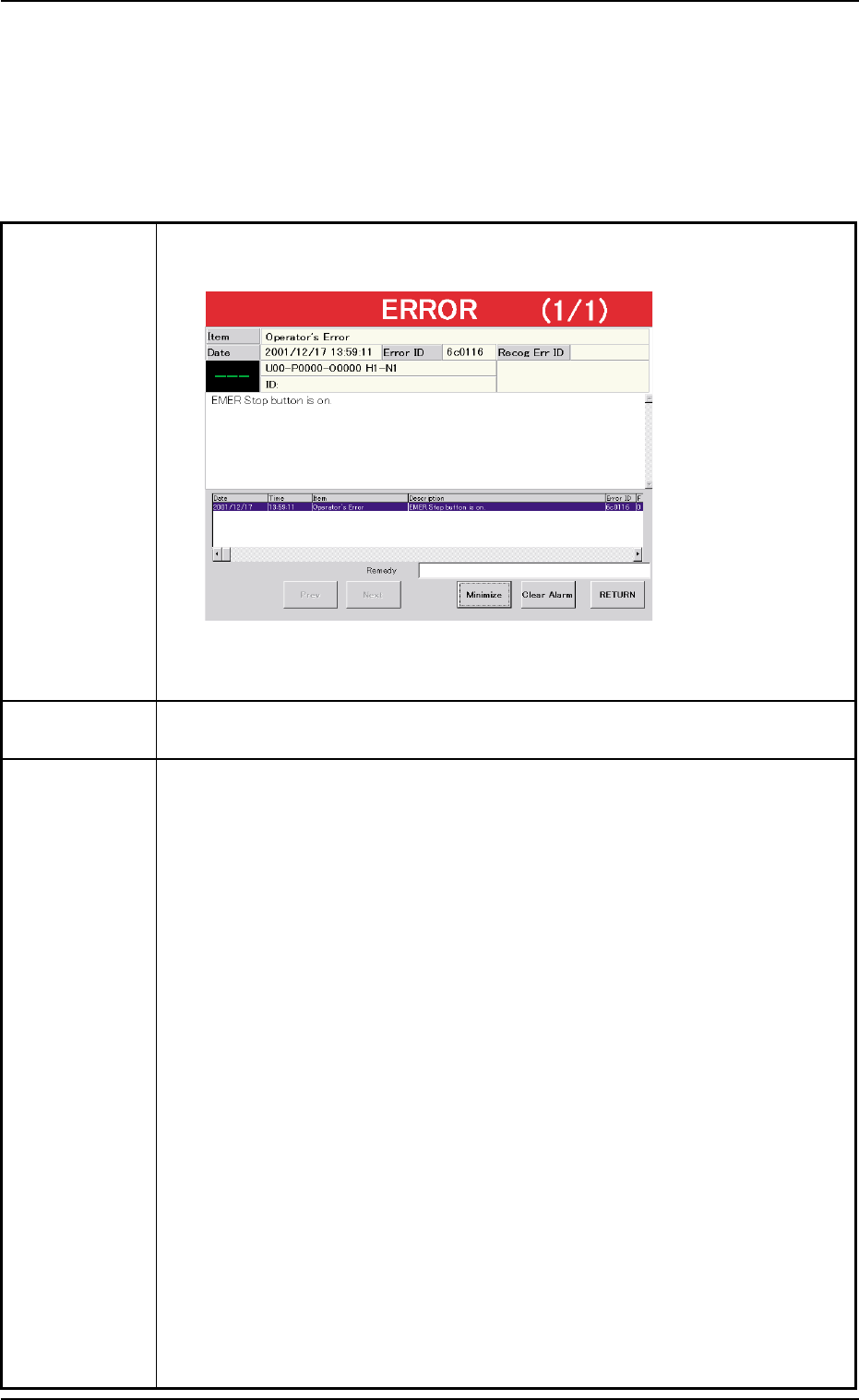
Symptom (1) The LED of the [POWER ON] button illuminates in red and the following
window opens.
Fig. 1D3
Cause (1) An [EMERGENCY STOP] switch was pressed.
Remedy (1) Check the displayed contents.
(2) Press the [RETURN] button.
(3) Remove the cause of the problem that prompted the operator to press the
[EMERGENCY STOP] switch.
(4) Check the feeders.
When the component to be picked up is left in the supply position, remove
it.
(5) Check if there is a component which has dropped inside the machine.
(6) Check whether or not the P.C.B. in the middle of component placement is
located correctly (not out of the P.C.B. positioning section) and the compo-
nents are placed normally (not dispersed).
(7) Turn the [EMERGENCY STOP] switch clockwise to release the locked
condition.
(8) Hold down the [POWER ON] button for more than 1 second to re-supply
power to the machine.
• When the LED of the [POWER ON] button illuminates in yellowish green,
it indicates that the power is supplied to the machine.
When the LED is kept red, re-check the cause and remove it.
(9) Press the [ALL] button (entitled "ZERO") in the "AUTO OPN." window. In 2
seconds, press the [ENABLE] button on the operation panel to zero all
device.
3. Remedial Procedures from "ERROR" Window
0308-004 4-4
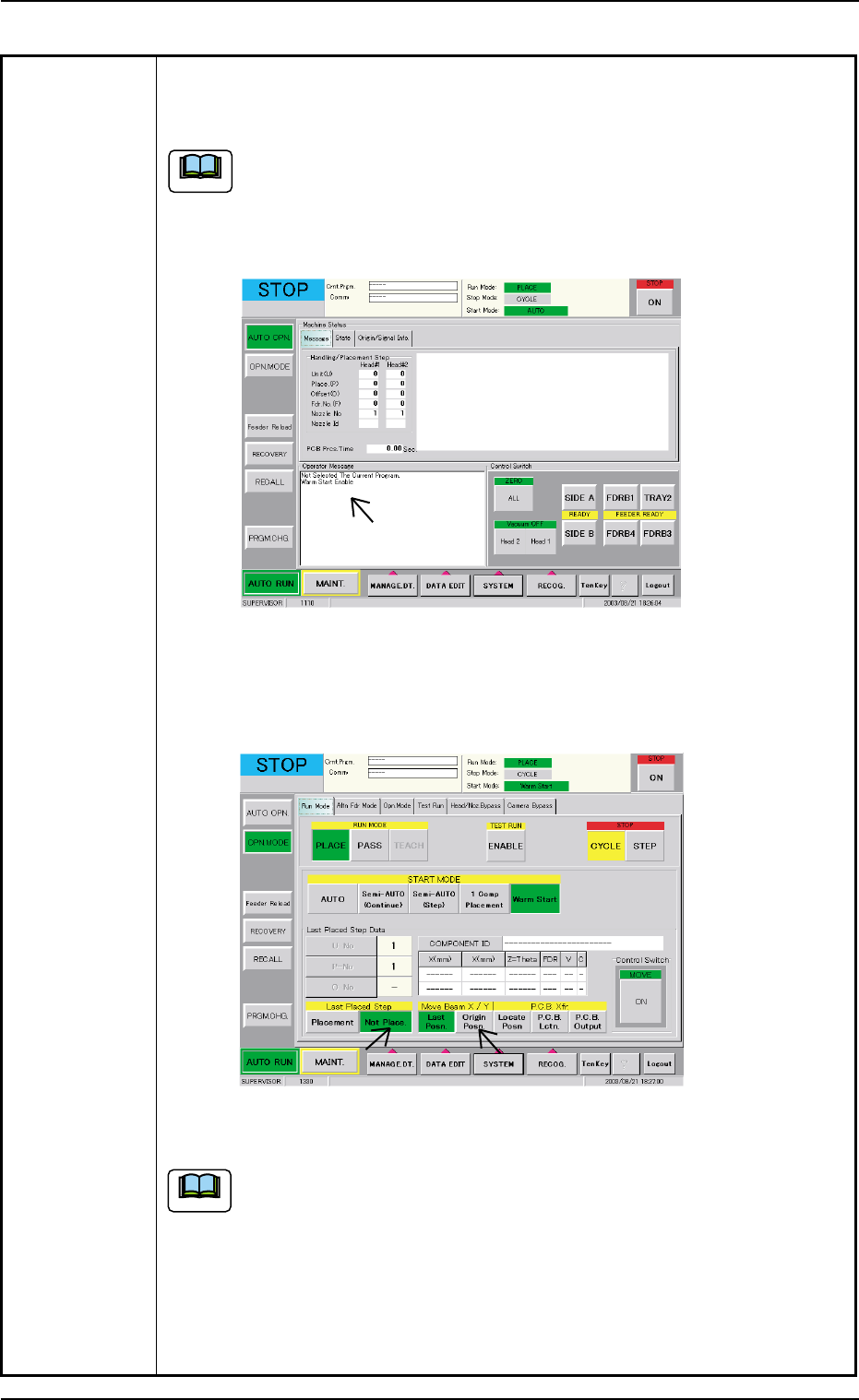
Table 1D4
(10) When the message "Warm Start Enable" is displayed in the "Operator
Message" pane in the "AUTO OPN." window, it means that the "Warm
Start" operation is feasible.
(a) "Warm Start Enable" means that the production is interrupted in
the middle of component placement.
(b) When the operation is interrupted without any component being
placed, "Warm Start" becomes impossible.
Fig. 1D4 "AUTO OPN." Window (Submenu)
(11) Press the [OPN. MODE] button on the submenu bar. The "OPN. MODE"
window (submenu) opens.
Fig. 1D5 "OPN. MODE" Window (Warm Start Available Mode)
(a) When the "Warm Start" operation is feasible, the [WARM] button
appears in the "OPN. MODE" window (submenu).
(b) When the [WARM] button is not displayed, it means that the "Warm
Start" operation is not feasible or there was a mistake in the re-
medial procedure after an error had occurred. In this case, per-
form the semi-automatic operation (step designation) to reset the
machine to its normal condition.
0308-004 4-5 AHB01ETRP
3.1 [EMERGENCY STOP] Button Pressed
Note
Note