SYS-CP842-1.1E.pdf - 第117页
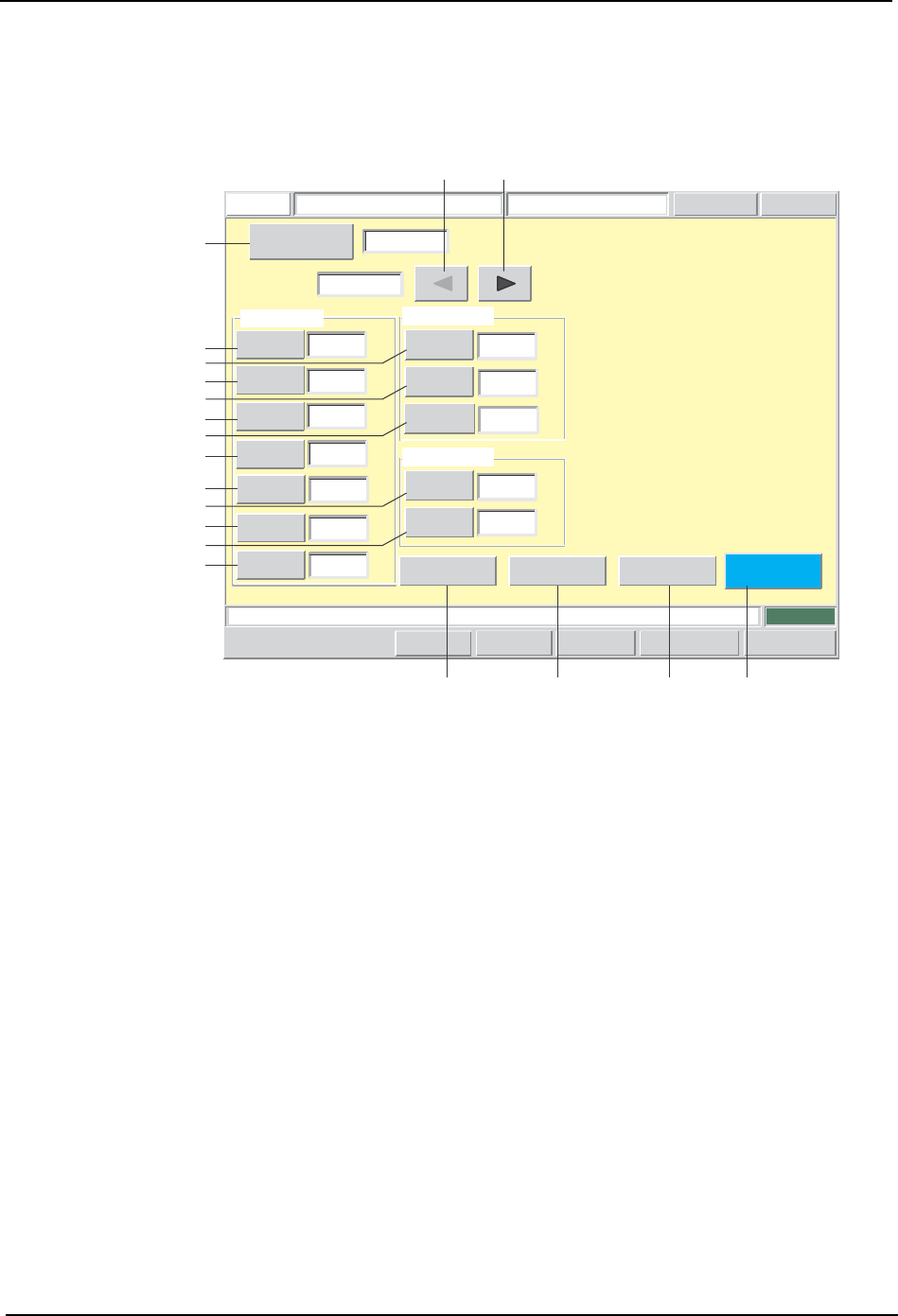
3.Machine System SYS-CP842-1.1E 108 CP-842E / CP-842ME System Reference Screen Button Explana tions A. [Sequence No.]: Switches to the sequence search screen. B. [ ]: Changes the ele ment data item which is being edited.…
SYS-CP842-1.1E 3.Machine System
CP-842E / CP-842ME System Reference 107
Element Data Editing Screen
Element data can be edited from this screen. For element data details, refer to the SMD3
Operation Manual.
Push the START button.
FUJI
Error
Operator
JOG:X Y CAM
Servo Count
GEMCCD Monitor
Element Data Editor
FUJI_CP7_2001
Front
Close
-0.6200
Position
X
Y
0.0000
[mm]
[mm]
0.1000
Lead Tolerance Values
Length
Width
0.1000
[mm]
[mm]
0.1000
Deviation
[mm]
Lead Data
Side
Number
0
P Pattern
3
Result 1
Pitch
0.0000
Width
0.3000
[mm]
0.5000
Length
[mm]
Count
1
[mm]
Lead
Body
Vision
Type
123
Sequence Number
1
Element
Set Switch
CP7S2020E
A
D
E
F
G
H
I
J
SRQP
B C
K
L
M
N
O

3.Machine System SYS-CP842-1.1E
108 CP-842E / CP-842ME System Reference
Screen Button Explanations
A. [Sequence No.]: Switches to the sequence search screen.
B. [ ]:
Changes the element data item which is being
edited. If element number 1 is being edited, the
item is disabled (grayed out) when this button is
clicked.
C. [ ]:
Changes the element data item which is being
edited. If final element number is being edited, the
item is disabled (grayed out) when this button is
clicked.
D. [Length]: Changes the lead element length (PGDELL) which
is specified in the production program’s part shape
data (ELDT).
E. [Width]: Changes the lead element width (PGDELW) which
is specified in the production program’s part shape
data (ELDT).
F. [Pitch]: Changes the lead element pitch (PGDELP) which
is specified in the production program’s part shape
data (ELDT).
G. [Number of Leads]: Changes the number of lead element leads
(PGDELQ) which is specified in the production
program’s part shape data (ELDT).
H. [Side No.]: Changes the lead element position (direction)
(PGDELSN) which is specified in the production
program’s part shape data (ELDT).
I. [P-Pattern]: Changes the lead element’s lead display pattern
(PGDELPP) which is specified in the production
program’s part shape data (ELDT).
J. [Result]: Changes the lead element’s check content
(PGDELR) which is specified in the production
program’s part shape data (ELDT).
K. [Length] (Lead tolerance): Changes the lead element’s lead length tolerance
(PGDELLT) which is specified in the production
program’s part shape data (ELDT).
L. [Width] (Lead tolerance): Changes the lead element’s lead width tolerance
(PGDELWT) which is specified in the production
program’s part shape data (ELDT).
M. [Deviation] (Lead tolerance): Changes the lead element’s lead bend tolerance
(PGDELCT) which is specified in the production
program’s part shape data (ELDT).
N. [X] (Position): Changes the lead element position’s X-coordinate
(PGDELX) which is specified in the production
program’s part shape data (ELDT).
O. [Y] (Position): Changes the lead element position’s Y-coordinate
(PGDELY) which is specified in the production
program’s part shape data (ELDT).
P. [Vision Type]: Switches to the vision type editing screen.
SYS-CP842-1.1E 3.Machine System
CP-842E / CP-842ME System Reference 109
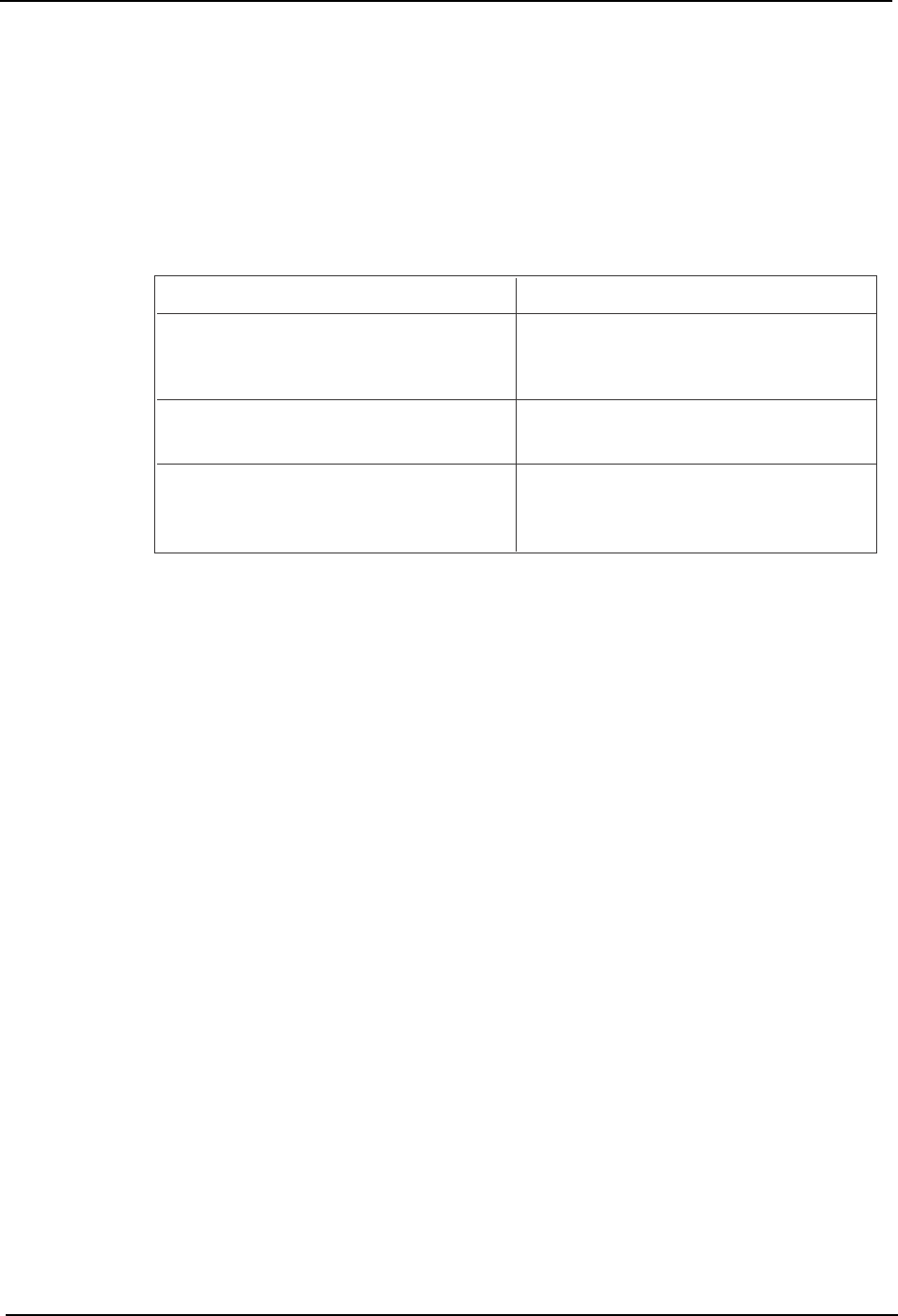
Editing Operations
The following editing operations can be performed at this screen.
Q. [Body]: Switches to the body data editing screen.
R. [Lead]: Switches to the lead data editing screen.
S. [Close]: Returns to the production program editing screen.
Problem
The test placement part shape differs from
the wire frame shape. Or a vision processing
error occurs.
Editing Operation
If the element data is incorrect, edit the lead
data's length, width, pitch, number of leads,
side number, P-pattern, and result items.
A vision processing error occurs during test
placement.
Edit the lead tolerance length, width, and
deviation items.
The panel's part pattern differs from the wire
frame's lead positions. Or, a vision
processing error occurs.
If the element data is incorrect, edit the
position X and Y values.
T008E