SYS-CP842-1.1E.pdf - 第95页
3.Machine System SYS-CP842-1.1E 86 CP-842E / CP-842ME System Reference Sequence Search 2 Screen Click the [ZOOM +] button on t he sequence search screen to zoom in (e nlarge) on the modeling object. The desired sequ ence…

SYS-CP842-1.1E 3.Machine System
CP-842E / CP-842ME System Reference 85
1. By entering the sequence number directly.
2. By entering a reference desighnator.
3. By moving the cursor to the desired position on the modeling object.
A. Click the [Sequence No.] button to display a ten-key pad, then enter the desired
sequence number. If the modeling object is enabled, the part for the specified
sequence displays on the modeling object.
B. Click the [Reference Designator] button to display a ten-key pad, then enter the
search object reference designator. If the modeling object is enabled, the part for
the specified sequence displays on the modeling object.
C. Click the [ZOOM+] button to enable the modeling object. The procedure for
specifying a sequence using the modeling object is explained on the following
page (Sequence Search 2 Screen).
3.Machine System SYS-CP842-1.1E
86 CP-842E / CP-842ME System Reference
Sequence Search 2 Screen
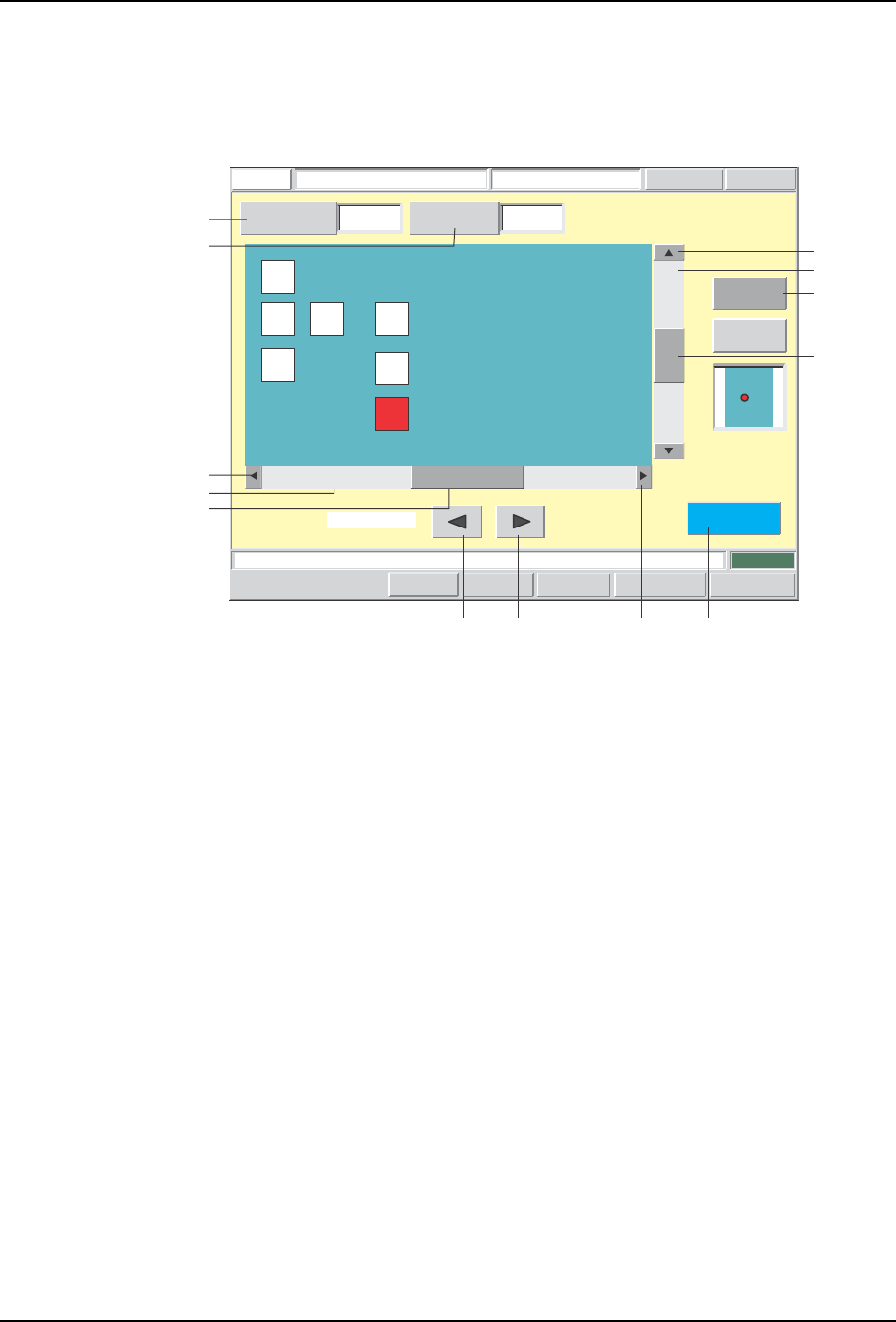
Click the [ZOOM +] button on the sequence search screen to zoom in (enlarge) on the
modeling object. The desired sequence can then be selected from the modeling object.
Specify the sequence number.
FUJI
Error
Operator
JOG:X Y CAM
Servo Count
GEMCCD Monitor
Search SequenceFUJI_CP7_2001
Front
Close
1
Sequence
Number
Reference
Designator Search
C87
ZOOM +
ZOOM -
Move Cursor
Set Switch
CP7S2011E
A
J
B
F
G
E
C D H O
K
I
L
N
M

SYS-CP842-1.1E 3.Machine System
CP-842E / CP-842ME System Reference 87
Screen Button Explanations
A. [Sequence Number]: Displays a ten-key pad where the desired sequence
number (search object) can be entered.
B. [Reference Designator
Search]:
Displays a ten-key pad where the desired reference
designator (search object) can be entered.
C. [ ] (Leftward cursor
movement):
If the part for the specified sequence is not
displayed, this key changes the sequence number
to that of the upper right part. If the specified
sequence part is displayed, this key changes the
sequence number to that of the part to the left. If
there is no part to the left, the sequence number is
changed to that of the lower right part. If the
sequence number of the lower left part is specified,
this key changes the sequence number to that of the
upper right part again.
D. [ ] (Rightward cursor
movement):
If the part for the specified sequence is not
displayed, this key changes the sequence number
to that of the upper right part. If the specified
sequence part is displayed, this key changes the
sequence number to that of the part to the right. If
there is no part to the right, the sequence number is
changed to that of the upper left part. If the
sequence number of the top right part is specified,
this key changes the sequence number to that of the
bottom left part.
E. [Horizontal scroll box]: Scrolls through the modeling display area in the
horizontal direction. A drag-and-drop can be
performed to scroll to a desired position.
F. [Horizontal scroll left arrow]: Scrolls through the modeling display area in 1mm
units in the left horizontal direction.
G. [Horizontal scroll gray
pattern]:
Scrolls through the modeling display area in the
horizontal direction in 1-screen units.
H. [Horizontal scroll right arrow]: Scrolls through the modeling display area in 1mm
units in the right horizontal direction.
I. [Vertical scroll box]: Scrolls through the modeling display area in the
vertical. A drag-and-drop can be performed to scroll
to a desired position.
J. [Vertical scroll up arrow]: Scrolls through the modeling display area in 1mm
units in the upward vertical direction.
K. [Vertical scroll gray
pattern]:Scrolls through the
modeling display area in the
vertical direction in 1-screen
units.
L. [Vertical scroll down arrow]: Scrolls through the modeling display area in 1mm
units in the downward vertical direction.
M. [ZOOM +]: Zooms in on the modeling object.
N. [ZOOM -]: Zooms out from the modeling object.