SYS-CP842-1.1E.pdf - 第43页
3.Machine System SYS-CP842-1.1E 34 CP-842E / CP-842ME System Reference 2. Correct the problem which ca used the error. There is a button for each error which indicates the type of error . To display the details of the er…

SYS-CP842-1.1E 3.Machine System
CP-842E / CP-842ME System Reference 33
Shutting Down
Carry out the following procedure to turn off the machine after production.
Procedure
1. Push the EMERGENCY STOP button to shut off the 200V power supply to the servo
system.
2. Push the [Power Off] on the display to turn off the main power supply, and press [OK] at
the confirmation message.
3. Windows is shutdown automatically using a timer.
Note: Do not press the SYSTEM ON button on the machine or the [Restart] command on the display, while
the timer is active.
That completes the normal shutdown procedure. The power light is still on, but it is not
necessary to turn off the power at the breaker unless maintenance work is required, or
when the machine is to be left idle for an extended period. In these cases, the UPS should
be deactivated, and the power should then be turned off at the breaker.
4. Open the transformer box cover and turn off the UPS switch.
The power light turns off.
5. Turn off the power to the machine at the breaker.
Stopping the Machine in an Emergency
Push any of the EMERGENCY STOP buttons on the machine.
When an EMERGENCY STOP button is pushed the 200V power supply to the servo
system is cut, and the machine stops immediately. When pushed, the button locks in
position and must be turned clockwise to release it.
To resume operation, release the EMERGENCY STOP button, and then push READY ON
and START.
Clearing an Error
There are two levels of error which can occur at the machine, emergency stop errors and
cycle stop errors.
Emergency Stop
If an emergency stop occurs, the 200V power supply to the servo system is cut, and the
machine stops immediately. Emergency stop errors are caused by actions such as opening
the safety doors (front or rear), tape leaf errors and pushing the EMERGENCY STOP
button.
Cycle Stop
If a cycle stop occurs, the machine stops when the current cycle of the cam is complete
(power to the servo system is not cut). Cycle stop errors are caused by actions such as
vision related errors, air pressure errors and carrier loader system errors.
Procedure
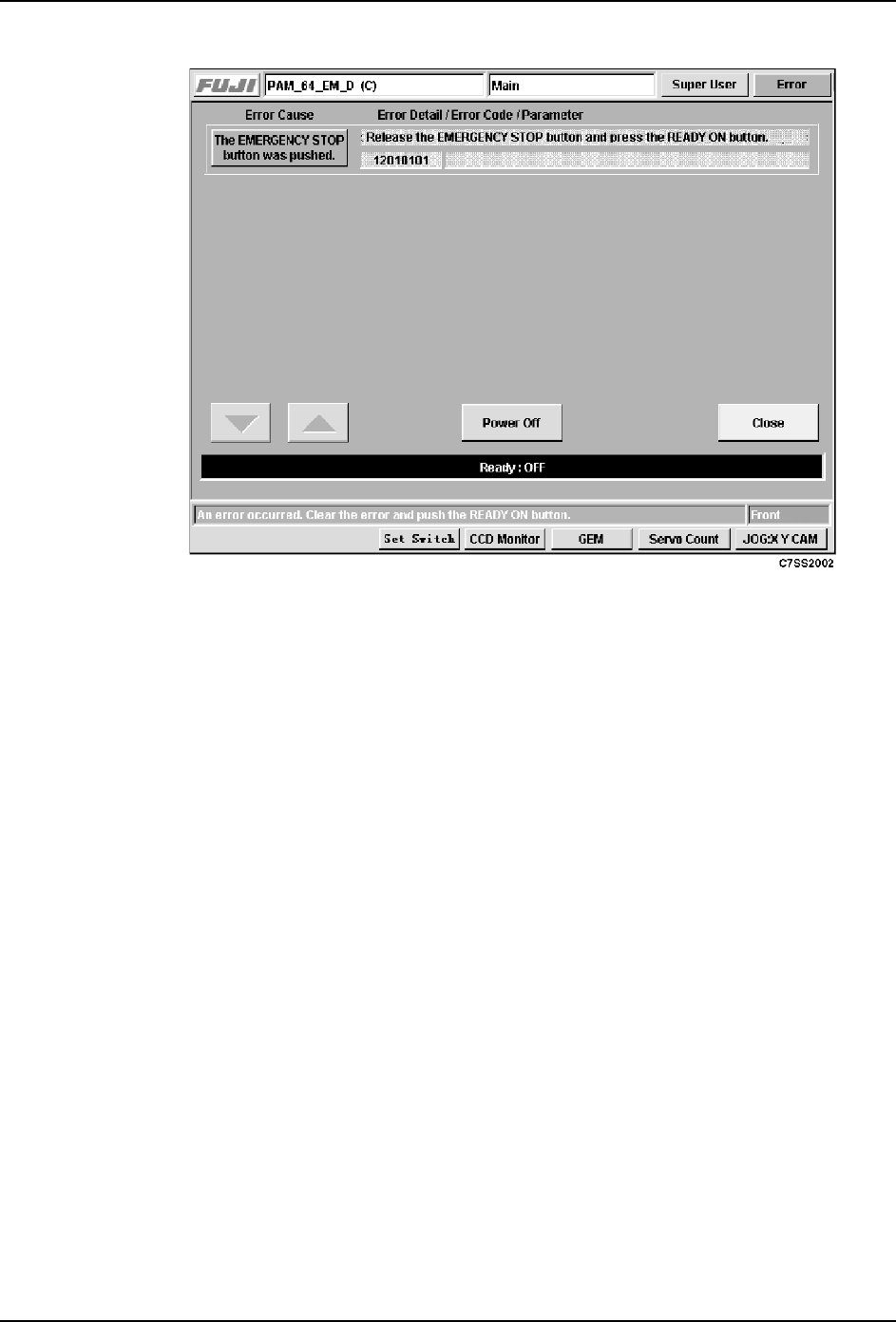
1. If an error occurs, the following error screen displays, and the Ready ON button is
enabled.
3.Machine System SYS-CP842-1.1E
34 CP-842E / CP-842ME System Reference
2. Correct the problem which caused the error. There is a button for each error which
indicates the type of error. To display the details of the error, press the error message
button.
3. Press the READY ON to indicate that the cause of the error has been corrected.
4. If the cause of the error has been properly corrected, the START button is enabled.
5. Press the START button to restart production.
3.1.2 Selecting a Production Program
Production programs are held in the machine background, or at the host. A program must
be in the foreground to be used for assembly. The production program at Current Program
is in the foreground, other programs held at the machine list under Background Programs
are in the background. You can select the production program to be used in production by
carrying out the following procedure or transmit straight from the host to the machine
foreground (refer to your host system documentation for details of this procedure).
Procedure
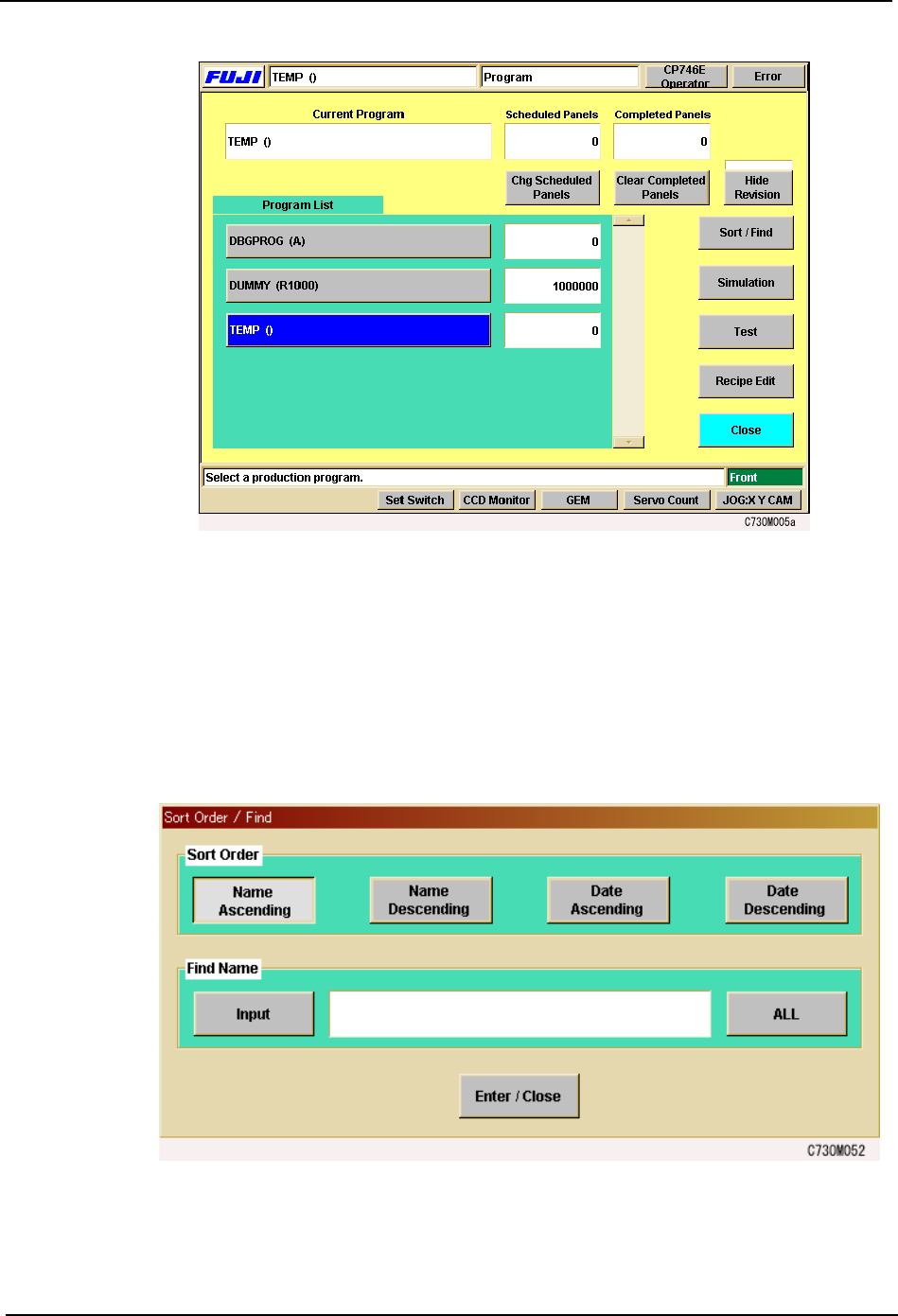
1. With the machine booted up and the desired program already transmitted to the
machine, press [Program] at the [Main] screen.
The [Program] screen displays, showing a list of the all the programs currently held at
the machine.
SYS-CP842-1.1E 3.Machine System
CP-842E / CP-842ME System Reference 35
Note: The production programs are held in the machines hard drive. The number of programs which can be
stored is limited only by the amount of hard disk space available. Scroll down to view the full list of
programs.
2. The [Sort Order/Find] function can alter of the order of the program list held at the
machine. It can also search the list by program name. To alter order of the program list,
select the type of ordering from the choices in the [Sort] section. To display program
names that contain a particular word string, select [Input] and use the virtual keyboard
to enter the word string. When finished, push the [Enter/close] button.
Note: To display all programs again after using the search function, press [All] in the [Sort Order/ Find] box.
3. Press [OK] after selecting the program to be used in production. The name of the