FlexTRAK 2MB Material Handler Addendum Rev 05.pdf - 第10页
FlexTRAK Series 2MB Mater ial Handler Adden dum Introduction 1-2 © 2023 Nordson Corporati on 1.4 Major S ystem Com ponents Figure 1-1 and Figure 1-2 describe the major components of the FlexTRAK-2MB system. Figure 1-1 Fr…

© 2023 Nordson Corporation 1-1
1 Introduction
1.1 Overview
The FlexTRAK-2MB System is a fully integrated plasma and Material Handling System (MHS). This
addendum is specific to the FlexTRAK-2MB material handling system and describes all system controls,
user-level hardware, interfaces, screens, and menus, along with their associated operating procedures.
Refer to the FlexTRAK Series Installation, Operations, and Maintenance Manual for specific information
regarding the standard FlexTRAK system. Refer to the HMI Software User Guide for directions on how
to use the software.
This section covers the following topics:
• General Description
• Typical System Applications
• Major System Components
1.2 General Description
The FlexTRAK-2MB consists of a standard base FlexTRAK system and an integrated material handling
system. The FlexTRAK includes features such as a patented plasma chamber design providing
exceptional etch, uniformity, and process repeatability. The material handling system completes the
overall system by incorporating a two-arm pick-and-place unit as well as a dual lane conveyance system.
The FlexTRAK-2MB is a fully automatic tool and is configurable as an in-line or stand-alone (batch)
system. The FlexTRAK-2MB is SMEMA 1.2 compatible for standard integration with
upstream/downstream systems and/or freestanding loaders. Our internal two-lane conveyance system can
integrate with dual lane conveyance systems or some single lane conveyance systems (depending on boat
width). See Section 4 - System Components for a detailed description of material handler components.
The system utilizes the standard FlexTRAK software integrated with specially designed material handling
software for the 2MB Material Handler. The software features a user-friendly Human Machine Interface
(HMI) that includes touch screen features. Software specific to the 2MB Material Handler is included
within this manual. Refer to the HMI Software User Guide for directions on how to use the software to
control the standard base FlexTRAK system.
1.3 Typical System Applications
The FlexTRAK-2MB system is designed around the industry standard Semiconductor Carrier Transport.
These carriers include 75 mm-wide, 136 mm-wide, and 160 mm-wide process carriers (also called
“boats”). The standard system is designed to accommodate process carriers with a minimum width of
75 mm. The tooling of the pick-and-place units can be adapted for custom carriers. Please contact
Technical Support for further details.
FlexTRAK Series 2MB Material Handler Addendum Introduction
1-2 © 2023 Nordson Corporation
1.4 Major System Components
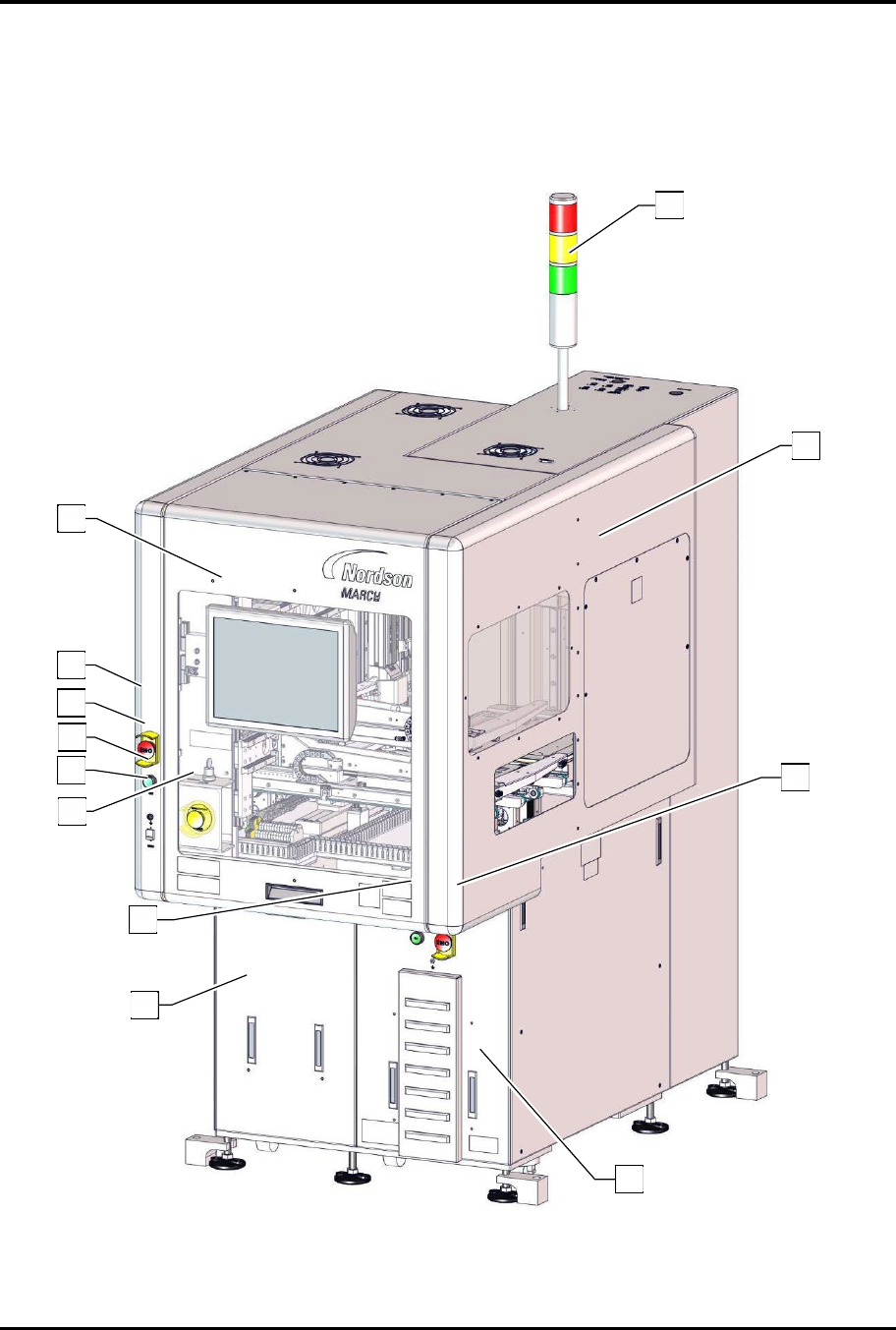
Figure 1-1 and Figure 1-2 describe the major components of the FlexTRAK-2MB system.
Figure 1-1 Front View Features
1
10
3
4
9
8
6
7
5
9
8
2
FlexTRAK Series 2MB Material Handler Addendum Introduction
© 2023 Nordson Corporation 1-3
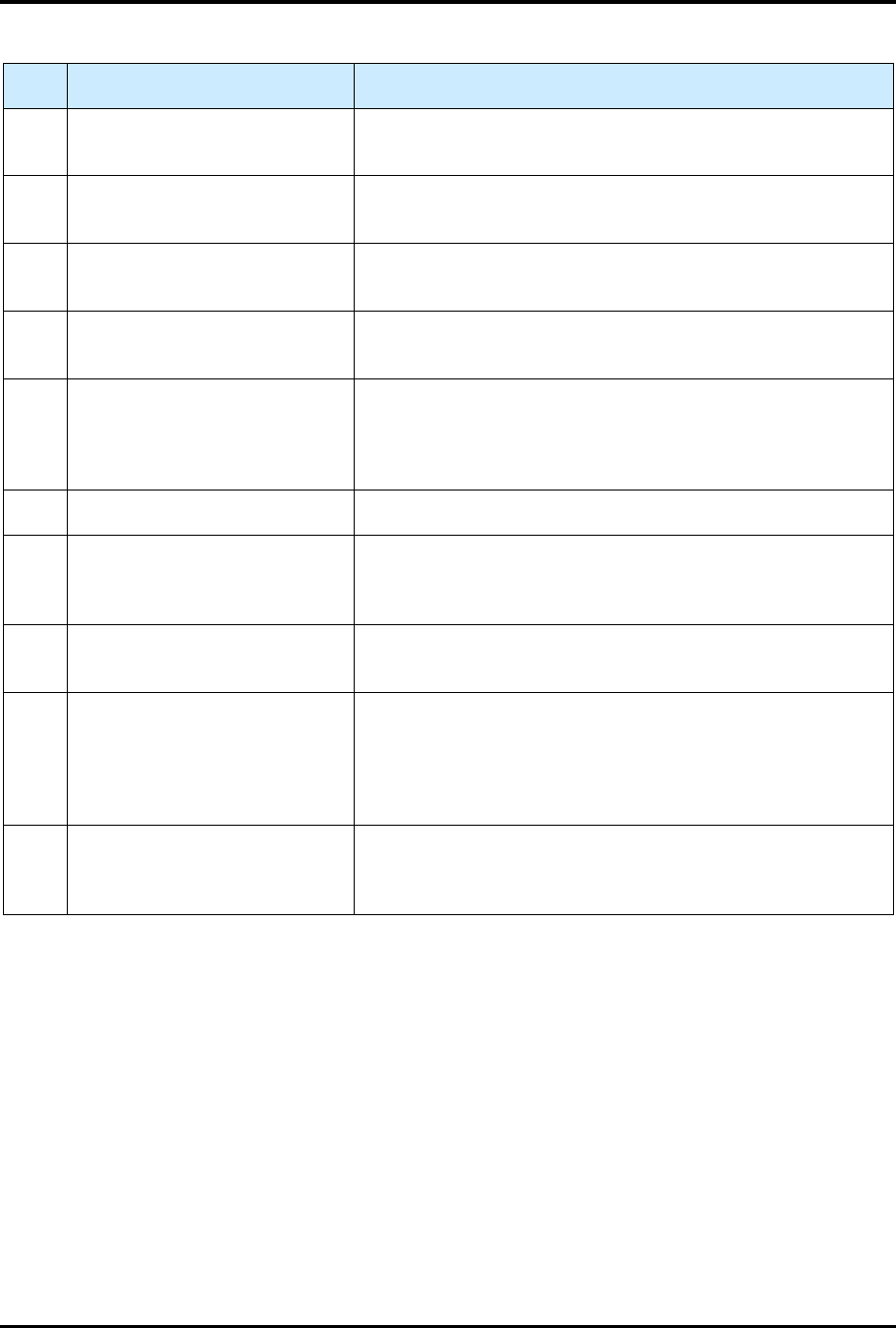
Table 1-1 Front View Component Description
Item Name Description
1 Light Tower
The Light Tower is a device that displays system status and
can warn the operator when fault conditions exist.
2 Safety Cover Assembly
The Safety Cover Assembly allows access to the reaction
chamber and material handler components.
3
FlexTRAK DC Electronics
Enclosure
Refer to the FlexTRAK Installation, Operation, and
Maintenance Manual for description.
4 MHS Electrical Enclosure
The MHS Electrical Enclosure allows access to material
handler electrical components.
5 E-Stop Button
Pressing the E-Stop Button stops all system motion for both
the FlexTRAK and the Material Handling System. The E-Stop
Button does NOT completely turn off power to the
FlexTRAK-2MB system.
6 USB Connection Port Allows a USB device to be connected to the FlexTRAK-2MB.
7 ESD Wrist Strap Jack
ESD wrist straps worn by the operator plug into this jack to
prevent Electrostatic Discharge (ESD) damage to work
pieces during system operation.
8 ON Button
The green ON (l) button illuminates and switches ON power
to the system.
9
Emergency Machine Off (EMO)
Button
Pressing the EMO button completely turns off power to the
FlexTRAK-2MB System. When activated, the main power
connection to the system is disconnected via a momentary
action switch that sets the main power relay to the OFF state
and stops operation.
10 HMI PC Touch Screen
The FlexTRAK system is easy to operate using a Human-
Machine Interface (HMI) Touch Screen. During operation,
system information is displayed on the screen.