FlexTRAK 2MB Material Handler Addendum Rev 05.pdf - 第28页
FlexTRAK Series 2MB Mater ial Handler Adden dum Safety 2-14 © 2023 Nordson Corporation Item Description 1 EMO Button 2 E-Stop Button (EMERGENCY STOP) Figure 2-5 EMO and E-Stop Buttons 2.10.3 27B27B Safety Interlocks 2.10…
FlexTRAK Series 2MB Material Handler Addendum Safety
© 2023 Nordson Corporation 2-13
2.10 Safety Features
The FlexTRAK-2MB system is designed with several integrated safety features to protect against
personal injury and equipment damage. These features include the emergency shut off button, residual
current device, and the safety interlocks.
2.10.1 Emergency Machine Off Button
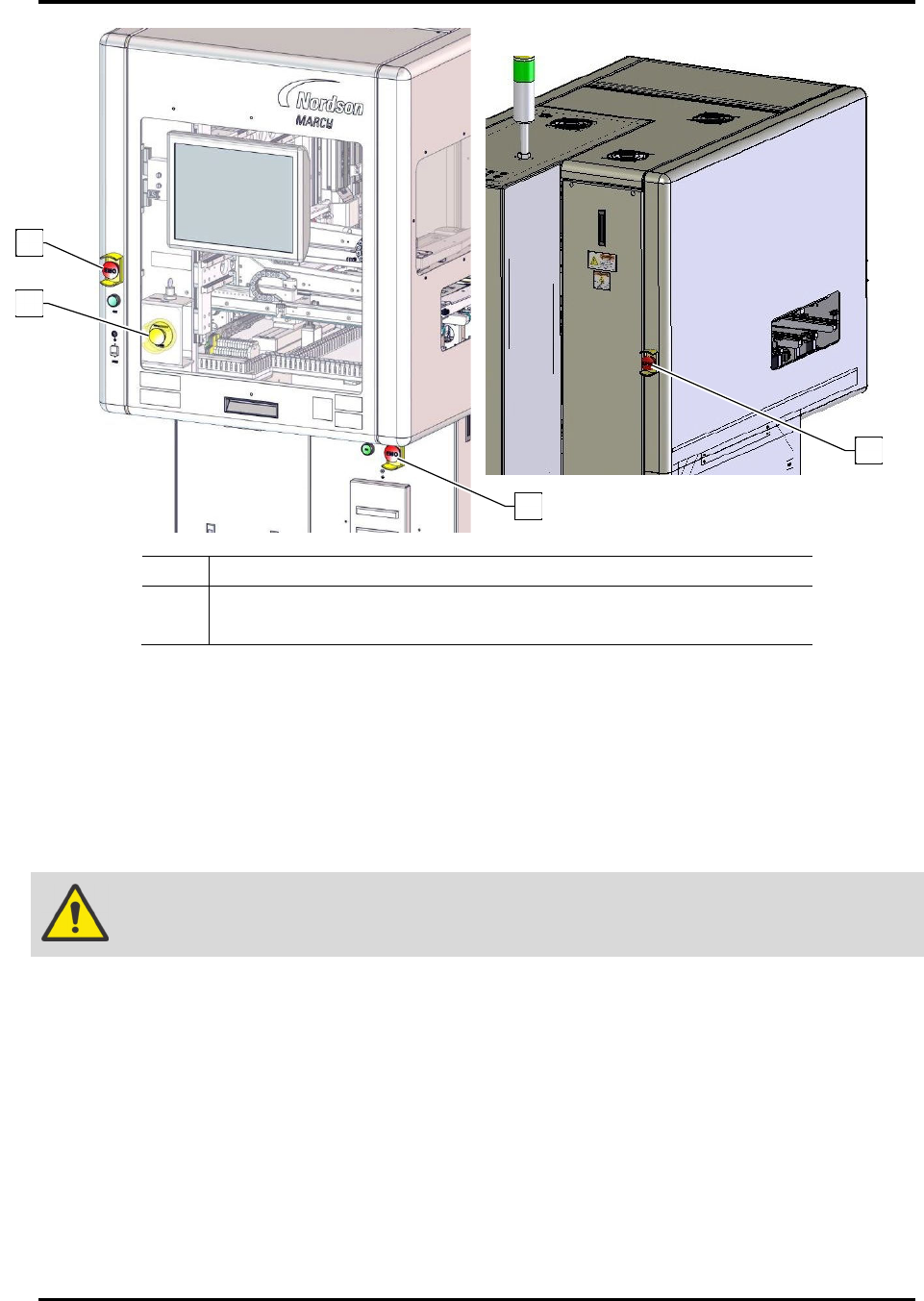
The FlexTRAK-2MB system is equipped with a large, clearly marked, front console-mounted Emergency
Machine Off (EMO) switch. An additional EMO button is located at the rear of the machine. When
activated, the main power connection to the system is disconnected via a momentary action switch that
sets the main power relay to the OFF state and stops operation. This operation can be used during auto,
manual and bypass modes (Figure 2-5).
?
NOTE Using the EMO button will completely turn off power to the FlexTRAK plasma module.
Both the system and the computer will have to be restarted. The only connection that
remains intact is the ON button which, after the EMO is reset, restores full power to the
system through a 24-volt, step-down transformer.
WARNING!
Cutting power to the computer without properly shutting down the operating
system may cause problems with the hard drive and operating system. The EMO
button should only be used in an emergency or after the computer has been
properly shutdown.
2.10.2
26B26B
Emergency Stop Button
In addition to the EMO buttons, the system is equipped with an E-Stop button. In an emergency, push the
yellow E-Stop button on the front door to stop the motion related to the FlexTRAK plasma module, as
well as the motion of the 2MB Material Handler. This operation can be used during auto, manual and
bypass modes (Figure 2-5).
?
NOTE Using the E-Stop button does NOT completely turn off power to the FlexTRAK-2MB
system. The system still has power to all components. Only the motion is completely
stopped. If an E-Stop is performed while plasma is on, the plasma process will continue,
however the operation of the chamber lid will not work.
CAUTION!
The E-Stop button should only be used in an emergency. Exercise caution if
entry into the machine is required after an E-Stop. Be sure to check the machine
for obstructions left inside after entry.
FlexTRAK Series 2MB Material Handler Addendum Safety
2-14 © 2023 Nordson Corporation
Item Description
1 EMO Button
2 E-Stop Button (EMERGENCY STOP)
Figure 2-5 EMO and E-Stop Buttons
2.10.3
27B27B
Safety Interlocks
2.10.3.1 Electromechanical Interlocks
An electromechanical interlock is located on the material handler front door. It functions using a switch
that trips when a door is opened. When the switch is tripped, the reaction chamber and the material
handlers will immediately cease their movement.
WARNING!
When this interlock is activated, the electrical power remains ON.
In order to resume operation, all access points must be closed, and the interlocks must be reset using the
touch screen. For more instructions about clearing interlock alarms, see Section 9 - Troubleshooting.
1
1
1
2
FlexTRAK Series 2MB Material Handler Addendum Safety
© 2023 Nordson Corporation 2-15
2.10.4 Seismic Safety
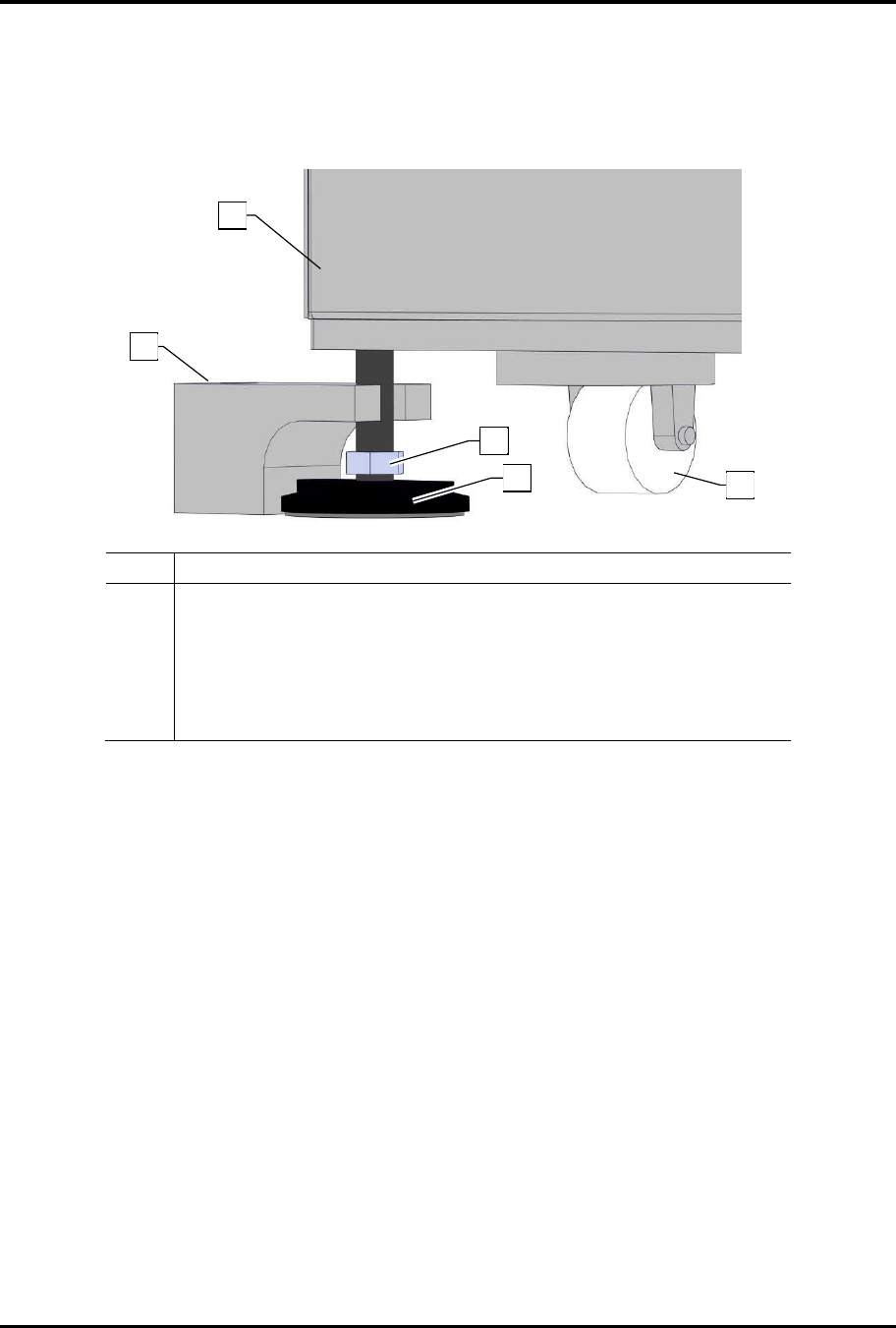
The FlexTRAK-2MB system is structurally designed to withstand seismic activity in accordance with
industry standards. Optional seismic brackets (Figure 2-6) can be installed, as required by local safety
codes, on each footpad to anchor the system to the floor.
Item Description
1 Plasma System
2 Seismic Bracket (Optional)
3 Height Adjustment Locking Nut (7/8 inch open-end wrench)
4 Leveler (Footpad)
5 Wheel Assembly
Figure 2-6 Seismic Brackets
1
2
5
3
4