FlexTRAK 2MB Material Handler Addendum Rev 05.pdf - 第142页
FlexTRAK Series 2MB Mater ial Handler Adden dum Maintenance 8-14 © 2023 Nordson Corporation 15. If necessary, tension the conveyor belts, see 8.4.3 Tensioning the Conveyor Belts . Item Description Item Description 1 Stop…

FlexTRAK Series 2MB Material Handler Addendum Maintenance
© 2023 Nordson Corporation 8-13
To replace the conveyor belts:
CAUTION! This procedure should only be performed by a trained service
technician.
1. Perform a service shutdown, see 2.11 Service Shutdown.
2. Open the front door.
3. Push the gripper assemblies toward the chamber, providing access to the conveyor.
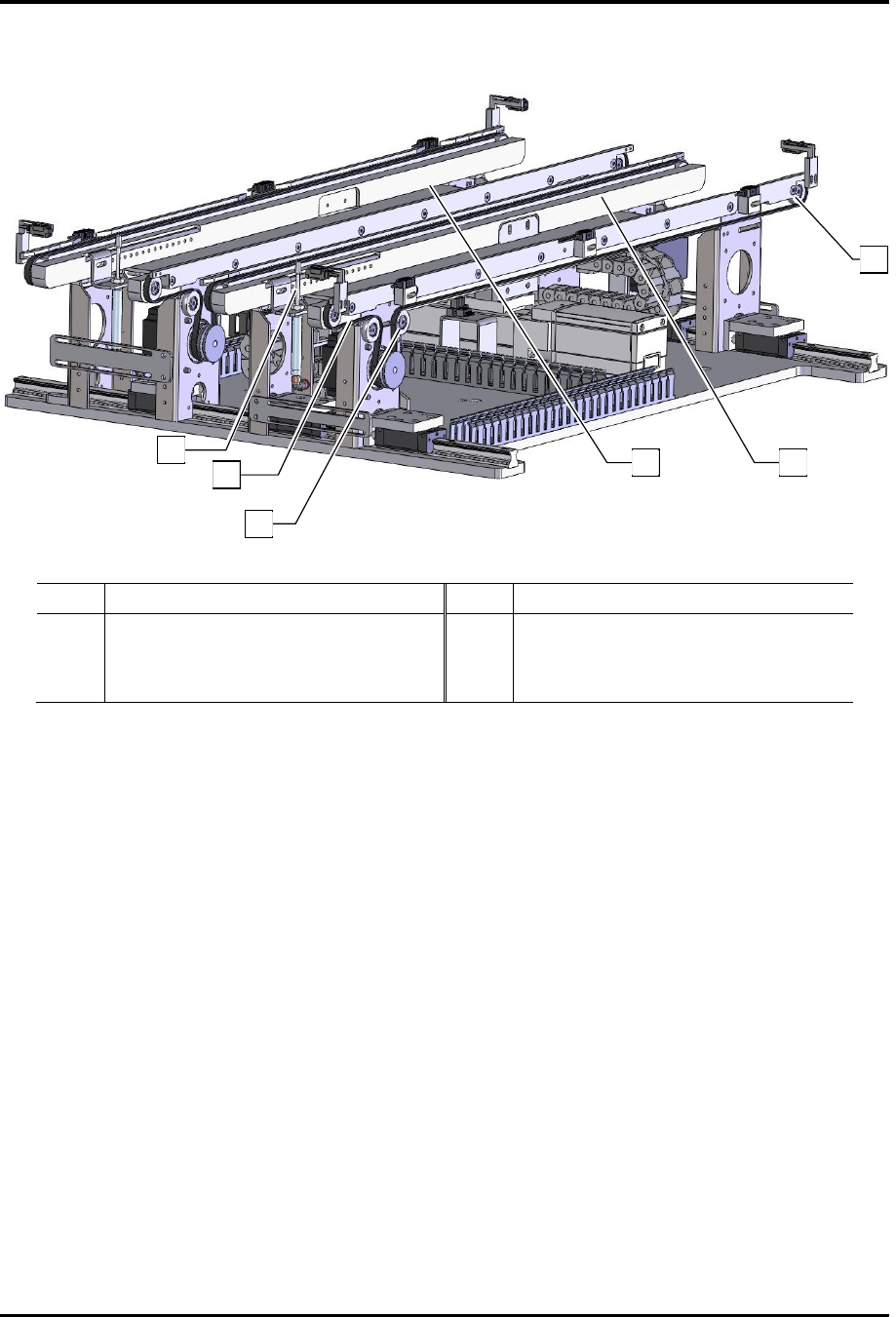
4. Loosen the belt tensioner screw located on the tension pulley tire (Figure 8-4).
5. Slide the tension pulley tire to the right to reduce tension and provide slack in the belt.
6. Remove the old belt from all pulley tires and discard.
7. Using isopropyl alcohol and a soft cloth or cotton swabs, clean all metal surfaces that make
contact with the belt, including pulleys and rails.
8. Compare the new belt to the one remaining on the other rail to determine its proper
orientation.
9. Loop the new belt around the pulley tires at the opposite end from the motor (Figure 8-4).
Continue to loop from one end of the conveyor rail and extend it toward the motor end.
10. Loop the conveyor belt around the two pulley tires on the tensioner.
11. Reposition the tension pulley tire and belt securely in place while tightening the screw with
a 4 mm hex key. Torque the screw to 87 in-lbs (1.0 kg-m).
12. When both conveyor belts have been replaced, power on the system.
13. Open the Maintenance screen and enable manual mode, see 6.7 Manual Mode.
14. Click on the conveyor tab and run both Lane 1 and Lane 2 motors manually to test the
conveyor belts.
„ The conveyor belts should move smoothly with no slipping on their pulleys.
FlexTRAK Series 2MB Material Handler Addendum Maintenance
8-14 © 2023 Nordson Corporation
15. If necessary, tension the conveyor belts, see 8.4.3 Tensioning the Conveyor Belts.
Item Description Item Description
1 Stop Pin 4 Front Conveyor Rail
2 Conveyor Belt 5 Rear Conveyor Rail
3 Pulley Tire Tensioner Screw 6 Pulley Tires
Figure 8-4 Conveyor Belt Removal/Installation
1
2
3
4
5
6
© 2023 Nordson Corporation 9-1
9 Troubleshooting
9.1 Overview
This section describes typical material handling system alarm conditions that can occur during system
operation and provides troubleshooting tips to remedy the alarm.
?
NOTE If problems persist after troubleshooting, contact Technical Support.
9.2 Safety First
It is essential that you follow all safety warnings and consider all safety warning labels when performing
the troubleshooting procedures. See Section 2 - Safety and the FlexTRAK Installation Operations, and
Maintenance Manual for specific information.
WARNING: Allow only qualified personnel to perform the following tasks.
Observe and follow the safety instructions in this document and all other
related documentation. Failure to do so may cause serious bodily injury to the
user or damage to the equipment.
CAUTION! Troubleshooting should only be performed by trained and
authorized personnel.
9.3 Record Keeping
Record the type of procedure performed in the maintenance records for the material handling system. This
includes dates, part numbers/serial numbers of replaced parts, names of technicians, and other pertinent
data.