FlexTRAK 2MB Material Handler Addendum Rev 05.pdf - 第84页
FlexTRAK Series 2MB Mater ial Handler Adden dum Tour of HMI Softw are for the Material Handler 5-18 © 2023 Nordson Corporation Control Description Y SPEED Dis plays the current set value of both gripper Y-axes. CONV SPEE…
FlexTRAK Series 2MB Material Handler Addendum Tour of HMI Software for the Material Handler
© 2023 Nordson Corporation 5-17
Control
Description
Z PICK Click to move the bottom gripper to the pick position.
SEPARATOR
GRIP POS.*
Touch to position Lane 2 so the gripper assembly can
pick/place process carriers on or off the conveyor belt.
CONVEYANCE*
Visible only when single infeed option is not selected.
Touch to position Lane 2 to be in line with the upstream and
downstream conveyors to allow the transfer of process carriers
in and out of the FlexTRAK-2MB system.
LANE 1
Visible only when single infeed option is selected.
Touch to position Lane 1 in line with the upstream and
downstream conveyor. Allows the transfer of process carriers in
and out of lane 1.
LANE 2
Visible only when single infeed option is selected.
Touch to position Lane 2 in line with the upstream and
downstream conveyor. Allows the transfer of process carriers in
and out of lane 2.
FLEXTRAK
FLEXTRAK MR
FlexTRAK To Material Handler Machine Ready - Reflects the
current state of the internal SMEMA signal between the MH and
the FlexTRAK system.
FLEXTRAK BA
FlexTRAK To Material Handler Board Available - Reflects the
current state of the internal SMEMA signal between the MH and
the FlexTRAK system.
CLEAR CHAMBER
Click CLEAR CHAMB to clear the material handler tracking
information for the FlexTRAK chamber.
TREAT BOATS
Click TREAT BOATS to initiate a single plasma process that
will run the current recipe loaded.
MH to FLEX MR
Toggles the Material Handler to FlexTRAK Machine Ready
signal ON/OFF.
MACROS
SWAP Swaps gripper assembly positions.
PICK CONV
Directs the gripper positioned at the conveyor to pick process
carrier(s) from the conveyor.
PICK CHAM
Directs the gripper positioned at the chamber to pick process
carrier(s) from the chamber.
PLACE CONV
Directs the gripper positioned at the conveyor to place the
process carrier(s) on the conveyor.
PLACE CHAM
Directs the gripper positioned at the chamber to place the
process carrier(s) in the chamber.
LOAD L1 Turns conveyor ON to accept a process carrier in Lane 1.
LOAD L2 Turns conveyor ON to accept a process carrier in Lane 2.
UNLOAD L1 Turns conveyor ON to unload a process carrier in Lane 1.
UNLOAD L2 Turns conveyor ON to unload a process carrier in Lane 2.
MOVE SPEEDS
Z SPEED Displays the current set value of both gripper Z-axes.
FlexTRAK Series 2MB Material Handler Addendum Tour of HMI Software for the Material Handler
5-18 © 2023 Nordson Corporation
Control
Description
Y SPEED Displays the current set value of both gripper Y-axes.
CONV SPEED Displays the current set value of the conveyor Y-axis.
SET Z HI SPEED
Displays the gripper Z-axis High speed
Touch to set the gripper Z-axis Hi speed.
SET Y HI SPEED
Displays the gripper Y-axis High speed.
Touch to set the gripper Y-axis Hi speed.
SET CONV SPEED
Displays the conveyor speed.
Touch to set the conveyor speed.
INTERLOCK
BYPASS
Displays the status of the Interlock bypass. The display is red
when the bypass key switch is set to AUTO. The display is
green when the bypass key switch is set to BYPASS.
SPEED MODE
Displays the current speed mode in green.
Touch to toggle between Full and Slow speed modes.
Full - Operates the system at the current set values.
Slow - Operates the system at 25 mm/sec. Slow speed is not
adjustable.
*Note:
This position is a taught location.
5.5.1.4 Process Cycle Mode (PCM) Control
Process Cycle Mode is a routine that will continuously run the material handling system for diagnostic
purposes, such as testing a new process carrier or cycling the system during down times.
?
NOTE The FlexTRAK system must be in stop mode when operating PCM Control with CYCLE
CHAMBER disabled. The FlexTRAK system must be in automatic mode when operating
PCM Control with CYCLE CHAMBER enabled.
To access the PCM control:
1. If necessary, return to the PM Overview screen and touch either the AUTO or STOP
button.
2. Touch MATERIAL HANDLER to access the MH Overview screen (Figure 5-4).
3. Touch the MAINTENANCE button on the MH Overview screen to access maintenance
commands.
„ The Maintenance Master screen opens (Figure 5-5).
4. Touch the SHUTTLER button.
„ The Axis Status screen opens (Figure 5-6) with the PCM CONTROL button enabled.
5. Touch PCM CONTROL.
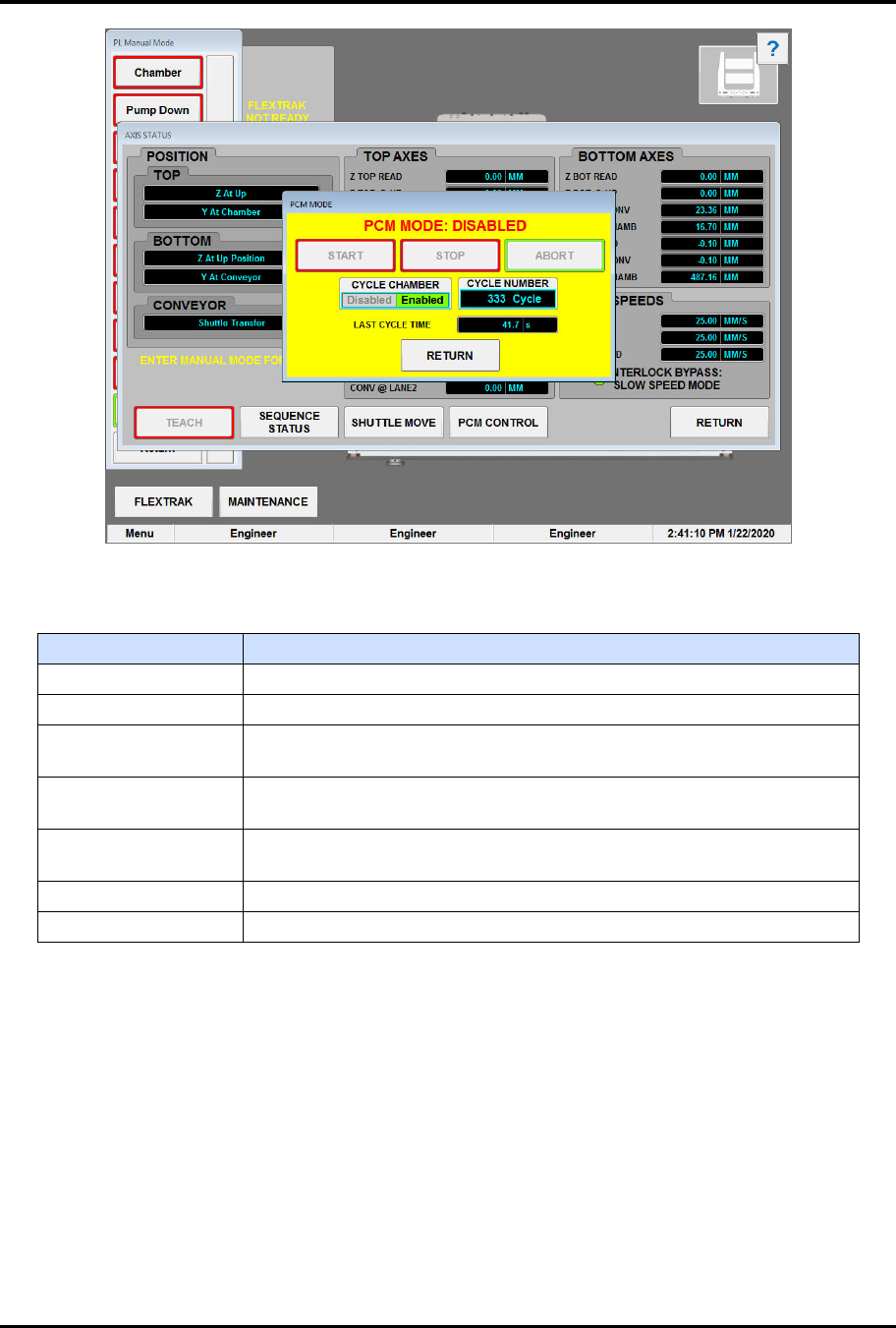
„ The PCM Mode dialog box opens (Figure 6-15).
„ Default status is disabled.
6. Touch RETURN to close the PCM Control dialog box.
FlexTRAK Series 2MB Material Handler Addendum Tour of HMI Software for the Material Handler
© 2023 Nordson Corporation 5-19
Figure 5-11 PCM Mode Dialog Box - Stop Mode
Table 5-13 PCM Mode Controls and Indicators
Control Description
START Touch START to start PCM mode.
STOP Touch STOP to stop the PCM at the end of the next cycle.
ABORT
Touch ABORT to stop the PCM at the current position. The MH will
finish the current move but not the complete cycle.
CYCLE CHAMBER
Touch DISABLED or ENABLED to toggle between cycling the MH
with or without the chamber.
NUM. CYCLES
Displays the current number of cycles performed by PCM. Click this
field to reset the cycle count.
LAST CYCLE TIME Displays the last cycle time in seconds.
RETURN Touch RETURN to close the PCM Mode dialog box.