FlexTRAK 2MB Material Handler Addendum Rev 05.pdf - 第98页
FlexTRAK Series 2MB Mater ial Handler Adden dum Tour of HMI Softw are for the Material Handler 5-32 © 2023 Nordson Corporation Table 5-16 Conveyor Status Screen Cont rols and Indicators Control Description MANUAL Touch t…
FlexTRAK Series 2MB Material Handler Addendum Tour of HMI Software for the Material Handler
© 2023 Nordson Corporation 5-31
Control Description
LANE 2 BA
Indicates the status of the Lane 2 BA sensor. A red light means the
I/O point is off (open/disconnected), and a green light means that it is
on (closed/connected).
E STOP
Indicates the status of the E-Stop sensor. A red light means the I/O
point is off (open/disconnected), and a green light means that it is on
(closed/connected).
NOT USED This signal is unused.
NOT USED This signal is unused.
5.5.4 Conveyor Status Screen
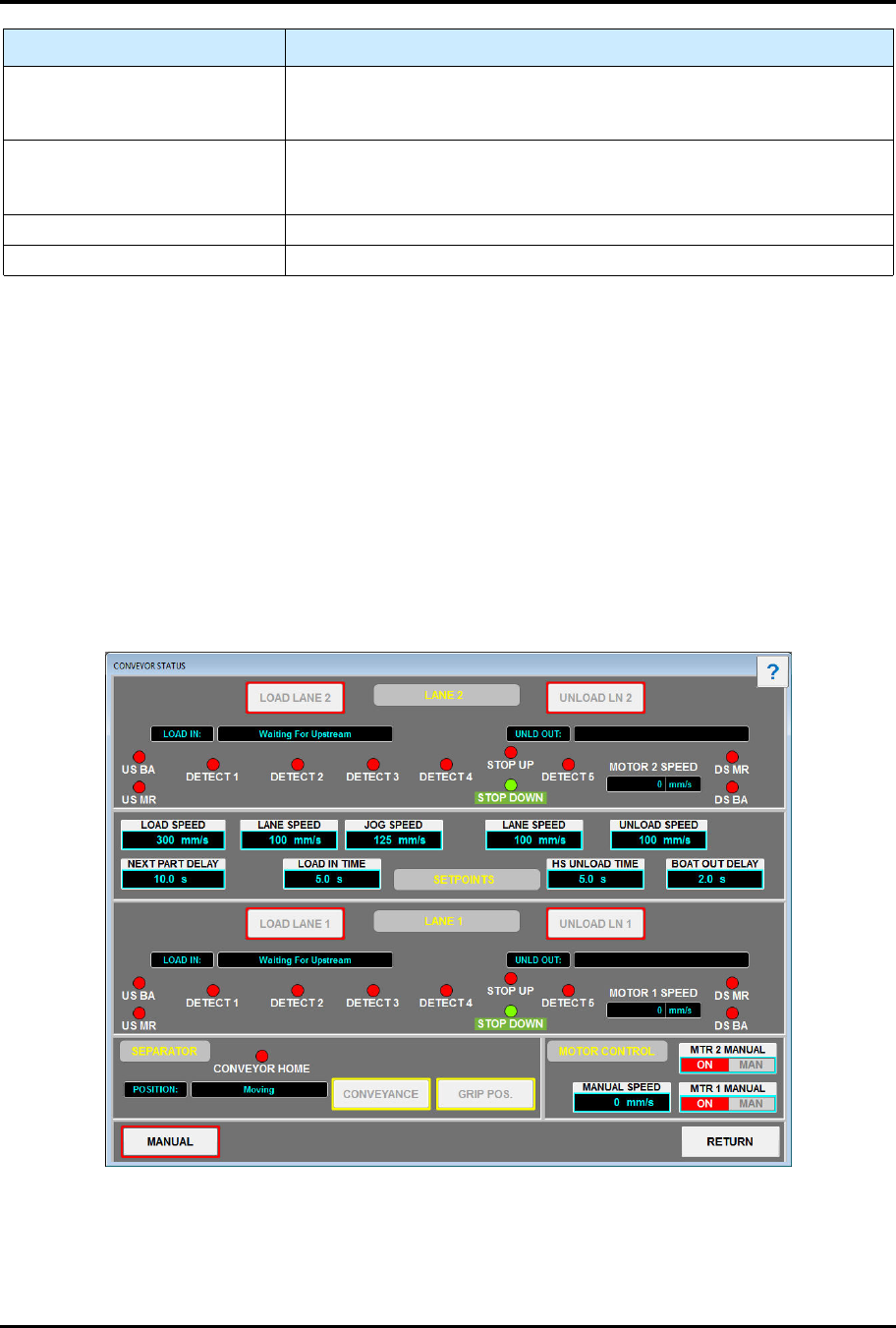
The Conveyor Status screen (Figure 5-14) displays all operational aspects of the conveyor system. See
Table 5-16 for descriptions of the Conveyor Status screen controls and indicators. See Table 5-16 for
descriptions of the Conveyor Status screen controls and indicators.
To access the input status screen:
1. Touch the MAINTENANCE button on the MH Overview screen to access maintenance
commands.
„ The Maintenance Master screen opens (Figure 5-5).
2. Touch the CONVEYOR button.
„ The Conveyor Status screen opens (Figure 5-14).
Figure 5-14 Conveyor Status Screen
FlexTRAK Series 2MB Material Handler Addendum Tour of HMI Software for the Material Handler
5-32 © 2023 Nordson Corporation
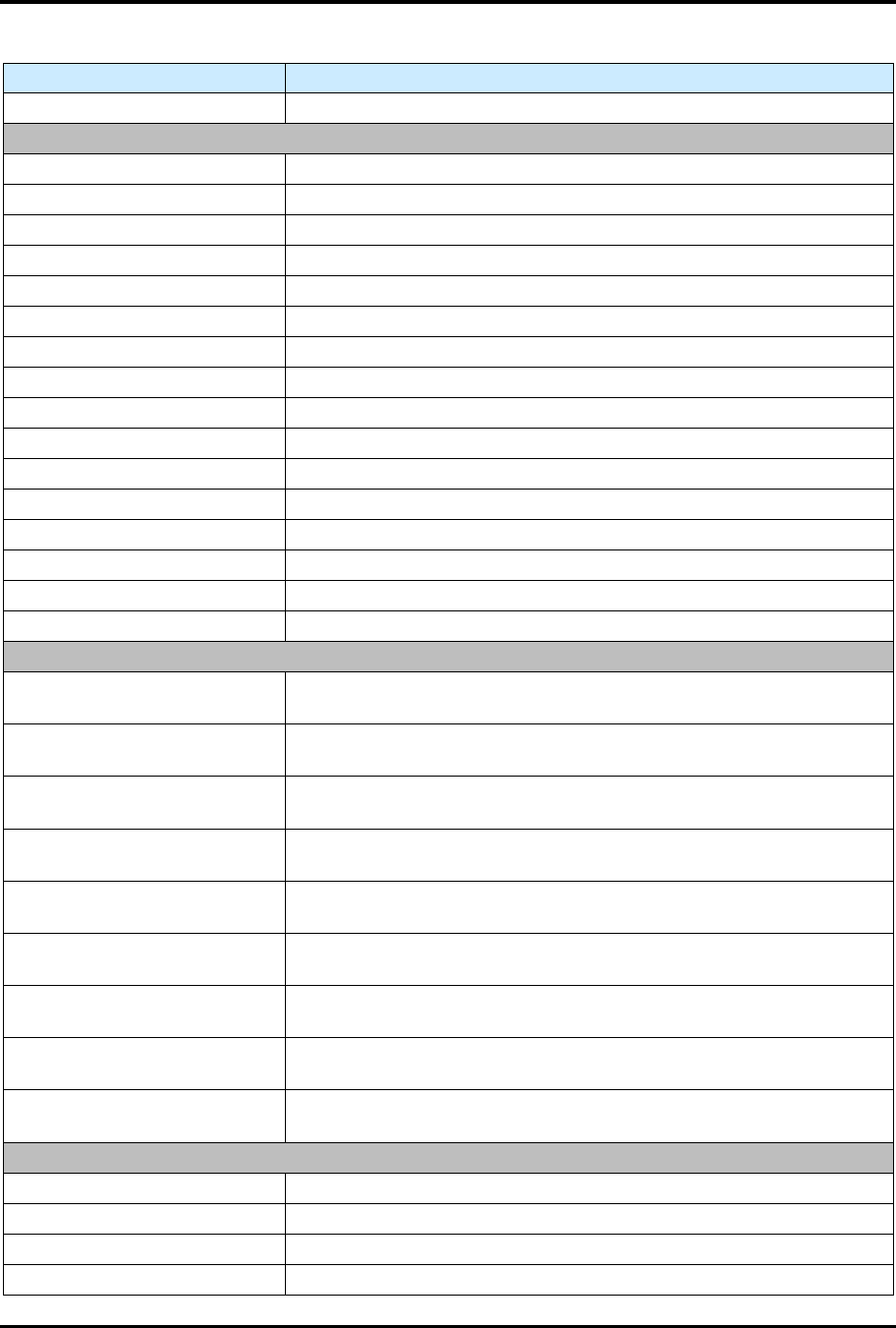
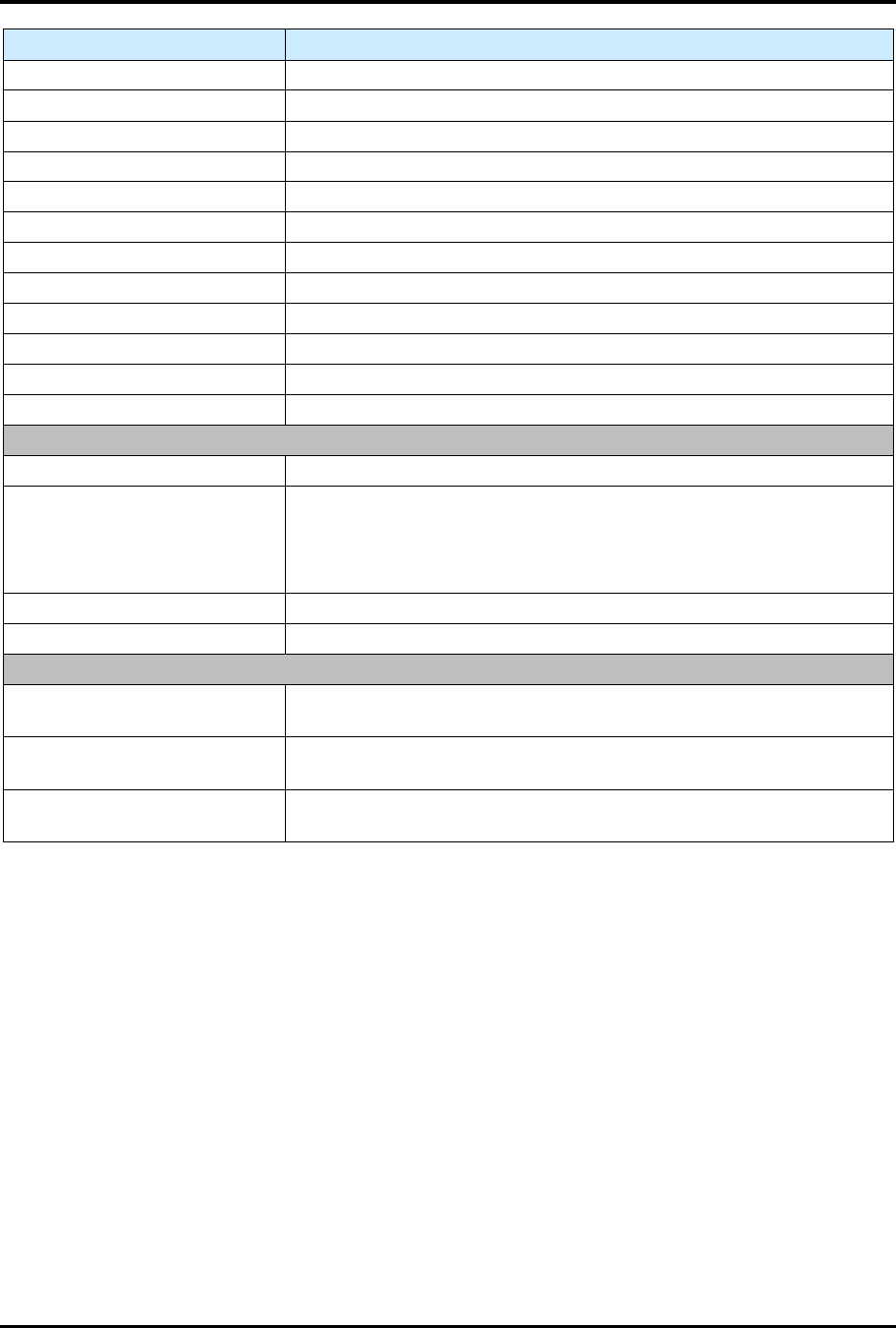
Table 5-16 Conveyor Status Screen Controls and Indicators
Control Description
MANUAL Touch to switch to Manual mode.
LANE 2
LOAD LANE 2 Touch to load Lane 2.
LOAD IN: Displays the load in status.
UNLOAD LANE 2 Touch to unload Lane 2.
UNLD OUT: Displays the unload out status.
US BA Displays the status of the upstream BA sensor.
US MR Displays the status of the upstream MR sensor.
DETECT 1 Displays the status of the Detect 1 sensor.
DETECT 2 Displays the status of the Detect 2 sensor.
DETECT 3 Displays the status of the Detect 3 sensor.
DETECT 4 Displays the status of the Detect 4 sensor.
STOP UP Displays the status of the Stop Up sensor.
STOP DN Displays the status of the Stop Down sensor.
DETECT 5 Displays the status of the Detect 5 sensor.
MOTOR 2 SPEED Displays the speed of Motor 2 (mm/sec).
DS MR Displays the status of the downstream MR.
DS BA Displays the status of the downstream BA.
SETPOINTS
LOAD SPEED
Displays the Load Speed setpoint.
Touch to edit the Load Speed setpoint.
LANE SPEED
Displays the Lane Speed setpoint.
Touch to edit the Lane Speed setpoint.
JOG SPEED
Displays the Jog Speed setpoint.
Touch to edit the Jog Speed setpoint.
LANE SPEED
Displays the Lane Speed setpoint.
Touch to edit the Lane Speed setpoint.
UNLOAD SPEED
Displays the Unload Speed setpoint.
Touch to edit the Unload Speed setpoint.
NEXT PART DELAY
Displays the Next Part Delay setpoint.
Touch to edit the Next Part Delay setpoint.
LOAD IN TIME
Displays the Load In setpoint.
Touch to edit the Load In setpoint.
HS UNLOAD TIME
Displays the Hs unload setpoint.
Touch to edit the Hs Unload setpoint.
BOAT OUT DELAY
Displays the Boat Out Delay setpoint.
Touch to edit the Boat Out Delay setpoint.
LANE 1
LOAD LANE 1 Touch to load Lane 1.
LOAD IN: Displays the status of the load in sensor.
UNLOAD LANE 1 Touch to unload Lane 1.
UNLD OUT: Displays the status of the unload out sensor.
FlexTRAK Series 2MB Material Handler Addendum Tour of HMI Software for the Material Handler
© 2023 Nordson Corporation 5-33
Control Description
US BA Displays the status of the upstream BA sensor.
US MR Displays the status of the upstream MR sensor.
DETECT 1 Displays the status of the Detect 1 sensor.
DETECT 2 Displays the status of the Detect 2 sensor.
DETECT 3 Displays the status of the Detect 3 sensor.
DETECT 4 Displays the status of the Detect 4 sensor.
STOP UP Displays the status of the Stop Up sensor.
STOP DN Displays the status of the Stop Down sensor.
DETECT 5 Displays the status of the Detect 5 sensor.
MOTOR 1 SPEED Displays the speed of Motor 1 (mm/sec).
DS MR Displays the status of the downstream MR.
DS BA Displays the status of the downstream BA.
SEPARATOR
CONVEYOR HOME Displays the status of the Conveyor Home sensor
POSITION
Displays the position of the separator using on the following:
Moving
Conveyance
Shuttle Transfer
CONVEYANCE Touch to switch from Grip Position to Conveyance.
GRIP POS. Touch to switch from Conveyance to Grip Position.
MOTOR CONTROL
MANUAL SPEED
Displays the Manual Speed setting. Touch to edit the Manual Speed
setting.
MTR 2 MANUAL
Displays the control mode of Motor 2. Touch to toggle between
Manual and Auto control of Motor 2.
MTR 1 MANUAL
Displays the control mode of Motor 1. Touch to toggle between
Manual and Auto control of Motor 1.
5.5.5 Parameters Screen
The Parameters screen (Figure 5-15) displays the system parameters and options of the current machine
configuration. See Table 5-17 for descriptions of the Parameters screen controls and indicators.
To access the parameters screen:
1. Touch the MAINTENANCE button on the MH Overview screen to access maintenance
commands.
„ The Maintenance Master screen opens (Figure 5-5).
2. Touch the SYSTEM button.
„ The Parameters screen opens (Figure 5-15).