FlexTRAK 2MB Material Handler Addendum Rev 05.pdf - 第145页
FlexTRAK Series 2MB Mater ial Handler Adden dum Troubleshooting © 2023 Nordson Corporation 9-3 9.5 Material H andling Alarms This section describes the possible material handling system alarm condi tions. The Alarm Count…
FlexTRAK Series 2MB Material Handler Addendum Troubleshooting
9-2 © 2023 Nordson Corporation
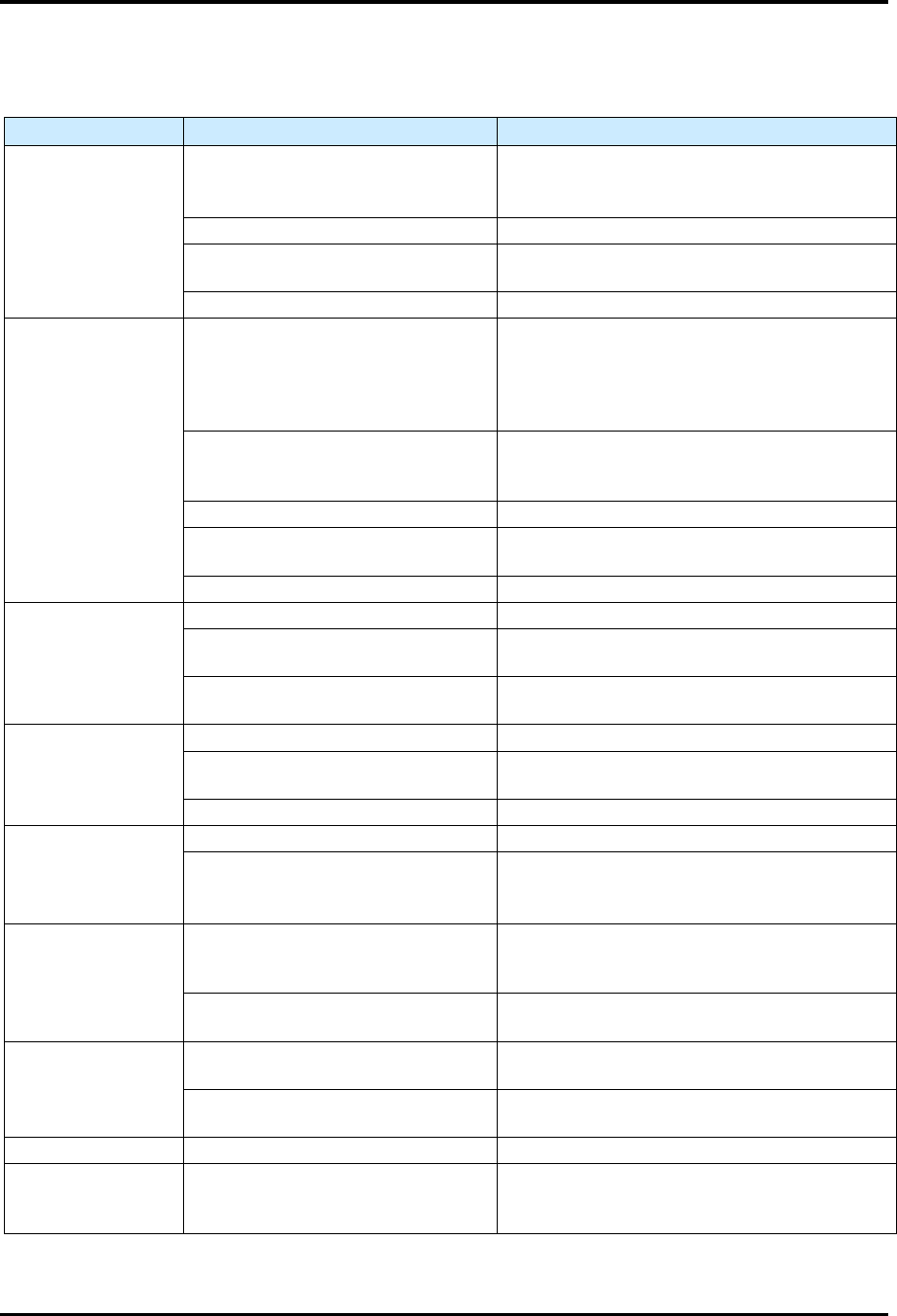
9.4 Basic System Troubleshooting
Table 9-1 Basic System Troubleshooting
Symptom
Possible Cause
Recovery
Rails or belt will
not move
EMO button is activated.
1. Turn the
EMO
button clockwise until it
pops back into position.
2. Press
ON
Button on the front door.
Motor cables are loose.
Contact
Technical Support
.
Fuse is blown in conveyor
controller power supply.
Check the fuses and replace if necessary.
Conveyo
r
controller malfunction.
Contact
Technical Support
.
Board stop pins,
pneumatic assist
or gripper
assemblies will not
actuate
Tooling air pressure is too low.
Adjust the FlexTRAK’s main air pressure
regulator to supply 5.5-6.9 bar
(80-100 psi). Refer to the FlexTRAK
Installation, Operations, and Maintenance
Manual.
There is an air leak in a pneumatic
line or component.
Leaking component or line must be located
and repaired or replaced. Contact Technical
Support
.
The pneumatic device has failed. Contact Technical Support.
Solenoid valve is defective.
The solenoid valve must be replaced.
Contact Technical Support.
Actuation is too slow or too fast. Adjust the stop pin flow controllers.
Conveyor does not
transfer parts from
upstream to
downstream
machines
Work piece or carrier is jammed. Contact Technical Support.
SMEMA interface is not functioning
properly.
Contact Technical Support.
Incorrect alignment of upstream or
downstream machine.
The machines must be realigned. Contact
Technical Support.
Board sensors not
sensing when
board is present
Sensor is not active. Contact Technical Support.
Sensor is dirty.
Clean sensors with a soft cloth or with
blown
air.
Sensor is out of adjustment.
Contact
Technical Support
.
Board will not
index to correct
position
Board stop pin is not receiving air.
Contact
Technical Support
.
Board sensor is dirty, not active or
out of adjustment.
Clean sensor.
If no improvement, contact Technical
Support
.
Shuttler/ conveyor
does not move at
all
Shuttler/conveyor controller has
no power.
Verify that the AC power cable is connected
to the module and to the facility power
source.
Fuse is blown in shuttler/conveyor
controller.
Check the fuses and replace if necessary.
Carrier jams or
does not move
Gap between conveyor rails is too
narrow.
Realign the board on the conveyor belt.
The carrier is bent.
Stop the dispensing program and remove the
carrier.
Fails to find Home The home sensor has failed. Contact Technical Support.
Gripper does not
pick up the carrier
properly
Gripper position needs to be
realigned.
Check and teach the gripper position.
FlexTRAK Series 2MB Material Handler Addendum Troubleshooting
© 2023 Nordson Corporation 9-3
9.5 Material Handling Alarms
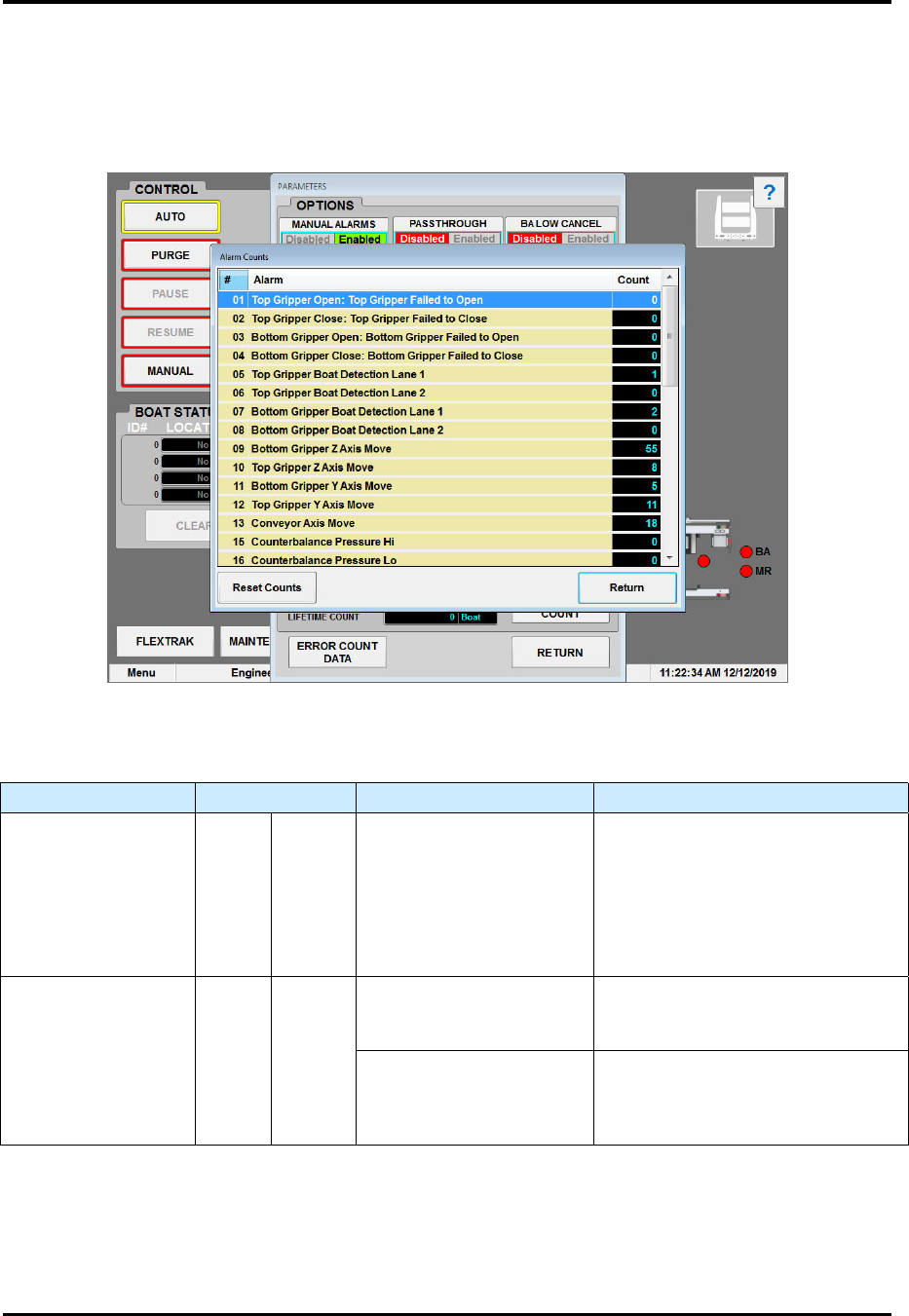
This section describes the possible material handling system alarm conditions. The Alarm Count screen
(Figure 9-1) shows found in the MHS Alarms dialog box (Figure 9-1). Possible causes and remedies are
shown in Table 9-2.
Figure 9-1 Material Handling Alarm Error Conditions
Table 9-2 Material Handling Alarms
Alarm Name Alarm Display Possible Causes Remedy
Top Gripper
Actuator Error
GRIP OPEN
A command was given to
open or close the top
gripper actuator, and the
corresponding sensor did
not signal that the
complete move was
made within 5 sec.
Verify that there is no obstruction
preventing the gripper assembly
from closing.
Check to see that the pneumatic
cylinder sensor LEDs become
enabled when fully open and
closed. Adjust as necessary.
Top Boat Detect
Error
B1 B2
Only one top gripper boat
detection sensor is
enabled.
Check to see that the process
carrier is fully gripped and both left
and right part sensors are enabled.
One sensor is toggled on
or off.
Check to see that the sensor is not
intermittently turning on and off by
shifting process carrier from one
side to another.

FlexTRAK Series 2MB Material Handler Addendum Troubleshooting
9-4 © 2023 Nordson Corporation
Alarm Name Alarm Display Possible Causes Remedy
Bot Boat Detect
Error
B1 B2
Only one bot gripper boat
detection sensor is
enabled.
Check to see that the process
carrier is fully gripped and both
sensors are enabled.
One sensor is toggled on
or off.
Check to see that the sensor is not
intermittently turning on and off by
shifting process carrier from one
side to another.
Top Axis Move Error Y Z
Controller feedback is
indicating a problem.
Possible stall or loss of power.
Check the controller for error
conditions. Digital Input Y Top/Bot
and/or Z Top/Bot Alarm LED will
be RED.
Timeout has expired for
the Top Axis to transfer to
the next position.
(Y timeout = 30 sec)
(Z timeout = 10 sec)
Verify that there is no interference
with the axis to prevent movement.
Bot Axis Move Error Y Z
Controller feedback is
indicating a problem.
Possible stall or loss of power.
Check the controller for error
conditions. Digital Input Y Top/Bot
and/or Z Top/Bot Alarm LED will
be RED.
Timeout has expired for
the Bot Axis to transfer to
the next position.
(Y timeout = 30 sec)
(Z timeout = 5 sec)
Verify that there is no interference
with the axis to prevent movement.
Conv Axis Move
Error
ERROR
Controller feedback is
indicating a problem.
Possible stall or loss of power.
Check the controller for error
conditions. Digital Input Convey
Alarm LED will be RED.
Timeout has expired for
the Conv Axis to transfer
to the next position.
(Y timeout = 7.5 sec)
Verify that there is no interference
with the axis preventing
movement.
Top Axis Home
Error
Y Z
Home sensor flag does
not enable the Home
sensor.
Verify that the drive has reached
position and home sensor is
enabled.
Controller feedback is
indicating a problem.
Possible stall or loss of power.
Check the controller for error
conditions. Digital Input Y Top/Bot
and/or Z Top/Bot Alarm LED will
be RED.
Timeout has expired for
the Top Axis to transfer to
the next position.
(Y timeout = 30 sec)
(Z timeout = 30 sec)
Verify that there is no interference
with the axis to prevent movement.