FlexTRAK 2MB Material Handler Addendum Rev 05.pdf - 第59页
FlexTRAK Series 2MB Mater ial Handler Adden dum System Compo nents © 2023 Nordson Corporation 4-15 4.3.1.5 Separator Actuator The separator has a home p osition inherently built in to the actuator and teachable positions…

FlexTRAK Series 2MB Material Handler Addendum System Components
4-14 © 2023 Nordson Corporation
4.3.1.4 Lane Position Sensors
As a carrier enters the system, multiple sensors monitor its position along the conveyor. The carrier
positions are displayed in the software as Detect 1-5, see 6.7.4 Manipulating the Lane 2 Conveyor. The
number of sensors for each Detect position is determined by the size of the carrier.
The conveyor will turn on when a board available signal is given by the upstream system and will operate
at the LOAD SPEED set point. If a lane sensor senses something out of sequence, the MH Alarm screen
will prompt an “Unexpected Boat on Lane” alarm, see 9.5 Material Handling Alarms.
Table 4-4 Typical Conveyor Carrier Sequence
Name Description Function
Detect 1 Carrier Entry The Detect 1 sensor activates when a carrier enters the conveyor.
Detect 2
Upstream
System Ready
When the trailing edge of the carrier clears Detect 1 and is sensed by
Detect 2, the SMEMA Upstream System Ready signal toggles and the
conveyor changes to the LOAD SPEED set point. This sensor must be
positioned so during a load in routine, the carrier can be sensed by at
least one of Detect 1, Detect 2, or Detect 3.
Detect 3
Initiate Load in
Time
When the leading edge of the carrier is sensed by Detect 3, it initiates the
LOAD IN TIME timer. The conveyor slows to the Jog speed after the
timer runs for the designated amount of time unless the leading edge of
the carrier is sensed by Detect 4 first. Detect 3 must be active when the
process carrier comes to a stop at the Gripper Pick Position in order for a
carrier to be picked up by the MH gripper assembly.
Detect 4 Stop Belt
This sensor stops the belt operation upon sensing the leading edge of a
carrier. Detect 4 must be active when the process carrier comes to a stop
at the Gripper Pick Position in order for a carrier to be picked up by the
MH gripper assembly.
Detect 5
Stop
Conveyer
When the leading edge of the carrier is sensed by Detect 5, the conveyor
ramps down to the UNLOAD SPEED. Detect 5 must remain off for the
designated amount of time specified in the BOAT OUT DELAY before the
timer can shut off and stop the conveyor. When Detect 5 does not sense
the trailing edge of a carrier for that amount of time, the SMEMA
Downstream Board Available signal toggles and the conveying process is
complete.
?
NOTE Load speed, lane speed, unload speed and timers are set in the FlexTRAK-2MB software,
see 6.7.4 Manipulating the Lane 2.

FlexTRAK Series 2MB Material Handler Addendum System Components
© 2023 Nordson Corporation 4-15
4.3.1.5 Separator Actuator
The separator has a home position inherently built into the actuator and teachable positions taught through
the FlexTRAK-2MB software, see 5.5.4 Conveyor Status Screen. The first position is called the Conveyor
Grip and the second is called Conveyance.
1. Conveyor Grip (Grip Pos.) - The Conveyor Grip position moves Lane 2 to a position where
the MH grippers can pick and place parts on and off of the conveyor. The lane space
position relates to the spacing of the gripper fingers as well as the spacing within the plasma
processing chamber where the carriers are to be placed for treatment. For the Fixed Position
Dual-Lane Conveyor system, the conveyor grip position is ignored.
2. Conveyance Position - The Conveyance position moves Lane 2 to a position where the parts
can be transferred to and from the upstream and downstream systems. This position is
taught during setup to ensure that the carrier can be conveyed through the system. It is a
relative position based on Lane 1 after the tool has been aligned with the upstream and
downstream systems. For the Adjustable Single-Unit Dual-Lane Conveyor system, the
single conveyance position is replaced by two conveyance positions--one for each lane. For
the Fixed Position Dual-Lane Conveyor system, the conveyance position is ignored.
4.3.1.6 Carrier Stops
There is one adjustable pneumatic carrier stop per lane. The stops can be adjusted using the flow
controllers located in the FlexTRAK-2MB’s rear enclosure (Figure 4-5). When the conveyor turns on,
both carrier stops engage, and the corresponding LED located on the MH Overview screen glows green.
The stops locate the carrier in a safe position to be picked up by the MH gripper assembly. When the
carrier reaches the Gripper Pick position, both the Detect 3 and Detect 4 sensors must be activated in
order for the carrier to be picked up.
4.3.1.7 High Temperature Belts
There are two high temperature belts per lane. Maximum temperature should not exceed 150 °C. A
qualified technician can adjust the tension periodically for continuous conveyor operation. Belts need to
be replaced periodically, see 8.4.4 Replacing the Conveyor Belts.
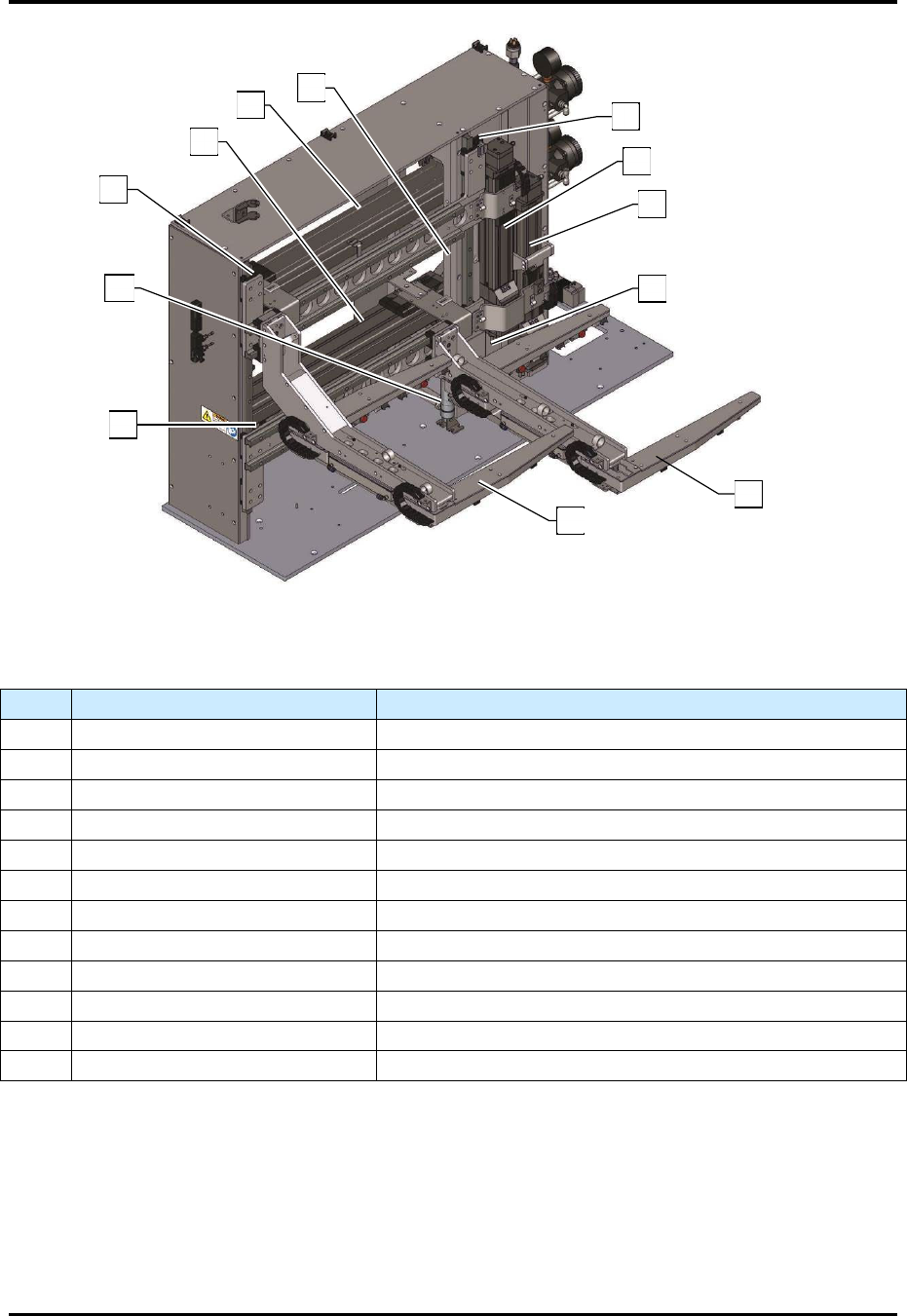
4.3.2 Shuttler Assembly
The shuttler assembly is a 4-axis pick and place system. The shuttler utilizes gripper assemblies to deliver
parts conveyed by the conveyor, to and from the plasma processing chamber for treatment.
FlexTRAK Series 2MB Material Handler Addendum System Components
4-16 © 2023 Nordson Corporation
Figure 4-11 Shuttler System
Table 4-5 Shuttler System Components
Item Description Function
1 Upper Z-axis Home Sensor Indicates that the upper gripper is home in the Z-axis.
2 Upper Z-axis Linear Actuator Positions the upper gripper along the Z-axis.
3 Lower Z-axis Linear Actuator Positions the lower gripper along the Z-axis.
4 Lower Z-axis Home Sensor Indicates that the lower gripper is home in the Z-axis.
5 Lower Gripper Delivers parts to and from the process chamber.
6 Upper Gripper Delivers parts to and from the process chamber.
7 Lower Y-axis Home Sensor Indicates that the lower gripper is home in the Y-axis.
8 Lower Z-axis Pneumatic Assist Used to reduce the load on the lower Z-axis actuator.
9 Upper Y-axis Home Sensor Indicates that the upper gripper is home in the Y-axis.
10 Lower Y-axis Linear Actuator Positions the lower gripper along the Y-axis.
11 Upper Y-axis Linear Actuator Positions the upper gripper along the Y-axis.
12 Upper Z-axis Pneumatic Assist Used to reduce the load on the upper Z-axis actuator.
5
6
9
11
10
12
1
2
3
4
8
7