FlexTRAK 2MB Material Handler Addendum Rev 05.pdf - 第76页
FlexTRAK Series 2MB Mater ial Handler Adden dum Tour of HMI Softw are for the Material Handler 5-10 © 2023 Nordson Corporation 5.5.1 Axis St atus Screen The Axis Status screen (Figu re 5-6) displays the positio n reads f…
FlexTRAK Series 2MB Material Handler Addendum Tour of HMI Software for the Material Handler
© 2023 Nordson Corporation 5-9
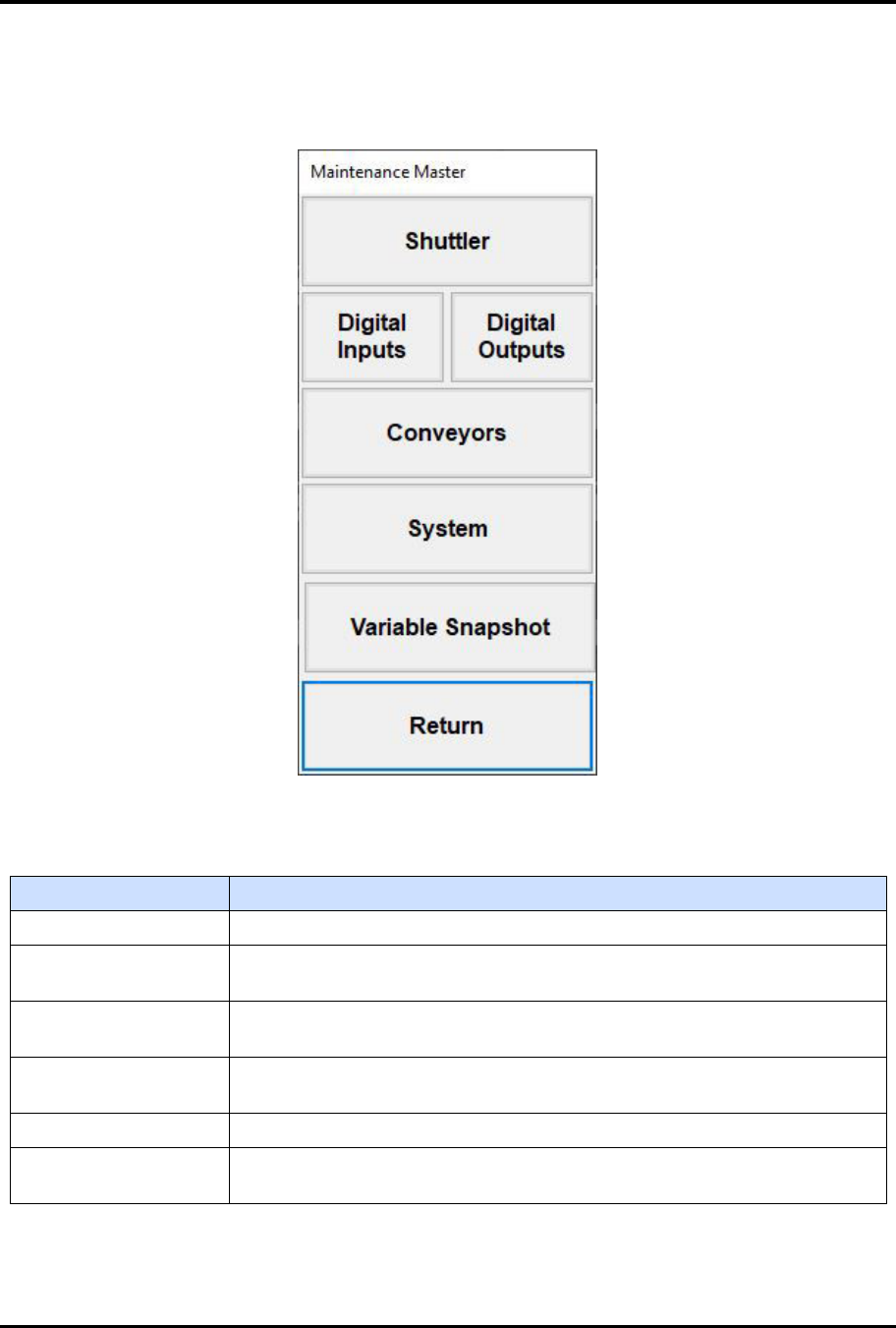
5.5 Maintenance Master Screen
To access the Maintenance Master screen, touch the MAINTENANCE button on the 2MB MH Overview
screen (Figure 5-4).
Figure 5-5 Maintenance Master Screen
Table 5-7 Maintenance Master Screen Controls
Control Description
SHUTTLER Touch to open the Axis Status screen, see 5.5.1 Axis Status Screen.
DIGITAL INPUTS
Touch to open the Input Status screen, see 5.5.2 Digital Input Status
Screen.
DIGITAL OUTPUTS
Touch to open the Output Status screen, see 5.5.3 Digital Output Status
Screen.
CONVEYORS
Touch to open the Conveyor Status screen, see 5.5.4 Conveyor Status
Screen.
SYSTEM Touch to open the Parameters screen, see for 5.5.5 Parameters Screen.
VARIABLE
SNAPSHOT
Touch to open the Data Input popup for the snapshot, see 5.5.6 Variable
Snapshot Screen.
FlexTRAK Series 2MB Material Handler Addendum Tour of HMI Software for the Material Handler
5-10 © 2023 Nordson Corporation
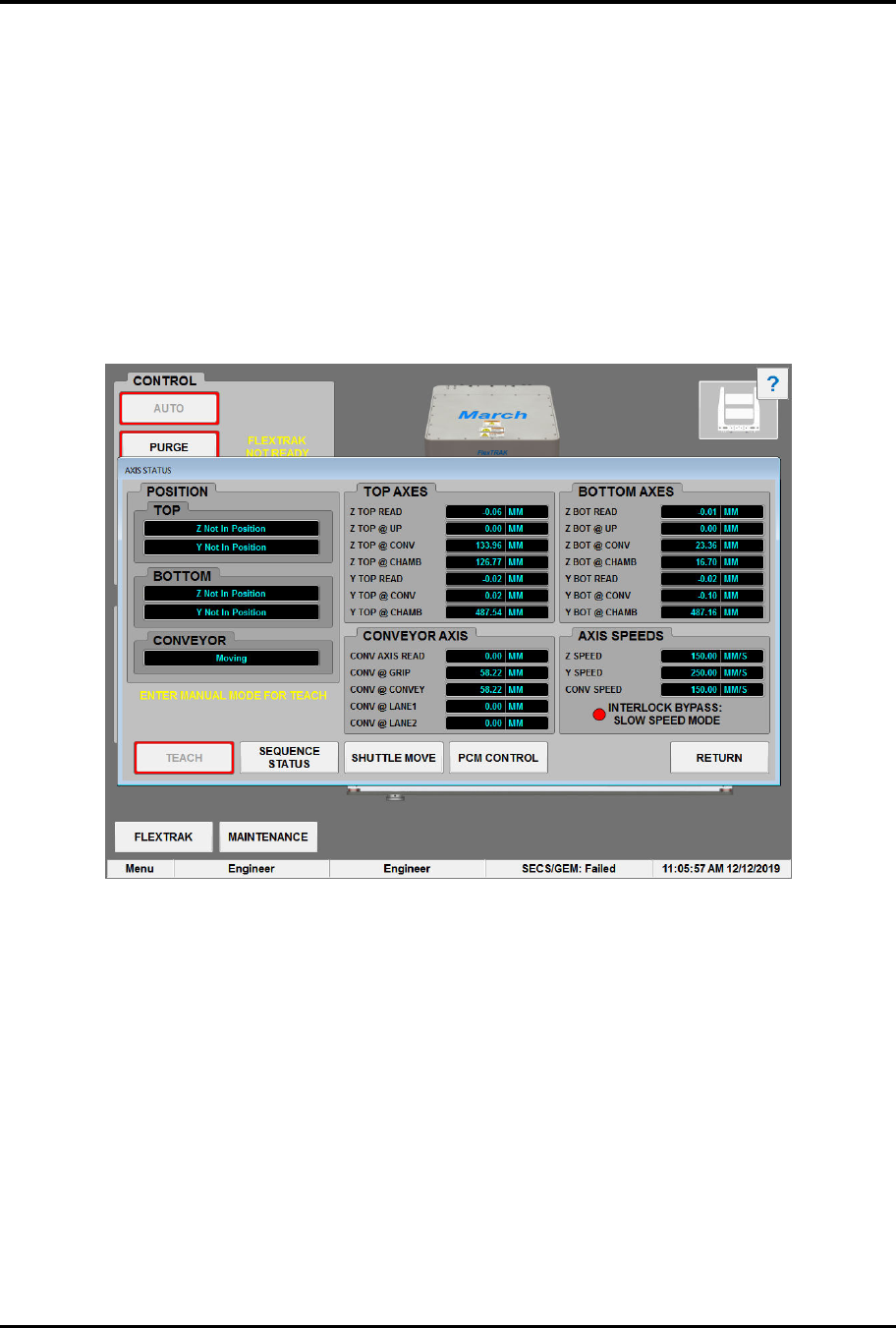
5.5.1 Axis Status Screen
The Axis Status screen (Figure 5-6) displays the position reads for the drive axes, see 7.1 Teaching MH
Axis Position for details. See Table 5-14 for descriptions of the Axis Status screen controls and indicators.
To access the Axis Status screen:
1. Touch the MAINTENANCE button on the MH Overview screen to access maintenance
commands.
„ The Maintenance Master screen opens (Figure 5-5).
2. Touch the SHUTTLER button.
„ The Axis Status screen opens (Figure 5-6).
Figure 5-6 Axis Status Screen
FlexTRAK Series 2MB Material Handler Addendum Tour of HMI Software for the Material Handler
© 2023 Nordson Corporation 5-11
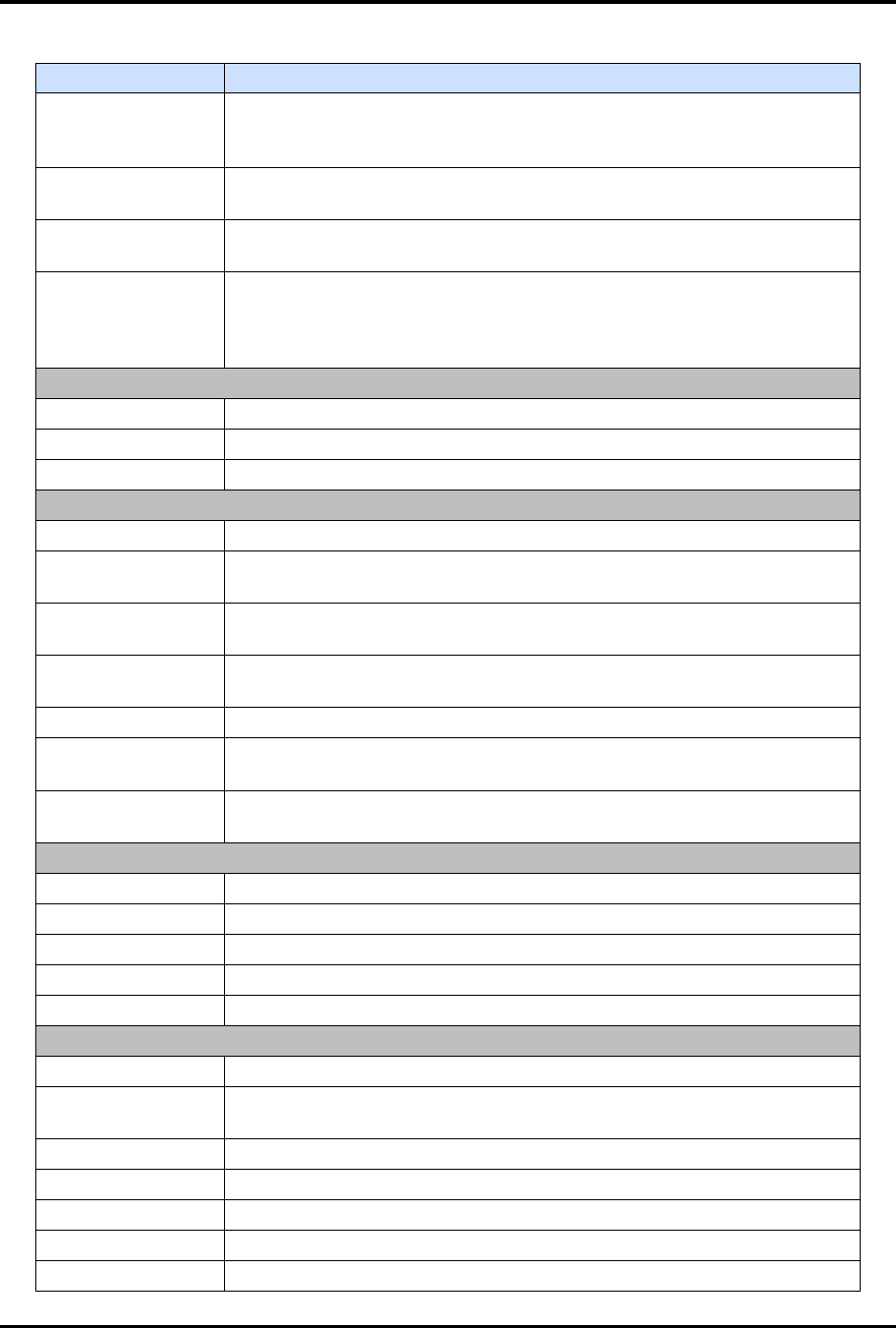
Table 5-8 Axis Status Screen Controls and Indicators
Control Description
TEACH
This button places the system into a teaching mode where adjustments
to each of the five axis positions can be taught and saved, see 5.5.1.1
Teach Pad.
SEQUENCE
STATUS
Click the SEQUENCE button to view the current PLC status of the
conveyor, shuttler, and chamber, see 5.5.1.2 Sequence Status.
SHUTTLE MOVE
Click the SHUTTLE MOVE button to access the manual commands to
manipulate the shuttler, see 5.5.1.3 Shuttler Move.
PCM CONTROL
Click the PCM CONTROL button to view the Process Cycle Mode dialog
box which is used to simulate the presence of a material handler for
testing and troubleshooting purposes, see 5.5.1.4 Process Cycle Mode
(PCM) Control.
POSITION
TOP Indicates the upper gripper position along the Y- and Z- axes.
BOTTOM Indicates the lower gripper position along the Y- and Z- axes.
CONVEYOR Indicates the conveyor position along the Y-axis.
TOP AXES
Z TOP READ Displays the current Z-axis position of the upper gripper.
Z TOP @ UP
Displays the teachable Z-axis position of the upper gripper at the up
(swap) position.
Z TOP @ CONV
Displays the teachable Z-axis position of the upper gripper at the
conveyor.
Z TOP @ CHAMB
Displays the teachable Z-axis position of the upper gripper at the
chamber.
Y TOP READ Displays the current Y-axis position of the upper gripper.
Y TOP @ CONV
Displays the teachable Y-axis position of the upper gripper at the
conveyor.
Y TOP @ CHAMB
Displays the teachable Y-axis position of the upper gripper at the
chamber.
CONVEYOR AXIS
CONV AXIS READ Displays the current axis position of the conveyor.
CONV @ GRIP Displays the teachable axis position of the conveyor at the gripper.
CONV @ CONVEY Displays the teachable axis position of the conveyor at the conveyor.
CONV @ LANE1 Displays the teachable axis position of the conveyor at Lane 1.
CONV @ LANE2 Displays the teachable axis position of the conveyor at Lane 2.
BOTTOM AXES
Z BOT READ Displays the current Z-axis position of the bottom gripper.
Z BOT @ UP
Displays the teachable Z-axis position of the bottom gripper at the up
(swap) position.
Z BOT @ CONV Displays the Z-axis position of the bottom gripper at the conveyor.
Z BOT @ CHAMB Displays the Z-axis position of the bottom gripper at the chamber.
Y BOT READ Displays the current Y-axis position of the bottom gripper.
Y BOT @ CONV Displays the Y-axis position of the bottom gripper at the conveyor.
Y BOT @ CHAMB Displays the Y-axis position of the bottom gripper at the chamber.