FlexTRAK 2MB Material Handler Addendum Rev 05.pdf - 第143页
© 2023 Nordson Corporation 9-1 9 T roubleshooting 9.1 Overview This section describes typ ical material handling sy stem alarm conditions th at can occur during system operation and provides trou bleshooting tips to reme…
FlexTRAK Series 2MB Material Handler Addendum Maintenance
8-14 © 2023 Nordson Corporation
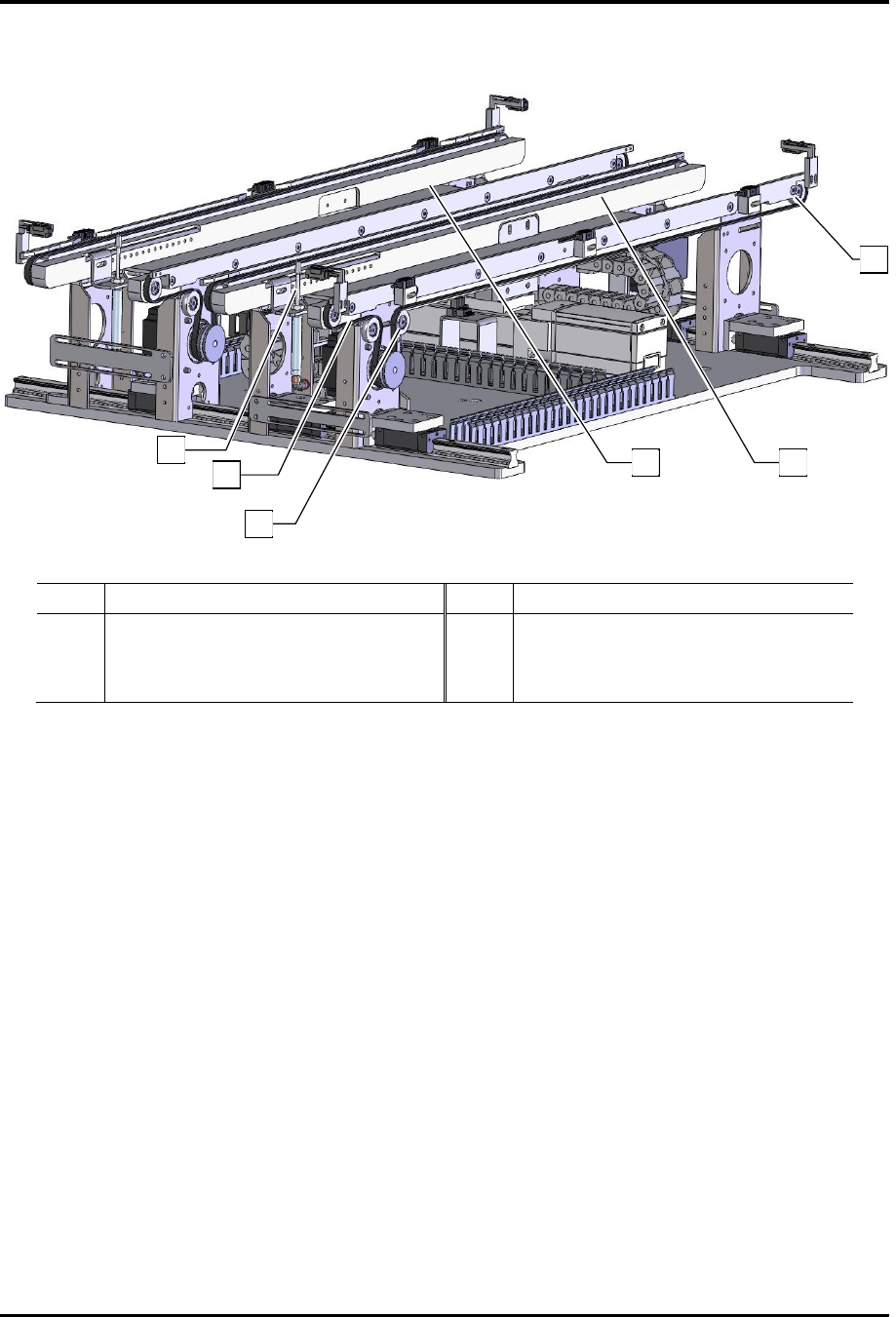
15. If necessary, tension the conveyor belts, see 8.4.3 Tensioning the Conveyor Belts.
Item Description Item Description
1 Stop Pin 4 Front Conveyor Rail
2 Conveyor Belt 5 Rear Conveyor Rail
3 Pulley Tire Tensioner Screw 6 Pulley Tires
Figure 8-4 Conveyor Belt Removal/Installation
1
2
3
4
5
6
© 2023 Nordson Corporation 9-1
9 Troubleshooting
9.1 Overview
This section describes typical material handling system alarm conditions that can occur during system
operation and provides troubleshooting tips to remedy the alarm.
?
NOTE If problems persist after troubleshooting, contact Technical Support.
9.2 Safety First
It is essential that you follow all safety warnings and consider all safety warning labels when performing
the troubleshooting procedures. See Section 2 - Safety and the FlexTRAK Installation Operations, and
Maintenance Manual for specific information.
WARNING: Allow only qualified personnel to perform the following tasks.
Observe and follow the safety instructions in this document and all other
related documentation. Failure to do so may cause serious bodily injury to the
user or damage to the equipment.
CAUTION! Troubleshooting should only be performed by trained and
authorized personnel.
9.3 Record Keeping
Record the type of procedure performed in the maintenance records for the material handling system. This
includes dates, part numbers/serial numbers of replaced parts, names of technicians, and other pertinent
data.
FlexTRAK Series 2MB Material Handler Addendum Troubleshooting
9-2 © 2023 Nordson Corporation
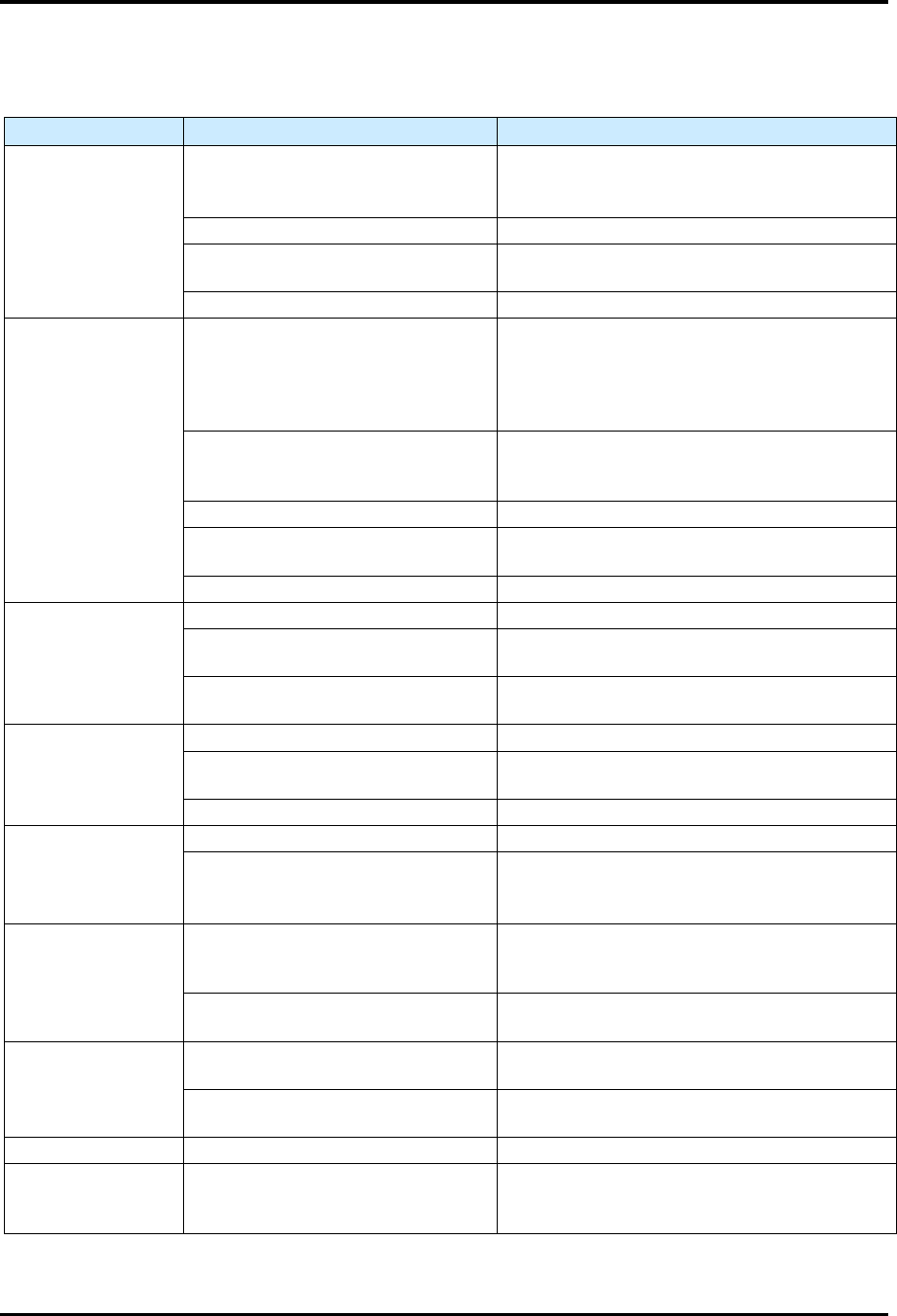
9.4 Basic System Troubleshooting
Table 9-1 Basic System Troubleshooting
Symptom
Possible Cause
Recovery
Rails or belt will
not move
EMO button is activated.
1. Turn the
EMO
button clockwise until it
pops back into position.
2. Press
ON
Button on the front door.
Motor cables are loose.
Contact
Technical Support
.
Fuse is blown in conveyor
controller power supply.
Check the fuses and replace if necessary.
Conveyo
r
controller malfunction.
Contact
Technical Support
.
Board stop pins,
pneumatic assist
or gripper
assemblies will not
actuate
Tooling air pressure is too low.
Adjust the FlexTRAK’s main air pressure
regulator to supply 5.5-6.9 bar
(80-100 psi). Refer to the FlexTRAK
Installation, Operations, and Maintenance
Manual.
There is an air leak in a pneumatic
line or component.
Leaking component or line must be located
and repaired or replaced. Contact Technical
Support
.
The pneumatic device has failed. Contact Technical Support.
Solenoid valve is defective.
The solenoid valve must be replaced.
Contact Technical Support.
Actuation is too slow or too fast. Adjust the stop pin flow controllers.
Conveyor does not
transfer parts from
upstream to
downstream
machines
Work piece or carrier is jammed. Contact Technical Support.
SMEMA interface is not functioning
properly.
Contact Technical Support.
Incorrect alignment of upstream or
downstream machine.
The machines must be realigned. Contact
Technical Support.
Board sensors not
sensing when
board is present
Sensor is not active. Contact Technical Support.
Sensor is dirty.
Clean sensors with a soft cloth or with
blown
air.
Sensor is out of adjustment.
Contact
Technical Support
.
Board will not
index to correct
position
Board stop pin is not receiving air.
Contact
Technical Support
.
Board sensor is dirty, not active or
out of adjustment.
Clean sensor.
If no improvement, contact Technical
Support
.
Shuttler/ conveyor
does not move at
all
Shuttler/conveyor controller has
no power.
Verify that the AC power cable is connected
to the module and to the facility power
source.
Fuse is blown in shuttler/conveyor
controller.
Check the fuses and replace if necessary.
Carrier jams or
does not move
Gap between conveyor rails is too
narrow.
Realign the board on the conveyor belt.
The carrier is bent.
Stop the dispensing program and remove the
carrier.
Fails to find Home The home sensor has failed. Contact Technical Support.
Gripper does not
pick up the carrier
properly
Gripper position needs to be
realigned.
Check and teach the gripper position.