FlexTRAK 2MB Material Handler Addendum Rev 05.pdf - 第116页
FlexTRAK Series 2MB Mater ial Handler Adden dum Operations 6-12 © 2023 Nordson Corporation 7. The Material Handli ng Alarm dialog box opens (Figure 6-11). An alarm will sound indicating th at th e E-Stop/Safety Co ver is…

FlexTRAK Series 2MB Material Handler Addendum Operations
© 2023 Nordson Corporation 6-11
6.7 Manual Mode
?
NOTE This section is intended for process engineering and maintenance personnel operating the
2MB material handler manually.
Manual mode operation is typically used for testing purposes, teaching axis positions, or troubleshooting.
Manual mode provides the same control over MH movement as automatic mode but requires the operator
to initiate each sequential step.
6.7.1 Operating in Manual Mode
To operate in manual mode:
1. Power on the system.
„ The system computer will start and the FlexTRAK MH Overview screen will be
displayed on the monitor.
2. Log into the system, Refer to the FlexTRAK Installation, Operations, and Maintenance
Manual.
„ At start-up, the plasma module will default to the previous running mode (automatic
mode, stop mode or manual mode).
„ The current mode will be highlighted in green.
3. If the system is not in stop mode, press the STOP button.
„ At start-up, the MH will default to the stop mode.
?
NOTE In order for the system to start, the chamber lid must trigger the chamber up
switch and both grippers must be open. If a gripper is closed, the assembly must
be manually moved toward the home position.
4. Touch the MANUAL button on the PM Overview screen to open the MH Overview screen
(Figure 5-4).
5. To enter manual mode, click the MANUAL MODE button. The button will change from a
yellow to a green highlight.
„ The MH is now in manual mode, see 5.4 Material Handler Overview Screen.
6. Open the FlexTRAK-2MB’s front door to manually load the workpieces.
FlexTRAK Series 2MB Material Handler Addendum Operations
6-12 © 2023 Nordson Corporation
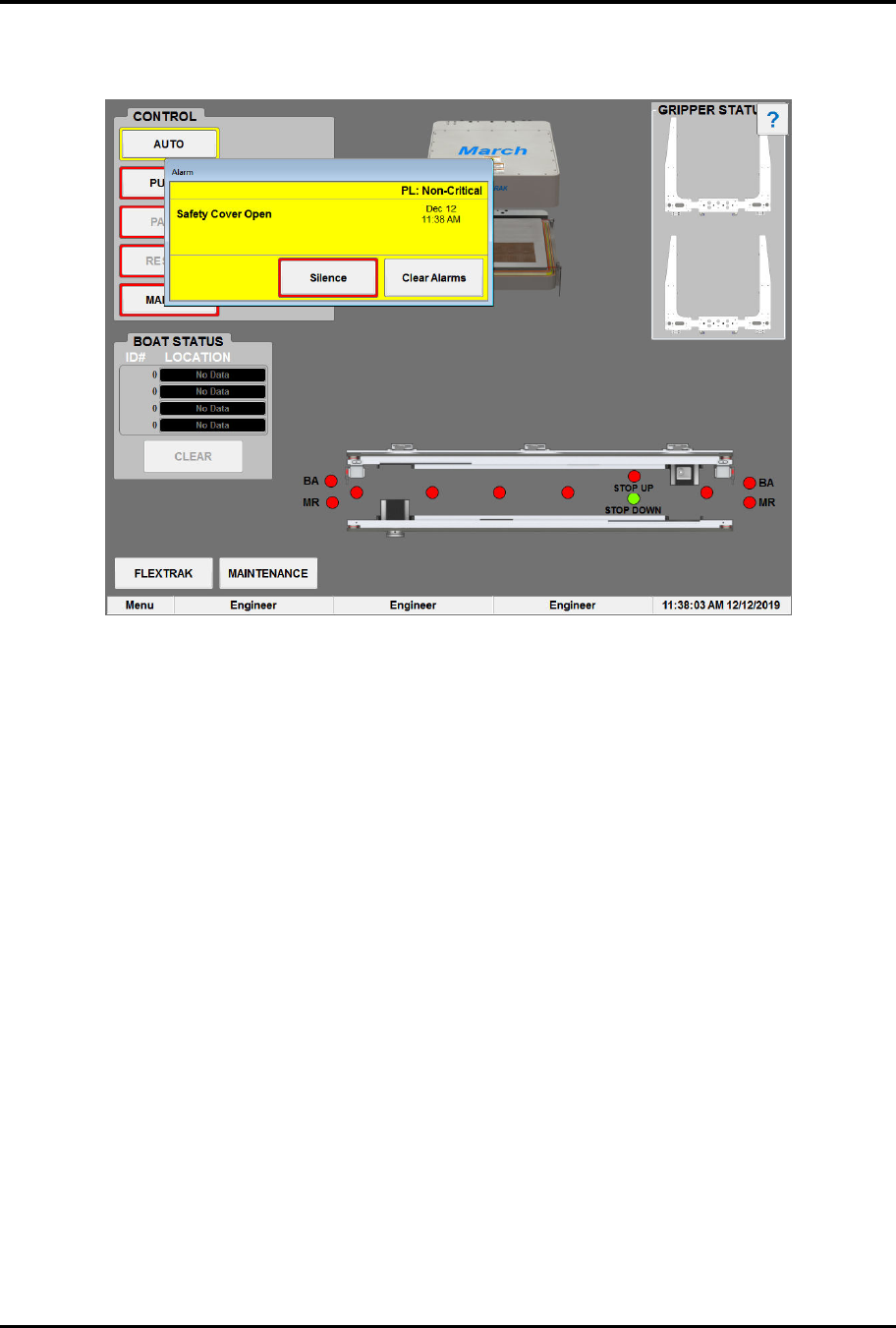
7. The Material Handling Alarm dialog box opens (Figure 6-11). An alarm will sound
indicating that the E-Stop/Safety Cover is open. To silence the alarm, click SILENCE.
Figure 6-11 Material Handling Alarm Dialog Box
8. Load the untreated parts onto the conveyor and close the FlexTRAK-2MB’s front door. The
SAFETY COVER / E-STOP STATUS field will update to read CLOSED.
9. Touch the RESET button to acknowledge the Safety Cover Open alarm or touch the
CONTINUE button to acknowledge the MH alarm.
10. Using the manual controls, load the workpiece(s) into the plasma processing chamber.
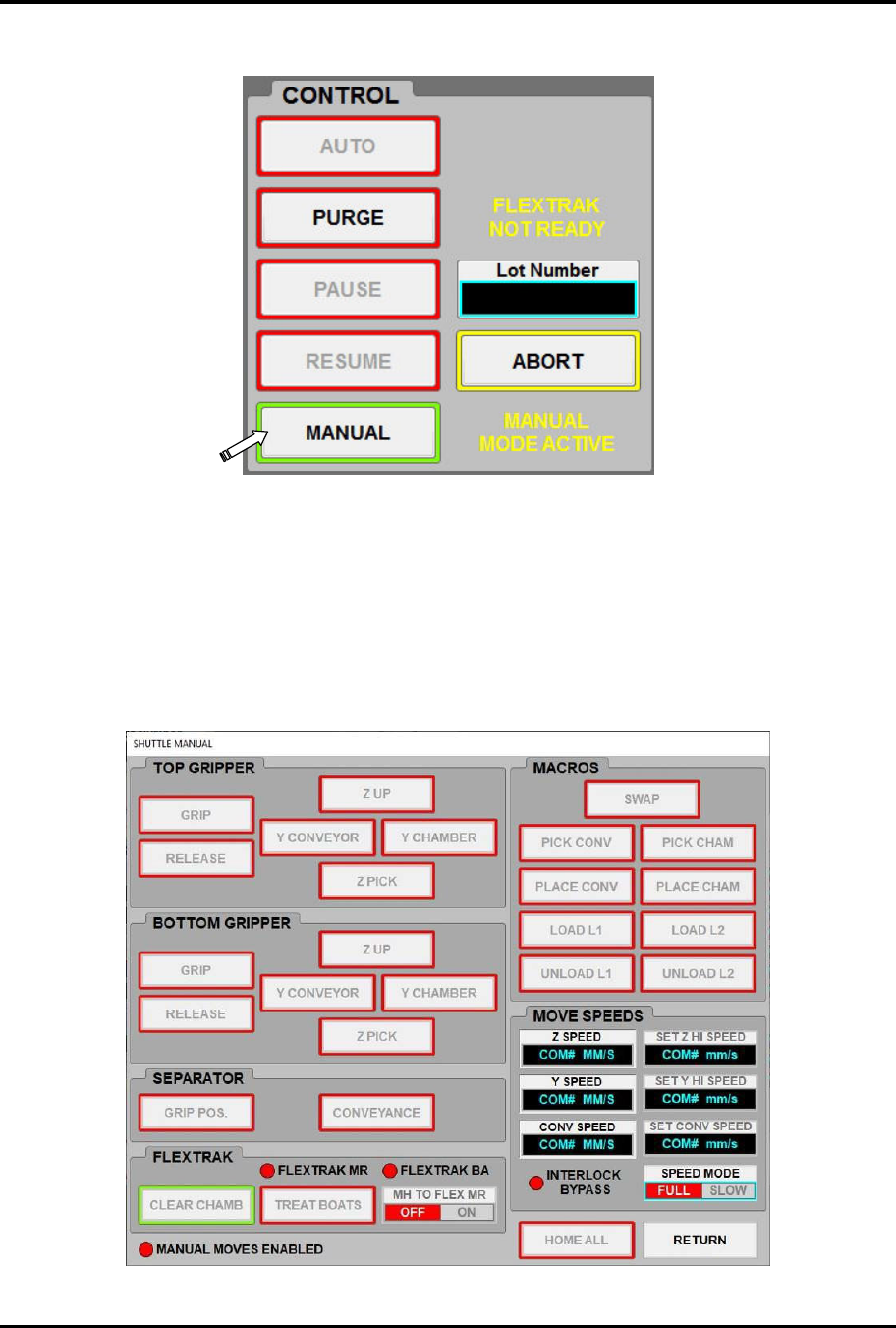
11. Touch the Overview button to return to the FlexTRAK MH Overview screen (Figure 6-12).
12. If the system is not in manual mode, touch the MANUAL button.
„ If the system is in manual mode, the MANUAL button will be highlighted in green and
the AUTO button will be highlighted in red.
FlexTRAK Series 2MB Material Handler Addendum Operations
© 2023 Nordson Corporation 6-13
13. Use the tool to process and unload the workpiece.
Figure 6-12 MH Overview Screen - Manual Mode
6.7.2 Manually Controlling the Shuttler System
The Shuttle Manual screen provides manual control of the shuttler system when the MH is in Manual
mode.
Manual mode must be enabled to control and manipulate shuttler and conveyor movements. When the
system is not in manual mode, the MANUAL MOVES ENABLED radio button is red and the Shuttle
Manual screen controls are inactive (Figure 6-13).
Figure 6-13 Manual Moves Disabled