FlexTRAK 2MB Material Handler Addendum Rev 05.pdf - 第132页
FlexTRAK Series 2MB Mater ial Handler Adden dum Teaching Axis Positions 7-4 © 2023 Nordson Corporati on 7.2 Bypass Mode Material handling bypass mode is typically used for setup and teaching axis pos itions. Bypass mode …

FlexTRAK Series 2MB Material Handler Addendum Teaching Axis Positions
© 2023 Nordson Corporation 7-3
6. Touch the button that corresponds with the position to be taught. That button highlights
green indicating that position can be taught. Teach commands are described in Table 5-9.
7. Touch the MODE button to select the mode to control the speed of the drive being taught.
There are two modes: STEP and JOG.
8. Press once or hold down a directional arrow button to move the assembly in the desired
position.
FRONT UP DOWN BACK
STEP: equals 0.05 mm per touch.
FRONT UP DOWN BACK
JOG: equals 25 mm per sec.
9. Touch the SAVE POSITION button to save new teach points and overwrite existing
values.
10. Repeat Step 6 through Step 9 for each set point that needs to be updated.
?
NOTE A save must be performed after each position is taught. Make sure the correct
position is highlighted before clicking SAVE. The new values will become the
new set points for the highlighted position.
11. Touch the EXIT TEACH button to exit the teach mode.
?
NOTE Closing the Teach dialog box will return the machine to stop mode.
FlexTRAK Series 2MB Material Handler Addendum Teaching Axis Positions
7-4 © 2023 Nordson Corporation
7.2 Bypass Mode
Material handling bypass mode is typically used for setup and teaching axis positions. Bypass mode
allows the technician to operate the MH with open access into the system via the front door.
?
NOTE This section is intended for maintenance personnel operating the FlexTRAK-2MB system
manually.
CAUTION! While operating the MH in bypass mode, exercise caution
around the moving components of the MH. Even though speeds
have been reduced, the potential danger of minor to moderate
injury to personnel can occur if proper procedures are not
followed.
Operating the FlexTRAK-2MB System in Bypass mode with the front door open disables safety
interlocks for the following hazards:
Table 7-1 Safety Hazards in Bypass Mode
Hazard Location Description
Pinch Point
Conveyor, Material
Handler System,
Process Chamber
A high-risk crushing hazard is created by the movement of the
conveyor.
Moving
Parts
Conveyor, Material
Handler System,
Process Chamber
A hand entanglement hazard is created by the movement of the
grippers. Keep hands away from this area unless the system
power is off.
Thermal
Hazard
Process Chamber
A high risk burn hazard is created by the process chamber.
Keep hands away from this area unless the system power is off
and heaters have cooled.
Radiation Process Chamber
Non-ionizing radiation hazard. RF generator produces RF
energy at levels that may cause burns.
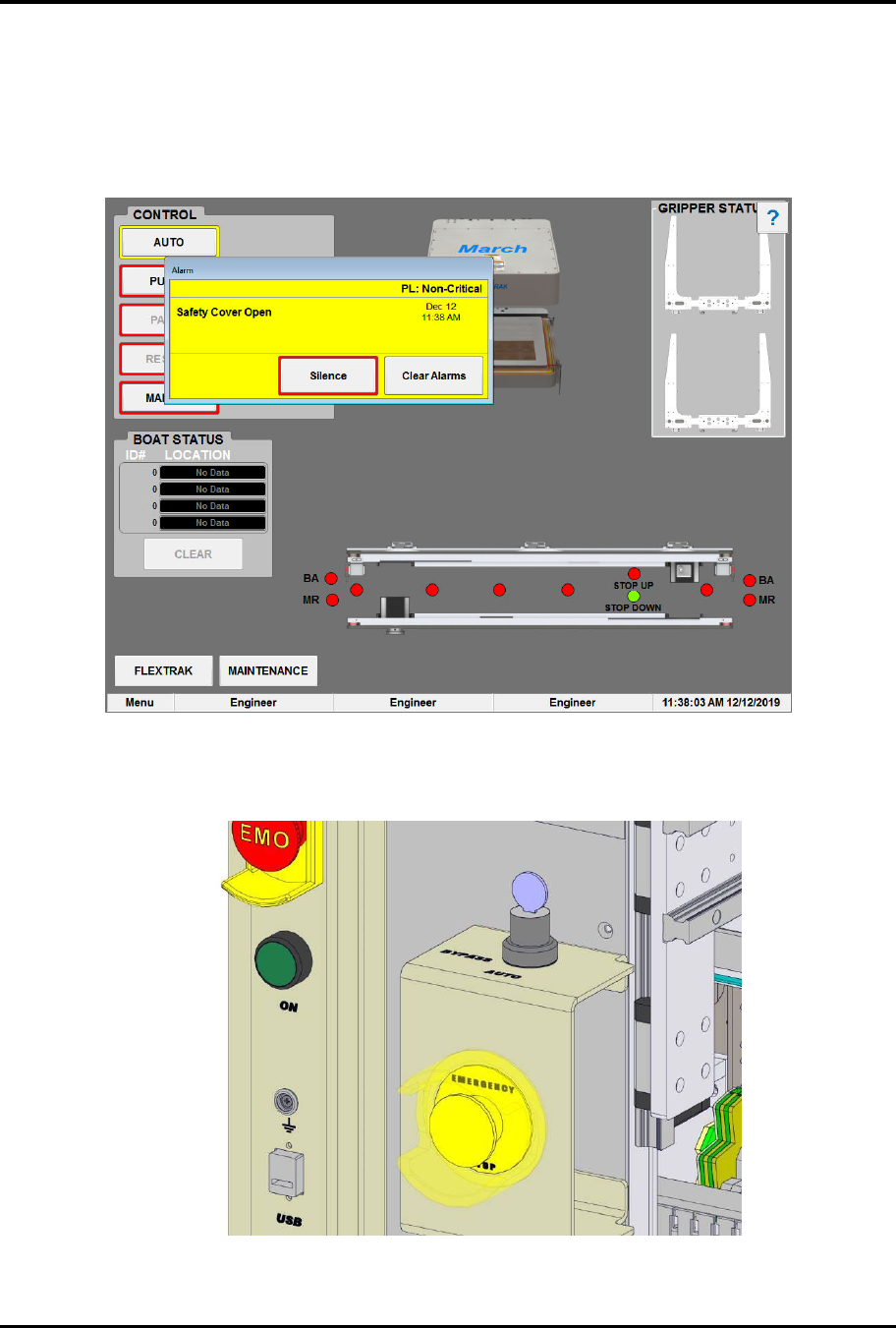
Material handling bypass mode allows the MH to operate while the front door of the FlexTRAK-2MB
System is open. While in this mode, all five drives will operate at a fixed 25mm/sec. There is a key switch
that can only be accessed after opening the front door (Figure 4-1). Once the key is positioned to
BYPASS, the MH will override the front door interlock. At this point only the MH controls will function
at the reduced speeds. However, if the front door is then closed (interlock is made but still in bypass
mode) all FlexTRAK-2MB system controls will function. This mode is used during setup and teaching of
the system.
FlexTRAK Series 2MB Material Handler Addendum Teaching Axis Positions
© 2023 Nordson Corporation 7-5
7.2.1 Operating in Bypass Mode
To operate in bypass mode:
1. Open the FlexTRAK-2MB’s front door.
„ The Safety Cover Open dialog box opens (Figure 7-3).
Figure 7-3 Safety Cover Open Alarm
2. Turn the bypass key switch to BYPASS (Figure 7-4).
Figure 7-4 Bypass Key Switch