FlexTRAK 2MB Material Handler Addendum Rev 05.pdf - 第148页
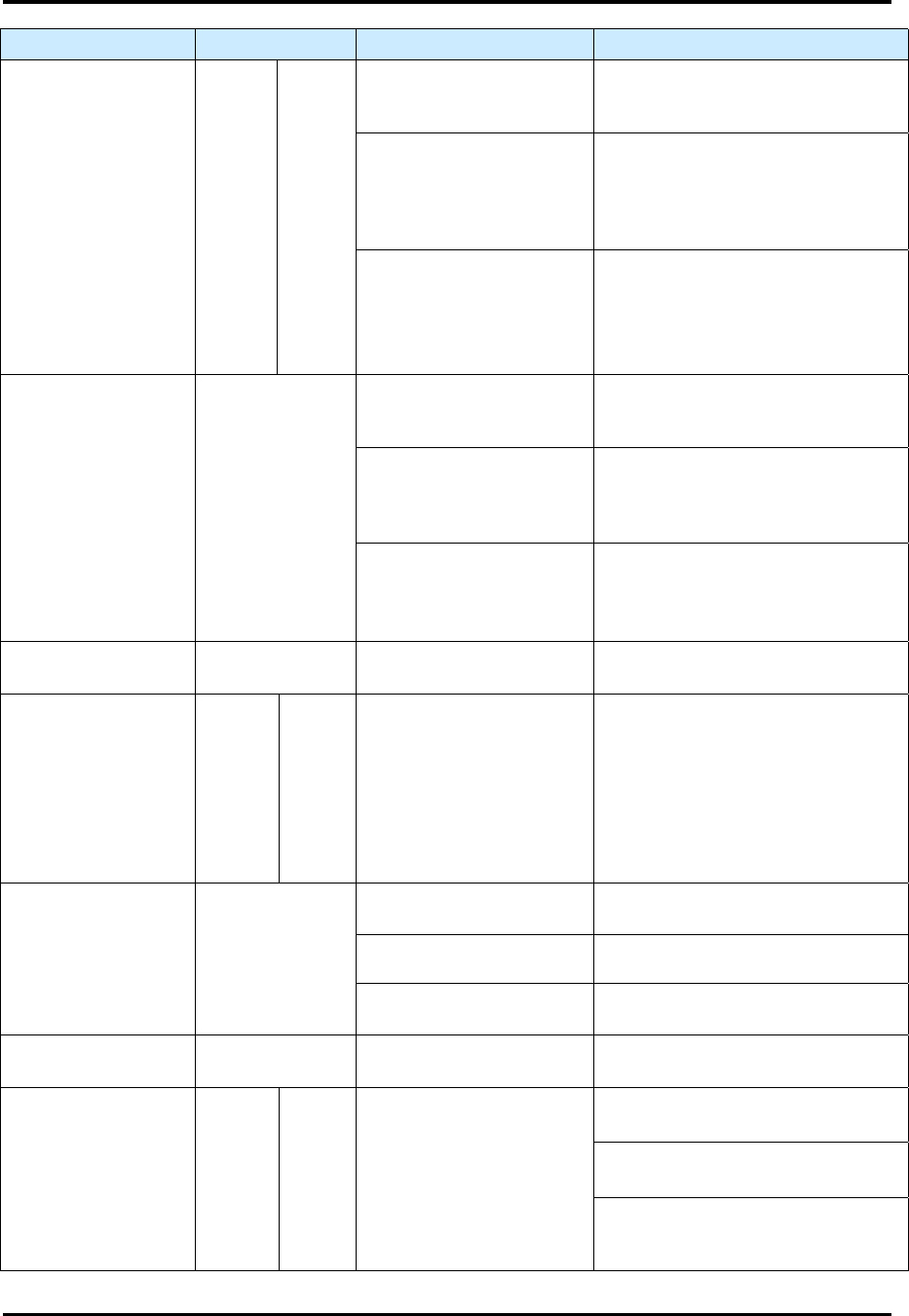
FlexTRAK Series 2MB Mater ial Handler Adden dum Troubleshooting 9-6 © 2023 Nordson Corporati on Alarm Name Alarm Display Possible Causes Remedy Unload Out Error LN 1 LN 2 Time out expired for unloading sequence. (Grip Po…
FlexTRAK Series 2MB Material Handler Addendum Troubleshooting
© 2023 Nordson Corporation 9-5
Alarm Name Alarm Display Possible Causes Remedy
Bot Axis Home Error Y Z
Home sensor flag does
not enable the Home
sensor.
Verify that the drive has reached
position and Home sensor is
enabled.
Controller feedback is
indicating a problem.
Possible stall or loss of power.
Check the controller for error
conditions. Digital Input Y Top/Bot
and/or Z Top/Bot Alarm LED will
be RED.
Timeout has expired for
the Bot Axis to transfer to
the next position.
(Y timeout = 30 sec)
(Z timeout = 30 sec)
Verify that there is no interference
with the axis to prevent movement.
Conv Axis Home
Error
ERROR
Home sensor flag does
not enable the Home
sensor.
Verify that the drive has reached
position and Home sensor is
enabled.
Controller feedback is
indicating a problem.
Possible stall or loss of power.
Check the controller for error
conditions. Digital Input Convey
Alarm LED will be RED.
Timeout has expired for
the Conv Axis to transfer
to the next position.
(Y timeout = 30 sec)
Verify that there is no interference
with the axis to prevent movement.
Not Clear To Home ERROR
Interlock conditions not
met for homing routine.
Check all interlocks.
Counter-Balance
Pressure
LO HI
MHS Transfer System
main pressure input has
tripped the high or low
limits.
Lo Limit = 42 psi (Not
adjustable)
Hi Limit = 62 psi (Not
adjustable)
Adjust the MHS Transfer System
regulator to read 52 psi.
E-Stop/Safety Cover OPEN
E-Stop button is pressed.
Release the E-Stop button by
twisting it until it resets.
Front door is opened. Close door to reset interlock.
Lower sliding shelf is not
closed.
Close the lower sliding shelf to
reset the interlock.
PLC Stepper Card
Error
ERROR
Possible internal issue
with the card.
Card may need to be
reprogrammed or replaced.
Load In Error LN 1 LN 2
Time out expired for
loading sequence.
Entry to Grip Pos. = 20
sec (default, user-
configurable)
Check for process carrier jamming.
Conveyor lane speeds are set too
low.
Conveyor motors are non-
responsive. Test motor using
manual commands.
FlexTRAK Series 2MB Material Handler Addendum Troubleshooting
9-6 © 2023 Nordson Corporation
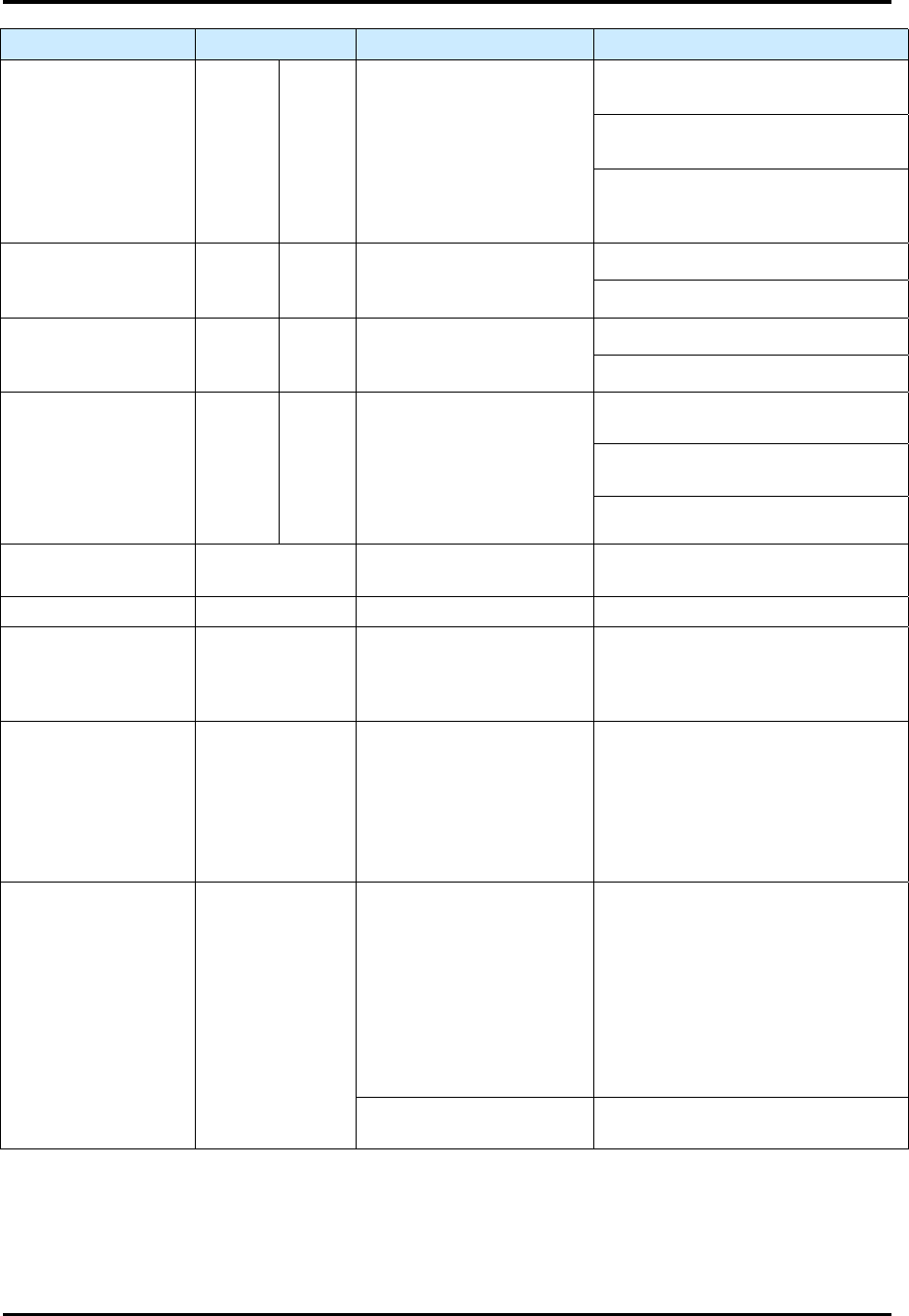
Alarm Name Alarm Display Possible Causes Remedy
Unload Out Error LN 1 LN 2
Time out expired for
unloading sequence.
(Grip Pos. to Exit = 20
sec)
Check for process carrier jamming.
Conveyor lane speeds are set too
low.
Conveyor motors are non-
responsive. Test motor using
manual commands.
Stopper Up Error LN 1 LN 2
Time out expired.
(Cyl Up to Cyl DN = 2 sec)
Check for interference.
Check air supply.
Stopper Down Error LN 1 LN 2
Time out expired.
(Cyl Up to Cyl DN = 2 sec)
Check for interference.
Check air supply.
Unexpected Boat On
Conveyor
LN 1 LN 2
DETECT 1-5 on Lane 1 or
2 have toggled state
unexpectedly.
Incorrect placement or sequence of
loading or unloading of work piece.
Sensor state was inadvertently
changed.
Debris on sensor lens.
Not Clear To Start ERROR
Interlock conditions not
met for homing routine.
Check all interlocks.
Process Aborted ABORTED MHS has been aborted. Acknowledge and continue.
Bypass Engaged In
Auto Mode
ERROR
AUTO process was
selected but the bypass
mode key switch is set to
BYPASS.
Set the bypass mode key switch to
AUTO.
Chamber Not Clear ERROR
The chamber lid is in an
unsafe position in order
the machine to operate.
The chamber lid must be up with
the chamber upper limit switches
made or down with the chamber
down switches made. Refer to the
FlexTRAK Installation, Operations
and Maintenance manual for
further troubleshooting remedies.
Sequencing Error ERROR
The MHS PLC has
detected an illegal
condition.
Try each remedy below in
sequence. Stop when the alarm
clears.
1. Acknowledge and reset the
alarm.
2. Toggle the PLC Run/Stop
switch.
3. Turn the system Off and then
On to reset.
The MHS PLC has failed. Contact Technical Support.

© 2023 Nordson Corporation A-1
A - Servicing Information
A.1 Overview
This appendix contains the Nordson service information for the plasma systems.
A.2 Servicing Information
If a plasma system requires service or if technical assistance is desired, contact
Technical Support. Be prepared to provide the following information:
The serial number of plasma system and all associated components.
q The currently installed software versions of the plasma system.
q A detailed description of process parameters, including the material being
etched, gas or gases used, chamber pressure during the process, RF power
levels applied, and duration of process.
q A detailed description of the problems encountered.
For recommended maintenance and part replacement procedures, refer to Section
8 -Maintenance and Appendix B - Parts Replacement.
A.3 Returning the Plasma System
If a plasma system is returned to Nordson for service or for any other reason, the
following procedure must be followed:
q Obtain a Return Authorization (RA) number through Technical Support. Display
this number on your shipping label. A unit received without a visible RA number
will be rejected.
q Repack the system in its original shipping container. If this is no longer
available, take special precautions to avoid damage to any parts of the system.
An approved shipping container may be purchased from Nordson.
q If the system is out of warranty, a purchase order will be required and you will
be billed for all parts, service, shipping costs, and travel expenses.