FlexTRAK 2MB Material Handler Addendum Rev 05.pdf - 第134页
FlexTRAK Series 2MB Mater ial Handler Adden dum Teaching Axis Positions 7-6 © 2023 Nordson Corporati on 3. Touch the MANUAL button to switch th e MH to Manual mode (Figure 5-4). 4. Touch the MAINTENANCE button. „ The Ma …
FlexTRAK Series 2MB Material Handler Addendum Teaching Axis Positions
© 2023 Nordson Corporation 7-5
7.2.1 Operating in Bypass Mode
To operate in bypass mode:
1. Open the FlexTRAK-2MB’s front door.
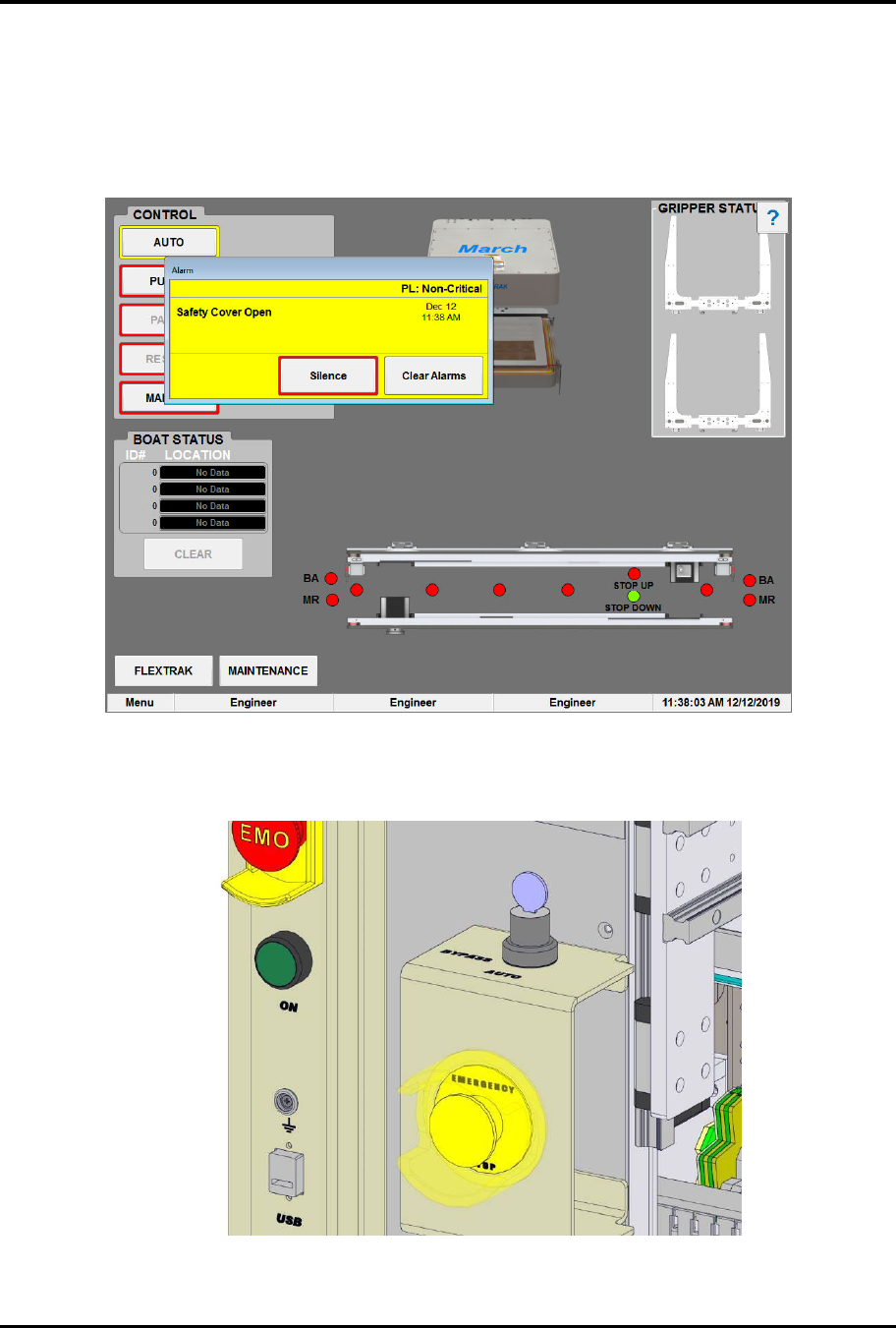
„ The Safety Cover Open dialog box opens (Figure 7-3).
Figure 7-3 Safety Cover Open Alarm
2. Turn the bypass key switch to BYPASS (Figure 7-4).
Figure 7-4 Bypass Key Switch
FlexTRAK Series 2MB Material Handler Addendum Teaching Axis Positions
7-6 © 2023 Nordson Corporation
3. Touch the MANUAL button to switch the MH to Manual mode (Figure 5-4).
4. Touch the MAINTENANCE button.
„ The Maintenance Master screen opens (Figure 5-5).
5. Touch the SHUTTLER button.
„ The Axis Status screen opens in Bypass Mode.
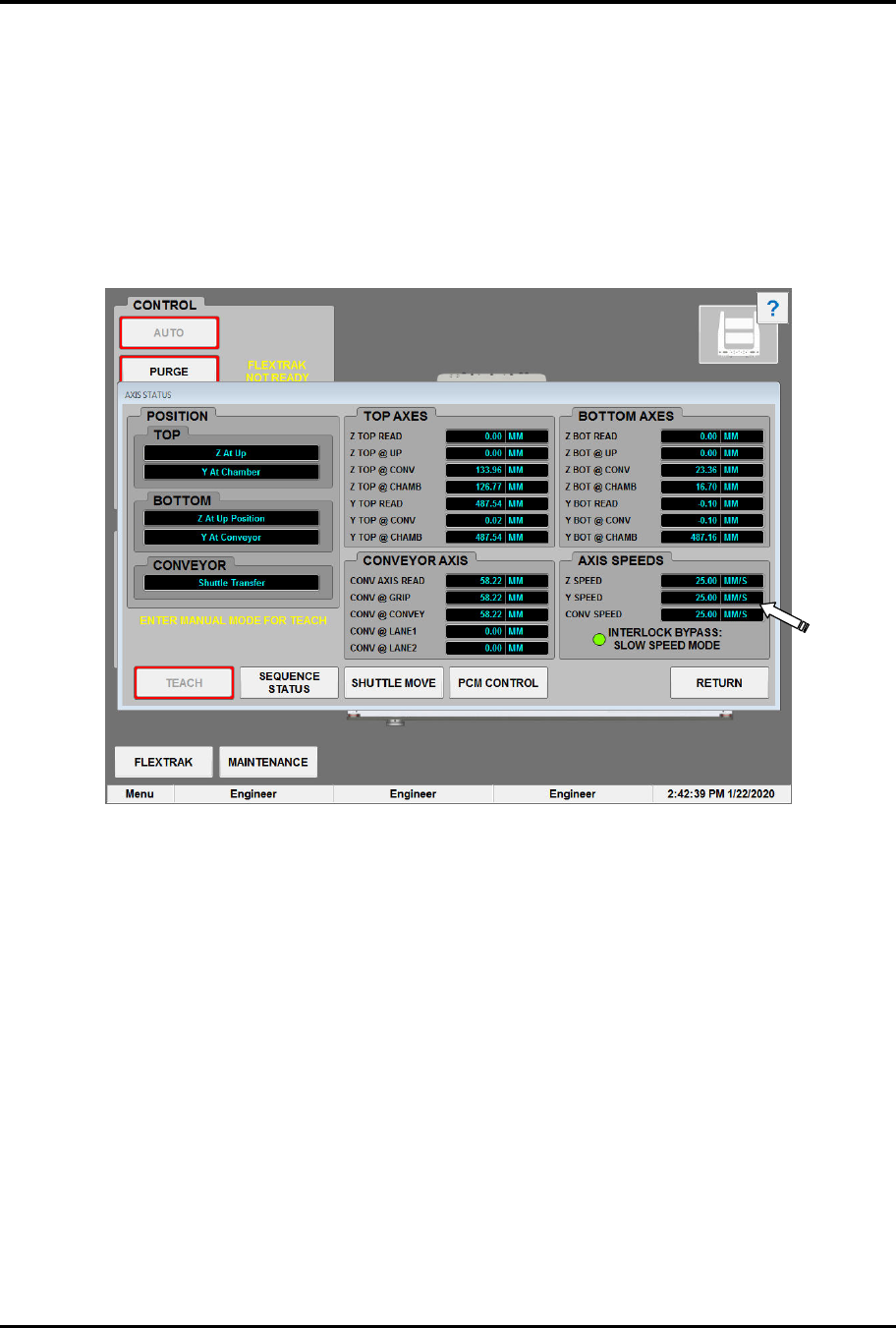
„ Notice that the axis speeds have all been reset to 25mm/sec and the note below the set
points reads "Interlock Bypass: Slow Speed Mode" (Figure 7-5).
Figure 7-5 Axis Status Screen in Bypass Mode
6. Click the MANUAL MODE button to enter manual mode.
„ The TEACH button becomes available after manual mode is entered.
7. Setup and teach the system using the FlexTRAK-2MB manual controls, see 7.1 Teaching
MH Axis Positions and 6.7 Manual Mode.
8. To exit bypass mode, open the FlexTRAK-2MB front door and turn the bypass key switch
to AUTO.
© 2023 Nordson Corporation 8-7
8 Maintenance
8.1 Overview
This section explains recommended periodic maintenance required on the major 2MB Material Handler
components in the list below.
8.2 Safety First
Before performing any of the procedures in this section, please review the precautions found in
Section 2 - Safety.
WARNING! To prevent exposure to hazardous voltages, RF radiation,
process gases, and pneumatic pressures, the system should be locked out and
tagged out during maintenance procedures, see 2.11 Service Shutdown.
CAUTION! Only trained and authorized personnel should perform
maintenance tasks on the 2MB Material Handler system.
8.3 Record Keeping
Record the type of procedure performed in maintenance records for the material handling system. This
includes dates, part numbers/serial numbers of replaced parts, names of technicians, and other pertinent
data.
8.4 Recommended Shuttler Maintenance
User-performed maintenance required for the shuttler system is minimal. However, regular attention to
the suggested maintenance items will help to ensure proper operation and maximum availability of
the system. Refer to your FlexTRAK 2MB Electrode Fixturing Addendum for details.
?
NOTE The maintenance interval depends on the level of system use. Specified intervals are for
systems averaging 12 or more hours per day (see Table 8-1).
Table 8-1 Recommended Shuttler Maintenance Procedures
Item Frequency Instructions Comments
Gripper Fingers As needed
Wipe down both mounting surfaces
with a soft cloth and isopropyl
alcohol, see 8.4.2 Changing the
Gripper Fingers and Detection
Switches.
8 each per assembly. Evaluated
based on excess wear.
Conveyor Six Months
Tension Conveyor Belts, see 8.4.3
Tensioning the Conveyor Belts
2 each per assembly. Evaluated
based on excess wear.
Conveyor As needed
Replace Conveyor Belts, see 8.4.4
Replacing the Conveyor Belts.
2 each per assembly. Evaluated
based on excess wear.