FlexTRAK 2MB Material Handler Addendum Rev 05.pdf - 第138页
FlexTRAK Series 2MB Mater ial Handler Adden dum Maintenance 8-10 © 2023 Nordson Corporation 8.4.2 Cha n ging the Gripper Fingers and Detection Switches Figure 8-2 shows h ow to remove the switch es and gripper fingers fr…
FlexTRAK Series 2MB Material Handler Addendum Maintenance
© 2023 Nordson Corporation 8-9
8.4.1 Removing the Gripper Assemblies
?
NOTE It is not necessary to remove the gripper assemblies for cleaning purposes. However, you
can remove the gripper assemblies for inspection, troubleshooting, or part replacement.
After you have removed the gripper assemblies, you can service them on a bench-top
table.
Tools and Materials Needed:
q
4 mm
Allen
Key
q
Soft Cloth and Cotton Swabs
q
Isopropyl Alcohol
q
Removable Thread Locker
?
NOTE See Appendix A for a list of replacement shuttler gripper parts.
For ease of reinstallation, note the location, orientation, and routing of the wiring, tubing,
and any additional components before removing them.
Retain all components and fasteners removed during this procedure in an orderly manner
and in a safe location for reinstallation or shipment back to Nordson.
To remove the shuttle gripper assembly:
CAUTION! This procedure should only be performed by a trained service
technician.
1. Perform a service shutdown, see 2.11 Service Shutdown.
2. Open the front door.
3. Pull the gripper assembly toward the front of the system.
4. Remove the electrical wires and air lines from the cable tie located at the mounting plate.
5. Disconnect the electrical connector located at the center of the gripper.
6. Disconnect both air lines from the gripper actuator at the push-in connectors.
7. Using a 4 mm Allen key, locate and remove the three mounting screws from the mounting
plate.
„ Even though the mounting plate is pinned to the Y-Axis drive assembly, use caution
when removing the last bolt, because the assembly could dislodge from the alignment
pins and fall.
8. Perform the necessary service or inspection, such as replacement of the gripper fingers.
9. Wipe down both mounting surfaces using a soft cloth and isopropyl alcohol.
10. Reassemble in reverse order.
11. Check alignment of the gripper assembly by manually picking and placing process carriers
to ensure proper reassembly and repeatability. Adjust if necessary.
FlexTRAK Series 2MB Material Handler Addendum Maintenance
8-10 © 2023 Nordson Corporation
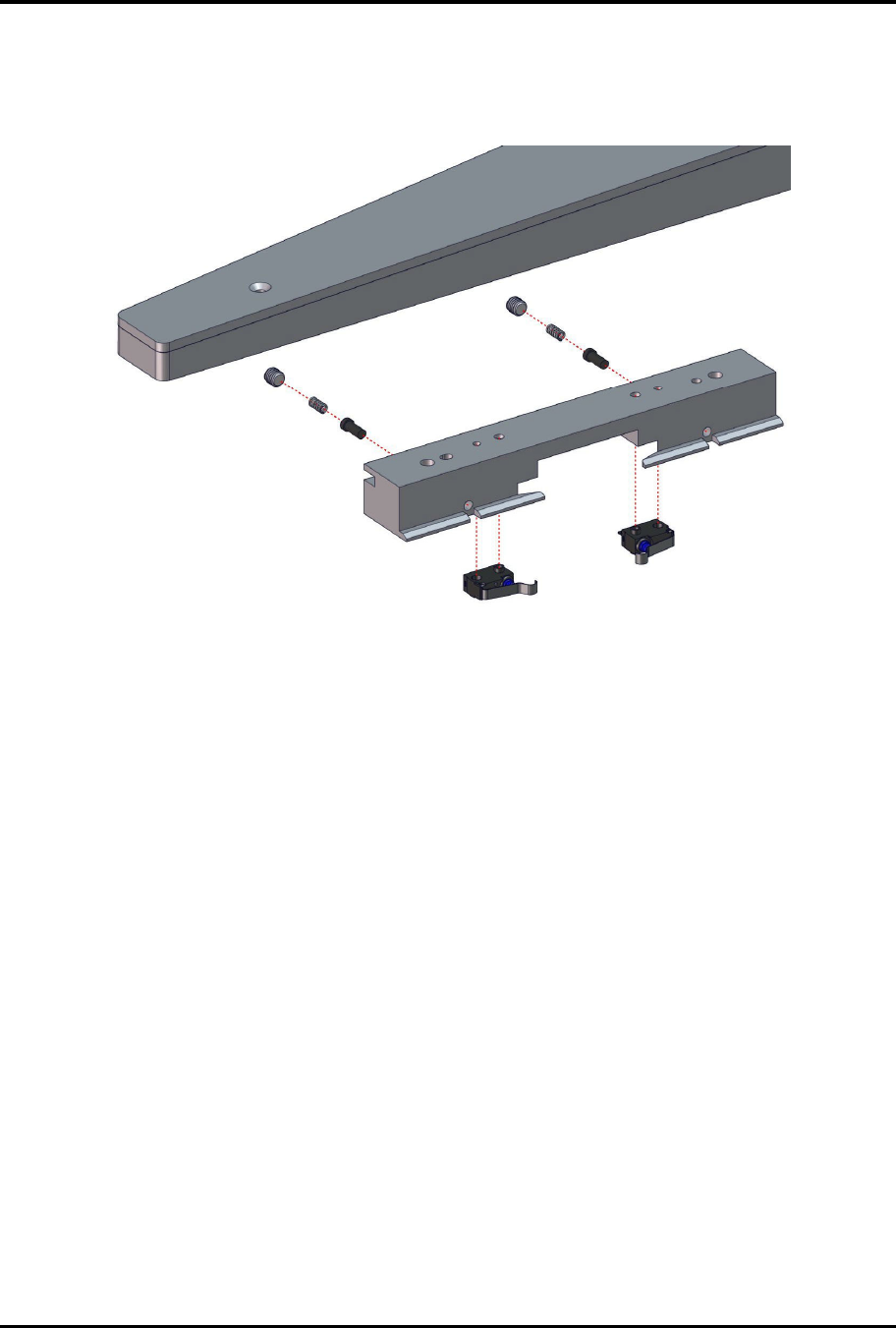
8.4.2 Changing the Gripper Fingers and Detection Switches
Figure 8-2 shows how to remove the switches and gripper fingers from the gripper arm for replacement or
repair.
Figure 8-2 Changing out the Gripper Fingers and Detection Switches
FlexTRAK Series 2MB Material Handler Addendum Maintenance
© 2023 Nordson Corporation 8-11
8.4.3 Tensioning the Conveyor Belts
To tension the conveyor belts:
1. Perform a service shutdown, see 2.11 Service Shutdown.
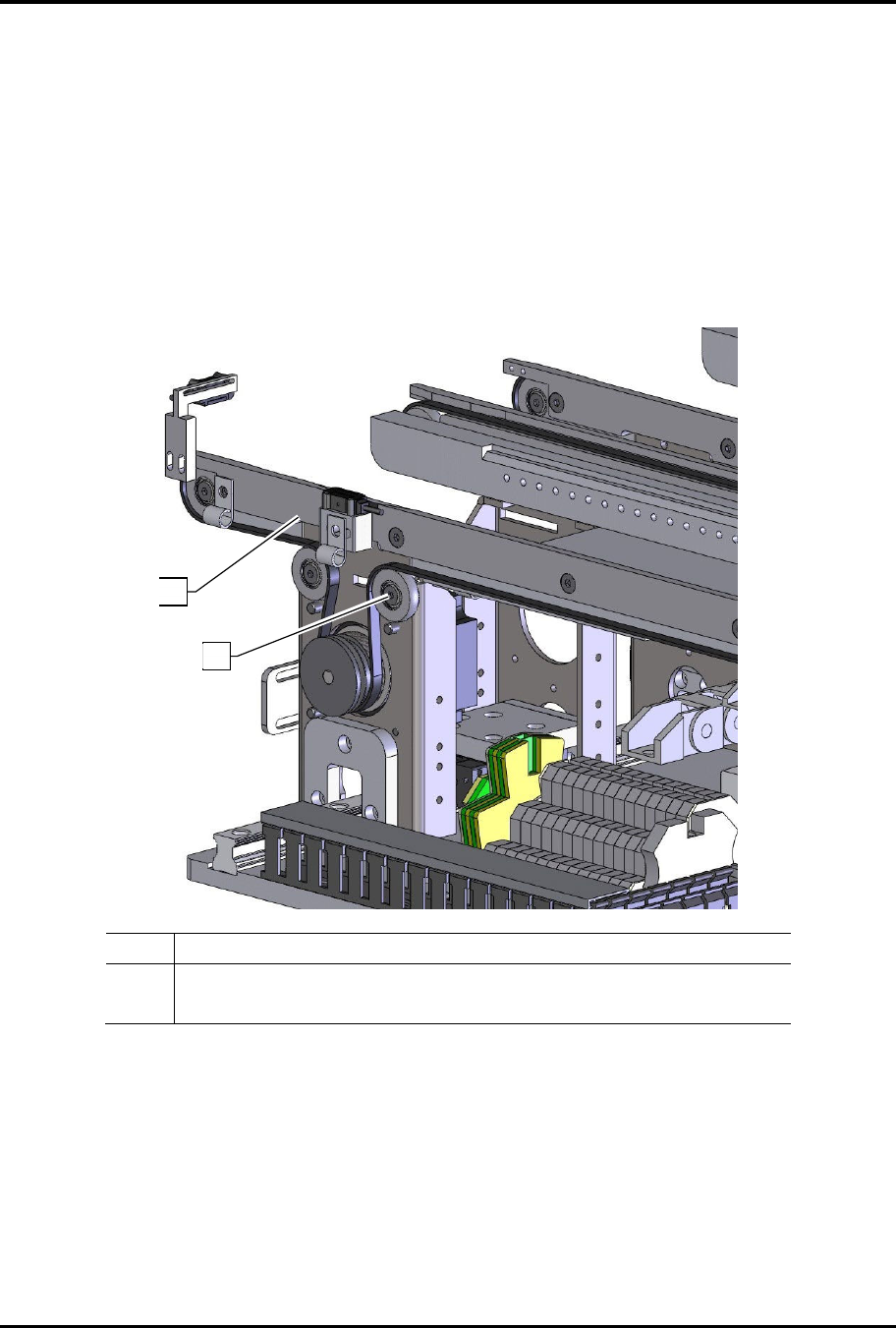
2. Loosen the pulley tire tensioner screw located on the tensioner pulley tire (Figure 8-3).
3. Move the tension pulley tire right and left until the desired tension is obtained.
4. Tighten the belt tensioner screw.
5. Repeat Step 2 through Step 4 for the other belt.
Item Description
1 Conveyor Belt
2 Pulley Tire Tensioner Screw
Figure 8-3 Tensioning the Conveyor Belts
?
NOTE If the conveyor belts need to be replaced, see 8.4.4 Replacing the Conveyor Belts.
2
1