FlexTRAK 2MB Material Handler Addendum Rev 05.pdf - 第87页
FlexTRAK Series 2MB Mater ial Handler Adden dum Tour of HMI Softw are for the Material Handler © 2023 Nordson Corporation 5-21 Control Description Z BOT POS BIT 4 Indicates the status of the Z-axis Bottom Positio n Bit 4…
FlexTRAK Series 2MB Material Handler Addendum Tour of HMI Software for the Material Handler
5-20 © 2023 Nordson Corporation
5.5.2 Digital Input Status Screen
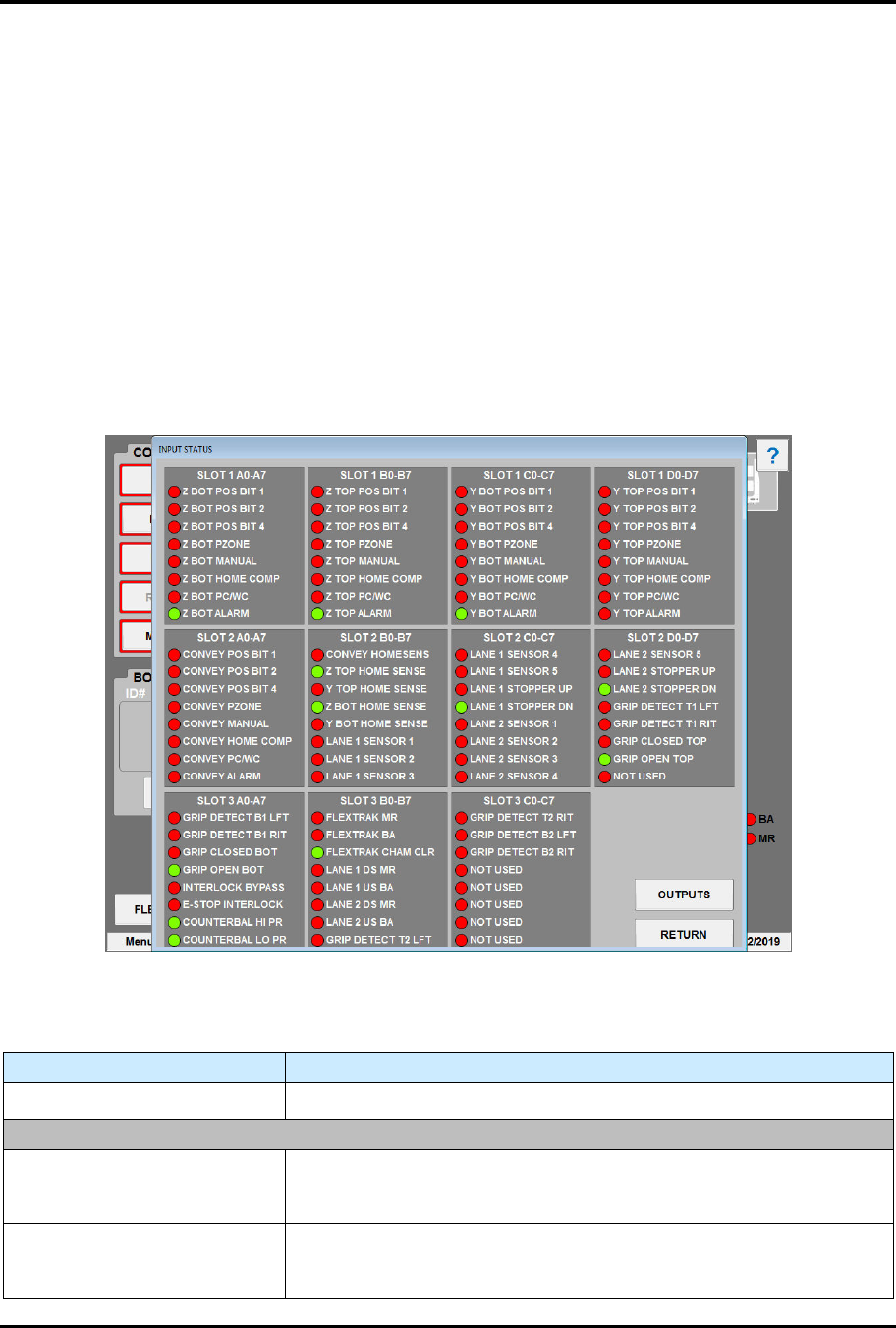
During operation, you can view the status of all digital input points of the plasma system’s EPC I/O on
the Input Status screen (Figure 5-12). The Input Status screen can also be useful during troubleshooting to
check if a sensor is active and lit. A red light means the I/O point is off (open/disconnected), and a green
light means that it is on (closed/connected). See Table 5-14 for descriptions of the Input Status screen
controls and indicators.
To access the input status screen:
1. Touch the MAINTENANCE button on the MH Overview screen to access maintenance
commands.
„ The Maintenance Master screen opens (Figure 5-5).
2. Touch the DIGITAL INPUTS button.
„ The Input Status screen opens (Figure 5-12).
Figure 5-12 Input Status Screen
Table 5-14 Input Status Screen Point Descriptions
Control Description
OUTPUTS
Touch to switch to the Output Status screen (Figure 5-13).
SLOT 1 A0-A7
Z BOT POS BIT 1
Indicates the status of the Z-axis Bottom Position Bit 1 sensor. A red
light means the I/O point is off (open/disconnected), and a green light
means that it is on (closed/connected).
Z BOT POS BIT 2
Indicates the status of the Z-axis Bottom Position Bit 2 sensor. A red
light means the I/O point is off (open/disconnected), and a green light
means that it is on (closed/connected).
FlexTRAK Series 2MB Material Handler Addendum Tour of HMI Software for the Material Handler
© 2023 Nordson Corporation 5-21
Control Description
Z BOT POS BIT 4
Indicates the status of the Z-axis Bottom Position Bit 4 sensor. A red
light means the I/O point is off (open/disconnected), and a green light
means that it is on (closed/connected).
Z BOT PZONE
Indicates the status of the Z-axis Bottom PZone sensor. A red light
means the I/O point is off (open/disconnected), and a green light
means that it is on (closed/connected).
Z BOT MANUAL
Indicates the status of the Z-axis Bottom Manual sensor. A red light
means the I/O point is off (open/disconnected), and a green light
means that it is on (closed/connected).
Z BOT HOME COMP
Indicates the status of the Z-axis Bottom Home Comp sensor. A red
light means the I/O point is off (open/disconnected), and a green light
means that it is on (closed/connected).
Z BOT PC/WC
Indicates the status of the Z-axis Bottom PC/WC sensor. A red light
means the I/O point is off (open/disconnected), and a green light
means that it is on (closed/connected).
Z BOT ALARM
Indicates the status of the Z-axis Bottom Alarm sensor. A red light
means the I/O point is off (open/disconnected), and a green light
means that it is on (closed/connected).
SLOT 1 B0-B7
Z TOP POS BIT 1
Indicates the status of the Z-axis Top Position Bit 1 sensor. A red light
means the I/O point is off (open/disconnected), and a green light
means that it is on (closed/connected).
Z TOP POS BIT 2
Indicates the status of the Z-axis Top Position Bit 2 sensor. A red light
means the I/O point is off (open/disconnected), and a green light
means that it is on (closed/connected).
Z TOP POS BIT 4
Indicates the status of the Z-axis Top Position Bit 4 sensor. A red light
means the I/O point is off (open/disconnected), and a green light
means that it is on (closed/connected).
Z TOP PZONE
Indicates the status of the Z-axis Top PZone sensor. A red light
means the I/O point is off (open/disconnected), and a green light
means that it is on (closed/connected).
Z TOP MANUAL
Indicates the status of the Z-axis Top Manual sensor. A red light
means the I/O point is off (open/disconnected), and a green light
means that it is on (closed/connected).
Z TOP HOME COMP
Indicates the status of the Z-axis Top Home Comp sensor. A red light
means the I/O point is off (open/disconnected), and a green light
means that it is on (closed/connected).
Z TOP PC/WC
Indicates the status of the Z-axis Top PC/WC sensor. A red light
means the I/O point is off (open/disconnected), and a green light
means that it is on (closed/connected).
Z TOP ALARM
Indicates the status of the Z-axis Top Alarm sensor. A red light
means the I/O point is off (open/disconnected), and a green light
means that it is on (closed/connected).
FlexTRAK Series 2MB Material Handler Addendum Tour of HMI Software for the Material Handler
5-22 © 2023 Nordson Corporation
Control Description
SLOT 1 C0-C7
Y BOT POS BIT 1
Indicates the status of the Y-axis Bottom Position Bit 1 sensor. A red
light means the I/O point is off (open/disconnected), and a green light
means that it is on (closed/connected).
Y BOT POS BIT 2
Indicates the status of the Y-axis Bottom Position Bit 2 sensor. A red
light means the I/O point is off (open/disconnected), and a green light
means that it is on (closed/connected).
Y BOT POS BIT 4
Indicates the status of the Y-axis Bottom Position Bit 4 sensor. A red
light means the I/O point is off (open/disconnected), and a green light
means that it is on (closed/connected).
Y BOT PZONE
Indicates the status of the Y-axis Bottom PZone sensor. A red light
means the I/O point is off (open/disconnected), and a green light
means that it is on (closed/connected).
Y BOT MANUAL
Indicates the status of the Y-axis Bottom Manual sensor. A red light
means the I/O point is off (open/disconnected), and a green light
means that it is on (closed/connected).
Y BOT HOME COMP
Indicates the status of the Y-axis Bottom Home Comp sensor. A red
light means the I/O point is off (open/disconnected), and a green light
means that it is on (closed/connected).
Y BOT PC/WC
Indicates the status of the Y-axis Bottom PC/WC sensor. A red light
means the I/O point is off (open/disconnected), and a green light
means that it is on (closed/connected).
Y BOT ALARM
Indicates the status of the Y-axis Bottom Alarm sensor. A red light
means the I/O point is off (open/disconnected), and a green light
means that it is on (closed/connected).
SLOT 1 D0-D7
Y TOP POS BIT 1
Indicates the status of the Y-axis Top Position Bit 1 sensor. A red
light means the I/O point is off (open/disconnected), and a green light
means that it is on (closed/connected).
Y TOP POS BIT 2
Indicates the status of the Y-axis Top Position Bit 2 sensor. A red
light means the I/O point is off (open/disconnected), and a green light
means that it is on (closed/connected).
Y TOP POS BIT 4
Indicates the status of the Y-axis Top Position Bit 4 sensor. A red
light means the I/O point is off (open/disconnected), and a green light
means that it is on (closed/connected).
Y TOP PZONE
Indicates the status of the Y-axis Top PZone sensor. A red light
means the I/O point is off (open/disconnected), and a green light
means that it is on (closed/connected).
Y TOP MANUAL
Indicates the status of the Y-axis Top Manual sensor. A red light
means the I/O point is off (open/disconnected), and a green light
means that it is on (closed/connected).
Y TOP HOME COMP
Indicates the status of the Y-axis Top Home Comp sensor. A red light
means the I/O point is off (open/disconnected), and a green light
means that it is on (closed/connected).
Y TOP PC/WC
Indicates the status of the Y-axis Top PC/WC sensor. A red light
means the I/O point is off (open/disconnected), and a green light
means that it is on (closed/connected).