Spectrum+Operating+Manual.pdf - 第142页
S2-9 XX X Se ri es Disp ensi n g Syst em IOM Man ual Troubleshoo ting 7-4 © 2023 Nordson Corporatio n 7.4.3 Dispense Head Co n troller Co n nections and Functions Table 7-3 Dispen sin g Hea d Troubleshooting Symptom Poss…
S2-9XXX Series Dispensing System IOM Manual Troubleshooting
© 2023 Nordson Corporation 7-3
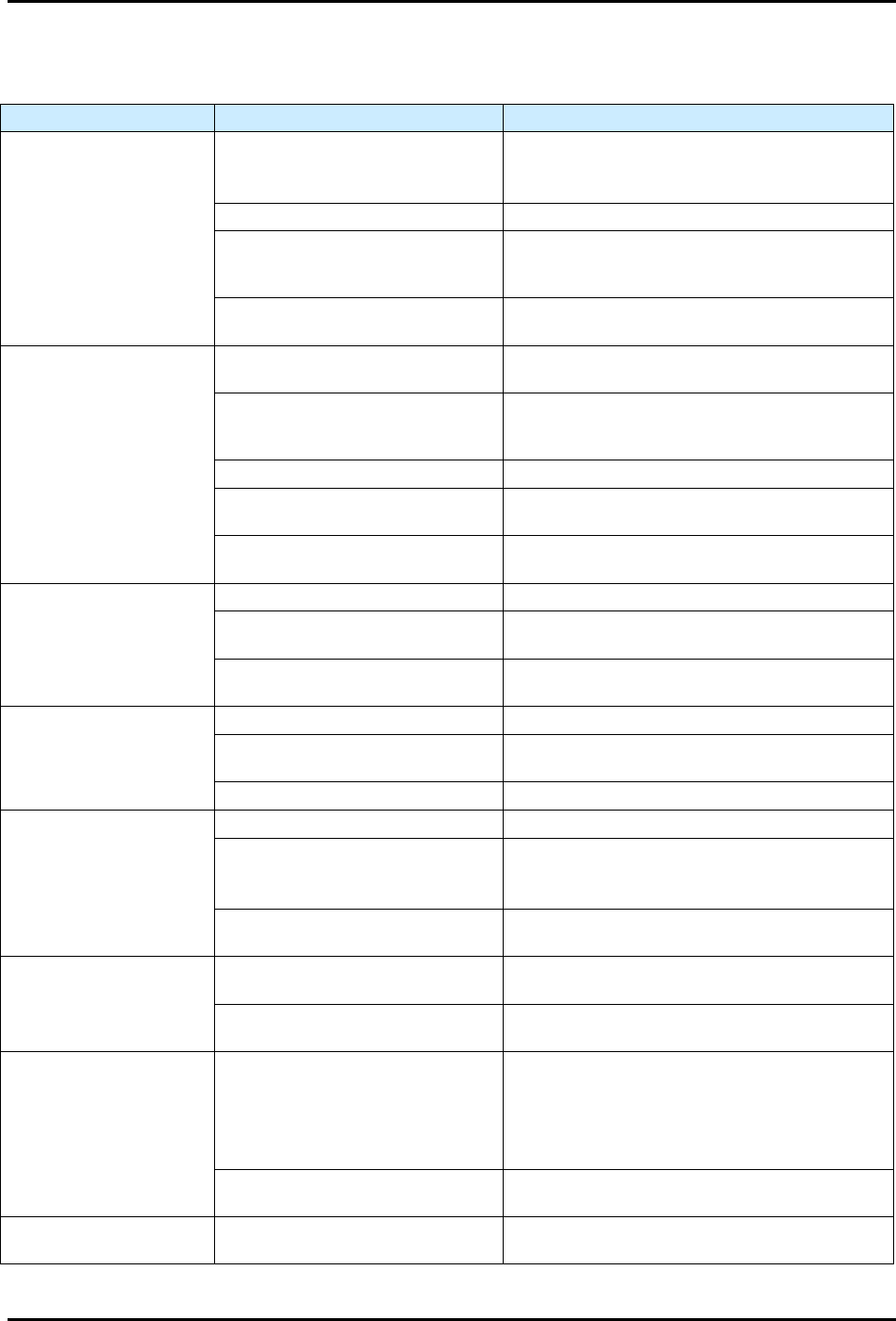
7.4.2 Conveyor
Table 7-2 Conveyor Troubleshooting
Symptom
Possible Cause
Recovery
Rails or belt will not move
EMO button has been activated.
1. Turn the EMO button clockwise until it pops
back into position.
2. Press ON (I) on the operator’s console.
X or Y Motor cables are loose. Contact Asymtek Technical Support.
Fuse is blown in conveyor/heater
controller power supply.
Check the fuses by the heater power
connections on the conveyor controller and
replace if necessary, see 8.16 Replacing Fuses.
Conveyor/heater controller
malfunction.
Contact Asymtek Technical Support.
Stop pins, lift tables or
clamps are inoperative
Tooling air pressure is too low.
Adjust tooling air pressure regulator to supply
275 kPa (40 psi).
There is an air leak in a pneumatic
line or component.
Leaking component or line must be located and
repaired or replaced. Contact Asymtek Technical
Support.
The pneumatic device has failed. Contact Asymtek Technical Support.
Solenoid valve is defective.
The solenoid valve must be replaced. Contact
Asymtek Technical Support.
Conveyor may not be properly
configured in Fluidmove.
Contact Asymtek Technical Support.
Conveyor does not
transfer parts from
upstream to downstream
machines
Workpiece or carrier is jammed. Contact Asymtek Technical Support.
SMEMA interface is not functioning
properly.
Contact Asymtek Technical Support.
Incorrect alignment of upstream or
downstream machine.
The machines must be realigned. Contact
Asymtek Technical Support.
Board sensors not
sensing when board is
present
Board sensor is not active. Contact Asymtek Technical Support.
Board sensor is dirty.
Clean board sensors with a soft cloth or with
blown air.
Board sensor is out of adjustment. Contact Asymtek Technical Support.
Board will not index to
correct position
Stop pin is not receiving air. Contact Asymtek Technical Support.
Board sensor is dirty, not active or
out of adjustment.
Clean board sensor.
If no improvement, contact Asymtek Technical
Support.
Gap between conveyor rails is too
narrow
Check conveyor width and readjust as
necessary.
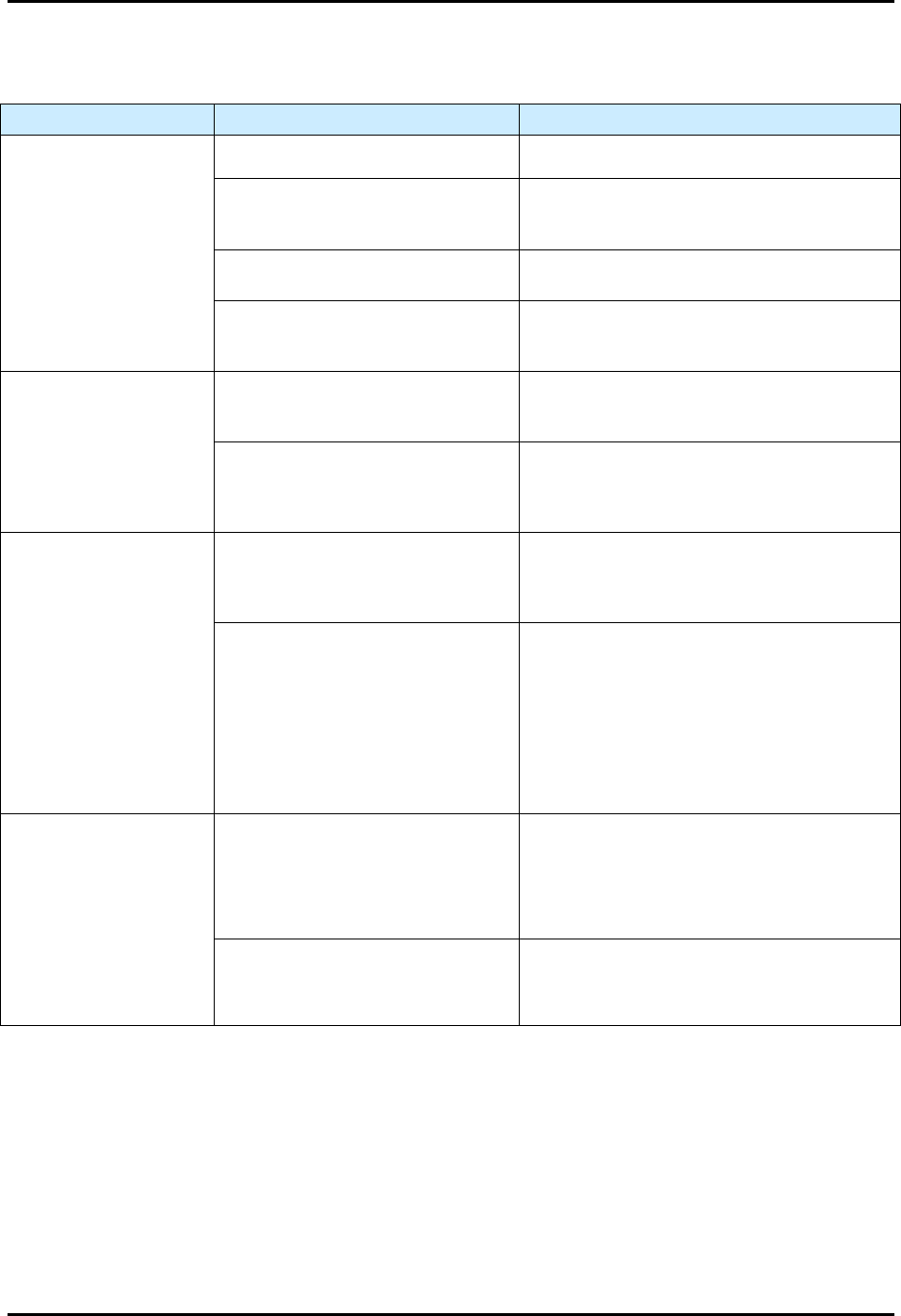
Conveyor does not move
at all (with Fluidmove
position controls)
Conveyor/heater controller has
no power.
Verify that the AC power cable is connected to
the module and to the facility power source.
Branch circuit breaker in 30A
power manager tripped.
Reset circuit breaker.
Conveyor jams or does
not move
Gap between conveyor rails is too
wide.
1. Stop the dispensing program.
2. Realign the workpiece on the conveyor belt.
3. Use the Fluidmove position controls to adjust
the rail gap.
4. Restart the dispensing program.
The carrier is bent.
Stop the dispensing program and remove the
carrier.
Fails to find width Home
The width “home” sensor has
failed.
Contact Asymtek Technical Support.
S2-9XXX Series Dispensing System IOM Manual Troubleshooting
7-4 © 2023 Nordson Corporation
7.4.3 Dispense Head Controller Connections and Functions
Table 7-3 Dispensing Head Troubleshooting
Symptom Possible Cause Recovery
Dispense Head
Controller fails to initialize
during Fluidmove startup
CAN terminator not present. Verify presence of CAN terminator.
Corrupt firmware or incorrect revision.
CAN firmware may need to be flashed to the
correct or latest firmware. Contact Asymtek
Technical Support.
Failed dispense head controller.
Verify DHC power indicator LEDs for
3.3V, -12V, and 12V are illuminated.
A fuse on the PDHC may have blown.
If power indicator lights on PDHC are not
illuminated, replace fuse, see 8.16 Replacing
Fuses.
Dispenses at wrong
Z-Axis position
Height sensor has been adjusted or is
loose.
Adjust height sensor and tighten locking screw,
see 5.12 Adjusting the Height Sensor Probe
(Option).
Nozzle/needle has been changed.
Perform a “Valve Offsets” or “Calculate Master
Offsets” routine in Fluidmove. For assistance,
refer to the Fluidmove User Guide or Fluidmove
Online Help.
No fluid dispensing
Valve setup incorrect.
Verify the valve type set in Fluidmove matches
the dispensing valve, and that the valve is
plugged into the pump connector on the
dispense head.
Valve Fatal Following Error (FFE).
1. Ensure valve does not have cured material
inside of it.
2. Exit Fluidmove, cycle power to the machine,
and retry.
3. PID parameters are not correct. Contact
Asymtek Technical support for correct PID
parameters for the particular pump being
used (applicable to the DV-7000, DV-8000,
and DP-2000 only).
Z-Axis Noise
Z counterbalance springs are not set
up correctly.
With the dispensing area door open, manually
lower the valve about 25 mm (1 in). When you
let go of the valve, it should neither rise nor fall.
If it does, you will need to adjust the Z-head
counterbalance, see 5.7 Adjusting the Z-Head
Counterbalance Force.
Wrong tuning file is loaded into the
machine.
The tuning values are set at the factory
according to the system configuration (single
valve vs. dual valve set up). To change tuning
files, contact Asymtek Technical Support.
S2-9XXX Series Dispensing System IOM Manual Troubleshooting
© 2023 Nordson Corporation 7-5
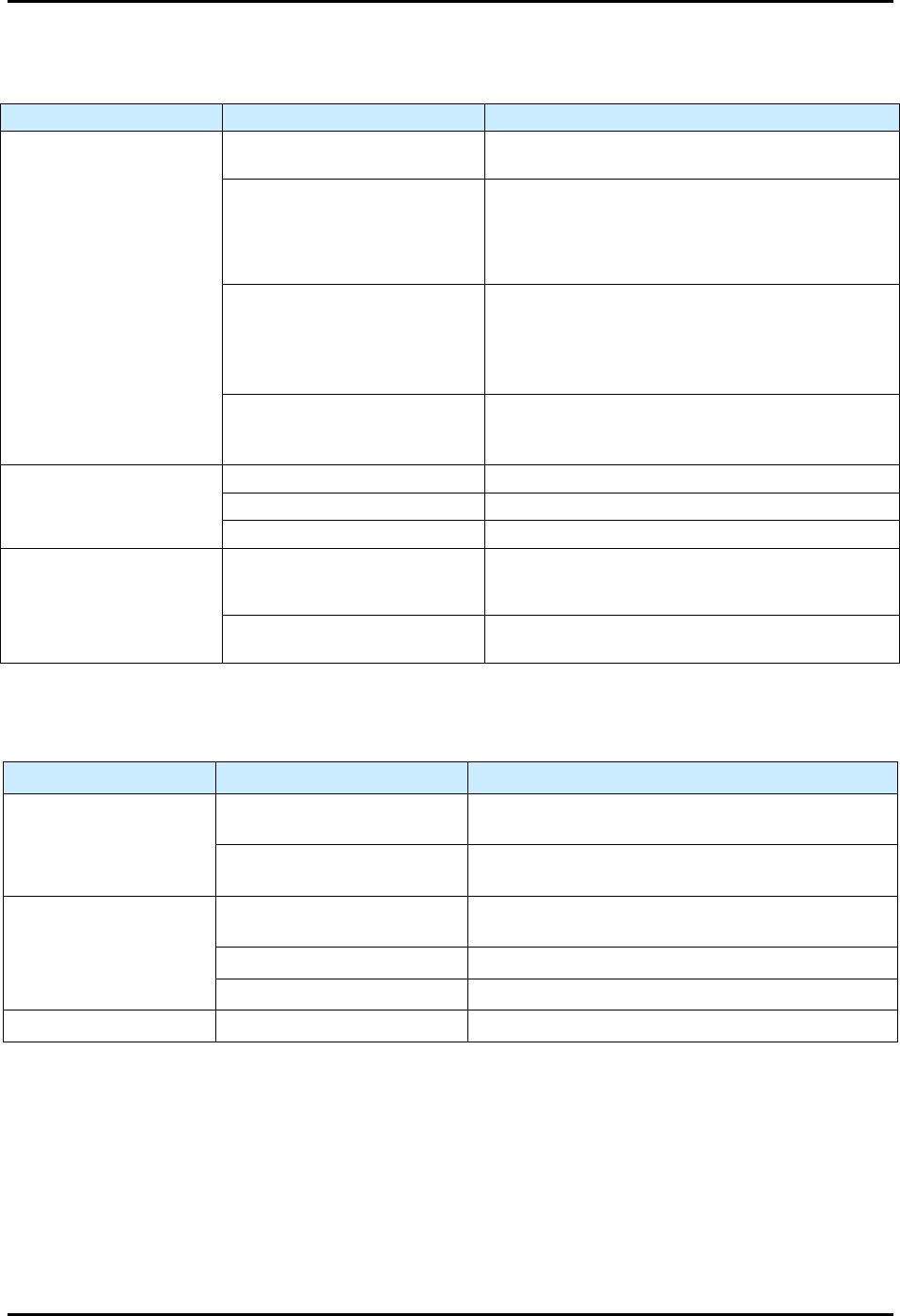
7.4.4 Fluidmove Startup
Table 7-4 Fluidmove Startup
Symptom
Possible Cause
Recovery
“The Dispenser ACLPlus
Device Failed to Respond”
message appears
Communications failure.
Verify COM port settings and serial communications
cables are attached. Restart computer and retry.
USB communications failure.
The USB hub may have failed or lost power. The
laptop PC communicates to system devices via the
USB hub. Check the USB connection and ensure
the USB hub is connected to its power source on
outlet AC4 from the power manager.
Main PWA NVRAM failure.
1. Replace battery and reinitialize Main PWA
memory.
2. Run escape sequences and reload machine
specific personalities. Refer to the system’s ACL
recovery disk.
Main PWA failure.
1. Check main PWA’s “Heartbeat” to see if board is
functioning. Cycle power and retry.
2. Replace fuse, see 8.16 Replacing Fuses.
No dispensing head
motion
No system power. See Table 7-1.
Interlock open. Restore Interlock, see 2.13.1 Interlock Recovery.
Home cable disconnected. Connect cable.
Dispensing head fails to
find home
Obstruction preventing machine
motion, and the servo system
goes open loop.
Remove obstruction.
Home switch failure.
Inspect and adjust home flag and retry. Replace
home switch if broken.
7.4.5 Laser Height Sensor
Table 7-5 Laser Height Sensor Troubleshooting
Symptom Possible Cause Recovery
Height Sensor does not
power up
Height sensor is not plugged in.
Check power connection and verify that height sensor
plugged in.
Bad resistor on the main board
d-sub connection.
Use a multimeter to verify that the main board d-sub
resistor is good.
Height Sensor does not
trigger
Dip switches not set properly.
Verify that dip switch number 6 on SW1 on the main
board is set to on.
Height sensor lens is dirty. Check and clean the height sensor lens.
No communication with PC. Verify I/O tools can toggle height sensor bits.
Intermittent function Loose or frayed cables. Check cables for tight connection and wear.