Spectrum+Operating+Manual.pdf - 第163页
S2-9 XXX Se ri es Dispensing Sys te m IOM Man ual Parts Replacement © 2023 Nordson C orpor ation 8-11 Item Description It em Descript ion 1 Bracket 5 Upper Sectio n 2 S crew (T hir d screw is loca te d opposi t e of lowe…

S2-9XXX Series Dispensing System IOM Manual Parts Replacement
8-10 © 2023 Nordson Corporation
8.12 Replacing the Camera Lens and Mechanical/Tactical
Height Sensor
Tools and Materials Needed:
• Hex Wrench (Item 59)
WARNING! Except for lens replacement and lighting adjustments, all other configuration and
adjustments should only be performed by a trained service technician.
8.12.1 Replacing the Camera Lens
To remove and replace the camera lens:
1. Perform a service shutdown, see 2.14 Service Shutdown.
2. Open the dispensing area door.
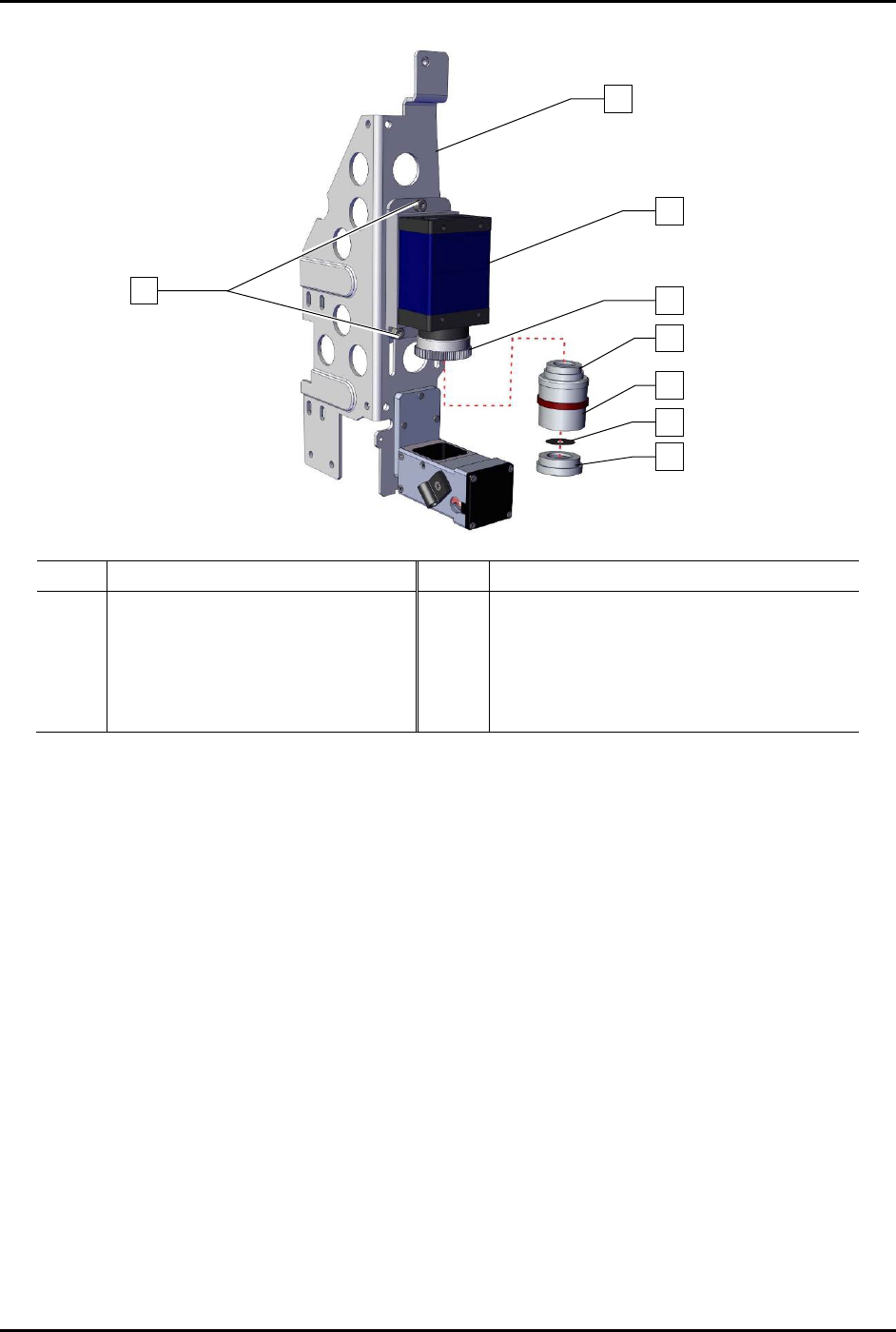
3. Loosen but do not remove the three (3) screws securing the camera to the bracket
(Figure 8-7).
4. Slide the camera assembly to the top of the bracket.
5. Secure the camera to the bracket by tightening three (3) screws.
6. Remove the lower, middle, and upper section as an assembly from the 2x optical lens by
turning counterclockwise.
NOTE Do not remove the 2x optical lens.
S2-9XXX Series Dispensing System IOM Manual Parts Replacement
© 2023 Nordson Corporation 8-11
Item
Description
Item
Description
1 Bracket 5 Upper Section
2
Screw (Third screw is located
opposite of lower left screw)
6 Middle Section
3 Camera (Item 55) 7 Aperture Disk (Item 56)
4 2x Optical Lens (Item 57) 8 Lower Section
Figure 8-7 Lens Assembly
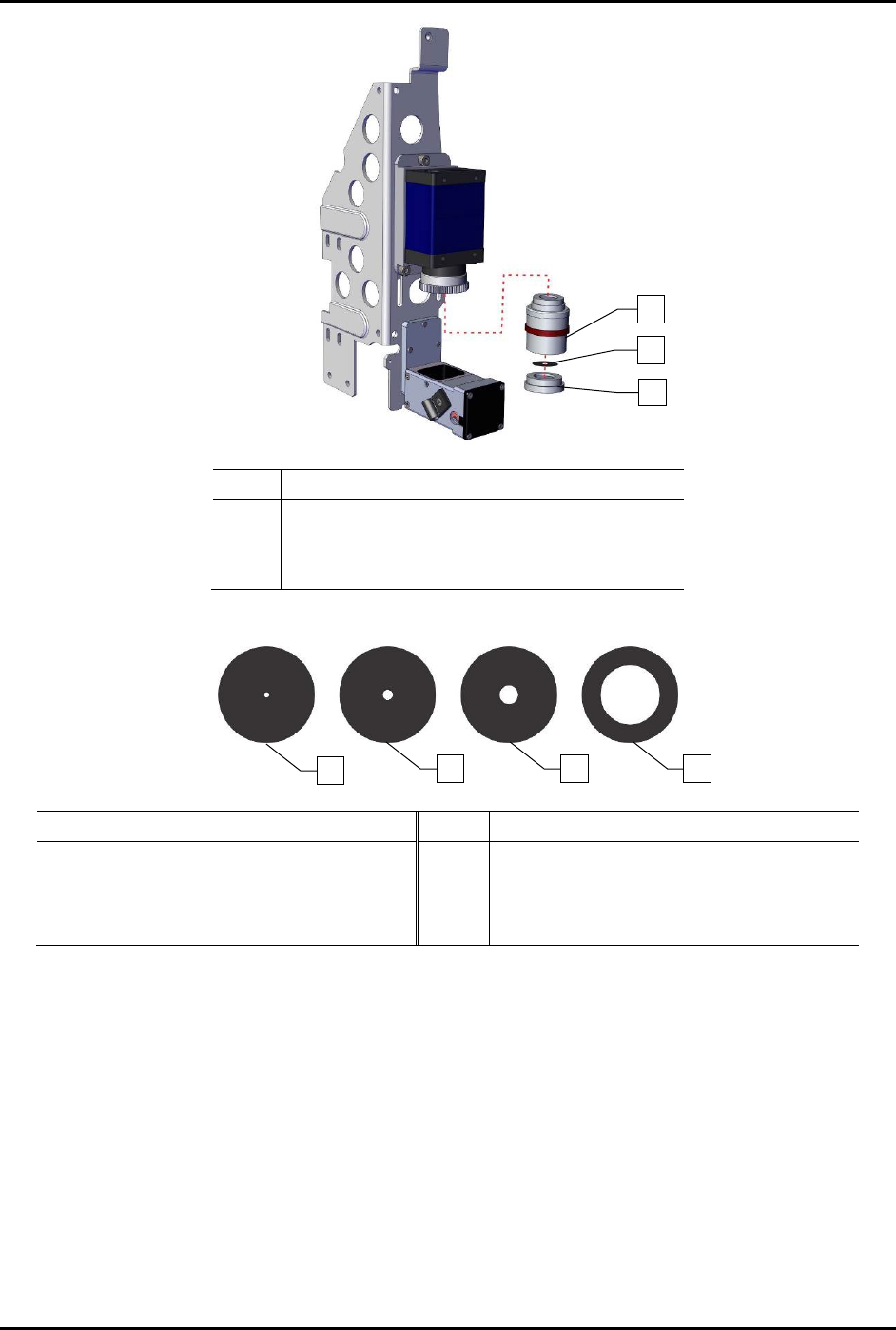
7. Before installing lens (Item 57), remove the lower section from the middle section by
unscrewing the lower section counterclockwise (Figure 8-8).
8. Remove the aperture disk (Figure 8-8).
9. Install one aperture disk into the lower section appropriate for the application, the F4
aperture disk is recommended as a starting point (Figure 8-9).
NOTE New dispensing systems are shipped with one (1) lens and four (4) aperture disks with
the F4 aperture disk already installed. Replacement lenses are shipped with the F1.4
aperture disk installed and must have the F1.4 aperture disk removed. Aperture disks
are also available to order as a set (Item 56).
1
3
4
7
6
5
8
3x
2
S2-9XXX Series Dispensing System IOM Manual Parts Replacement
8-12 © 2023 Nordson Corporation
Item
Description
1 Middle Section
2 Aperture Disk
3 Lower Section
Figure 8-8 Replacing the Aperture Disk
Item Description Item Description
1
F16 (Good Depth of Field,
Low Light Transmission)
3 F4 (Standard)
2 F8 4
F1.4 (Narrow Depth of Field,
Good Illumination)
Figure 8-9 Aperture Disks
1
2
3
4
2
1
3