Spectrum+Operating+Manual.pdf - 第191页
S2-9 XXX Se ri es Dispensing Sys te m IOM Man ual Parts Replacement © 2023 Nordson C orpor ation 8-39 It em D es cription Item D escri ption Not Shown Screws (2) 3 EMO Rea r Bracket 1 EMO Conta ct B lock Sw itch (Item 15…
S2-9XXX Series Dispensing System IOM Manual Parts Replacement
8-38 © 2023 Nordson Corporation
8.17 Replacing Components Inside the Rear Door Panel
Tools and Materials Needed:
• Hex Wrench (Item 59)
• Torque Wrench
• Switch Mounting Tool
• Thread Lock-Plastic Adhesive
WARNING! Ensure the dispensing system has been completely shutdown before attempting to
remove or install any panel, electrical component, or pneumatic component.
8.17.1 Replacing the Rear EMO Actuator Switch
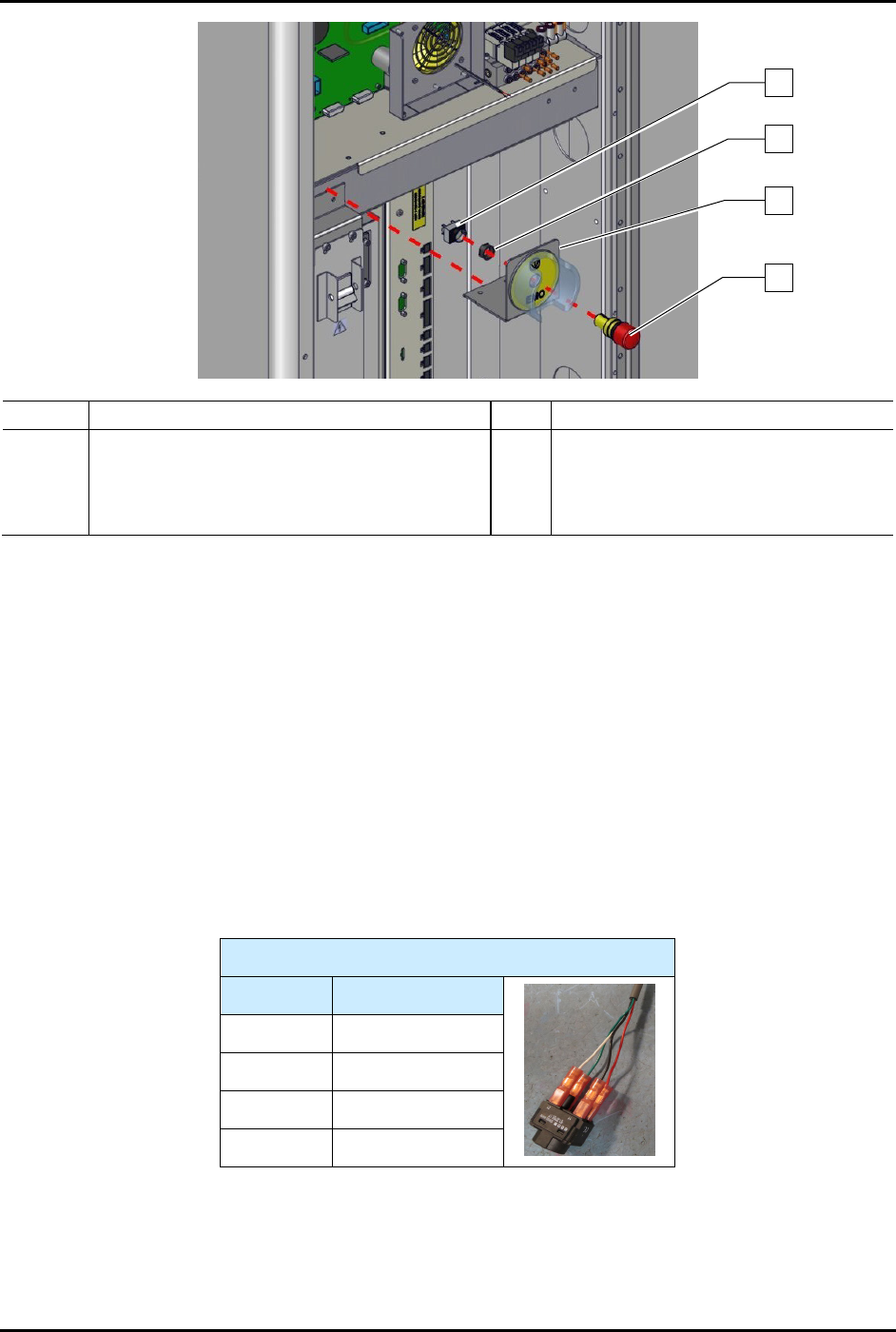
To remove the rear EMO actuator switch (Figure 8-29):
1. Perform a service shutdown, see 2.14 Service Shutdown.
2. Open the rear door of the dispensing system.
3. Loosen two (2) screws securing the EMO rear bracket to the dispensing system and remove
the EMO rear bracket from the dispensing system.
WARNING! The EMO actuator switch must be supported during removal as there are cable
connections from the dispensing system to the EMO actuator switch. Not
supporting the EMO actuator switch may cause wiring and cable connector
damage.
4. Disconnect the power control cables from the EMO contact block switch.
5. Unplug the EMO contact block from the EMO actuator switch.
6. From the rear of the E-stop rear bracket using the switch mounting tool, remove the nut
securing the EMO actuator switch.
7. Remove the EMO actuator switch and EMO switch guard from the EMO rear bracket.
S2-9XXX Series Dispensing System IOM Manual Parts Replacement
© 2023 Nordson Corporation 8-39
Item
Description
Item
Description
Not
Shown
Screws (2) 3 EMO Rear Bracket
1
EMO Contact Block Switch (Item 15)
4
EMO Actuator Switch (Item 15)
2 EMO Nut (included with Item 15)
Figure 8-29 Replacing the Rear EMO Actuator Switch (Wiring Not Shown for Clarity)
To install the rear EMO actuator switch (Figure 8-29):
1. Install the EMO actuator switch through the front of the EMO rear bracket.
2. Apply plastic thread locker to the threads of the EMO nut.
3. Install a new EMO nut from the rear of the EMO rear bracket onto the EMO actuator
switch.
4. Tighten the EMO nut with the switch mounting tool.
5. Connect the EMO switch contact block switch to the EMO actuator switch.
6. Connect the power control cables to the EMO contact block switch, see Table 8-4.
Table 8-4 Power Control Cable Connections (EMO Switch)
EMO Switch
Contact # Color
11 Black
12 Red
21 White
22 Green
7. Install the EMO rear bracket to the dispensing system by tightening the two (2) screws.
8. Torque the two (2) screws to 5.6 Nm (50 in-lbs).
9. Close the rear door of the dispensing system.
3
2
1
4
S2-9XXX Series Dispensing System IOM Manual Parts Replacement
8-40 © 2023 Nordson Corporation
8.17.2 Replacing the 3-Way Valve Assembly
To remove the 3-way valve assembly (Figure 8-30):
1. Perform a service shutdown, see 2.14 Service Shutdown.
2. Open the rear door of the dispensing system.
3. Disconnect the pneumatic and electrical connections to the 3-way valve assembly.
Note the connection locations.
4. Remove the two (2) screws securing the 3-way valve assembly to the panel.
5. Remove the 3-way valve assembly.
Item Description
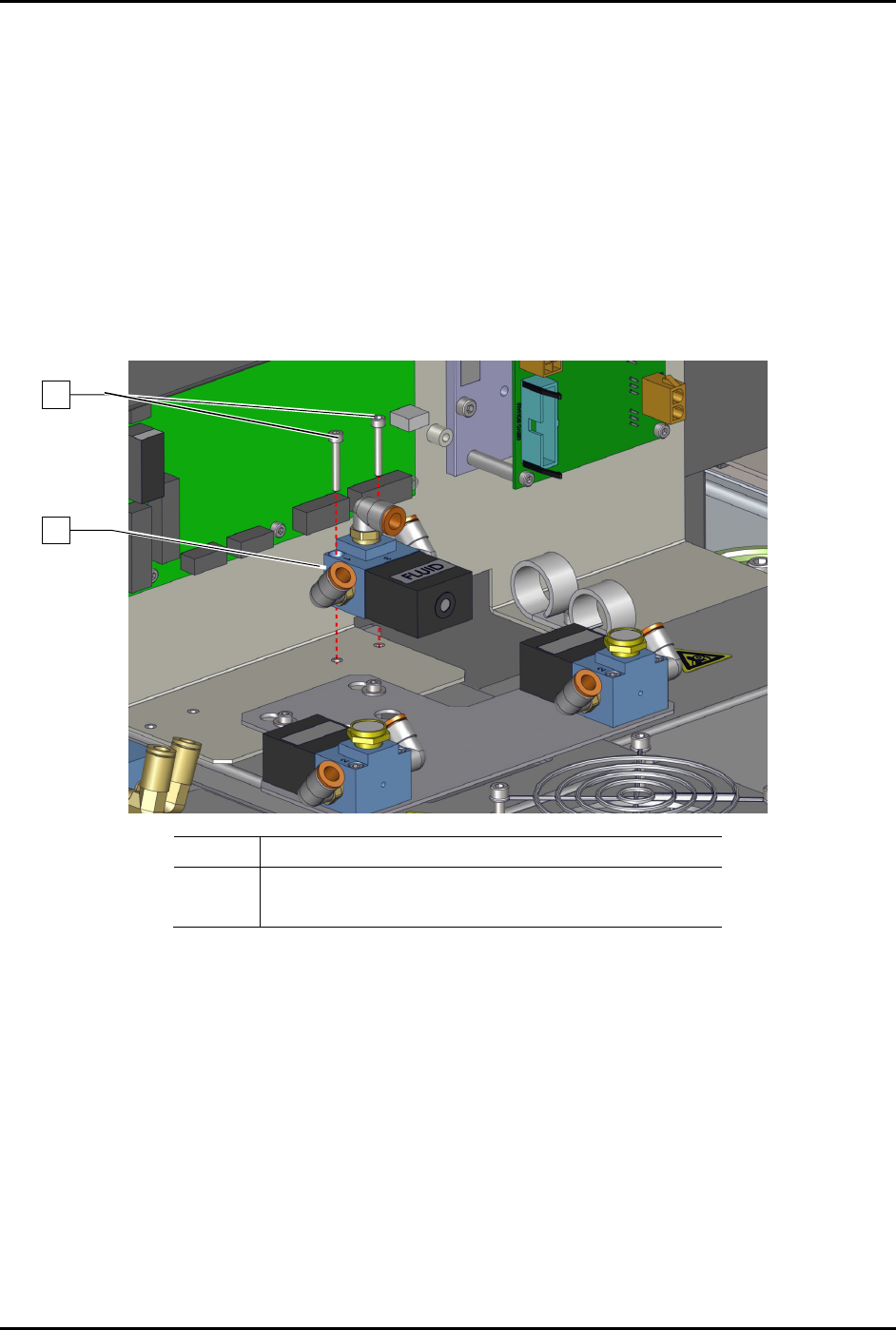
1 Screws (2)
2 3-Way, 24V Valve (Item 18)
Figure 8-30 Replacing the 3-Way Valve Assembly
To install the 3-way valve assembly (Figure 8-30):
1. Install the two (2) screws securing the 3-way valve assembly to the panel.
2. Torque the two (2) screws to 0.67 Nm (6 in-lbs).
3. Connect the pneumatic and electrical connections to the 3-way valve assembly.
4. Close the rear door of the dispensing system.
1
2