Spectrum+Operating+Manual.pdf - 第57页
S2-9 XXX Se ri es Dispensing Sys te m IOM Man ual Installation © 2023 Nordson Co rporat ion 3-5 Figure 3-3 Removing the Fr ont Cover 9. If the system is equipped wi th a scale, loosen the strap covering th e scale and re…

S2-9XXX Series Dispensing System IOM Manual Installation
3-4 © 2023 Nordson Corporation
10. Remove bag and plastic wrap from the machine.
NOTE Location of packaging materials to be removed is indicated by the presence of
red warning tags.
11. Remove all shrink-wrap and other packing material from the perimeter of the dispensing
system.
3.6 Unpacking the Dispensing Chamber
To unpack the dispensing chamber:
1. Remove all perimeter packaging material from the dispensing area.
2. Remove all tie wraps, tape, foam packing material, and warning tags from the following
areas:
• Dispensing Head
• Conveyor
• Service Station
NOTE Location of packaging materials to be removed is indicated by the presence of
red warning tags. The amount, type, and arrangement of packaging materials
will depend on your system’s configuration.
3. Use a 3 mm hex key to loosen the setscrews on the X- and Y-axis dispensing head stoppers.
4. Remove the stoppers and retain them in a safe place.
5. Remove the shipping bracket and warning tag attached to the Z-head by loosening the
three (3) screws.
Retain bracket and hardware for future shipping purposes.
NOTE The camera is installed and connected at the factory prior to shipping.
6. Remove the tape covering the service station and lid.
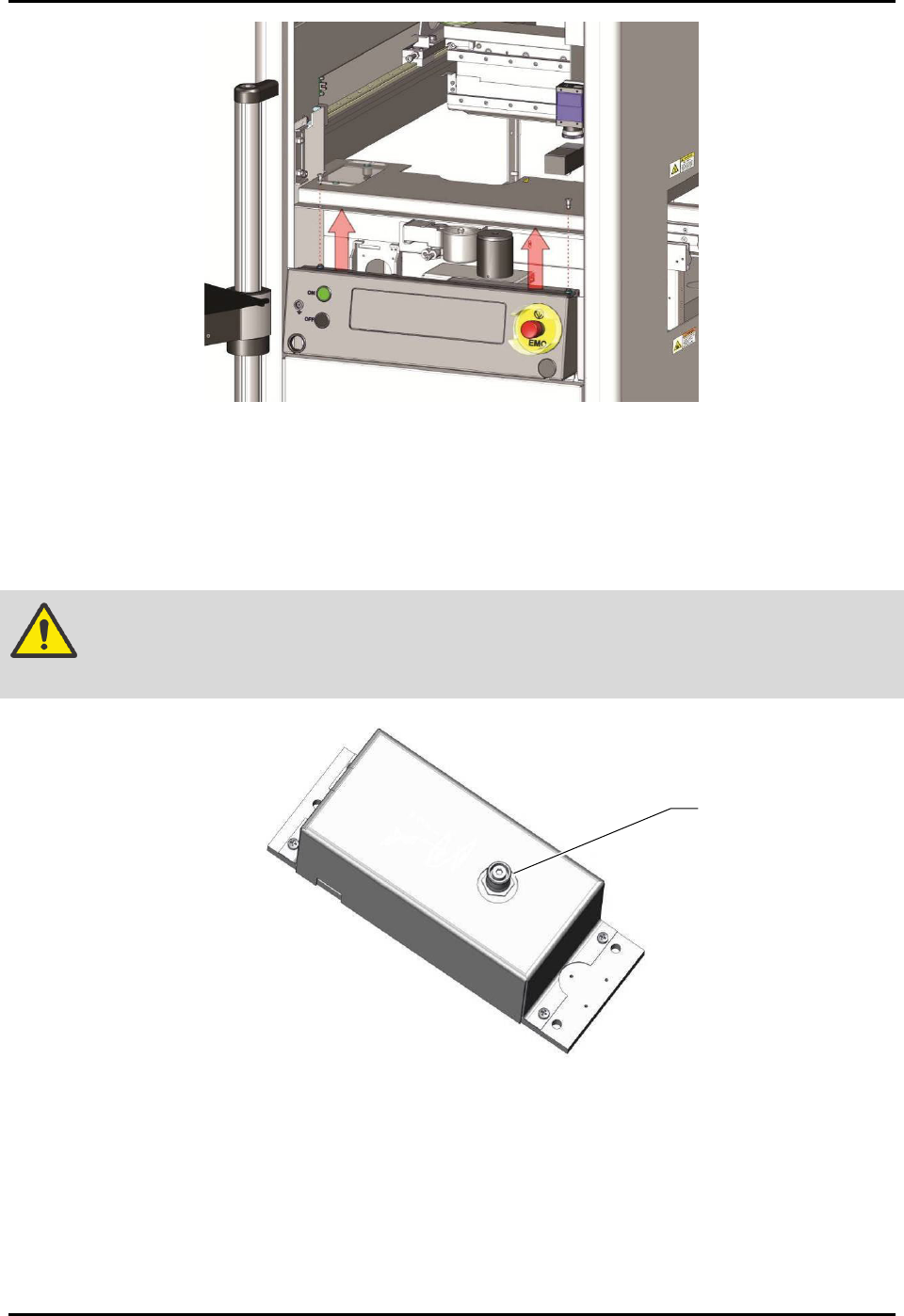
7. Remove the front cover by first removing the two screws from the ends of the cover
(Figure 3-3).
8. Lift the cover up and away from the machine.
S2-9XXX Series Dispensing System IOM Manual Installation
© 2023 Nordson Corporation 3-5
Figure 3-3 Removing the Front Cover
9. If the system is equipped with a scale, loosen the strap covering the scale and remove the
warning tag from the scale unit.
NOTE Do not remove the strap. The strap may be needed when moving or shipping
machine.
CAUTION! The scale stem is extremely sensitive. Be careful not to hit or apply pressure to
the scale stem (Figure 3-4).
Figure 3-4 Scale Stem
10. Replace the scale cover and reinstall the two mounting screws.
NOTE It is not necessary to level the scale. The scale is leveled to the dispense plane at the
factory and does not need to be leveled again. However, it does need to be recalibrated
after the machine installation is complete, see 5.6 Calibrating the Scale.
11. Remove the tie wraps and warning tag from the lift table(s), if installed.
Scale Stem
S2-9XXX Series Dispensing System IOM Manual Installation
3-6 © 2023 Nordson Corporation
3.7 Leveling the Dispensing System
WARNING! This procedure should only be performed by a trained service technician.
To level the dispensing system:
1. Perform a service shutdown, see 2.14 Service Shutdown.
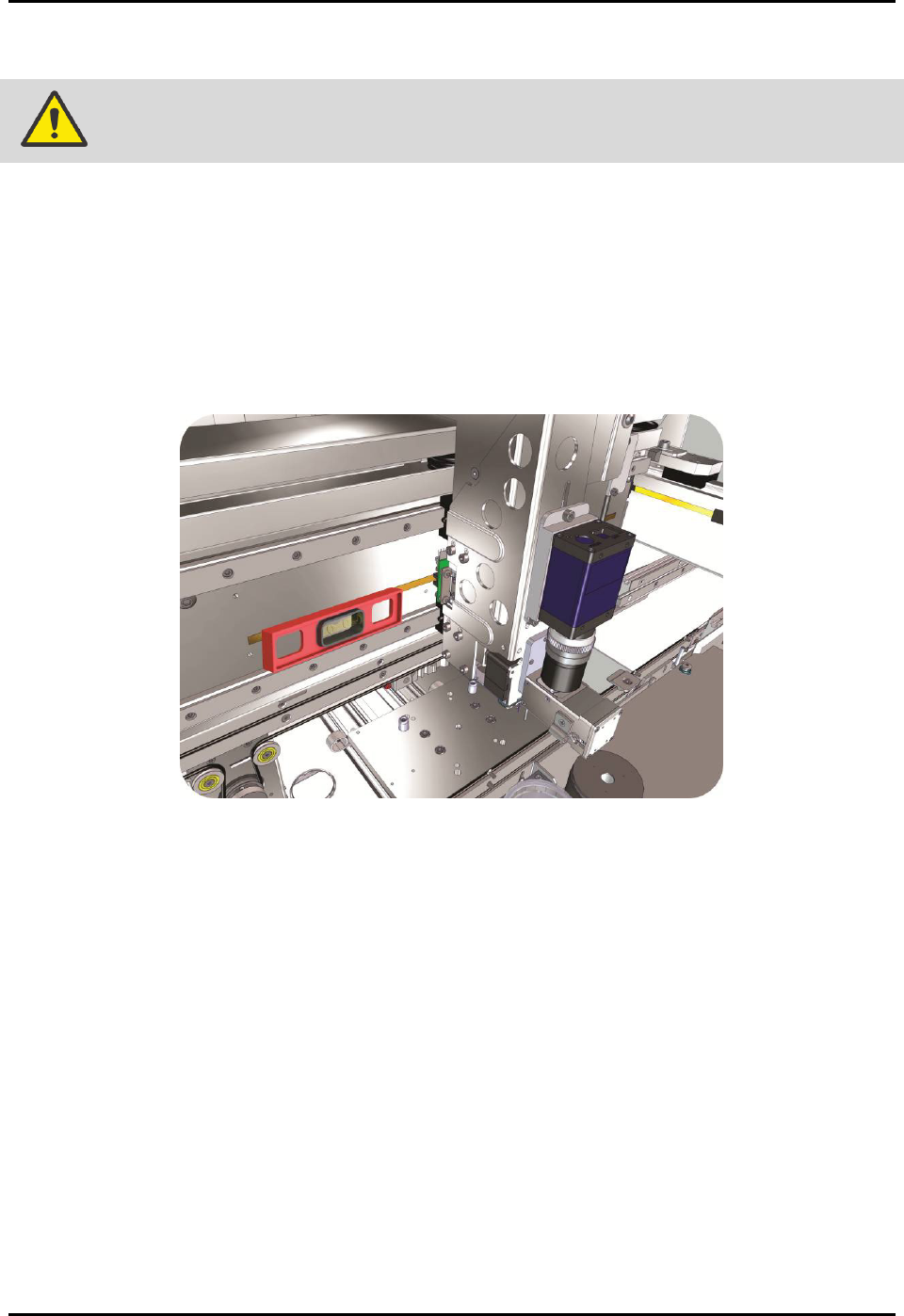
2. Place the box level on the X-axis linear guide (Figure 3-5).
3. Observe the position of the bubble within the level’s window.
The bubble should be centered, indicating the dispensing system is level from
side-to-side.
Figure 3-5 Leveling the X-Axis
4. If necessary, adjust the levelers (Figure 3-2) of the dispensing system as follows:
a. Loosen the 1 1/2-inch lock nut on the leveler.
b. Turn the 1 1/2-inch post nut in the desired direction until the level’s bubble is centered,
indicating that the system is level from side-to-side.
Turning the post nut clockwise raises the dispensing system. Turning the post nut
counterclockwise lowers the dispensing system.
c. Tighten the 1 1/2-inch lock nut on the leveler.