Spectrum+Operating+Manual.pdf - 第194页
S2-9 XX X Se ri es Disp ensi n g Syst em IOM Man ual Parts Replacement 8-42 © 2023 Nordson Corporatio n 8.17.4 Replacing the Main Air Regulator To remove the main air reg ulator ( Figu re 8 - 32 ): 1. Perform a service s…
S2-9XXX Series Dispensing System IOM Manual Parts Replacement
© 2023 Nordson Corporation 8-41
8.17.3 Replacing the 3-Way High Flow Valve
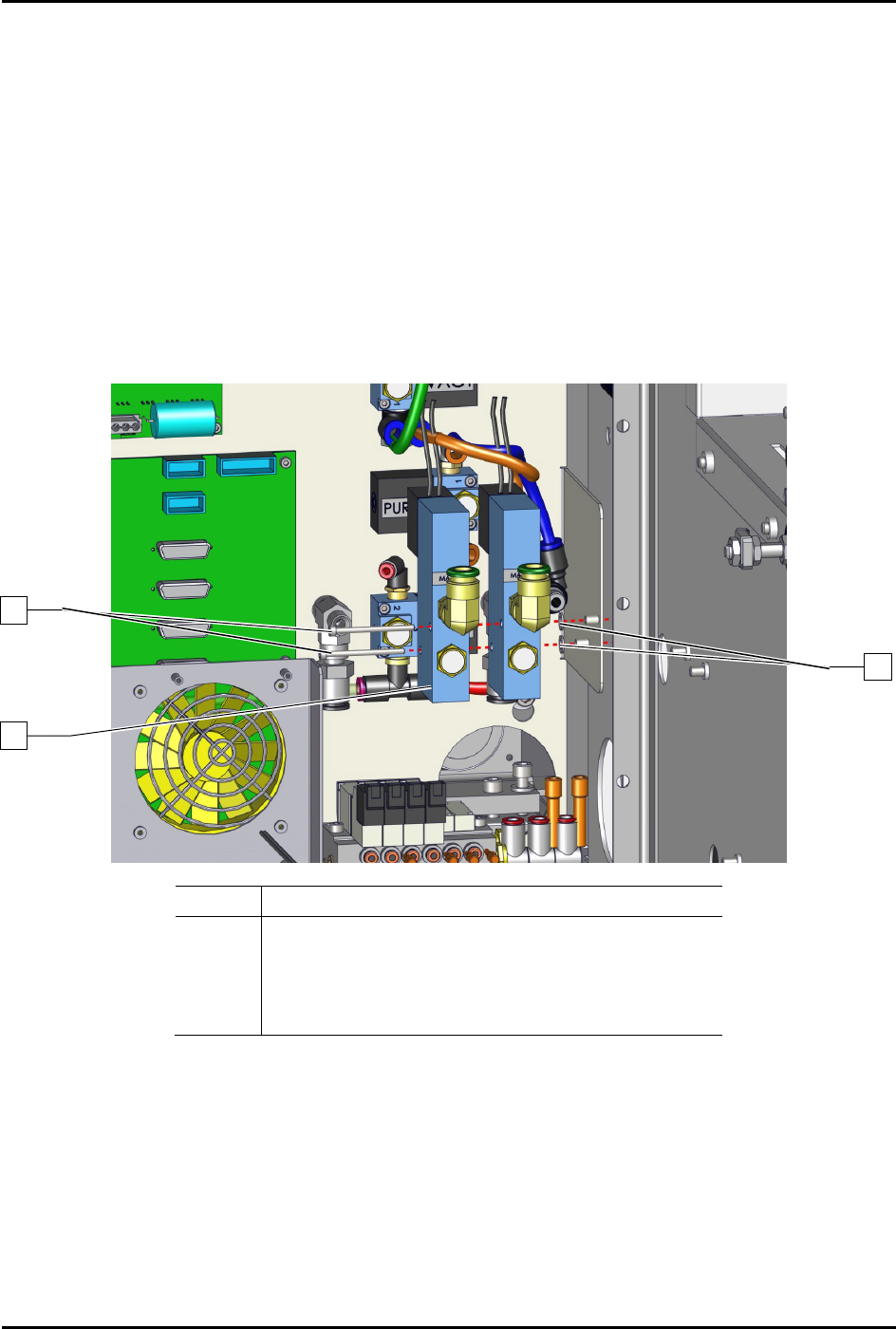
To remove the 3-way high flow valve (Figure 8-31):
1. Perform a service shutdown, see 2.14 Service Shutdown.
2. Open the rear door of the dispensing system.
3. Disconnect the pneumatic and electrical connections to the 3-way high flow valve.
Note the connection locations.
4. Remove the two (2) screws and two (2) washers securing the 3-way high flow valve to the
dispensing system.
5. Re
move the 3-way high flow valve from the dispensing system.
Item Description
1 Screws (2)
2 Washer
3 Valve, 3-Way, High Flow (Item 19)
4 Washer
Figure 8-31 Replacing the 3-Way High Flow Valve
To install the 3-way high flow valve (Figure 8-31):
1. Install the 3-way high flow valve with two (2) screws and two (2) washers to the dispensing
system.
2. Torque the two (2) screws to 1.4 Nm (12 in-lbs).
3. Connect the pneumatic and electrical connections to the 3-way high flow valve.
4. Close the rear door of the dispensing system.
1
1
2
S2-9XXX Series Dispensing System IOM Manual Parts Replacement
8-42 © 2023 Nordson Corporation
8.17.4 Replacing the Main Air Regulator
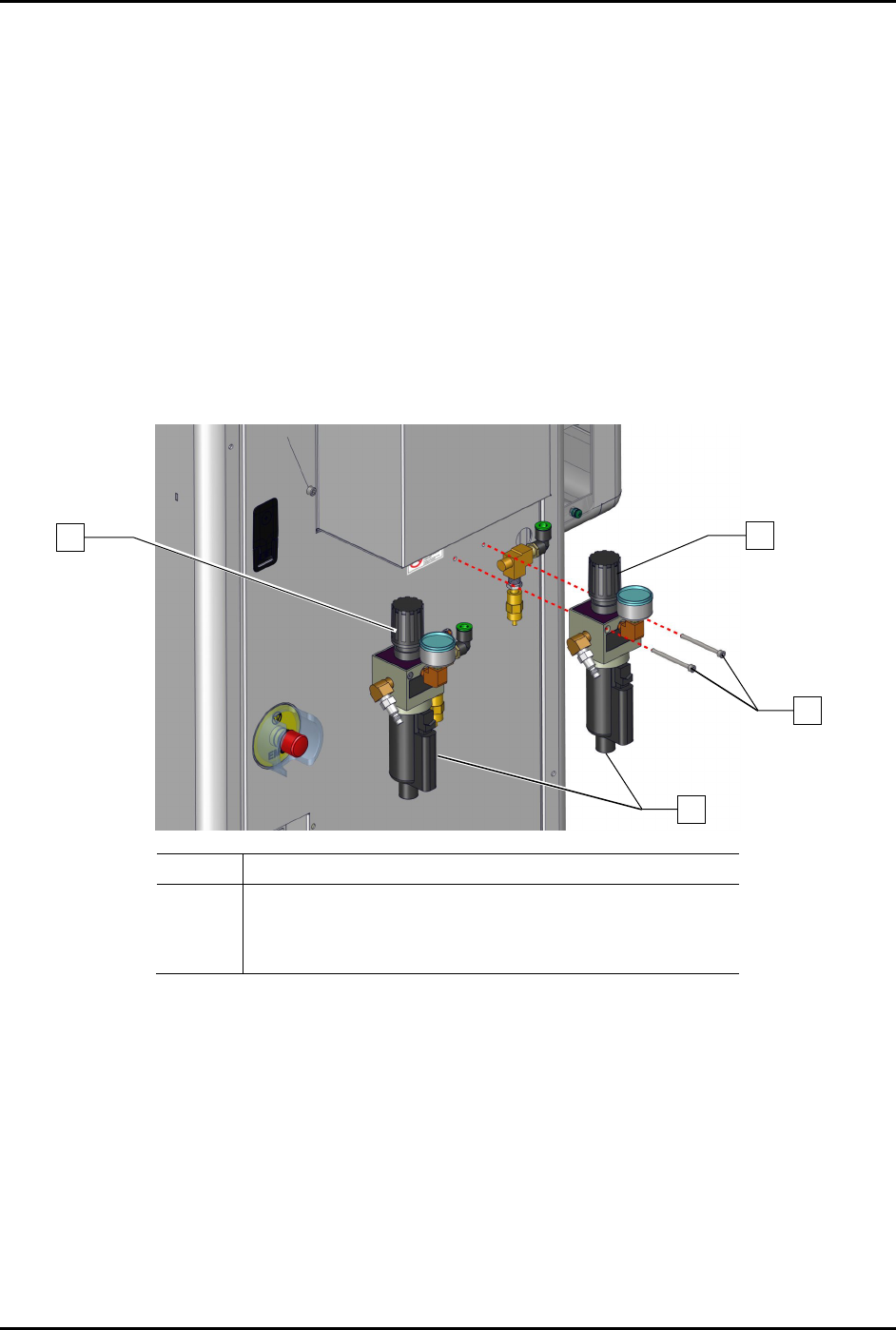
To remove the main air regulator (Figure 8-32):
1. Perform a service shutdown, see 2.14 Service Shutdown.
2. Rotate the main air regulator knobs counterclockwise until the main air regulators register
zero (0).
3. Disconnect the main air pressure hose from the main air regulator.
4. Open the rear door of the dispensing system.
5. Disconnect the pneumatic connection from the main air regulator.
6. Support the main air regulator and remove the regulator nut from the main air regulator.
7. Remove the main air regulator from the regulator panel.
Item Description
1 Main Air Regulator Knob
2 Screws (2)
3 FRU, Assy, Main Air Regulator, S-9XX (Item 24)
Figure 8-32 Replacing the Main Air Regulator
To install the main air regulator (Figure 8-32):
1. Support the main air regulator and install two (2) screws securing the main air regulator to
the dispensing system.
2. Connect the pneumatic connection to the main air regulator.
3. Close the rear door of the dispensing system.
4. Connect the main air pressure hose to the main air regulator.
5. Rotate the main air regulator knob counterclockwise until the pressure gauge registers
desired pressure, see 5.10
Adjusting the Air Pressure.
1
2
1
3
S2-9XXX Series Dispensing System IOM Manual Parts Replacement
© 2023 Nordson Corporation 8-43
8.17.5 Replacing the Power Manager
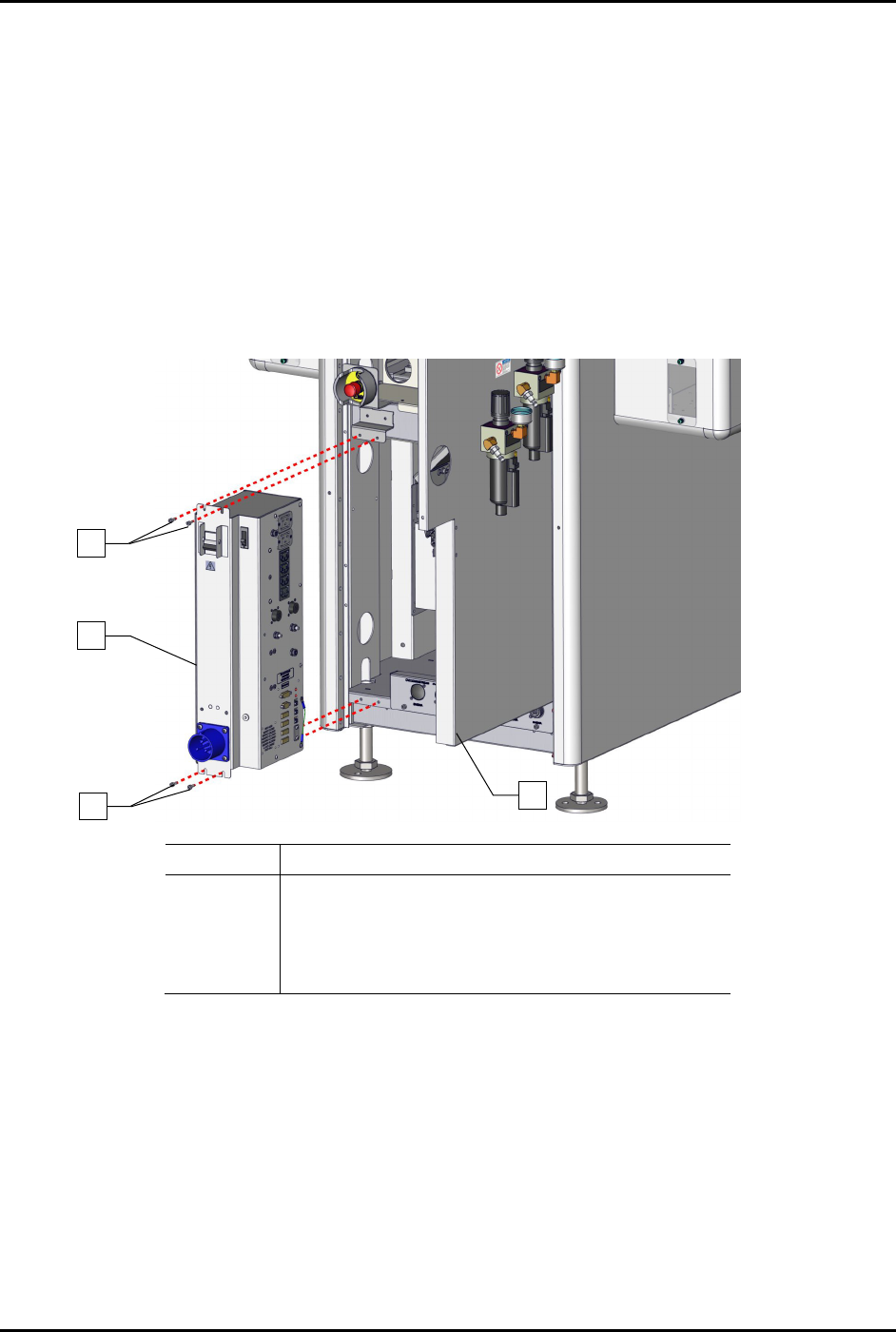
To remove the power manager (Figure 8-33):
1. Perform a service shutdown, see 2.14 Service Shutdown.
2. Open the rear door of the dispensing system.
3. Disconnect all electrical connections to the power manager.
4. Disconnect the grounding wire from the power manager to the dispensing system.
5. Remove the four (4) screws securing the power manager to the dispensing system.
6. Remove the power manager.
Item
Description
1 Screws (4)
2 Assy, 30A CM Power Manager C31 (Item 22)
3 Rear Door Panel
Not Shown Grounding Wire
Figure 8-33 Replacing the Power Manager
To install the power manager (Figure 8-33):
1. Install the four (4) screws securing the power manager to the dispensing system.
2. Connect the grounding wire to the dispensing system.
3. Connect all electrical connections to the power manager.
4. Close the rear door of the dispensing system.
2
1
1
3