Spectrum+Operating+Manual.pdf - 第147页
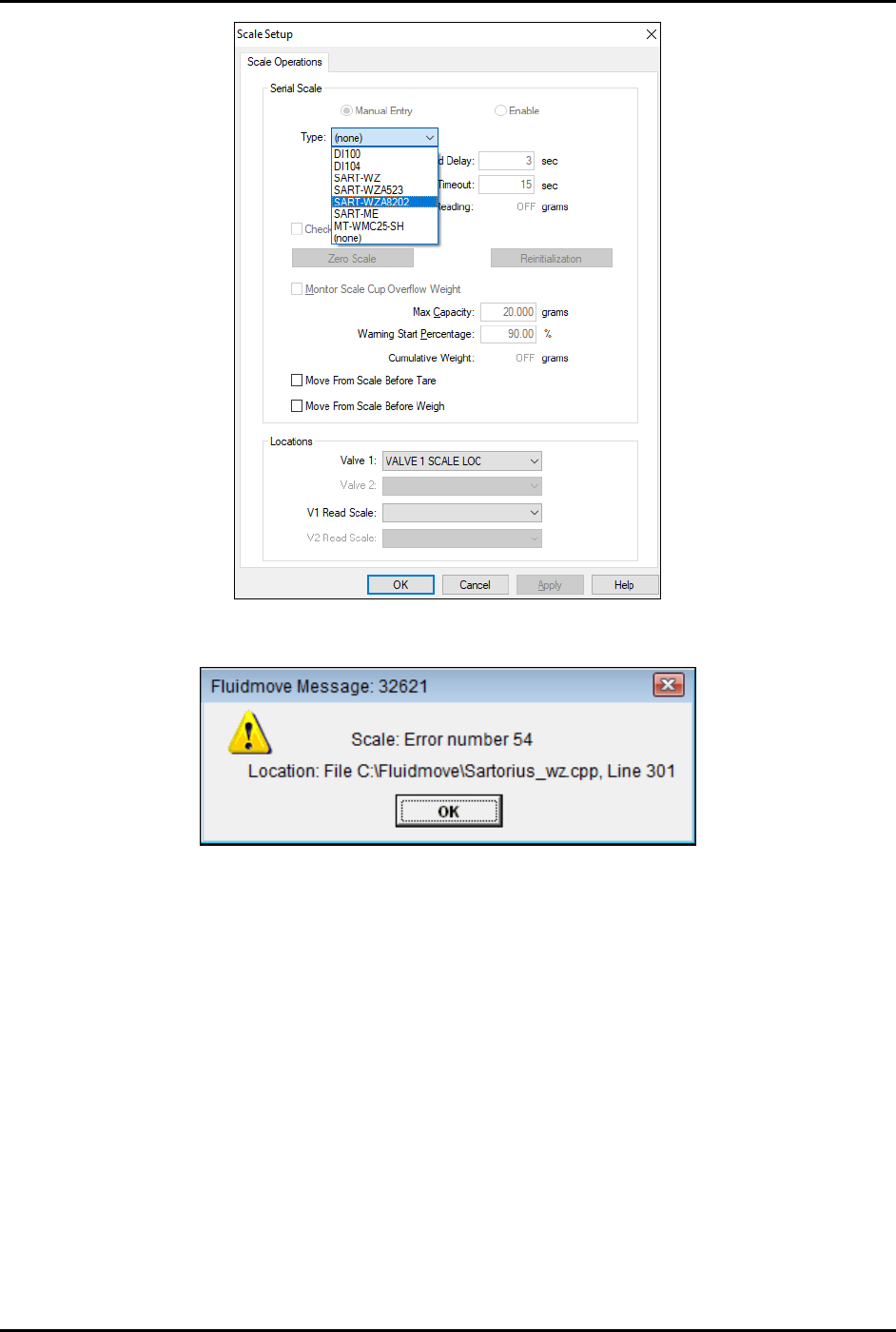
S2-9 XXX Se ri es Dispensing Sys te m IOM Man ual Troubleshootin g © 2023 Nordson C orpor ation 7-9 Figure 7-1 Scale Setup M enu F igure 7-2 S cale Er ror Message

S2-9XXX Series Dispensing System IOM Manual Troubleshooting
7-8 © 2023 Nordson Corporation
7.4.9 Scale
Table 7-9 Scale Troubleshooting
Symptom Possible Cause Recovery
No scale communication No power.
Check communication ports for proper connection.
Check power (+24V) and RS-232 communications
cables.
Scale Error No. 54
(Figure 7-2)
Pedestal not installed.
You will typically receive a Fluidmove error message
when the pedestal is not installed on the scale. There
is a minimum weight that must be placed on the
scale in order for it to read properly.
Unstable scale
Lid not on scale.
Verify that the scale lid is installed. Air turbulence will
cause scale instability issues.
Dispensing area door open.
Verify that the dispensing area door is closed. Slight
air turbulence can cause unstable readings.
Floor vibration.
In some rare cases, vibration through the floor can
cause scale instability issues. This is most common
where the dispensing system is not installed on a
concrete floor.
NOTE The scale can also be tested from the Fluidmove Terminal Mode. See instructions below.
To test the scale from the Fluidmove terminal mode:
1. In the Fluidmove Main Window, select
Tools.
2. In the Tools menu, click on
Terminal and then on Scale .
3. Use the following commands to check the scale responses:
ESC+P (escape key and capital P) Outputs the current scale value to the terminal
screen.
ESC+S (escape key and capital S) Restarts the scale but gives no response.
ESC+T (escape key and capital T) Tares and Re-zeroes the scale.
4. If the scale does not respond to those commands, then there may be a software
configuration issue. Verify the scale is configured from the configuration menu. The scale
type selected should be
SART-WZ (Figure 7-1). For detailed instructions, refer to the
Fluidmove User Guide or Fluidmove Online Help.
S2-9XXX Series Dispensing System IOM Manual Troubleshooting
© 2023 Nordson Corporation 7-9
Figure 7-1 Scale Setup Menu
Figure 7-2 Scale Error Message

S2-9XXX Series Dispensing System IOM Manual Troubleshooting
7-10 © 2023 Nordson Corporation
7.4.10 System Accuracy
Table 7-10 System Accuracy
Symptom
Possible Cause
Recovery Procedures
Inaccurate dispensing
Loose camera lens.
Refocus the camera, see 5.4 Focusing the
Camera.
Bad offset routines.
Perform a “Valve Offsets” routine in Fluidmove.
Refer to the Fluidmove User Guide or Fluidmove
Online Help.
Camera needs to be calibrated.
Calibrate the camera, see 5.5 Calibrating the
Camera.
Cal Maps disabled.
Enable Cal Maps. Contact Asymtek Technical
Support.
Bent needle.
Replace the needle. Refer to the applicable valve
manual.
Bad height sensor. Contact Asymtek Technical Support.
Z-head not counterbalanced
properly.
Balance Z-head, see 5.7 Adjusting the Z-Head
Counterbalance Force.
Fiducials not found
Loose camera lens.
Refocus the camera, see 5.4 Focusing the
Camera.
Corrupted vision file.
Re-teach the vision targets or entire program as
necessary.
7.4.11 Substrate Heaters
Table 7-11 Substrate Heater Troubleshooting
Symptom Possible Cause Recovery
Hissing air leak
Missing vacuum hole screw(s). Replace screw(s).
Other pneumatic leaks. Contact Asymtek Technical Support.
Erroneous temperature
display
Wrong display unit. Change display unit to C.
Workpiece part not held
steady
Check for improper open or
plugged vacuum holes.
Remove and install screws as applicable.
Vacuum does not start or
fails to work properly
System has low or no air
pressure.
1. Verify air is connected to facility air supply.
2. Set main air regulator to approximately 620 kPa
(90 psi).
Hot plate does not heat
Set Point (SP) value below
Present Value (PV).
Change the SP value within the Heater Controls
window. Refer to the Fluidmove User Guide or
Fluidmove Online Help.
Disconnected heater.
Verify the heater cable connections are securely
attached to the correct ports.
Hardware or software failure. Contact Asymtek Technical Support.
Blown fuse on the
conveyor/heater controller.
Check the fuses by the heater power connections
on the conveyor controller and replace if
necessary, see 8.16 Replacing Fuses.