Spectrum+Operating+Manual.pdf - 第46页
S2-9 XX X Se ri es Disp ensi n g Syst em IOM Man ual Safety 2-14 © 2023 Nordson Corporatio n 2.12 Emerge ncy Shutdown In th e event of an e me rgency or malfu nction, press the EMO but ton. The dispensing system has two …
S2-9XXX Series Dispensing System IOM Manual Safety
© 2023 Nordson Corporation 2-13
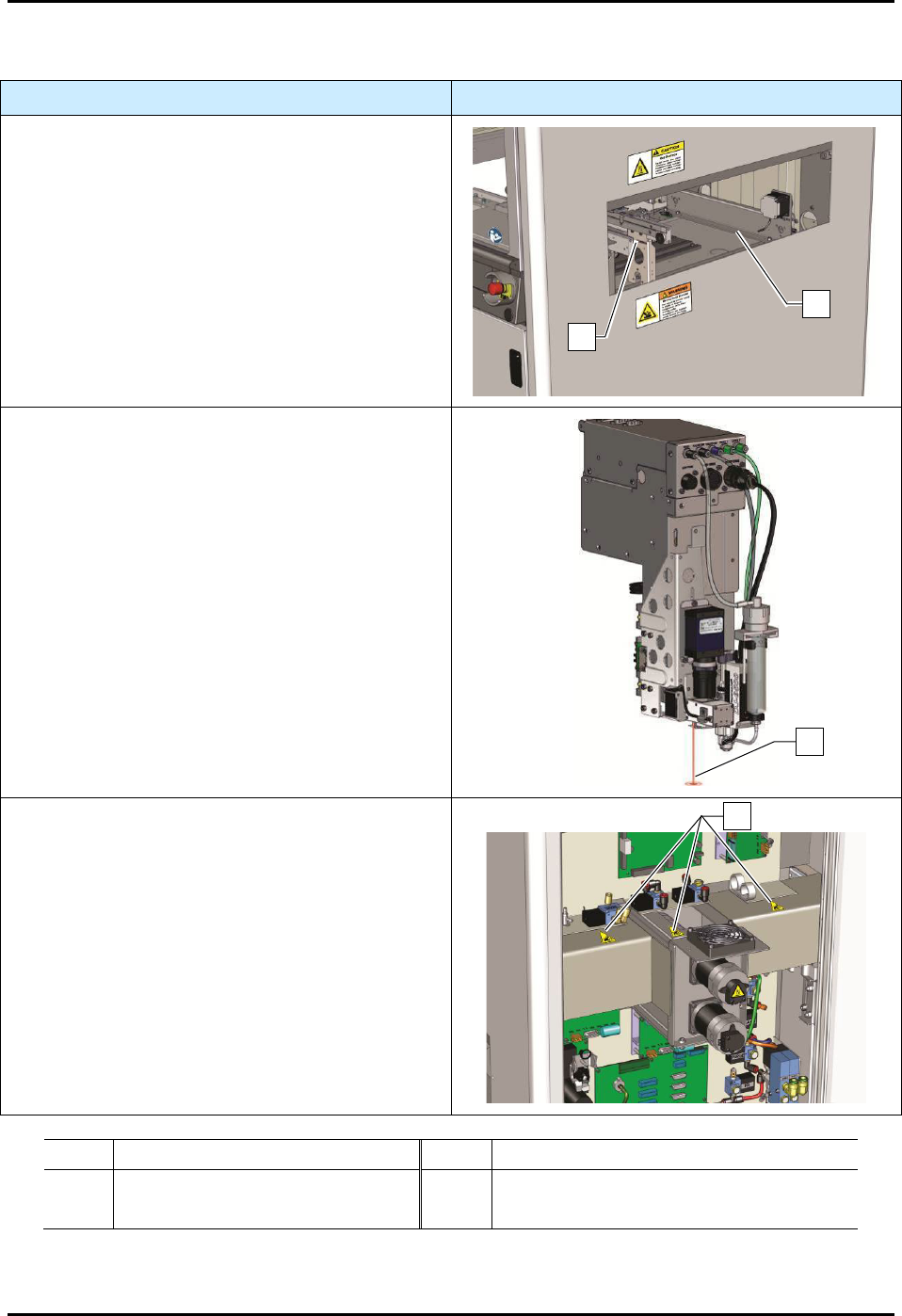
2.11 Residual Safety Risks
Safety Hazard
Risk Area
A hand crush or pinch point hazard is created by
the movement of the conveyor. DO NOT reach into
the conveyor while the system is operating. Keep
hands away from this area unless the system power
is off.
A high risk burn hazard is created by the heaters.
Keep hands away from this area unless the system
power is off and heaters have cooled.
If the system is equipped with a Class 2 laser height
sensor, serious eye injury may occur by staring
directly into the laser beam on the laser height
sensor. The laser height sensor is located behind
the camera and not visible from the front of the
machine. DO NOT bypass the safety interlock. DO
NOT open the dispensing area door while the laser
is on. Wear protective goggles when using the laser
height sensor, see 2.8 Laser Radiation.
A hand entanglement hazard is created by the
movement of the drive cables and motor pulley.
DO NOT remove the access panels while the
system is operating. DO NOT bypass the safety
interlock. DO NOT operate the equipment with the
access panels removed and/or doors open. Keep
hands away from this area unless the system power
is off.
Item
Description
Item
Description
1
Conveyor
3
Laser Beam
3
Heaters
4 Drive Cables and Motor Pulley
Figure 2-9 S2-9XXX Safety Hazard Areas
1
2
4
3
S2-9XXX Series Dispensing System IOM Manual Safety
2-14 © 2023 Nordson Corporation
2.12 Emergency Shutdown
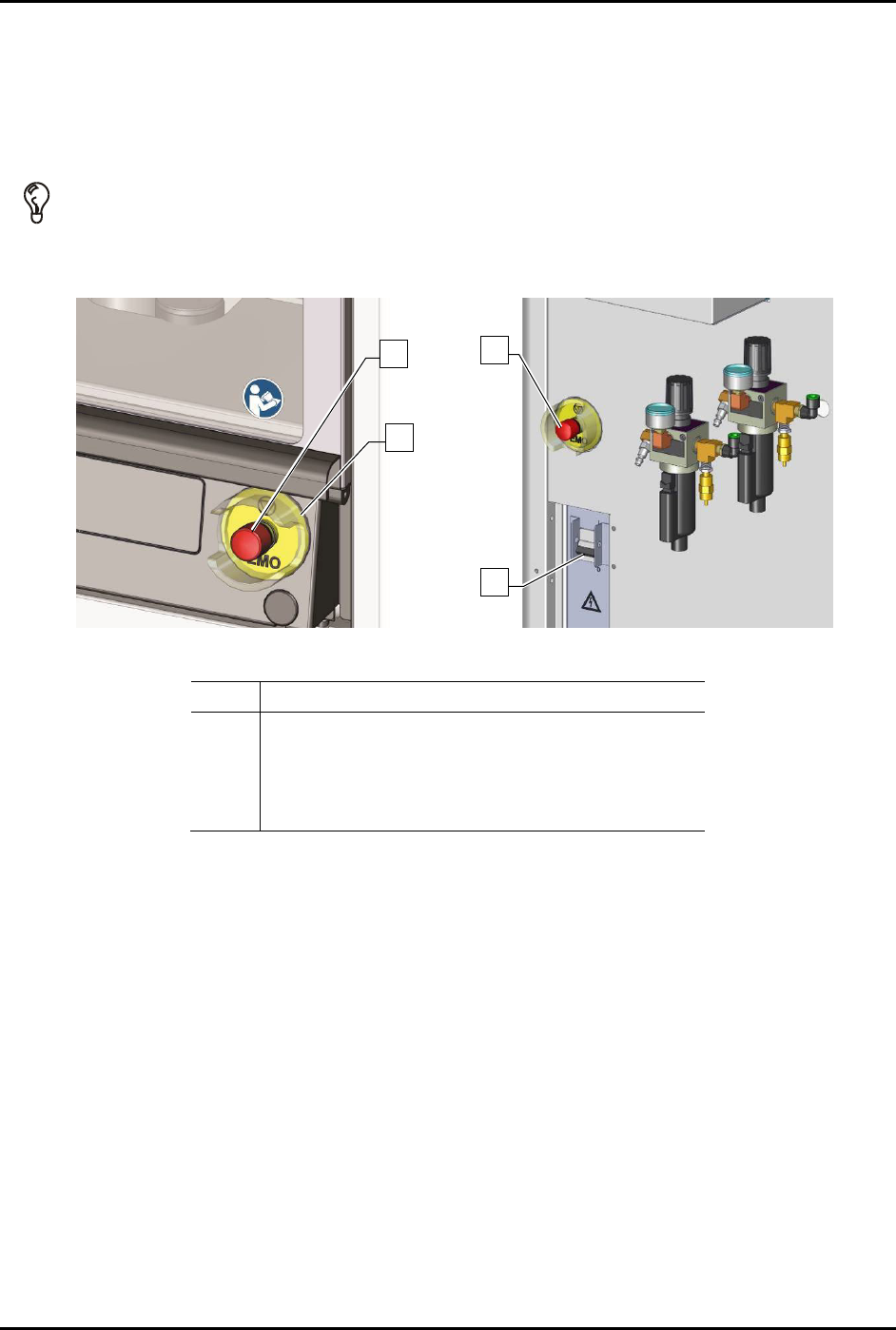
In the event of an emergency or malfunction, press the EMO button. The dispensing system has two EMO
buttons. The EMO buttons are the large red buttons located on the front panel and the rear of the
dispensing system (Figure 2-10). Activating the EMO vents all pressure in the pneumatic system and cuts
power to all components except the laptop computer, the camera, the interior light, and the light beacon.
TIP If the operator or technician is unable to reach the EMO button, the main circuit breaker ,
which is located on the back of the system, can be used for emergency shutdown
(Figure 2-10).
Front Panel Rear View
Item
Description
1 Rear EMO button
2 Front EMO button
3 EMO Guard
4 Main Circuit Breaker
Figure 2-10 EMO/Main Circuit Breaker Locations
2
3
1
4
S2-9XXX Series Dispensing System IOM Manual Safety
© 2023 Nordson Corporation 2-15
2.12.1 Emergency Shutdown Situations
As a minimum, activate the EMO in the following situations:
WARNING! In an emergency, failure to completely shutdown power to the dispensing system
with the EMO can cause serious injury to the user and/or damage to the
dispensing system.
• If anyone is in immediate danger of being injured by moving parts, hazardous materials, or
electrical shock.
• If valuable dispensing system components or the workpieces are in danger of being
damaged. This can include:
- Physical damage to the dispensing valve or workpiece by unexpected dispensing
head movement.
- Electrical damage to the dispensing system.
2.12.2 Emergency Shutdown Recovery
WARNING! Do not restart the dispensing operation until the condition that caused the
emergency shutdown has been corrected. Failure to comply could cause serious
injury to the user and/or serious damage to the dispensing system.
NOTE If the main circuit breaker has been tripped, you will need to restart the dispensing
system, see 4.3 Powering on the Dispensing System.
To recover after an emergency shutdown:
1. Open the dispensing area door and clear the conveyor of all workpieces.
2. Locate and remedy the cause of the emergency shutdown. If necessary, see
Section 7 - Troubleshooting.
3. Close the dispensing area door.
4. Turn the EMO knob clockwise until it pops back into position.
5. Press the
ON (I) button on the front panel.
6. Restart your dispensing program. Refer to the Fluidmove User Guide or Fluidmove Online
Help to load and run a program.