Spectrum+Operating+Manual.pdf - 第95页
S2-9 XXX Se ri es Dispensing Sys te m IOM Man ual Calibration and Adjustme nt © 2023 Nordson C orporatio n 5-19 5.10.4 Adjusting the Vac uum Contr ol The v acuu m c ont rol ( Figure 5- 24 ) allow s lo w viscosity fluids …
S2-9XXX Series Dispensing System IOM Manual Calibration and Adjustment
5-18 © 2023 Nordson Corporation
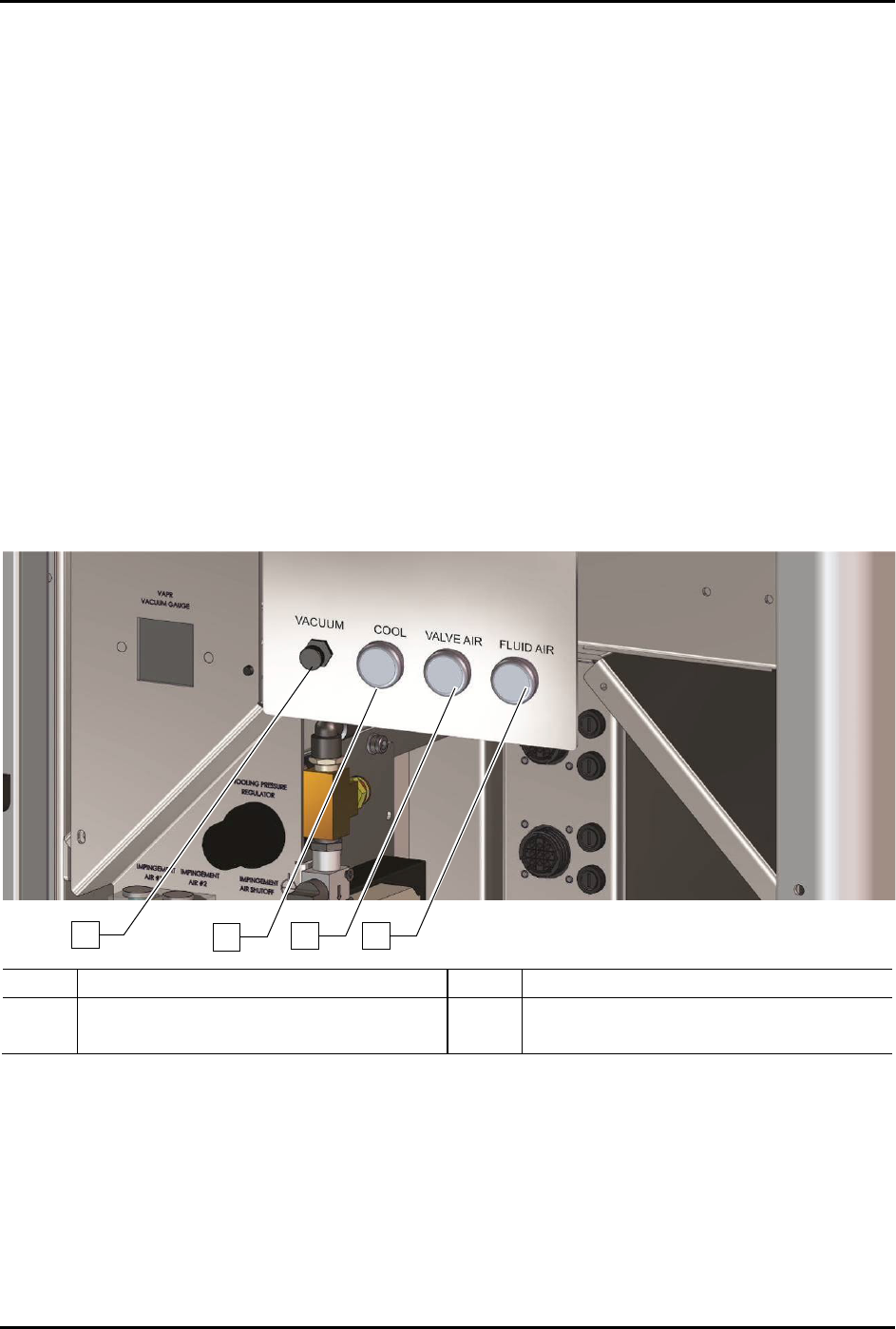
5.10.3 Adjusting the Cooling/Coaxial, Valve, and Fluid Air Pressure
To adjust the cooling/coaxial, valve, and fluid air pressure (Figure 5-20):
1. Locate the desired air pressure regulator adjustment knobs in the front cabinet.
2. Rotate the adjustment knob counterclockwise until the gauge registers 0 psi.
3. Rotate the adjustment knob clockwise until the associated gauge registers the air pressure
value (kPa or psi) required by your dispensing application.
For accurate pressure adjustment, lower the pressure below the desired level and then
increase to the desired pressure.
NOTE Pressure settings depend on the fluid being dispensed and dispensing valve
being used. Refer to the applicable dispensing valve manual for additional
information.
4. Monitor the pressure gauge to make sure that pressure builds at a steady rate. A drop in air
pressure can indicate an air leak.
If there is an air leak, identify the source, shut off the facility air, and fix the leak before
proceeding.
Item
Description
Item
Description
1
Vacuum Control Regulator
3
Valve Air Regulator
2
Cooling/Coaxial Air Regulator
4
Fluid Air Regulator
Figure 5-20 Adjusting the Valve and Fluid Pressure Regulators (S2-9XX/A shown)
NOTE Programmable fluid and valve pressure is an option. Refer to the Fluidmove User Guide
or Fluidmove Online Help for instructions on using the E/P option.
1
2
3
4

S2-9XXX Series Dispensing System IOM Manual Calibration and Adjustment
© 2023 Nordson Corporation 5-19
5.10.4 Adjusting the Vacuum Control
The vacuum control (Figure 5-24) allows low viscosity fluids to be consistently dispensed without
dripping between cycles. The vacuum exerts a negative pressure (suckback) on the fluid, thereby
decreasing dripping.
To adjust the vacuum control:
1. Rotate the knob counterclockwise to increase vacuum pressure and decrease dripping.
2. Rotate the knob clockwise to decrease vacuum pressure.
5.10.5 Setting the Low-Pressure Detection Threshold
This feature allows the user to set the air pressure level at which the software will issue an on-screen low
air pressure error message. Refer to the Fluidmove User Guide or Fluidmove Online Help for
instructions.
S2-9XXX Series Dispensing System IOM Manual Calibration and Adjustment
5-20 © 2023 Nordson Corporation
5.11 Adjusting the Service Station Height
After the camera position has been adjusted for the part set height, the service station height must be
adjusted to bring the ceramic square into focus. The service station can be adjusted upward 1-inch
(25 mm) from the factory set position by performing both rough and fine height adjustments. Each
adjustment will allow 1/2-inch (12.7 mm) of vertical adjustment.
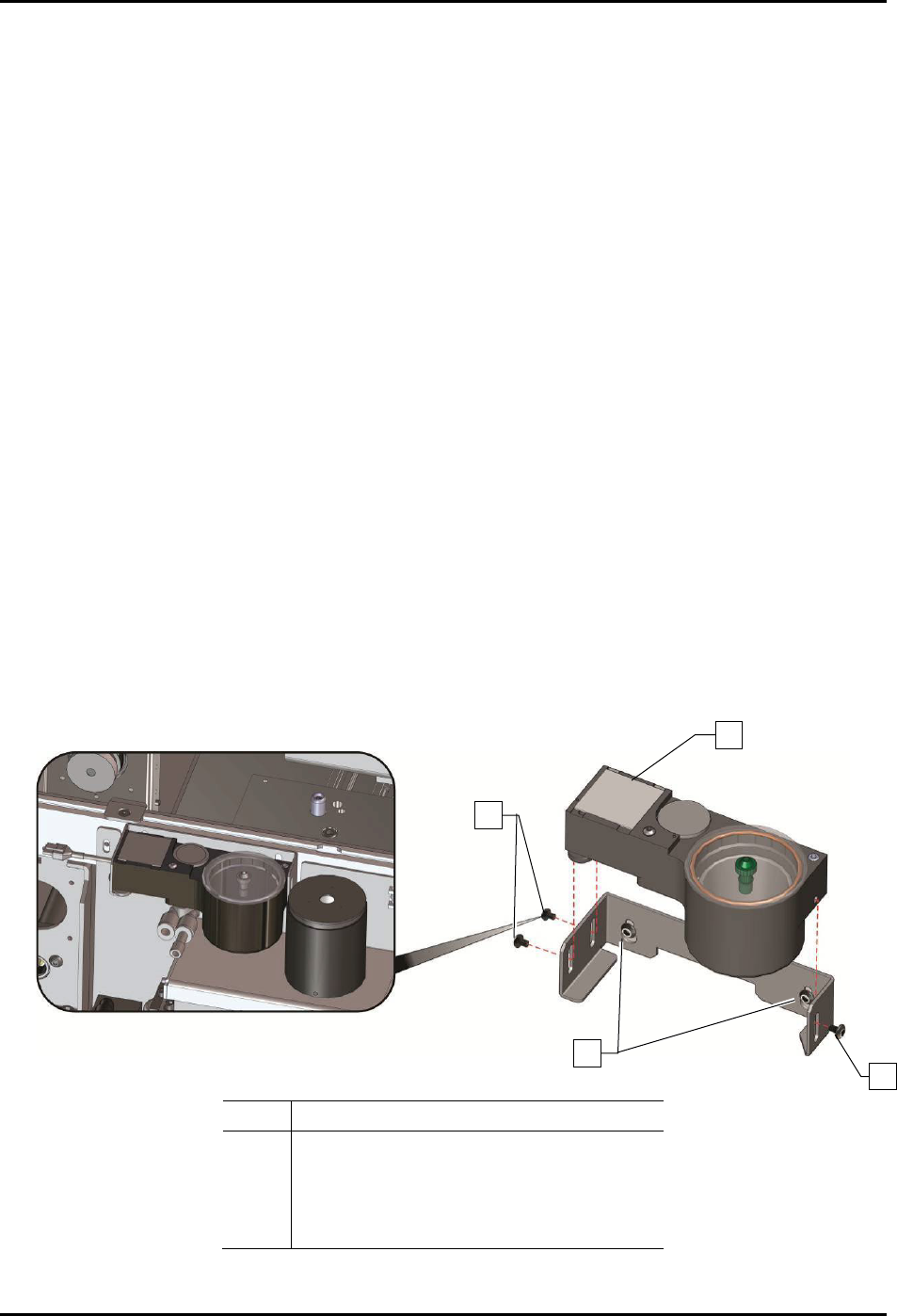
To adjust the service station height (Figure 5-25):
1. Remove the scale cover to gain access to the side mounting screws on the bracket.
2. Loosen the three (3) side mounting screws holding the service station to the bracket.
3. Move the camera over the ceramic tile and adjust the three (3) leveling feet to bring the
ceramic tile into focus.
4. Continue to adjust the leveling feet until all corners of the ceramic square are in focus.
5. Tighten the three (3) side mounting screws.
6. If the leveling feet do not provide enough vertical adjustment to bring the service station
into focus:
a. Remove the three (3) side mounting screws.
b. Slide the service station forward to gain access to the bracket mounting screws.
c. Loosen the two (2) bracket mounting screws, adjust the bracket upwards, and retighten
the two (2) bracket mounting screws.
d. Repeat Step 1 through Step 5 above.
7. When finished, replace the scale cover.
Item
Description
1 Ceramic Tile
2 Side Mounting Screws (3)
3 Bracket Mounting Screws (2)
4 Leveling Feet (not shown)
Figure 5-21 Adjusting the Service Station Height
1
2
2
3