3OM-1050-002.pdf - 第157页
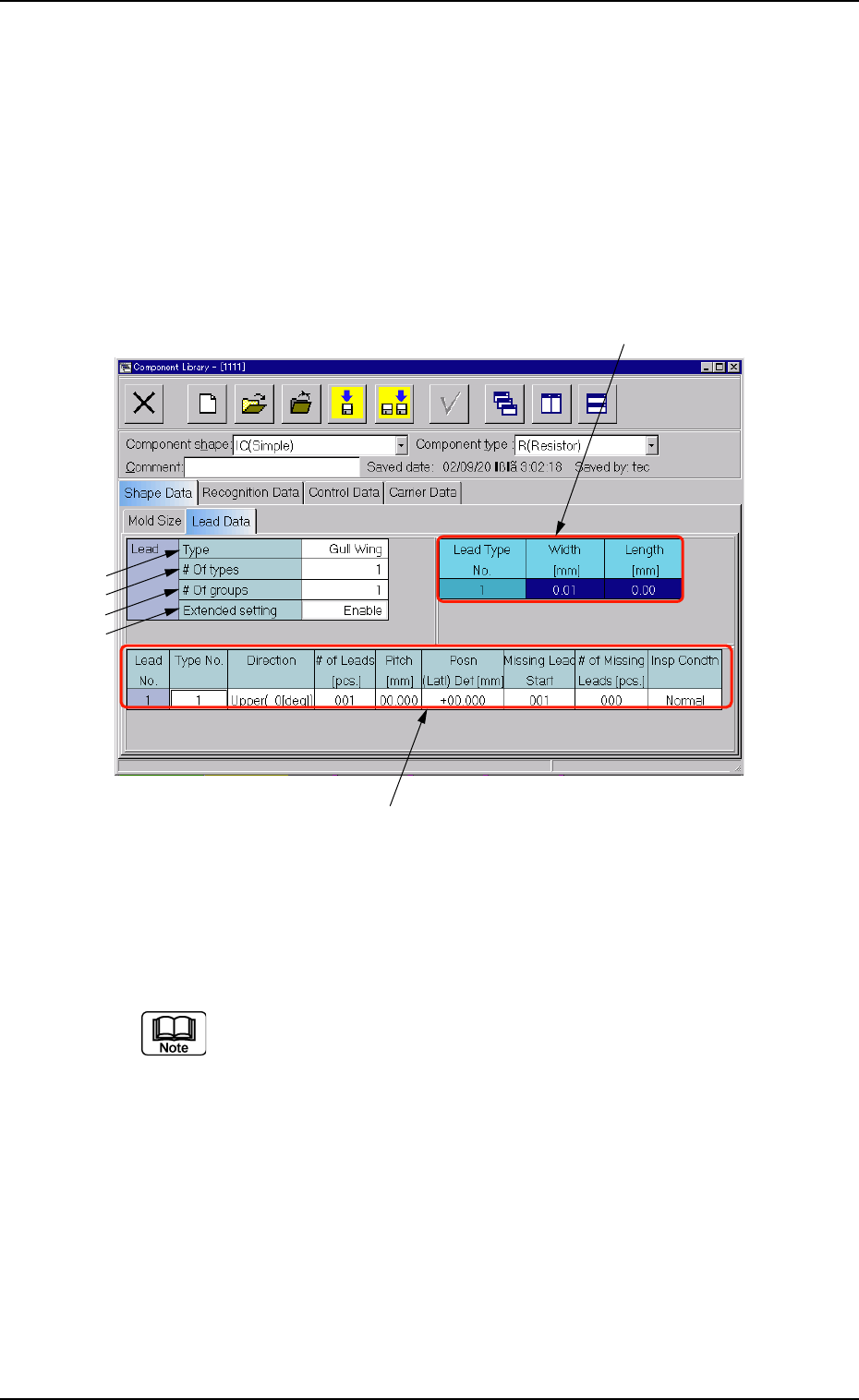
0307-004 3- 21 AFO01EDTP (1) Component Shape: IC (Simple) *1 T ype Different items will be displayed in "*5", depending on which type is selected in this text box. Gull Wing The width and length are displayed i…
3.2.4 "Lead Data" Tab (Simple Shape)
The corresponding tab sheet appears when "IC (Simple)", "Connector
(Simple)", or "Other Leaded (Simple)" is selected in the "Component
shape" text box.
• Sheet Layout
When the "Lead Data" tab is pressed in the "Shape Data" tab sheet,
the following tab sheet appears.
Fig. 3C12 "Lead Data" Tab Sheet ("IC (Simple)" Selected)
• Sheet Composition
Each parameter is displayed or can be entered.
Refer to "4.1.3 Basic Usage of Text Boxes" (Section 2) for the
detailed information on how to enter each parameter.
0301-005 3-20
AFO01EDTP
*5
*6
*1
*2
*3
*4
3.2 "Shape Data" Tab

0307-004 3-21 AFO01EDTP
(1) Component Shape: IC (Simple)
*1 Type
Different items will be displayed in "*5", depending on which
type is selected in this text box.
Gull Wing
The width and length are displayed in "*5".
J Bend, Straight
The width, length, and full length are displayed in "*5".
Leadless
The width and full length are displayed in "*5".
*2 # Of Types, *3 # Of Groups
*4 Extended setting
Different items will be displayed in "*6", depending on which
parameter ("Disable" or "Enable") is set in this text box.
Disable
When this is set in the "Extended setting" text box, the type
No., the direction, the number of leads, and pitch are dis-
played in "*6".
Enable
When this is set in the "Extended setting" text box, the type
No., the direction, the number of leads, pitch, center position
(lateral), top position (longitudinal), missing lead start, and
number of missing leads are displayed in "*6".
*5 Lead Type Data
"Width [mm]", "Length [mm]", "Full Length [mm]"
*6 Lead Group Data
"Type No.", "Direction", "# of Leads [pcs.]", "Pitch [mm]", "Posn
(Latl) Det [mm]", "Posn (Long) Det [mm]", "Missing Lead
Start", "# of Missing Leads [pcs.]"
3.2 "Shape Data" Tab

(2) Component shape: Connector (Simple), Other Leaded (Simple)
*1 Type
Different items will be displayed in "*5", depending on which
type is selected in this text box.
Std
The width and length are displayed in "*5".
Electd
The shape, width, and full length are displayed in "*5".
*2 # Of types, *3 # Of groups
*4 Extended setting
Different items will be displayed in "*6", depending on which
parameter ("Disable" or "Enable") is set in this text box.
Disable
When this is set in the "Extended setting" text box, the type
No., the direction, the number of leads, and pitch are dis-
played in "*6".
Enable
When this is set in the "Extended setting" text box, the type
No., the direction, the number of leads, pitch, center position
(lateral), top position (longitudinal), missing lead start, and
number of missing leads are displayed in "*6".
*5 Lead Type Data
"Shape", "Width [mm]", "Length [mm]", "Full Length [mm]"
*6 Lead Group Data
"Type No.", "Direction", "# of Leads [pcs.]", "Pitch [mm]", "Posn
(Latl) Det [mm]", "Posn (Long) Det [mm]", "Missing Lead
Start", "# of Missing Leads [pcs.]"
0307-004 3-22
AFO01EDTP
3.2 "Shape Data" Tab