3OM-1050-002.pdf - 第175页
Different Points between Management Data and Pattern Program Management Data T able 3D1 Item Management Data Pattern Program Management Data Pattern Program { Product History Machine Performance Data {{ (No P .C.B. Proce…

1. Outline of Management Data
The following management data is prepared to manage the operating
condition of the machine, the completed amount of products, the pro-
duction rate, etc.
(1) Management Data
Information data of the whole machine performance is collected
and displayed.
A group of items related to machine maintenance are mainly
summed up.
The number of finished P.C.B.’s is counted up not limited to the
current pattern program data but including all implemented pattern
programs.
That is, the cumulative total of P.C.B.’s finished according to sev-
eral pattern programs can be regarded as the completed amount of
P.C.B.’s.
There are two types (Type #1 and Type #2) of management data
whose only difference is the date and time which they are cleared
(this is based on individual needs for management data tracking.
The possibility is using one for weekly tracking and the other for
monthly tracking).
(2) Pattern Program Management Data
Management data is summed up for each pattern program data.
As this information is collected independently for each pattern pro-
gram, each bit of information is collected and displayed only when
the pattern program is active as the current one.
Thus, when a particular pattern program is used periodically during
a span of time, data is collected only during the times which that
program is active. This management data makes it possible to track
each program’s performance and machine productivity individually.
This management data gives individual information on each pattern
program data, enabling the management of the selected model pro-
duction.
(3) Component Handling Error Rate Data
This session describes how to check the pick-up rate calculated
for each feeder or nozzle and based on each pick-up rate specified
in the automatic operation set-up data.
01 10-003 4 - 1
AFO01EDTP
1. Outline of Management Data
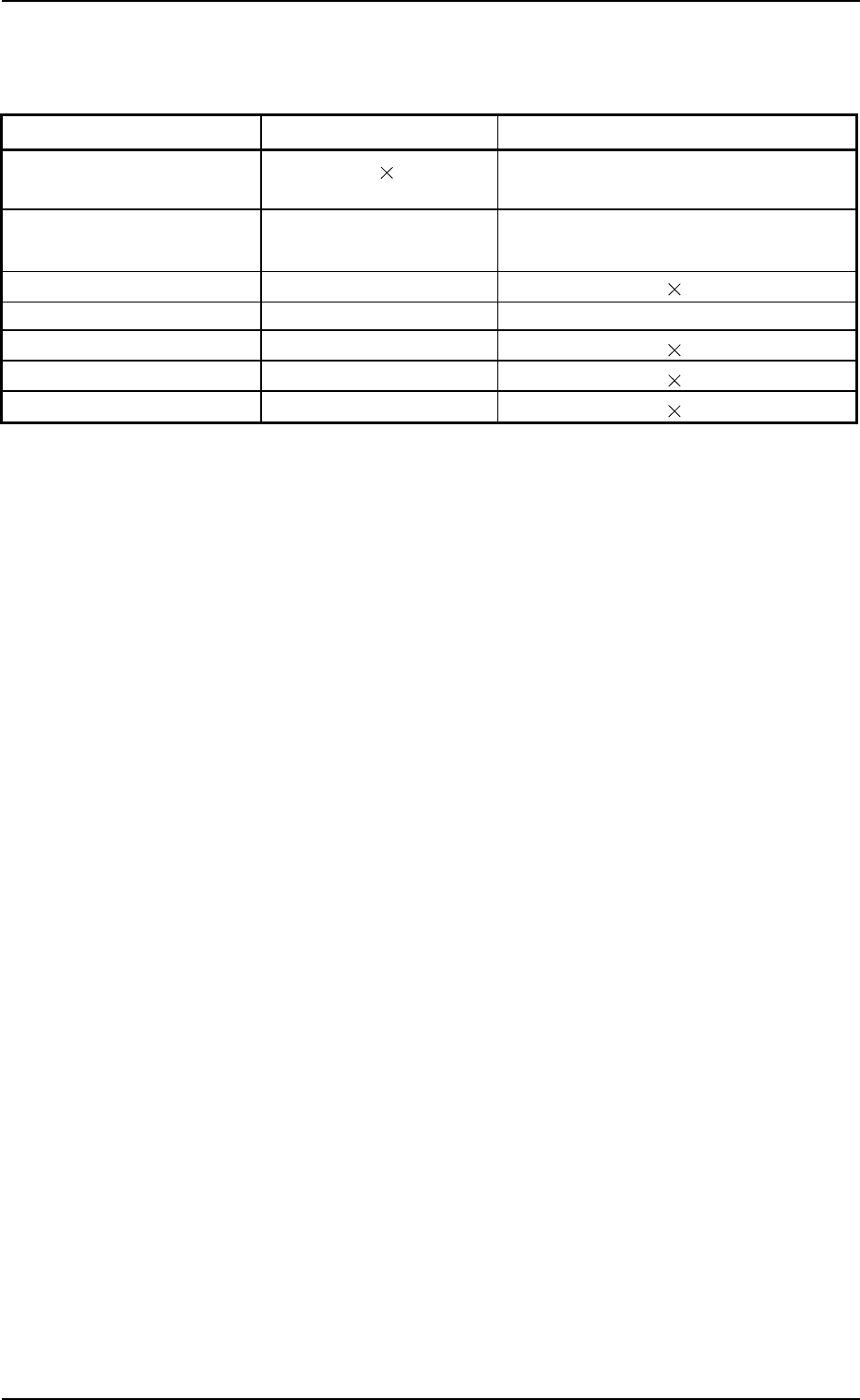
Different Points between Management Data and Pattern Program
Management Data
Table 3D1
Item Management Data Pattern Program Management Data
Pattern Program
{
Product History
Machine Performance Data {{
(No P.C.B. Process Time) (P.C.B. Process Time)
Sub-System Error Counts {
Handling Errors Per Feeder {{
Head Management Data {
Nozzle Management Data {
Handling/Placement Data {
1. Outline of Management Data
0207-004 4 - 2 AFO01EDTP
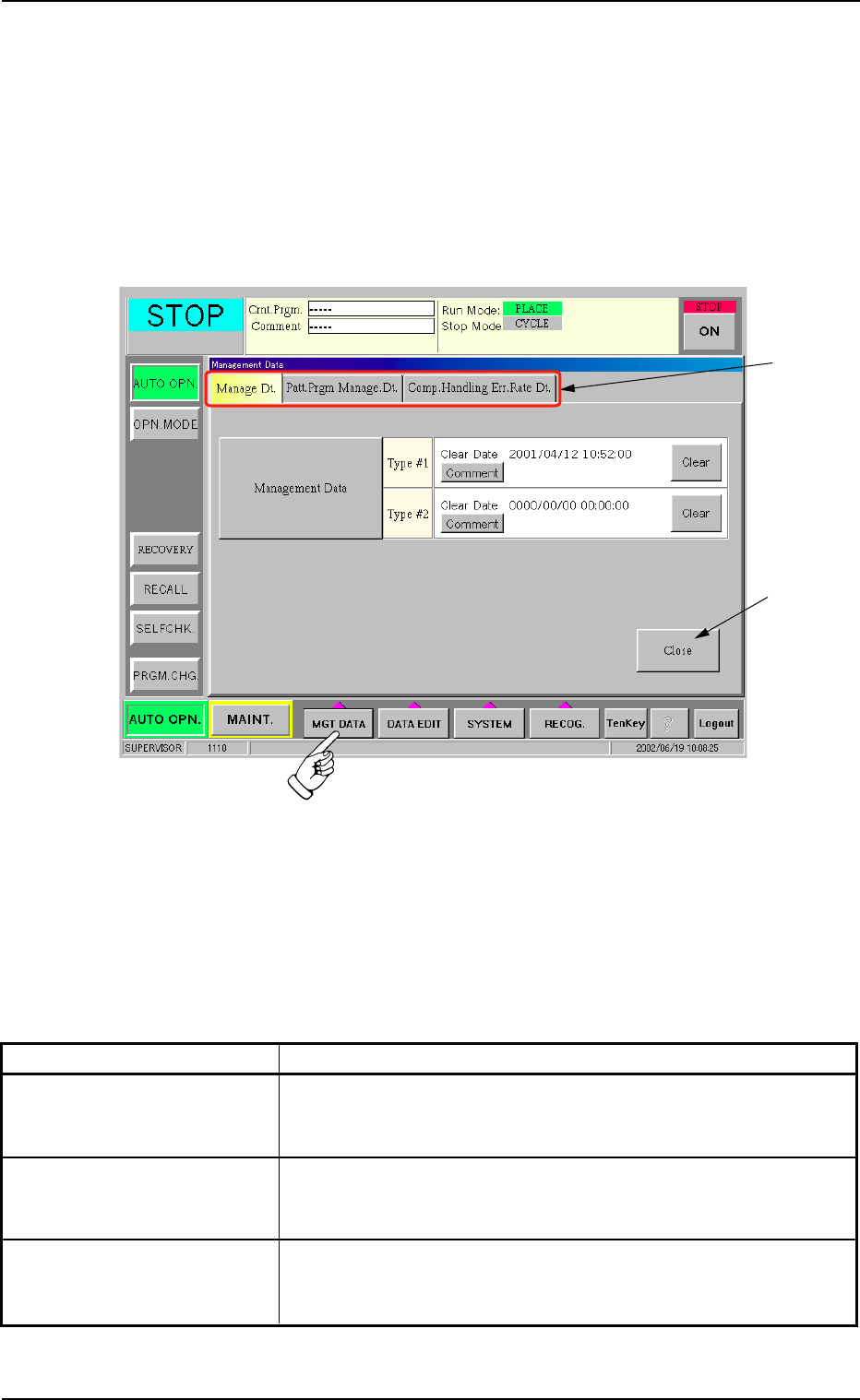
2. "Management Data" Window (Main Menu)
This window enables the operator to select the data to be summed up
and displayed.
• Window Layout
When the [MGT DATA] button on the main menu bar is pressed, the
following window opens.
Fig. 3D1 "Management Data" Window (Main Menu)
• Window Composition
*1 Tabs and Tab Sheets
The "Management Data" window (main menu) is provided with the
following three tab sheets. When a tab is pressed, the correspond-
ing tab sheet appears inside the window.
Table 3D3
Tabs Description
Manage Dt. The corresponding tab sheet enables the operator to view the
summed management data covering the whole machine per-
formance.
Patt Prgm Manage Dt. The corresponding tab sheet enables the operator to view the
summed pattern program management data related to each
individual pattern programs.
Comp. Handling Err. Rate Dt. The corresponding tab sheet enables the operator to check the
pick-up rate calculated for each feeder or nozzle and based on
each pick-up rate specified in the auto operation setup.
*2 [Close] Button
When this button is pressed, the "Management Data" closes.
0207-004 4 - 3 AFO01EDTP
2. "Management Data" Window (Main Menu)
*1
*2