3OM-1050-002.pdf - 第207页
4. 2 "Machine Performance Data" T ab The corresponding tab sheet enables the operator to view the perfor- mance data of the production model. • Sheet Layout When the "Machine Performance Data" tab is …
4.1 "Pattern Program Product History" Tab
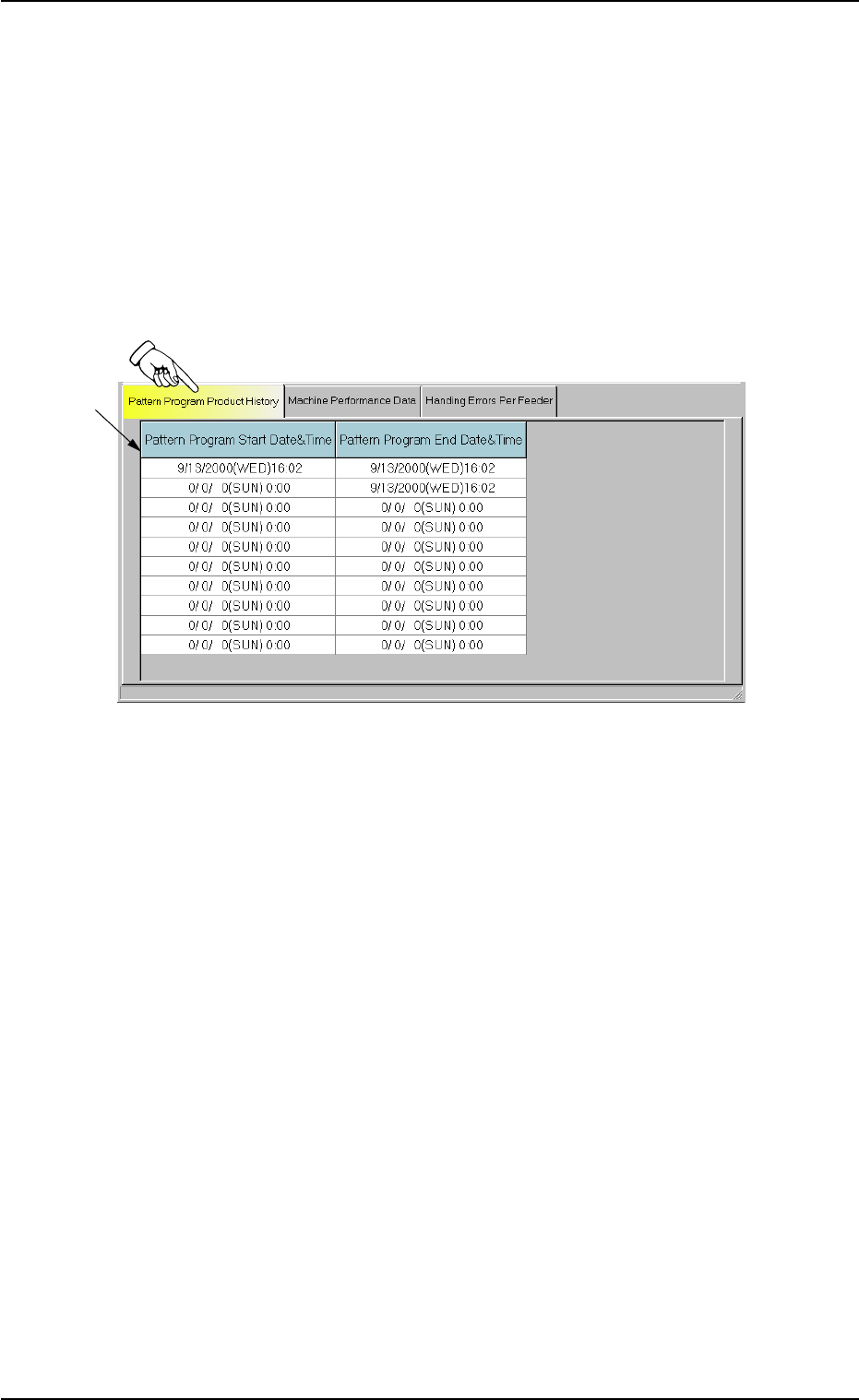
The corresponding tab sheet enables the operator to check the pattern
program start and end date & time records (logs).
• Sheet Layout
When the "Pattern Program Product History" tab is pressed in the
"Pattern Program Management Data" window, the following tab sheet
appears inside the window.
Fig. 3D16 "Pattern Program Product History" Tab Sheet
• Sheet Composition
*1 List of Pattern Program Logs
Up to 10 records (logs that show the number of times specified as
current pattern program) are displayed for each individual pattern
programs.
The start and end date & time records (logs) are also displayed for
the selected pattern program.
When there are more than 10 logs, the older ones are deleted one
by one.
01 10-003 4-31
AFO01EDTP
*1
4.1 "Pattern Program Product History" Tab
4.2 "Machine Performance Data" Tab
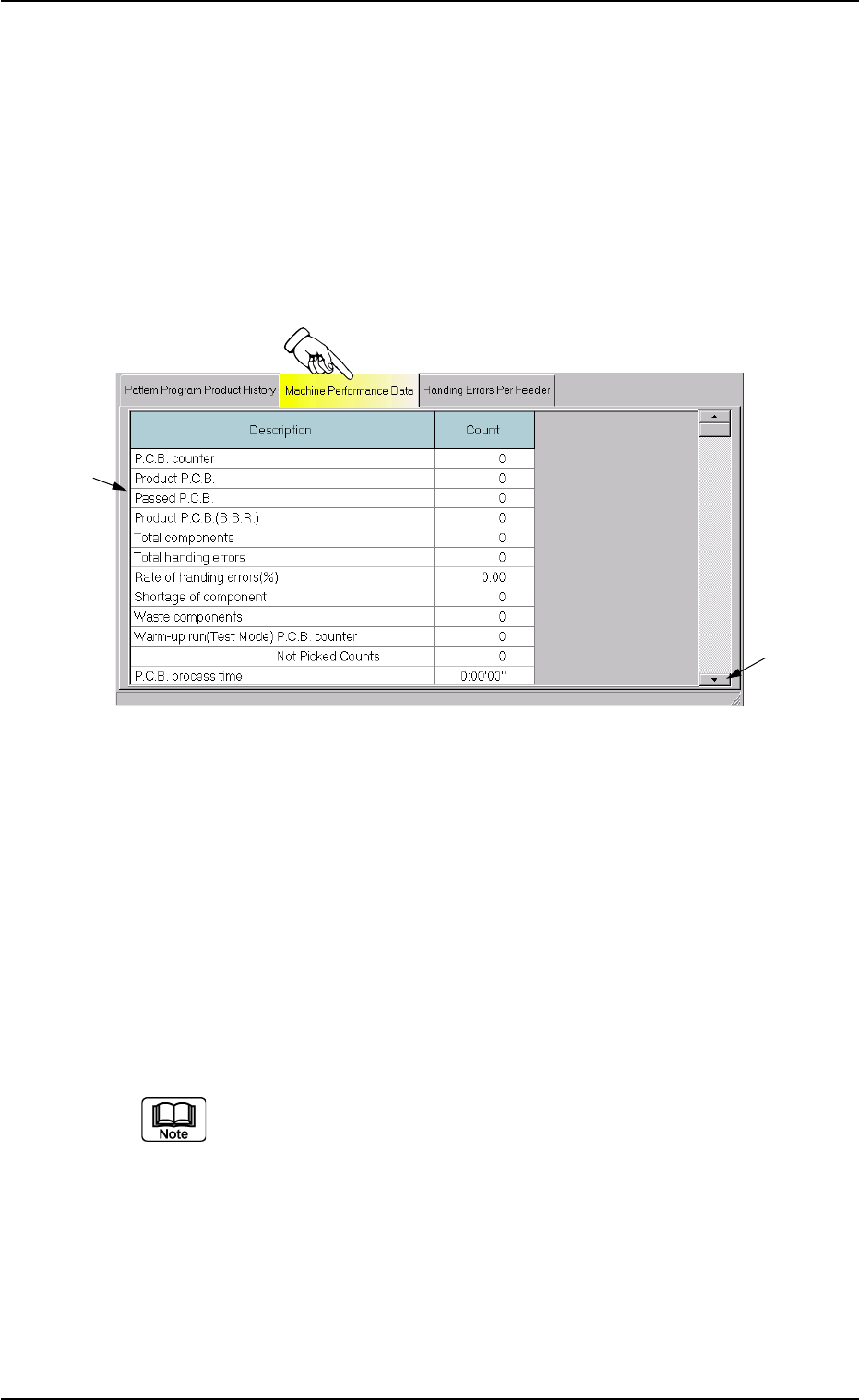
The corresponding tab sheet enables the operator to view the perfor-
mance data of the production model.
• Sheet Layout
When the "Machine Performance Data" tab is pressed in the "Pat-
tern Program Management Data" window, the following tab sheet
appears inside the window.
Fig. 3D17 "Machine Performance Data" Tab Sheet
• Sheet Composition
*1 Items
The following items are displayed.
(1) P.C.B. counter
Shown is the number of produced P.C.B.’s.
Counting is implemented when the X/Y table is zeroed after com-
ponent placement operation (when a P.C.B. is finished).
When a particular pattern program is set several times as cur-
rent one, the sum total is computed.
(2) Product P.C.B.
The number of produced unit P.C.B.’s on multi-unit P.C.B. is
summed up. Counting is implemented when the X/Y table is ze-
roed after component placement operation (when a unit is fin-
ished).
When the bad board reject (B.B.R.) function is used, defective
unit P.C.B.’s are excluded.
4.2 "Machine Performance Data" Tab
*2
*1
0301-005 4-32 AFO01EDTP

(3) Passed P.C.B.
The number of passed P.C.B.’s is counted when the machine is
set in the "PASS" mode.
Counting is implemented when the P.C.B. transfer starts (when
the P.C.B. on the X/Y table is transferred to the output conveyor).
(4) Product P.C.B. (B.B.R.)
Shown is the number of defective P.C.B.’s summed up when
the bad board reject function is used.
(5) Total components
Shown is the number of picked components (the number of pick-
up operations).
(6) Total handling errors
Shown is the total number of component handling errors.
(7) Rate of handling errors (%)
Shown is the percentage of handling errors per total number of
picked components.
(8) Shortage of component
Shown is the total number of detected component shortage er-
rors.
(9) Waste components
Shown is the total number of components that were picked up
but not placed.
(10) Warm-up run (Test Mode)
The data of the warm-up run (dry cycle) is counted.
P.C.B. counter
The number of P.C.B.’s is counted when the machine is oper-
ated under the following condition.
• "ENABLE" set for "TEST RUN" in "Run Mode" Tab Sheet ("OPN.
MODE" Window)
• "PCB XFR Err Det Disabled" Check Box Checked
(State in which no P.C.B. is put in and out)
Not Picked Counts
The number of non-picking/non-placement actions is counted
when the machine is operated under the following condition.
• "ENABLE" set for "TEST RUN" in "Run Mode" Tab Sheet ("OPN.
MODE" Window)
• "Handling/Place Disabled" or "Vacuum/Blower Disabled" Check
Box Checked
0301-005 4-33
AFO01EDTP
4.2 "Machine Performance Data" Tab