3OM-1050-002.pdf - 第82页
0301-004 2 - 6 1 AFO01EDTP 3 . 2 Single Pattern (P .E.C. Recognition Function Enabled) (1) Information on Pattern Program Creation • P .C.B. size Follow the same procedure as described in "3.1 Single Pattern". …
0210-005 2-60 AFO01EDTP
• P.E.C. Recognition Data
Set "Disable" in the "P.E.C. recognition function" text box.
Do not set any parameter in the other text boxes.
• P.E.C. Recognition Mark Data
Do not make this data.
• Setup Data
Create this data when the automatic setup function should be used.
(3) Creation of Placement Feeder Location Data
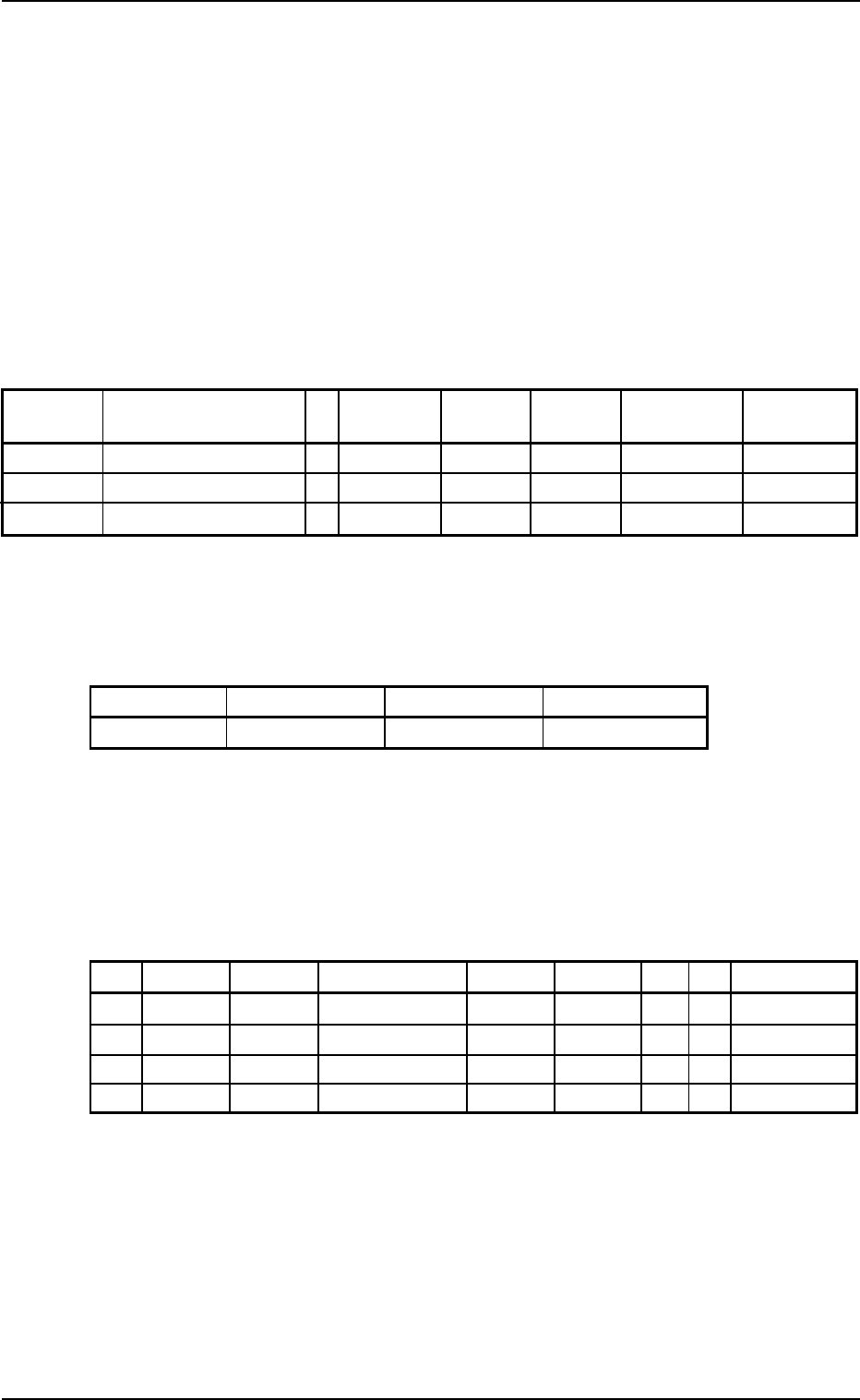
Table 3B19
Fdr. No. Component ID C Comment Dual Fdr
Feeder Feeder
Fdr. No.
Fixed Alternate
101 TANA3216B0- - - - - Disable Disable 000
103 TR2012-3B0SANL2 - - Disable Disable 000
105 SOP008-B02SAN E - Disable Disable 000
(4) Creation of Placement Data (P-data) U01
• Unit Control
Table 3B20
Unit Control Offset X [mm] Offset Y [mm] Offset Z [deg
]]
]]
]
Placement +000.000 +000.000 +000.00
• Unit P.C.B. B.B.R.
Set "Disable" in this text box.
Do not set any parameter in the other text boxes.
• Placement Data (P-data)
Table 3B21
P-No. X [mm] Y [mm] Z
= =
= =
= theta [deg
]]
]]
] H [mm] Fdr. No. V C Comment
1 X
1
Y
1
+000.00 +0.000 101 00 -
2 X
2
Y
2
+090.00 +0.000 103 00 -
3 X
3
Y
3
+180.00 +0.000 105 00 -
4 +000.000 +000.000 +000.00 +0.000 000 00 E
(5) Creation of Placement Data (O-data) U01
Do not make this data.
3.1 Single Pattern
0301-004 2-61 AFO01EDTP
3.2 Single Pattern (P.E.C. Recognition Function
Enabled)
(1) Information on Pattern Program Creation
• P.C.B. size
Follow the same procedure as described in "3.1 Single Pattern".
• Packaged Posture and IDs of Components
Follow the same procedure as described in "3.1 Single Pattern".
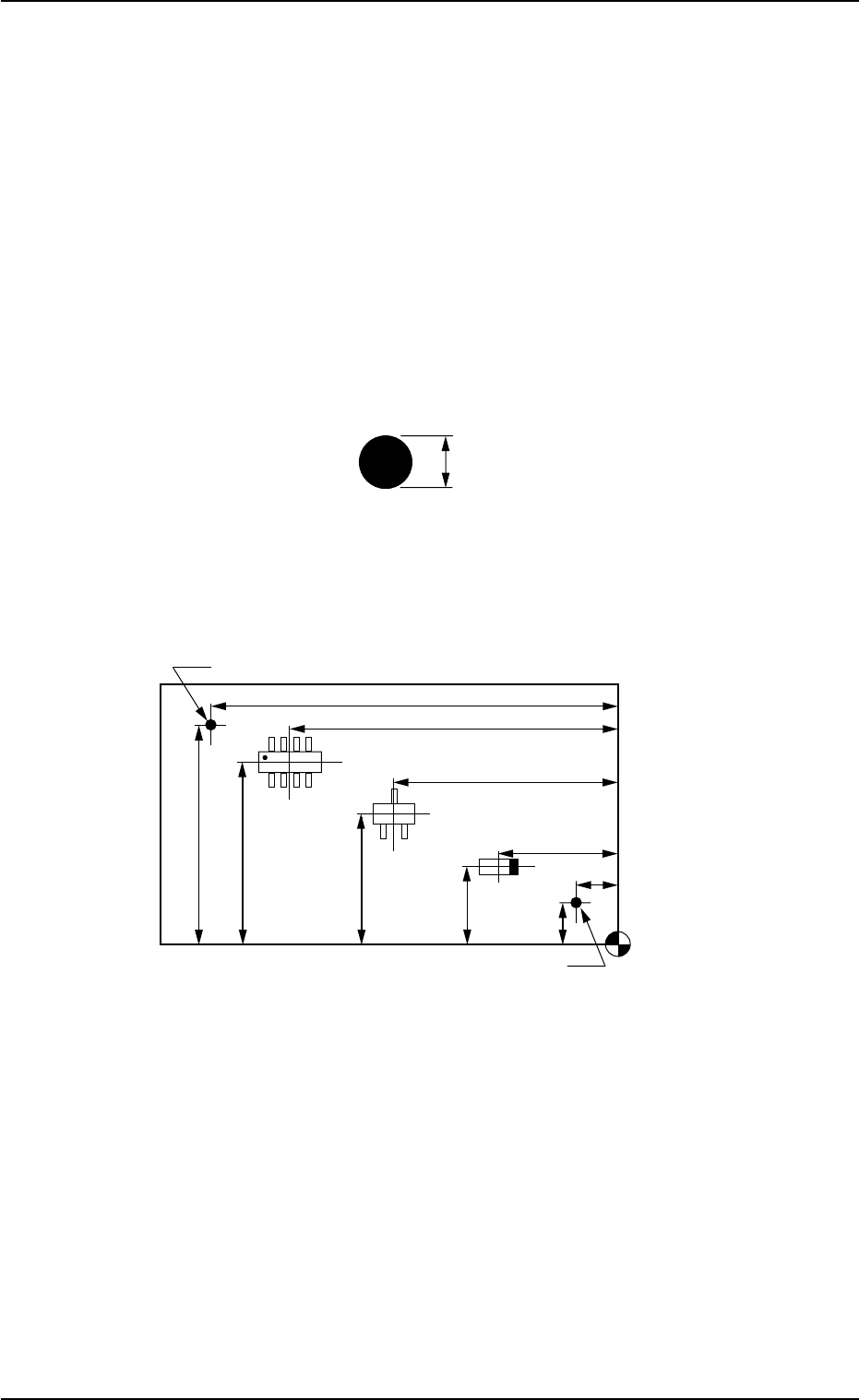
• P.E.C. Recognition Mark Data
Fig. 3B119
• Placement Coordinates & Angles and Coordinates of Fiducial
Marks
Fig. 3B120
1.0 mm
Placement Coordinate
Reference Point
X
3
Y
3
X
2
Y
2
X
1
FX
1
Y
1
FY
1
FY
2
FX
2
Fiducial Mark
Fiducial Mark
3.2 Single Pattern (P.E.C. Recognition Function Enabled)
0307-006 2-62 AFO01EDTP
(2) Creation of Operation Data
• P.C.B. Data
Follow the same procedure as described in "3.1 Single Pattern".
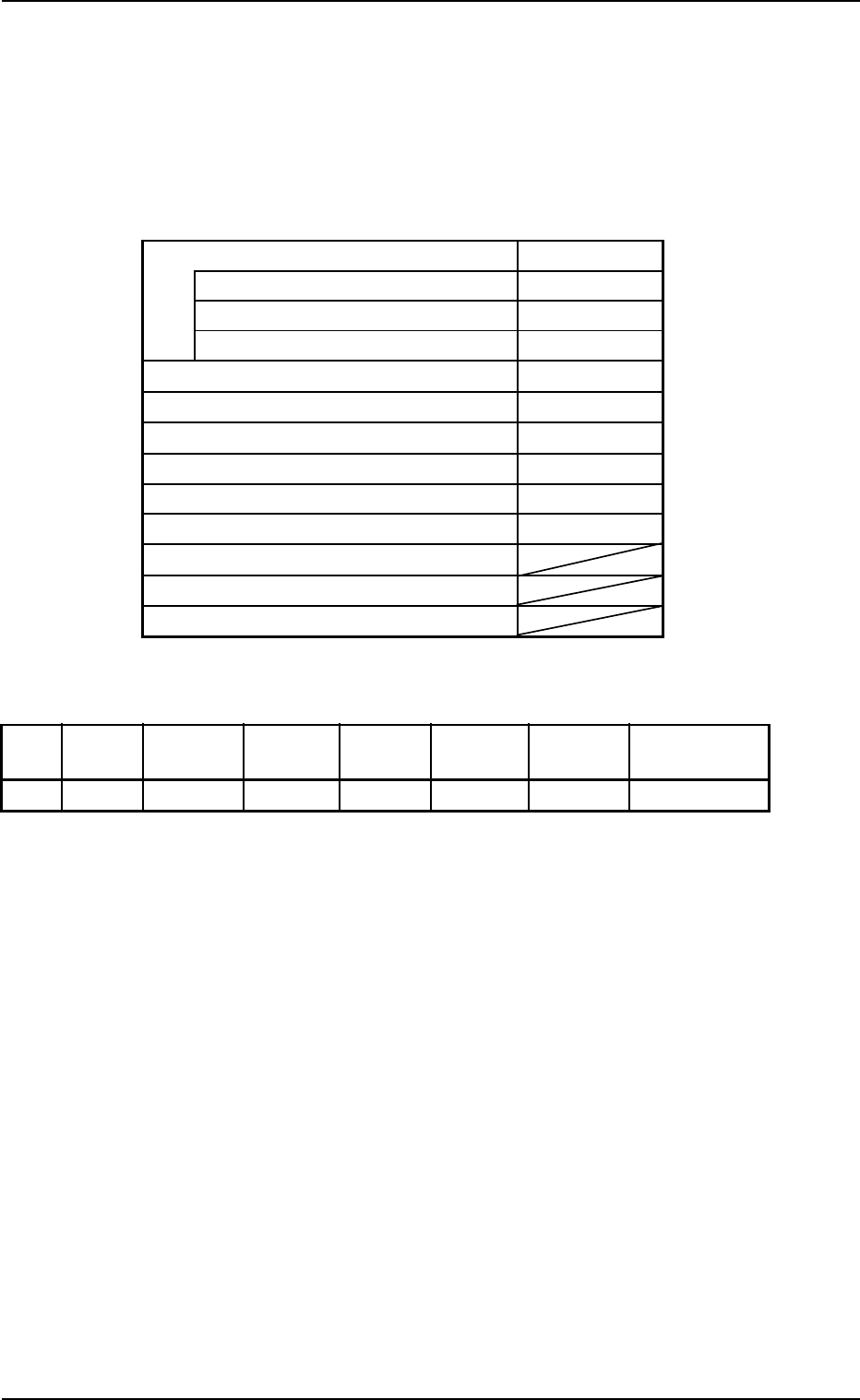
• P.E.C. Recognition Data
Table 3B22
P.E.C. recognition function Enable
P.E.C. recognition mode global 2 Point
P.E.C. recognition mode image Disable
P.E.C. recognition mode local Disable
Fiducial mark #1 X location [mm] FX
1
Fiducial mark #1 Y location [mm] FY1
Fiducial mark #1 Mark # 1
Fiducial mark #2 X location [mm] FX
2
Fiducial mark #2 Y location [mm] FY2
Fiducial mark #2 Mark # 1
Fiducial mark #3 X location [mm]
Fiducial mark #3 Y location [mm]
Fiducial mark #3 Mark #
• P.E.C. Recognition Mark Data
Table 3B23
Mark #
Mark Mark Size Mark Size Window
Mark Image Mark Level Recog Algo
Type D1 [mm] D2 [mm] Size [mm]
1 Round 1.00 0.00 5.0 Bright High Pattern
• Setup Data
Create this data when the automatic setup function should be used.
(3) Placement Feeder Location Data
Follow the same procedure as described in "3.1 Single Pattern".
3.2 Single Pattern (P.E.C. Recognition Function Enabled)