3OM-1050-002.pdf - 第98页
(4) Creation of Placement Data • Model A A program must be created such that the machine places compo- nents repeatedly on three identical patterns. Follow the same procedure as described in "3.3 Repetitive Patterns…
3.8 Multi-Model Repetitive Patterns
(1) Information on Pattern Program Creation
• Example of Patterns
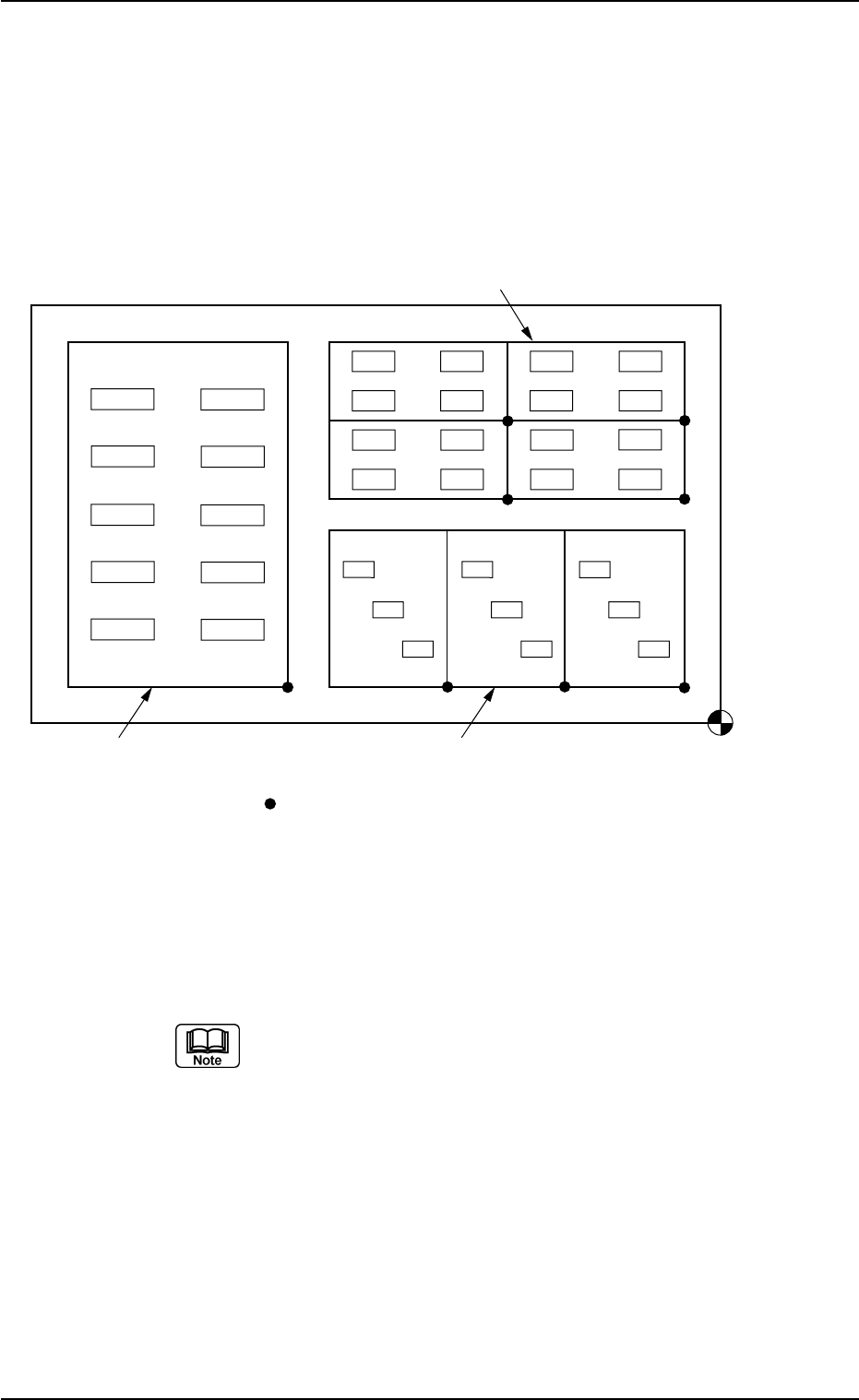
The following multi-unit P.C.B. consists of three unit P.C.B.’s for Mod-
els A, B, and C.
Fig. 3B130
(2) Creation of Operation Data
Follow the same procedure as described in "3.1 Single Pattern".
The created data is commonly used for Models A, B, and C.
When the unit P.C.B. B.B.R. function or the P.E.C. recog-
nition function is used, be sure to set correct parameters
for the function.
(3) Creation of Placement Feeder Location Data
Follow the same procedure as described in "3.1 Single Pattern".
Note: The created data is commonly used for Models A, B, and C.
0307-004 2-76
AFO01EDTP
Placement Coordinate
Reference Point
Model C Model A
Model B
(OX1,OY1)
( signs are pattern origins.)
3.8 Multi-Model Repetitive Patterns
(4) Creation of Placement Data
• Model A
A program must be created such that the machine places compo-
nents repeatedly on three identical patterns.
Follow the same procedure as described in "3.3 Repetitive Patterns".
(a) It is required to create the following placement data.
• Placement Data (P-data) U01
• Placement Data (O-data) U01
(b) Each pattern origin (coordinates) must be based on the
placement coordinate reference point.
• Model B
A program must be created such that the machine places compo-
nents repeatedly on four identical patterns.
Follow the same procedure as described in "3.3 Repetitive Patterns".
(a) It is required to create the following placement data.
• Placement Data (P-data) U02
• Placement Data (O-data) U02
(b) Each pattern origin (coordinates) must be based on the
placement coordinate reference point.
• Model C
Although this is a single pattern, follow the same procedure as de-
scribed in "3.3 Repetitive Patterns" to create placement data in place
of a single pattern program.
It is required to create the following placement data.
• Placement Data (P-data) U03
• Placement Data (O-data) U03
Refer to the following example.
Example of Placement Data (O-data) U03
Table 3B37
O-No. X [mm] Y [mm] Z = theta [deg] C Comment B-X [mm] B-Y [mm]
1 OX
1
OY
1
+000.00 - +000.000 +000.000
2 +000.000 +000.000 +000.00 E +000.000 +000.000
0210-004 2-77 AFO01EDTP
3.8 Multi-Model Repetitive Patterns
4. "Pattern Program" Edit Window
4.1 Basic Operations in Edit Windows
4.1.1 Window Layout
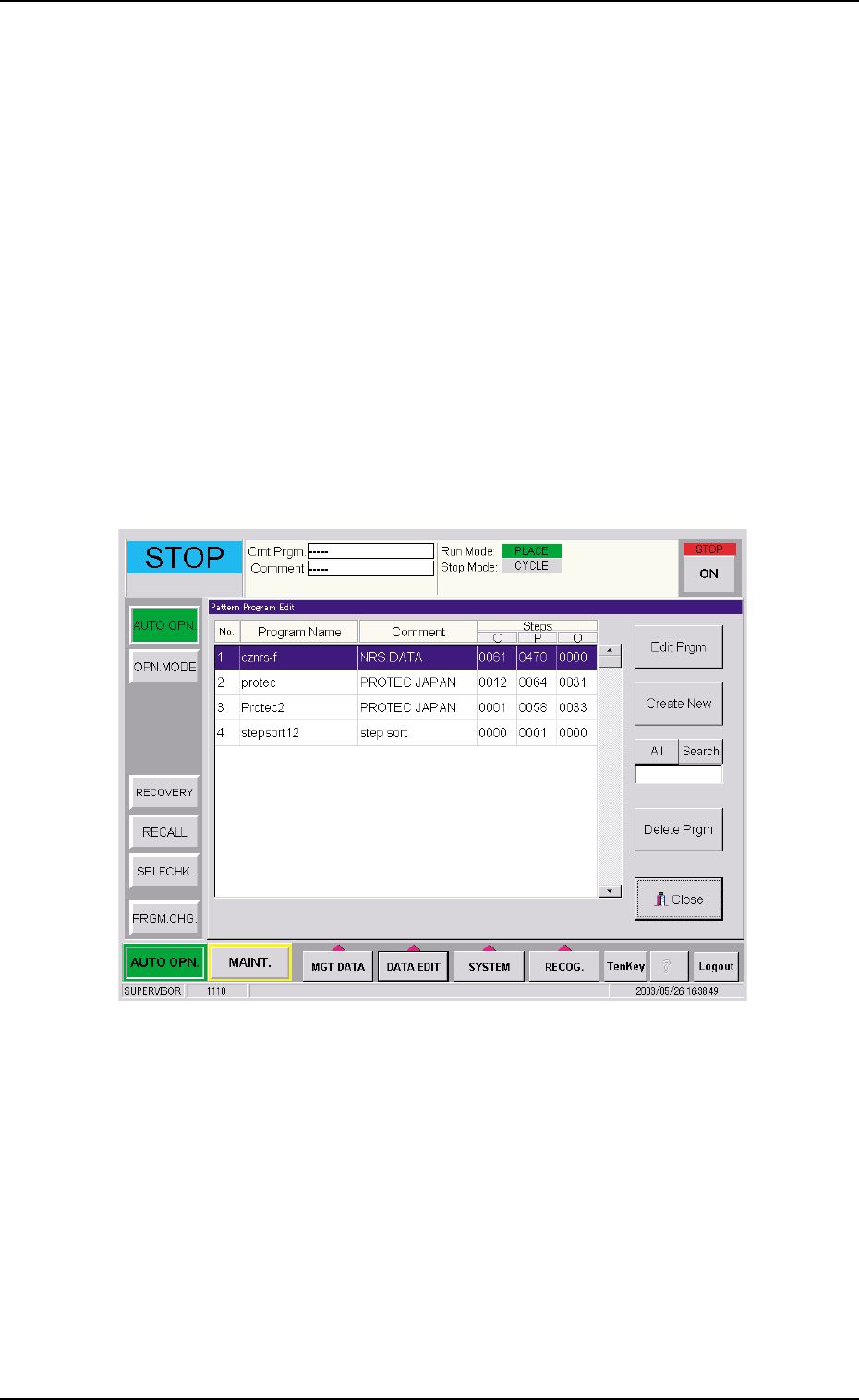
Described below is how to open the "PATTERN PROGRAM EDIT" win-
dow.
• New Data Creation
(1) Press the [DATA EDIT] button on the main menu bar. An "EDIT SEL."
menu opens.
(2) Press the [PATT PRGM] button. The "Pattern Program Edit" win-
dow opens.
Fig. 3B131 "Pattern Program Edit" Window
(3) Press the [Create New] button. The "Pattern Program" edit window
opens.
4. "Pattern Program" Edit Window
0307-005 2-78 AFO01EDTP