3OM-1050-002.pdf - 第91页
(2) Creation of Operation Data • P .C.B. Data T able 3B31 • P .E.C. Recognition Data Set "Disable" in the "P .E.C. recognition function" text box. Do not set any parameter in the other text boxes. • P…
3.5 Repetitive Patterns (Unit P.C.B. B.B.R. Function
Enabled)
Described below are the typical examples of data creation.
(1) Information on Pattern Program Creation
• P.C.B. Size and Packaged Posture & IDs of Components
Follow the same procedure as described in "3.1 Single Pattern".
• Placement Coordinates and Angles (Z=Theta)
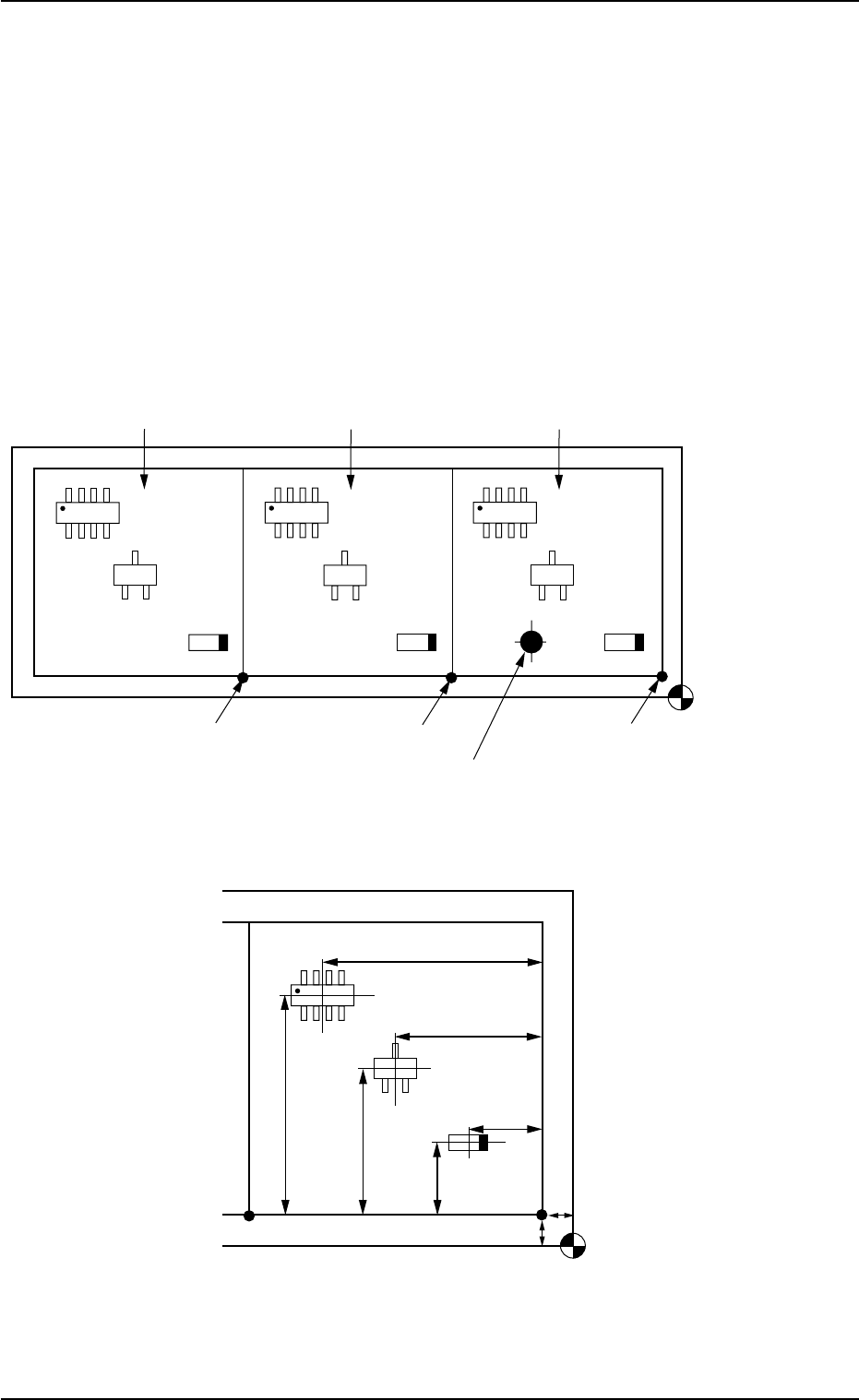
Fig. 3B125 General View
Fig. 3B126 Pattern 1 (Magnified View)
0110-003 2-6 9
AFO01EDTP
Placement Coordinate
Reference Point
(OX
1
, OY
1
)
(OX
2
, OY
2
)
Pattern Origin (OX
3
, OY
3
)
Pattern 1
Location of Bad Mark (BX
1
, BY
1
)
Pattern 2
Pattern 3
Placement Coordinate
Reference Point
X3
Y3
X2
Y2
X1
Y1
OY1
OX1
3.5 Repetitive Patterns (Unit P.C.B. B.B.R. Function Enabled)
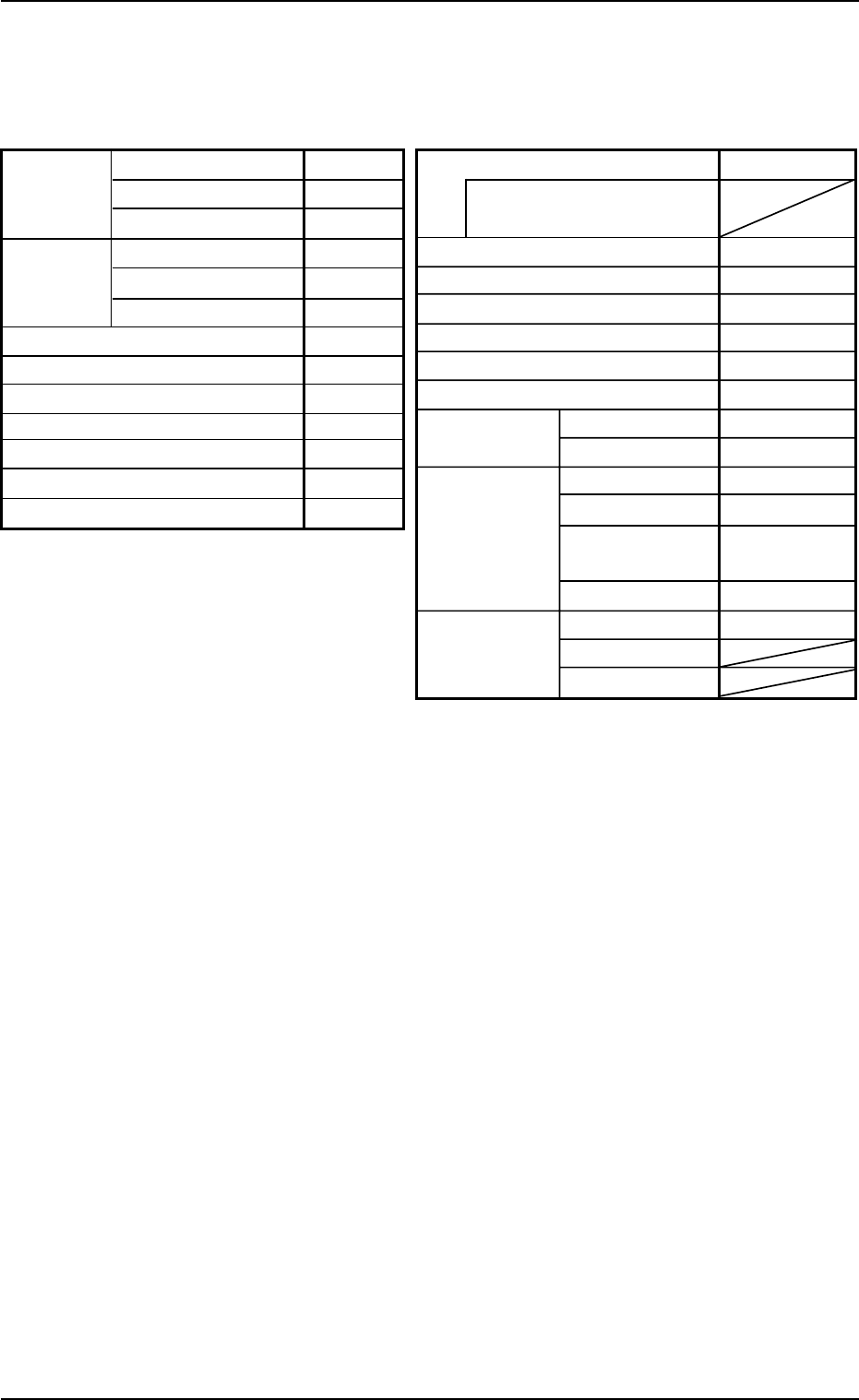
(2) Creation of Operation Data
• P.C.B. Data
Table 3B31
• P.E.C. Recognition Data
Set "Disable" in the "P.E.C. recognition function" text box.
Do not set any parameter in the other text boxes.
• P.E.C. Recognition Mark Data
Do not create this data.
• Setup Data
Create this data when the automatic setup function should be used.
(3) Creation of Placement Feeder Location Data
Follow the same procedure as described in "3.1 Single Pattern".
0210-004 2-70
AFO01EDTP
Alternate mode Disable
Alternate carriage data
priority processing
Feeder No. offset +000
X/Y table accel des Full Speed
F1 accel des Full Speed
F2 accel des Full Speed
F3 accel des Full Speed
F4 accel des Full Speed
Recovery U-N Disable
regulation
Block Disable
Unit P.C.B. B.B.R.
Mode Standard
Mark Image Dark (E/NR)
Component
prechuck
Disable
Sequence Bad Mark
Overall Mode Disable
P.C.B. B.B.R. X [mm]
Y [mm]
P.C.B. size
P.C.B.
origin offset
X [mm]
Y [mm]
T [mm]
X [mm]
Y [mm]
Z=Theta [deg]
P.C.B. height offset [mm]
P.C.B. Positioning Reference
Pre-Placed component thickness [mm]
Placement mode
P.C.B. transfer speed
Placement data sorting
Feeder standby position
330.000
250.000
1.600
+00.000
+00.000
+0.00
+00.000
Front Right
00.000
Placement
Standard
Standard
000
3.5 Repetitive Patterns (Unit P.C.B. B.B.R. Function Enabled)
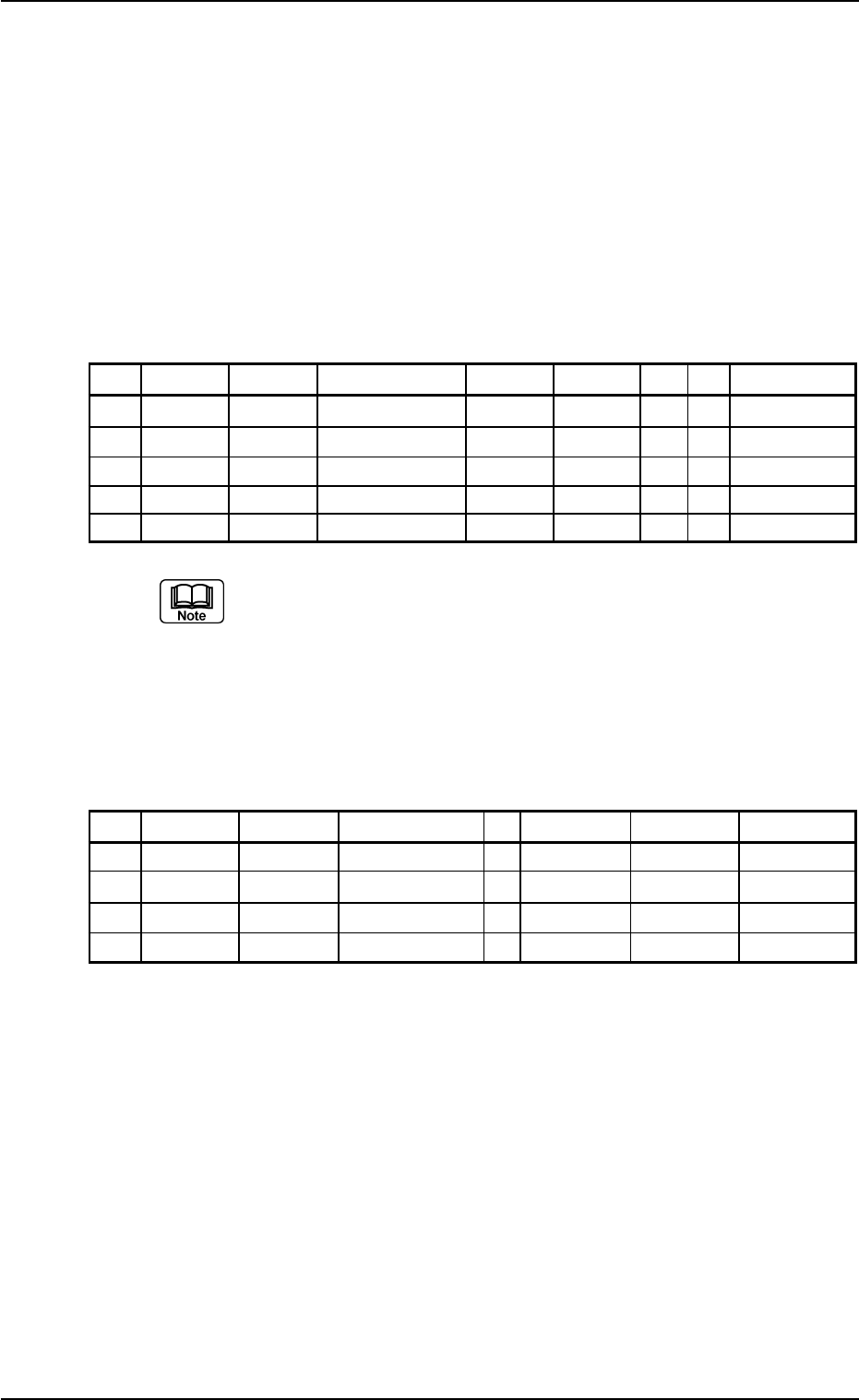
(4) Creation of Placement Data (P-data) U01
• Unit Control
Follow the same procedure as described in "3.1 Single Pattern".
• Unit P.C.B. B.B.R.
Set "Disable" in this text box.
Do not set any parameter in the other text boxes.
• Placement Data (P-data)
Table 3B32
P-No. X [mm] Y [mm] Z = theta [deg] H [mm] Fdr. No. V C Comment
1 BX
1
BY
1
+000.00 +0.000 000 00 B
2 X
1
Y
1
+000.00 +0.000 101 00 -
3 X
2
Y
2
+090.00 +0.000 103 00 -
4 X
3
Y
3
+180.00 +0.000 105 00 -
5 +000.000 +000.000 +000.00 +0.000 000 00 P
(a) Set the coordinates (BX
1
, BY
1
) of the bad mark in the "X
[mm]" and "Y [mm]" text boxes and "B" (control com-
mand) in the "C" text box of the "P-No. 1" step.
(b) Set "P" or "Q" as a control command in the last line (last
step No.).
(5) Creation of Placement Data (O-data) U01
Table 3B33
O-No. X [mm] Y [mm] Z = theta [deg] C Comment B-X [mm] B-Y [mm]
1 OX
1
OY
1
+000.00 - +000.000 +000.000
2 OX
2
OY
2
+000.00 - +000.000 +000.000
3 OX
3
OY
3
+000.00 - +000.000 +000.000
4 +000.000 +000.000 +000.00 E +000.000 +000.000
0210-005 2-71 AFO01EDTP
3.5 Repetitive Patterns (Unit P.C.B. B.B.R. Function Enabled)